

No One Database Rules Them All: A 2025 Guide to Modern Data Stores
Modern systems are no longer built on a single database. High‑scale, cloud‑native applications combine multiple database types, each optimized for a specific access pattern, latency requirement, or workload. Choosing the right database is now an architectural decision that directly impacts cost, performance, resilience, and developer velocity.
Below is a practical, cloud‑focused guide to the most important database types in 2025 — what they are best at, when to use them, and how they map to Azure, AWS, and Google Cloud services.
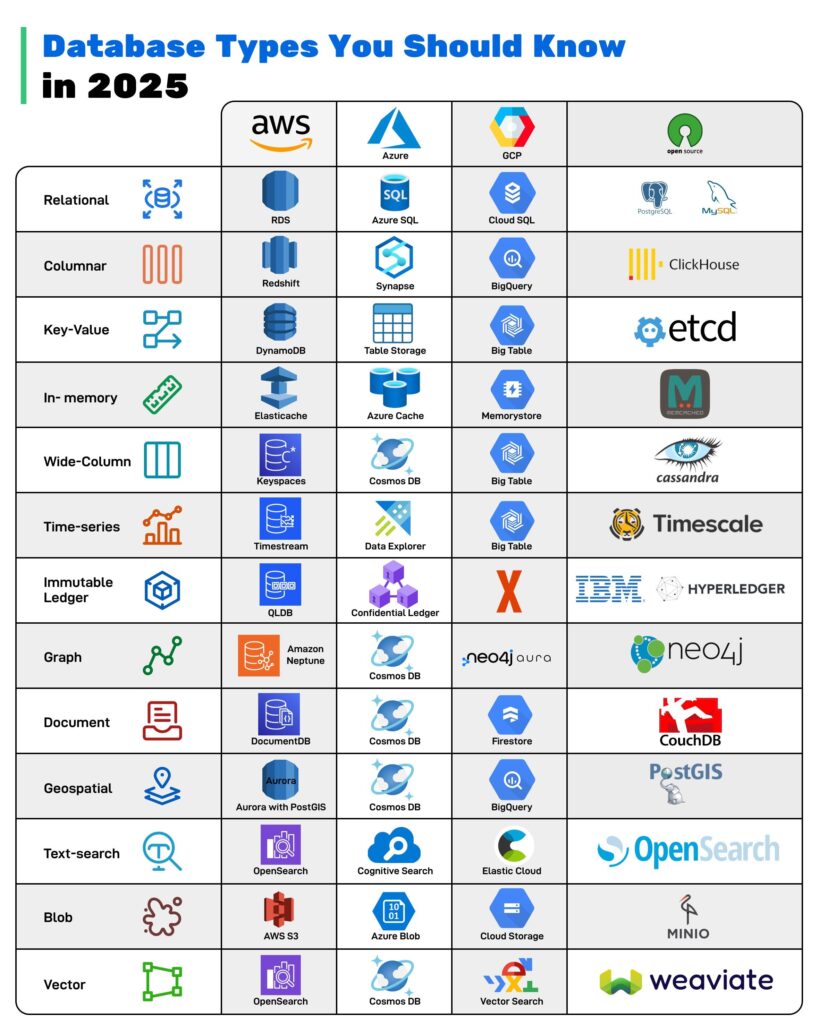
1. Relational databases (OLTP workhorse)
Relational databases organize data into normalized tables with strict schemas and transactional guarantees, making them the default choice for core business systems that need strong consistency. They are ideal for financial transactions, order management, identity/authorization, and anything requiring multi-row ACID transactions.
- Azure: Azure SQL Database / SQL Managed Instance for SaaS line-of-business apps; many ISVs run multi-tenant applications with sharded Azure SQL plus read replicas for reporting.
- AWS: Amazon RDS for PostgreSQL/MySQL and Aurora for high-throughput transactional backends (e.g., fintech platforms performing millions of balance updates per day).
- GCP: Cloud SQL and AlloyDB backing ERP, CRM, and payment gateways that must honor strict transactional and compliance requirements.
When NOT to use this DB (callout for seniors):
- Massive, write-heavy telemetry or clickstream (billions of events/day) where schema evolution and horizontal write scaling are more important than joins.
- Highly variable or unstructured content models where every feature launch requires schema migrations and complex ALTER TABLE workflows.
Example customer patterns
- Azure: Retailers migrating legacy on-prem SQL Server–based point-of-sale and inventory systems into Azure SQL Managed Instance as part of a modernization program.
- AWS: Streaming platforms using Aurora PostgreSQL as the source of truth for subscriptions and billing while offloading analytics to Redshift.
- GCP: SaaS HR providers running their transactional core on AlloyDB, replicating into BigQuery for HR analytics dashboards.
2. Columnar databases (analytics and BI)
Columnar stores keep data by column instead of row, enabling very fast aggregations, scans, and analytical queries over large, mostly immutable datasets. They shine for dashboards, reporting, ad-hoc analytics, and mixed-structured data warehouses.
- Azure: Azure Synapse Analytics or Fabric Warehouse for enterprise BI, sales pipeline reporting, and operational analytics across ERP/CRM.
- AWS: Amazon Redshift and Athena over columnar formats like Parquet/Iceberg for marketing analytics and user behavior analysis.
- GCP: BigQuery as the primary analytics fabric for clickstream analysis, ML feature stores, and cost-optimization analytics.
When NOT to use this DB
- High-frequency OLTP with many small updates and transactions that must commit in milliseconds.
- Workloads that need complex, row-level business logic and strict referential integrity across many tables in real time.
Example customer patterns
- Azure: Global manufacturers pulling IoT telemetry from Event Hubs into Synapse for production quality dashboards and predictive maintenance.
- AWS: E-commerce companies landing web clickstream in S3, transforming with Glue, and querying via Redshift/Athena for funnel and cohort analysis.
- GCP: Ad-tech firms centralizing billions of daily events into BigQuery for near-real-time campaign optimization and lookalike modeling.
3. Key-value databases (low-latency lookups)
Key-value stores provide simple key-to-blob semantics with ultra-fast reads and writes, typically with in-memory or log-structured engines. They are the go-to for session stores, feature flags, personalization caches, and idempotency/token lookups.
- Azure: Azure Cache for Redis for per-user session data, shopping carts, and feature toggles in front of backend APIs.
- AWS: DynamoDB for high-scale key-value workloads such as user profiles, game state, and request throttling metadata.
- GCP: Cloud Bigtable and Memorystore (Redis) for user state, configuration, and serving ML model features with low latency.
When NOT to use this DB
- When you need rich ad-hoc querying, secondary indexes across multiple dimensions, or complex joins.
- When strong multi-item transactional guarantees (e.g., transfer across multiple keys) are central to business correctness.
Example customer patterns
- Azure: Online marketplaces storing cart and session state in Azure Cache for Redis to keep response times sub-10 ms.
- AWS: Gaming studios modeling player inventory and game sessions in DynamoDB to sustain surges of millions of concurrent players.
- GCP: Streaming platforms using Bigtable as a high-throughput profile store for recommendation engines.
4. In-memory databases (extreme latency-sensitive paths)
In-memory databases keep primary data in RAM, trading capacity for microsecond-level latency. They are ideal for hot-path caching, leaderboards, rate-limiting, and real-time bidding/auction loops.
- Azure: Azure Cache for Redis for token introspection, authorization decisions, and real-time scoreboard updates.
- AWS: Amazon ElastiCache (Redis/Memcached) for low-latency microservice caching, API throttling, and high-speed queues.
- GCP: Memorystore for Redis for session caching and as a low-latency feature cache for online ML inference.
When NOT to use this DB
- Primary system of record for large, durable datasets where data loss is unacceptable and memory cost would be prohibitive.
- Analytics workloads where persistence, long-term retention, and historical queries matter more than microsecond latency.
Example customer patterns
- Azure: Financial services firms using Redis as a pricing cache for real-time quotes while persisting trades to Azure SQL.
- AWS: Ad-tech platforms keeping bidder profiles in ElastiCache for sub-5 ms response in real-time bidding, with Redshift for long-term analytics.
- GCP: Gaming backends using Redis leaderboards plus Cloud SQL for durable transaction history.
5. Wide-column databases (high-scale, semi-structured)
Wide-column databases (e.g., Bigtable lineage systems like Cassandra) store data in sparse, distributed tables keyed by row and column families, supporting huge write volumes and flexible schemas. They work well for time-ordered events, user activity streams, and IoT/telemetry with predictable access patterns.
- Azure: Azure Cosmos DB for Apache Cassandra for global-scale event storage and telemetry ingestion.
- AWS: DynamoDB often plays the wide-column role with partition/sort keys and sparse attributes.
- GCP: Cloud Bigtable for large-scale, time-series-like data such as analytics events, monitoring, or product catalog attributes.
When NOT to use this DB
- When ad-hoc, cross-partition querying and joins are required but access patterns are unknown or changing frequently.
- When the team lacks capacity to design and maintain careful partitioning keys and access models; bad key design quickly leads to hotspots.
Example customer patterns
- Azure: Telcos storing billions of CDRs (call detail records) per day in Cosmos DB (Cassandra API) for downstream rating and analytics.
- AWS: IoT fleets logging device telemetry into DynamoDB with TTL for automatic expiry, then streaming to S3/Redshift for historical analysis.
- GCP: Streaming video services logging playback events to Bigtable for quality-of-experience monitoring and ML training data.
6. Time-series databases (metrics and observability)
Time-series databases are optimized for data where time is the primary dimension: metrics, logs, traces, and sensor readings. They leverage time-based partitioning, compression, and retention policies.
- Azure: Azure Data Explorer (Kusto) and Azure Monitor Metrics/Logs for platform and application telemetry.
- AWS: Amazon Timestream and CloudWatch metrics/logs for IoT sensor data, application metrics, and operational dashboards.
- GCP: Cloud Monitoring and Cloud Logging, often backed by Bigtable/BigQuery for high-volume time-series analytics.
When NOT to use this DB
- Business data whose primary key is a business identifier rather than time, where join-heavy queries and multi-entity transactions are common.
- Workloads where high cardinality dimensions explode metric storage and query cost without a clear aggregation strategy.
Example customer patterns
- Azure: Industrial IoT deployments streaming PLC sensor readings into Azure Data Explorer for anomaly detection and near-real-time monitoring.
- AWS: Smart device makers using Timestream for telemetry, feeding summarized aggregates into Redshift for BI.
- GCP: SaaS companies centralizing application metrics in Cloud Monitoring and exporting to BigQuery for SLO and capacity planning.
7. Immutable ledger databases (audit and compliance)
Ledger databases provide an append-only, cryptographically verifiable history of changes, enabling tamper-evident audit trails. They are suited to compliance-heavy domains where the full history, not just current state, must be provably intact.
- Azure: Azure Confidential Ledger for system-of-record logs, configuration changes, and compliance evidence.
- AWS: Amazon QLDB for financial transaction histories, supply-chain tracking, and configuration audit logs with cryptographic verification.
- GCP: Typically implemented with Cloud Spanner/Cloud SQL plus append-only audit tables and cryptographic signing, or partner solutions.
When NOT to use this DB
- Standard CRUD apps where the overhead of immutable history and verification adds little value.
- High-frequency event streams where full cryptographic integrity for every record is unnecessary and too costly.
Example customer patterns
- Azure: Financial institutions storing key governance decisions and critical config changes in Azure Confidential Ledger for regulators.
- AWS: Logistics providers using QLDB to track provenance of goods, enabling auditors to verify every step in the chain.
- GCP: Regulated SaaS vendors maintaining append-only audit tables in Spanner with signed digests for change tracking.
8. Graph databases (relationships first)
Graph databases store nodes and edges, focused on relationships rather than rows. They excel where traversals (friends-of-friends, shortest path, knowledge graphs) and relationship depth matter more than raw aggregations.
- Azure: Azure Cosmos DB for Apache Gremlin and integrations with Neo4j on Azure for knowledge graphs and relationship analytics.
- AWS: Amazon Neptune for social graphs, fraud linkage analysis, and recommendation relationships.
- GCP: Neo4j Aura on GCP or graph analytics on top of BigQuery for entity resolution and dependency mapping.
When NOT to use this DB
- Simple key-based CRUD workloads where relationship depth is shallow and can be modeled with standard foreign keys.
- Analytics workloads where large scans and aggregates dominate, and graph traversal patterns are minimal.
Example customer patterns
- Azure: B2B SaaS vendors modeling tenant, user, permission, and resource relationships as a graph to power complex sharing models.
- AWS: Banks using Neptune to detect fraud rings by identifying unusual relationships among accounts, merchants, and devices.
- GCP: Security platforms building attack-path analysis graphs from IAM, network, and workload data stored in Neo4j on GCP.
9. Document databases (flexible JSON-first)
Document databases store semi-structured data as JSON-like documents, allowing each record to have its own structure while still enabling indexing and querying. They are ideal for content, user profiles, catalogs, and event payloads that evolve frequently.
- Azure: Azure Cosmos DB (Core/SQL and MongoDB APIs) for multi-tenant SaaS apps with flexible per-tenant schemas.
- AWS: Amazon DocumentDB (MongoDB compatibility) and DynamoDB for JSON-centric workloads.
- GCP: Firestore and MongoDB Atlas on GCP for mobile and web apps needing offline sync, flexible schema, and hierarchical data.
When NOT to use this DB
- Complex, multi-document transactions with strict referential integrity and cross-collection joins as the core of the domain.
- Highly relational domains where you routinely need to query across many entity types using ad-hoc joins.
Example customer patterns
- Azure: Content-management platforms storing articles, templates, and user configurations in Cosmos DB for rapid feature iteration.
- AWS: Personalization platforms storing user preferences and event histories as documents in DynamoDB/DocumentDB.
- GCP: Mobile-first startups using Firestore for chat apps and collaborative tools with offline capabilities and real-time updates.
10. Geospatial databases (location-aware workloads)
Geospatial databases and indexes support coordinates, shapes, and spatial operators like “nearby,” “within polygon,” and routing-based queries. They are essential for logistics, mapping, mobility, and local search.
- Azure: Azure Cosmos DB with spatial indexes and Azure Maps for geo queries and routing.
- AWS: DynamoDB and Aurora with PostGIS-like extensions (on PostgreSQL) plus Amazon Location Service.
- GCP: Cloud SQL (PostgreSQL/PostGIS) and BigQuery GIS for spatial analysis, geofencing, and route scoring.
When NOT to use this DB
- Workloads that never query by location; adding spatial complexity increases operational and cognitive overhead for no benefit.
- Pure transactional systems where the geographic context is rarely used in queries and a simple lat/long in a standard table suffices.
Example customer patterns
- Azure: Last-mile delivery apps using Cosmos DB spatial queries and Azure Maps to assign drivers to nearby orders.
- AWS: Ride-sharing and fleet management startups using Aurora PostgreSQL with spatial extensions to compute ETAs and optimal routes.
- GCP: Retailers performing site-selection analysis in BigQuery GIS to choose new store locations.
11. Text-search databases (search and relevance)
Text-search engines provide full-text indexing, relevance scoring, faceting, and complex filtering over unstructured and semi-structured text. They power application search, product discovery, and log exploration.
- Azure: Azure AI Search indexing content from Blob Storage, Cosmos DB, and SQL for app search and knowledge bases.
- AWS: Amazon OpenSearch Service for log analytics, application search, and observability dashboards.
- GCP: Elastic/Opensearch on GCE or managed partners; Cloud Logging and BigQuery for log analysis with text search capabilities.
When NOT to use this DB
- Core transactional storage; search engines are eventually consistent and optimized for retrieval, not transactional integrity.
- Workloads where strict numeric accuracy and ACID guarantees matter more than fuzzy matching and relevance scoring.
Example customer patterns
- Azure: Enterprises indexing internal documents and wikis into Azure AI Search to power internal knowledge search with semantic ranking.
- AWS: E-commerce platforms indexing product catalogs into OpenSearch for type-ahead search, faceting, and relevance tuning.
- GCP: SaaS logging providers hosting multi-tenant log search on GCP using managed Elasticsearch and BigQuery.
12. Blob/object storage (unstructured data lake)
Blob/object storage systems act as the durable foundation for large binary objects and raw data lakes: files, images, videos, backups, and analytics-ready datasets. They provide cheap, highly durable storage with lifecycle management.
- Azure: Azure Blob Storage and Data Lake Storage Gen2 backing data lakes, ML feature stores, and archival.
- AWS: Amazon S3 as the central data lake for raw, curated, and feature data, plus media assets and backups.
- GCP: Cloud Storage as the backbone of analytics pipelines (feeding BigQuery), ML training data, and media distribution.
When NOT to use this DB
- Transactional workloads where row-level updates, indexing, and immediate consistency queries are required.
- Scenarios needing strong schemas and constraints; object stores are schema-on-read and rely on external tools for structure.
Example customer patterns
- Azure: Media companies storing mezzanine and streaming files in Blob Storage, with Synapse reading Parquet data for analytics.
- AWS: Enterprises centralizing all raw logs and batch data in S3, serving as the canonical data lake feeding Redshift and EMR.
- GCP: ML-heavy companies storing image and text corpora in Cloud Storage for Vertex AI training pipelines.
13. Vector databases (AI-native similarity search)
Vector databases index high-dimensional embeddings produced by ML models, enabling similarity search, semantic retrieval, and RAG (retrieval-augmented generation). They are central to modern AI applications.
- Azure: Azure AI Search vector indexes and Cosmos DB + vector capabilities for RAG over enterprise content, plus integrations with Azure OpenAI.
- AWS: Amazon OpenSearch Serverless with vector search and Amazon Aurora/DynamoDB vector features for hybrid transactional + semantic search.
- GCP: Vertex AI Vector Search and AlloyDB/BigQuery vector features for semantic search, recommendations, and RAG.
When NOT to use this DB
- Classic OLTP or reporting workloads where exact matching and relational constraints matter more than semantic similarity.
- Low-scale AI workloads where a simple in-memory index or library-based ANN search suffices without introducing a new managed service.
Example customer patterns
- Azure: Enterprises building RAG copilots over SharePoint, Confluence, and email using Azure AI Search vectors plus Azure OpenAI.
- AWS: Customer support platforms indexing tickets and knowledge base content in OpenSearch vectors to power case deflection bots.
- GCP: Data and analytics teams running semantic search over large documentation and codebases with Vertex AI Vector Search, integrating into internal developer assistants.
Pulling it together: polyglot architectures
Senior engineers should think in terms of “right tool for the job” and accept polyglot persistence as a design norm. A typical cloud-native application in 2025 might combine:
- Relational (Aurora/Cloud SQL/Azure SQL) for core transactions.
- Document or key-value (Cosmos DB/DynamoDB/Firestore) for user-facing APIs and flexible schemas.
- Columnar/warehouse (BigQuery/Redshift/Synapse) for analytics.
- Vector search (Vertex AI Vector Search/OpenSearch/Azure AI Search) for AI features and copilots.
- Caches and in-memory stores (Redis/ElastiCache/Memorystore) to meet strict latency SLOs.
Additional Resources:
Editorial Integrity & Security Protocol
This technical deep-dive adheres to the Rack2Cloud Deterministic Integrity Standard. All benchmarks and security audits are derived from zero-trust validation protocols within our isolated lab environments. No vendor influence.

R.M.
Senior Solutions Architect with 25+ years of experience in HCI, cloud strategy, and data resilience. As the lead behind Rack2Cloud, I focus on lab-verified guidance for complex enterprise transitions. View Credentials →
Get the Playbooks Vendors Won’t Publish
Field-tested blueprints for migration, HCI, sovereign infrastructure, and AI architecture. Real failure-mode analysis. No marketing filler. Delivered weekly.
Select your infrastructure paths. Receive field-tested blueprints direct to your inbox.
- > Virtualization & Migration Physics
- > Cloud Strategy & Egress Math
- > Data Protection & RTO Reality
- > AI Infrastructure & GPU Fabric
Zero spam. Includes The Dispatch weekly drop.
Need Architectural Guidance?
Unbiased infrastructure audit for your migration, cloud strategy, or HCI transition.
>_ Request Triage Session