The “Day 2” Reality of Migrating VMware to Nutanix: What the Migration Tools Don’t Tell You
When you migrate VMware to Nutanix, the migration tool moves the bits — but the operational model, backup chain, network abstraction, and licensing math are yours to rebuild from Day 1. Everyone loves the “green lights” on a migration dashboard. I’ve sat in plenty of steering committee meetings where the project lead flashes a slide showing 500 VMs successfully moved from ESXi to AHV using Nutanix Move. There is applause, the project is marked “Complete,” and the consultants leave.
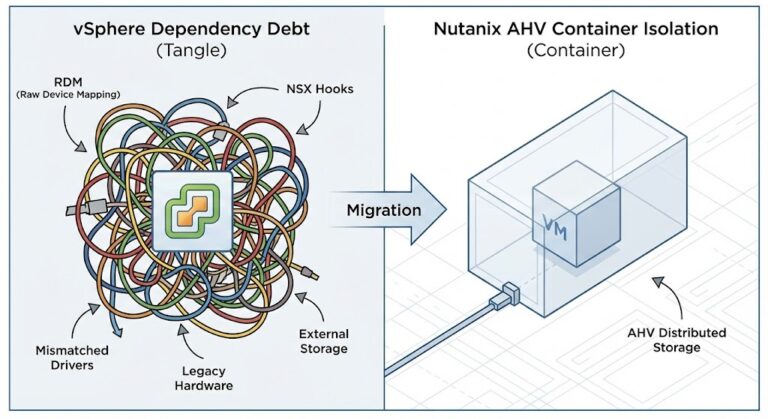
But for the Solution Engineers and Cloud Architects left holding the pager, the real work is just starting. The migration tool moves the bits, but it doesn’t migrate the operational model.
If you are treating a VMware-to-Nutanix migration as a simple lift-and-shift, you are walking into a trap. This isn’t just a hypervisor swap; it’s a platform shift. Here is the unvarnished reality of Day 2 operations that the sales decks usually skip.

Key Takeaways
- The “Move” is the Easy Part: Nutanix Move is excellent at data replication, but it cannot replicate your operational runbooks, backup chains, or network flows.
- Don’t Guess on Licensing: The shift to NCI core licensing is complex. Use our free VMware to Nutanix Migration Estimator to calculate your exact core requirements before you sign the contract.
- Network Abstraction Shift: Moving from NSX-T to Nutanix Flow is complex. Don’t do it manually—use our NSX-to-Flow Translator to automate the policy mapping.
- The Backup Gap: Your existing VADP-based backup proxies will break immediately. Day 2 requires re-architecting protection groups for AHV APIs.
For the full platform decision framework — hypervisor alternatives, workload fit, and migration sequencing — the Virtualization Architecture Strategy covers the complete stack before you commit to a migration path
The Network Layer: Goodbye vDS, Hello OVS
The most common “Day 2” ticket I see involves network reachability or performance degradation on high-throughput database VMs. In the VMware world, we spent a decade getting comfortable with the vSphere Distributed Switch (vDS). We built complex port mirroring, NetFlow configurations, and private VLANs inside vCenter.
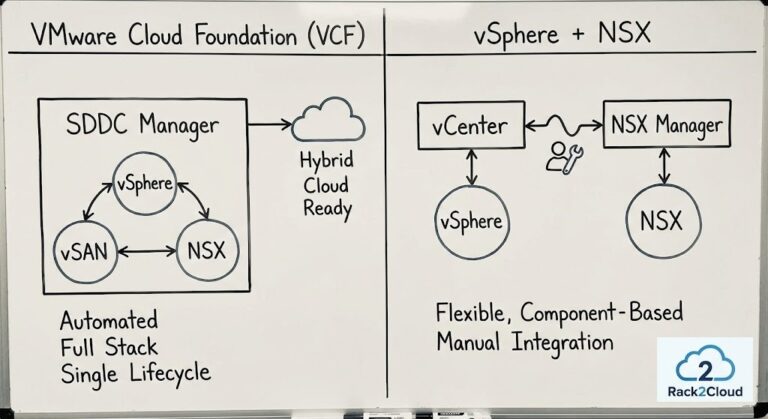
Map your NSX-T Security Tags, IP Sets, and DFW rules to Nutanix Flow Categories and Security Policies without manual re-keying. The Translator handles the Rosetta Stone logic — so your security posture migrates with the workload, not after a security incident forces the rebuild.
→ Launch the NSX-T to Flow TranslatorWhen you migrate to AHV, those vDS constructs don’t translate 1:1. You are moving to an Open vSwitch (OVS) architecture managed by Prism.1
The Decision Framework:
- If you rely heavily on NSX-T Micro-segmentation: You cannot just “migrate” to AHV without adopting Nutanix Flow. Traditionally, this requires a painful manual policy rebuild. To solve this, we developed the Rack2Cloud NSX-to-Flow Translator, a custom tool that automates the translation of your legacy NSX security groups into modern Flow categories.
- If you use standard VLANs: The transition is smooth, but you must verify that your upstream TOR (Top of Rack) switches are configured for LACP active if you plan on using LACP on the AHV bond. AHV is stricter about LACP negotiation than ESXi.
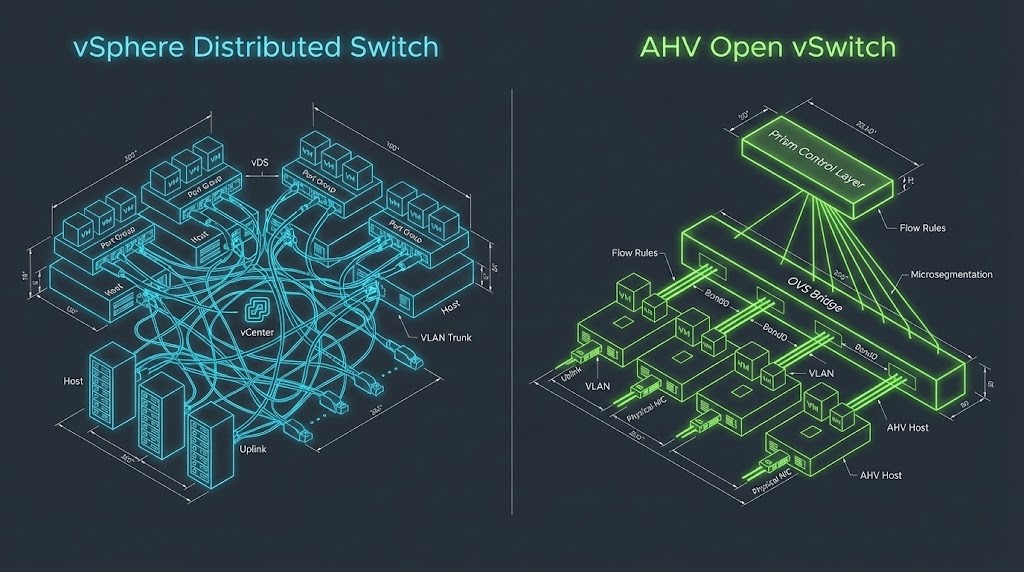
The full philosophy shift — from network-centric NSX-T security to workload-centric Flow categories — is covered in NSX-T to Nutanix Flow.
Comparison: vSphere Networking vs. Nutanix AHV
| Feature | VMware vSphere (vDS) | Nutanix AHV (OVS) | Day 2 Impact |
| Switch Management | Centralized via vCenter | Centralized via Prism Element/Central | Prism is simpler, but less granular for deep packet inspection without Flow. |
| Load Balancing | Route based on IP hash / Physical NIC Load | Balance-SLB / Balance-TCP (LACP) | Balance-SLB is default; requires no switch config. LACP requires switch-side config. |
| Micro-segmentation | NSX (Overlay) | Flow (VLAN-based or Overlay) | High Risk. Policies do not migrate. Security posture must be rebuilt. |
| Jumbo Frames | Configured on vSwitch & VMKernel | Configured on vSwitch (Bridge) | Must be explicitly set on the bridge interface via CLI (acli) in some older versions. |
The “Hidden” Cost of Migration: Licensing & OpEx
We need to talk about money. The primary driver for these migrations right now is Broadcom’s acquisition of VMware and the resulting shift to bundled subscription pricing (VVF/VCF). While moving to Nutanix AHV eliminates the vSphere tax, it introduces its own complexity in the Nutanix Cloud Infrastructure (NCI) licensing model.
Right-size your NCI core requirements against your existing vSphere footprint before you migrate. The HCI Migration Advisor runs automated readiness checks — detecting over-provisioned vCPUs, snapshot conflicts, ISO mounts, and hardware compatibility issues that inflate your Nutanix core count if left unresolved.
→ Run the Migration Readiness CheckCapEx vs. OpEx Analysis:
- The VMware Exit (OpEx Savings): By moving to AHV, you immediately shed the per-core subscription cost of vSphere. For a cluster with 6 nodes (Dual 24-core CPUs), this can save $30k-$50k/year depending on your previous contract.
- The Nutanix Entry (The NCI Reality): Nutanix has also moved to a core-based subscription model. You aren’t buying a perpetual license anymore.
- The Trap: If you migrate inefficient VMs (over-provisioned vCPUs from the VMware days), you are bloating your Nutanix core count requirements.
- The Fix: Right-size and Calculate BEFORE you migrate. Don’t guess. We built the VMware to Nutanix Migration Estimator specifically to model these NCI core requirements against your existing vSphere footprint. It highlights exactly where you can reduce the “hypervisor tax” before you deploy.
Architect’s Note: Do not forget the Windows Server Datacenter licensing. When you move VMs from host A to host B, ensure you aren’t breaking Microsoft’s 90-day reassignment rule unless you have License Mobility or active Software Assurance.
For the broader financial and platform decision — including whether renewal, migration, or a hybrid bridge is the right call for your specific environment — Broadcom Year Two Strategy covers the full framework.
Operations: The “VADP” Cliff
This is where the operational team usually gets burned. In vSphere, almost every backup tool (Veeam, Rubrik, Cohesity) utilizes VADP (vSphere Storage APIs for Data Protection).2 It’s the industry standard for snapshot-based backups.
When a VM lands on AHV, VADP is gone.
The Operational Reality:
- Agent vs. Agentless: Most modern backup vendors support AHV agentless backups, but they use a different proxy appliance.
- The “Gap”: You cannot simply repoint the backup job. You must deploy a new AHV-compatible proxy, register the Nutanix cluster, and create new protection groups.
- The Risk: If you migrate 100 VMs on Friday night, and don’t configure the new AHV backup policies, those VMs are running unprotected all weekend.
Additional Resources
Editorial Integrity & Security Protocol
This technical deep-dive adheres to the Rack2Cloud Deterministic Integrity Standard. All benchmarks and security audits are derived from zero-trust validation protocols within our isolated lab environments. No vendor influence.

R.M.
Senior Solutions Architect with 25+ years of experience in HCI, cloud strategy, and data resilience. As the lead behind Rack2Cloud, I focus on lab-verified guidance for complex enterprise transitions. View Credentials →
Get the Playbooks Vendors Won’t Publish
Field-tested blueprints for migration, HCI, sovereign infrastructure, and AI architecture. Real failure-mode analysis. No marketing filler. Delivered weekly.
Select your infrastructure paths. Receive field-tested blueprints direct to your inbox.
- > Virtualization & Migration Physics
- > Cloud Strategy & Egress Math
- > Data Protection & RTO Reality
- > AI Infrastructure & GPU Fabric
Zero spam. Includes The Dispatch weekly drop.
Need Architectural Guidance?
Unbiased infrastructure audit for your migration, cloud strategy, or HCI transition.
>_ Request Triage Session