


Azure Private Network Auditor
The “Too Long; Didn’t Read” Summary
- Tool Status: v0.1 Alpha (Active Development)
- Architecture: Client-side Only (Stateless / No Database)
- Cost: Free / No Login Required
- Goal: Audit Azure Private Networking logic without deploying “Sacrificial VMs.”
The Operational Mandate (Why this exists)
We built this utility in direct response to a community discussion on r/Azure regarding the hidden operational costs of Private Endpoint sprawl.
The consensus was frustrating but accurate: Azure’s native verification tools often fail to provide instant visibility into “Day 2” connectivity issues. As a result, many architects resort to deploying “Sacrificial VMs” – jump boxes spun up in specific subnets just to run nslookup or tcpping to verify if a CNAME is resolving correctly.
That is not architecture. That is brute force. It burns billable hours, wastes compute credits, and leaves “zombie” resources scattered across your subscription – ultimately fracturing your broader Microsoft Azure Hybrid Cloud Strategy.
The Azure Private Network Auditor replaces the “Jump Box” method with deterministic logic.
Active Modules (v0.2)
This tool is currently focused on the Connectivity Layer preventing deployment failures before they happen. (For a detailed architectural breakdown of the mechanics behind these failures, see our post on Azure Private Endpoint DNS Issues: Fix Recursive Loops and Prevent Subnet Exhaustion).
1. DNS & Routing Auditor
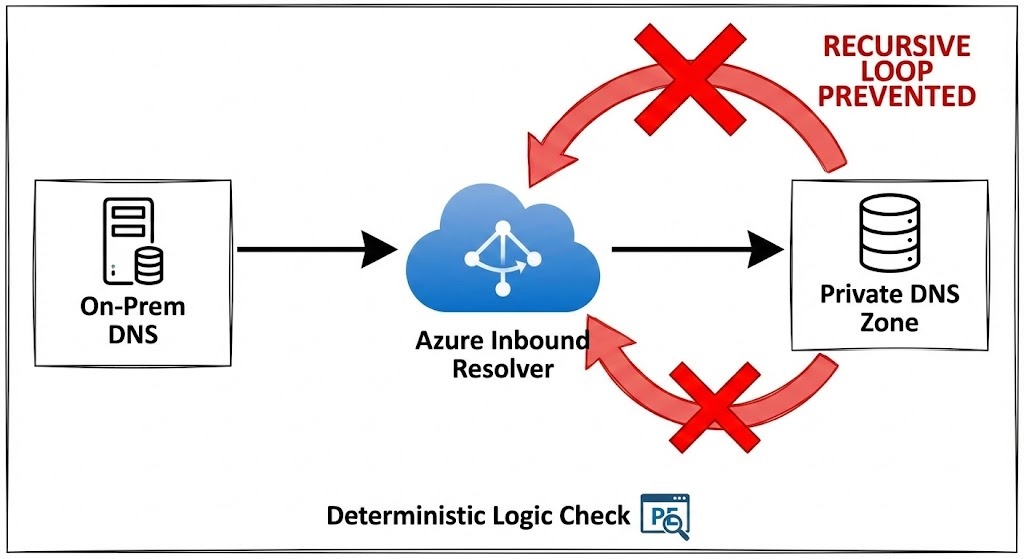
- The Problem: Recursive DNS loops. A common outage scenario involves an On-Premises DNS Forwarder pointing to an Azure Inbound Resolver, which conditionally forwards back to itself or the on-prem VIP.
- The Logic: We compare your Source IP (On-Prem Forwarder) against the Target IP (Azure Inbound). If they match or create a known circular path, the tool flags the loop before you commit the config.
2. Capacity & Cost Auditor
- The Problem: Subnet exhaustion and “Ghost Costs.” Engineers often deploy a
/29thinking they have 8 IPs, only to find they have 3 usable IPs after the Azure reservation tax. - The Logic:
- Capacity: Instantly subtracts the 5 Azure Reserved IPs from your CIDR to show actual usable capacity.
- Run-Rate: Calculates the baseline monthly cost (Idle Endpoint + Data Processing Fees) based on current East US rates, forcing you to see the bill before you deploy.
3. Bulk CSV Matrix Auditor (New in v0.2)
- The Problem: Testing one IP at a time doesn’t scale for enterprise migrations.
- The Logic: Paste a CSV matrix of your planned endpoints (Name, CIDR, Count, IPs, Zone). The engine loops the architectural math across the entire array and outputs a clean Pass/Fail matrix instantly.
4. Deterministic Terraform Generation (New in v0.2)
- The Problem: Writing the HCL for Private Endpoints and linking the
private_dns_zone_groupis tedious and prone to copy/paste errors. - The Logic: If (and only if) an endpoint passes all validation checks in the CSV Matrix, the tool dynamically generates the valid
azurerm_private_endpointblock for you to copy and paste.
Architecture & Security (Stateless by Design)
I know the skepticism around “random tools” posted on Reddit. We designed this tool specifically to be used in secure, enterprise environments where you cannot grant “Reader” access to third-party apps.
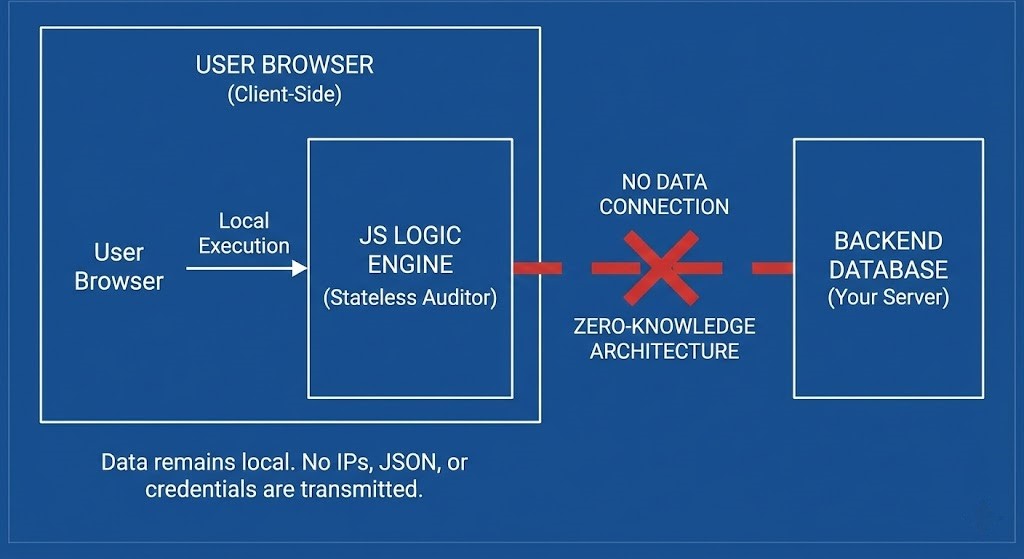
- Client-Side Execution: The logic runs entirely in your browser’s JavaScript engine.
- Zero-Knowledge: We do not save, store, or transmit your IP addresses, Topology JSON, or Subscription IDs. There is no database connected to this tool.
- No Login Wall: I am not asking for your email. This is a utility, not a lead magnet.
Roadmap: The “Offline” NOC
We are expanding the Auditor into a broader “Day 2” operational suite. The next phase will handle architectural sprawl using safe, client-side parsing of your own Azure Resource Graph (ARG) exports (Bring-Your-Own-JSON).
Phase 3: The “Sprawl” Layer (Future State)
- VNet Topology Visualization: Paste your peering JSON. We will map the sprawl and flag “hub-skipping” violations or peering limits.
- Orphan Hunter: Identify Private Endpoints that are billing you but are not connected to any backend resource.
- “Zombie” VNet Finder: Highlight VNets with no connected devices or active peerings.
Feedback Loop
This is v0.2. It is rough around the edges. If the logic fails on a specific edge case in your environment, don’t just close the tab – tell me. I can fix the math faster than Microsoft can update their documentation.
[ Report a Bug / Request Feature ] (or just roast the logic in the Reddit comments)
Reference Architecture:
- Why Private Endpoints Break DNS
- Microsoft Private Endpoint DNS Scenarios (Official)
- Azure Private Link Troubleshooting Guide
🔒 Privacy Architecture: No cookies. No tracking pixels. No server-side database.
This logic runs entirely in your local browser session.