AWS Lambda for GenAI: The Real-World Architecture Guide (2026 Edition)
AWS Lambda LLM Inference 2026 is not the punchline it would have been two years ago.. Back then, Lambda was for glue code, JSON shuffling, and the occasional cron job. The idea of shoving a memory-hungry LLM into a 15-minute ephemeral function felt like trying to run Crysis on a toaster.
But here we are in 2026. The game hasn’t just changed — the board has been flipped.
We are moving from the era of massive, monolithic training clusters to the era of distributed utility inference. The release of efficient Small Language Models and AWS Lambda Durable Functions (late 2025) dismantled the old barriers. This is a field report on how to build this stack without bankrupting your company or losing your mind over cold starts.
This is Part 1 of a two-part series. This post covers the strategic architecture — SnapStart, memfd loading, Durable Functions, and the cost model. For the exact implementation — the 10GB RAM hack, BLAS thread pool configuration, SafeTensors vs Pickle benchmarks, and Terraform snippet — see Part 2: Sub-500ms Llama 3.2 on Lambda.
For the broader cloud architecture framework that governs when serverless inference makes sense vs dedicated GPU infrastructure, see the Cloud Architecture Learning Path.
The Silicon Reality: It’s All About the Vectors
Before building an aws lambda llm inference 2026 stack, let’s talk silicon. Sticking with x86 because “it’s what we know” is a costly mistake for serverless GenAI.
Why Graviton5 is Non-Negotiable
AWS Graviton5 chips are the unsung heroes of Lambda-based inference. AI inference is fundamentally massive matrix multiplication — and Graviton5’s SVE (Scalable Vector Extensions) are purpose-built for exactly this operation.
Running quantized models in GGUF format on Graviton isn’t just cheaper — it runs approximately 20-30% faster than the equivalent Intel setup. When you’re paying by the millisecond, that difference is your entire margin.
The Memory Trap
This is the biggest architectural gotcha for engineers new to Lambda-based inference. Lambda couples CPU allocation to memory allocation — they are not independent variables.
- 2GB RAM allocation → tiny vCPU slice
- 10GB RAM allocation → 6 vCPUs
Architectural Rule: Always max Lambda to 10,240MB. Even if your model only needs 4GB. You aren’t paying for the RAM — you are paying to unlock those 6 vCPUs. Starve the memory allocation and your inference engine runs at 1-2 tokens per second. The exact mechanics of why 6 vCPUs changes everything — BLAS thread pools, parallel matrix deserialization, memory bandwidth — are covered in Part 2.
The Storage Headache: Surviving the Triangle of Pain
Storage on Lambda is genuinely messy for AI workloads in 2026. Three options exist — and each has a dealbreaker caveat:
| Storage Type | The Promise | The 2026 Reality (The Dealbreaker) |
| Container Images | “Bring your 10GB model!” | Breaks SnapStart. You get 40s+ cold starts. |
| EFS | “Persistent shared storage!” | Latency Spike. Mounting EFS adds massive overhead during init. |
Ephemeral (/tmp) | “Fast local NVMe!” | Size Limit. SnapStart requires /tmp < 512MB. |
The pattern is clear: to get SnapStart speed, you can’t use disk. Which means the solution has to bypass disk entirely.
The Magic Trick: Bypassing Disk with memfd_create
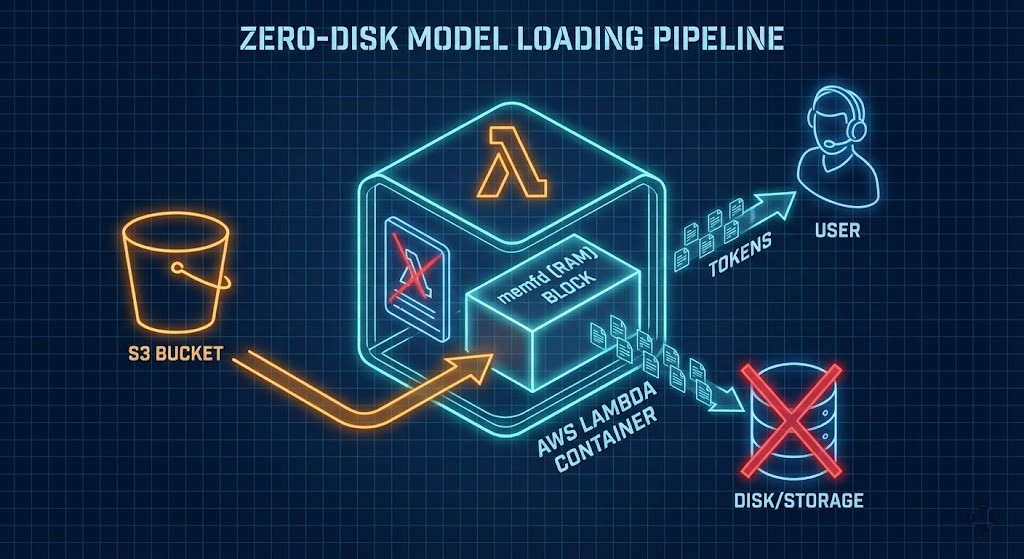
Since saving a 4GB model to disk breaks SnapStart, we use a Linux kernel mechanism: memfd_create. This is the S3-to-RAM pipeline — the only viable approach for production Lambda inference in 2026.
- Create: A small loader script creates an anonymous file directly in RAM using
memfd_create - Stream: During initialization, model bytes stream from S3 directly into that RAM block
- Lie: The inference engine (llama.cpp) is told to load from that file descriptor — it thinks it’s reading a file, but it’s reading pure memory
- Snap: AWS SnapStart takes a snapshot of that RAM state
- Wake: Every subsequent invocation wakes with the 4GB model already in memory — no download, no disk I/O
Result: Cold starts drop from 40+ seconds to sub-500ms. The benchmark data validating this across four architectural configurations is in Part 2.
Inference at the Edge: Which Models Actually Fit
We aren’t running GPT-4 here. The Lambda architecture is optimized for quantized Small Language Models:
- Llama 3.2 1B — fits comfortably in the 10GB memory limit with substantial context window headroom
- DeepSeek R1 Distilled — quantized to 4-bit GGUF, strong reasoning performance at minimal parameter count
Using the AWS Lambda Web Adapter, responses stream token-by-token rather than waiting for full generation. On a maxed-out Lambda, expect 15-25 tokens per second — faster than the average human reads. The perceived latency is near-zero because the first token arrives almost immediately.
For workloads requiring models above 5GB or context windows beyond 4k tokens, Lambda will hit memory and timeout limits. At that scale, dedicated GPU endpoints are the correct architecture — covered in the cost decision framework below.
Orchestration: Goodbye, Step Functions?
Building complex agents with AWS Step Functions means writing more YAML state definitions than actual code. Passing a 50k token context window between steps is painful. Durable Functions (released December 2025) fundamentally changes this.
You write standard Python. The underlying service handles freezing state, killing compute (so billing stops), and restoring everything — including local variables with full chat history — when the function resumes.
Python
# The "Durable" way - zero infrastructure code
context.wait(days=3)
FinOps Warning: State Bloat
Durable Functions charge $0.25 per GB to persist state. An agent carrying a 10MB PDF in a variable will generate unexpected bills at scale.
The fix: Manually clear large variables (doc = None) before checkpointing. State should contain references and identifiers — not raw document content.
The broader IaC governance framework for Lambda deployments — including state management patterns, Terraform module structure, and pipeline reliability — is in the Modern Infrastructure & IaC Learning Path.
The 15% Rule: When Lambda Stops Making Sense
Serverless inference is not universally cheaper. The break-even point is approximately 15% sustained utilization.
- Below 15% utilization: Lambda wins. Internal tools, sporadically used agents, development environments
- Above 15% utilization: Reserved EC2 or SageMaker endpoints become cheaper
- Above 40% utilization: Repatriation. At enterprise scale, the cloud premium becomes indefensible
At the 40%+ threshold, running inference on sovereign on-premises GPU infrastructure — Nutanix GPT-in-a-Box or local Kubernetes with dedicated GPU nodes — produces better economics and eliminates data residency risk simultaneously. The architecture for this is covered in the Sovereign AI Private Infrastructure guide.
The egress cost that makes repatriation calculations non-obvious — moving training data and model weights in and out of hyperscaler regions has a physics problem — is covered in The Physics of Data Egress.
Before committing to a cloud vs on-prem inference decision, model the actual TCO against your utilization curve using the Virtual Stack TCO Calculator. The gap between “cheap serverless” and “expensive monthly bill” closes faster than most architecture reviews account for.
Architect’s Verdict: The Serverless Agent Stack
The aws lambda llm inference 2026 stack is lean, capable, and finally production-viable:
- Brain: Llama 3.2 on Lambda SnapStart, loaded via memfd S3-to-RAM pipeline
- Body: Durable Functions for stateful agent orchestration
- Hands: AgentCore MCP tools for external integrations
We are finally at a point where you can build always-on AI capabilities without the always-on GPU bill. The cold start problem is solved. The orchestration complexity is solved. The cost model is understood.
The remaining question is implementation precision — and that’s where most production deployments break down. The exact configuration that produces sub-500ms cold starts, the benchmark data across four architectural variants, and the Terraform snippet that enforces the CPU unlock are in Part 2: Sub-500ms Llama 3.2 on Lambda.
Additional Resources
Editorial Integrity & Security Protocol
This technical deep-dive adheres to the Rack2Cloud Deterministic Integrity Standard. All benchmarks and security audits are derived from zero-trust validation protocols within our isolated lab environments. No vendor influence.

R.M.
Senior Solutions Architect with 25+ years of experience in HCI, cloud strategy, and data resilience. As the lead behind Rack2Cloud, I focus on lab-verified guidance for complex enterprise transitions. View Credentials →
Get the Playbooks Vendors Won’t Publish
Field-tested blueprints for migration, HCI, sovereign infrastructure, and AI architecture. Real failure-mode analysis. No marketing filler. Delivered weekly.
Select your infrastructure paths. Receive field-tested blueprints direct to your inbox.
- > Virtualization & Migration Physics
- > Cloud Strategy & Egress Math
- > Data Protection & RTO Reality
- > AI Infrastructure & GPU Fabric
Zero spam. Includes The Dispatch weekly drop.
Need Architectural Guidance?
Unbiased infrastructure audit for your migration, cloud strategy, or HCI transition.
>_ Request Triage Session