


Backups Don’t Fail During Backup. They Fail During Recovery.
Most backup architectures are optimized for the wrong outcome. Jobs run on schedule. Retention policies are configured. Snapshots accumulate across storage tiers. The dashboard is green. None of that measures what backup architecture is actually supposed to guarantee — that recovery works, under pressure, against an adversary who has already been inside your environment for days.
Backup architecture and data protection architecture are not the same discipline. Backup is a copy mechanism. Data protection is the system that ensures the copy can be used. The distinction matters because the failure modes are entirely different — and the one that destroys organizations isn’t a failed backup job. It’s a successful backup job that produces an unrecoverable state when the incident arrives.
The modern threat model for backup architecture is adversarial by default. Ransomware operators don’t target your data first — they target your recovery path. Backup catalog deletion, snapshot schedule modification, retention window compression — these happen during the dwell period, before encryption runs. By the time the encryption event is visible, the six attack patterns that defeat standard backup architecture have already completed. The backups exist. The recovery path doesn’t.
Data integrity compounds the problem. A backup you haven’t verified is a file. Application-consistent recovery requires more than a successful backup job — it requires that the restored state is usable at the application layer, not just bootable at the VM layer. Hash validation, restore pipelines, and application-layer health checks are the difference between a recovery that works and one that surfaces corruption only under production load.
This page covers backup architecture as a recovery system — not a storage system. The Data Protection Architecture pillar covers the broader framework. This page goes deeper on the mechanics.
| Traditional Backup Thinking | Reality in Modern Architecture |
|---|---|
| Backups = copies of data | Backups = a recovery system with identity, isolation, and verified restore paths |
| More copies = safer | Isolation defines survivability — ten copies in the same blast radius fail simultaneously |
| Snapshots = backup | Snapshots = local rollback only — same platform, same credentials, first target in any adversarial scenario |
| Backup job success = protected | Recovery success = protected — the job completing proves nothing about the recovery path |
| DR = failover to secondary site | DR = clean, verified recovery into an isolated environment with independent identity — failover replicates the incident if the recovery plane isn’t isolated |
| Immutable backup = safe backup | Immutable backup = deletion-resistant storage — still requires identity isolation, tested recovery, and application-consistent state to be usable |
| Cloud provider manages backup | Cloud provider manages infrastructure durability — backup architecture, immutability configuration, identity isolation, and recovery testing are your responsibility |
Where Backup Architectures Fail in Production
Backup failures are almost never backup failures. They are recovery failures — and they are invisible until the incident that exposes them.
The most common failure pattern is silent success. Backup jobs complete. Retention metrics are green. No alerts fire. The first sign that the architecture doesn’t work is the restore attempt during an actual incident — when application-layer inconsistencies surface, when the backup catalog has already been deleted, or when the clean room environment that was never built turns out to be required.
Five failure patterns account for the majority of production backup architecture breakdowns. Each is architectural, not operational.
Snapshot-only protection treats snapshots as backups. Snapshots live on the same storage platform as the data they protect, managed by the same admin credentials. Ransomware that compromises storage admin access deletes both simultaneously. The snapshot schedule ran successfully until the day it didn’t matter.
Flat trust model — backup infrastructure shares credentials, network paths, or identity planes with production. A single compromised account has deletion rights across both environments. The backup system is reachable from the same network that was just compromised. There is no isolation between the production blast radius and the protection plane.
Untested recovery — backups run successfully for years. No restore drill has ever been run against the actual application stack. The first recovery attempt happens under incident pressure, against a workload that requires application-consistent state that crash-consistent snapshots don’t provide. The VM boots. The application fails.
Replication of bad state — DR replication runs continuously and faithfully. During a ransomware dwell period, it faithfully replicates the compromised state to the DR site. Failover reproduces the incident, not the recovery.
Egress blindness — recovery architecture depends on restoring from cloud object storage at incident scale. Egress cost was never modeled for a full recovery event. The recovery timeline extends while cost approval processes run during an active incident.
The common thread across all five: none are technology failures. They are architecture decisions — made without modeling the failure condition they were supposed to protect against.
The Rack2Cloud Backup Architecture Model
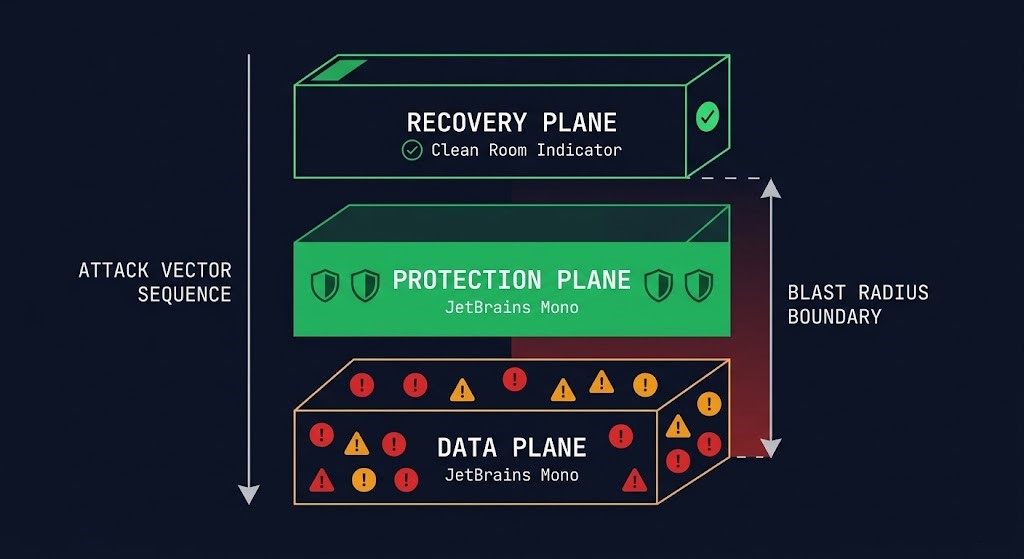
Backup architecture operates across four distinct planes. Most organizations build the first two and assume the third and fourth are implied. They aren’t. Each plane has a different failure mode, a different attacker target profile, and a different set of controls required for survivability.
Backup Is a Control Plane, Not a Storage System
The mental model that produces the most backup architecture failures is treating backup as a storage problem. More storage, more retention, more copies. The investment goes into the protection plane — the copies themselves — while the control plane that defines whether those copies are usable receives no architectural attention.
Backup architecture is a control plane problem. The copies are the data plane. The control plane is the policy, orchestration, and identity layer that determines whether the data plane produces recoverable state. When ransomware operators prepare an attack, they don’t research your storage topology. They research your control plane — which credentials govern backup jobs, which API endpoints manage retention, which identity systems control snapshot schedules.
A functional backup control plane defines four things. Retention policy — how long copies are kept and whether retention is enforced at the storage layer or the management layer. Storage-layer enforcement survives credential compromise. Management-layer enforcement doesn’t. Immutability enforcement — whether copies can be modified or deleted during the retention window, and by whom. WORM storage that can be overridden by an admin API call is not immutable. Replication orchestration — which copies go where, at what frequency, and with what consistency guarantees. Replication policy determines blast radius. Access and deletion controls — who can modify backup jobs, shorten retention windows, and delete catalog entries. These are the specific controls that ransomware operators target during the dwell period.
The three planes of the R2C model — data, protection, recovery — fail when the control plane connecting them isn’t isolated. A protection plane that shares identity with the data plane has a blast radius that covers both. A recovery plane that shares network paths with the compromised production environment is not a recovery plane — it is a re-infection vector.
If the recovery plane doesn’t exist as a distinct, isolated architecture with its own identity, its own network boundary, and a tested restore sequence — what exists is a protection plane that has never been proven to produce recovery. A backup you haven’t restored is a theory. The recovery plane is what makes it proof.
The Three Planes of Backup Architecture
Backup architecture operates across three planes. Most organizations build the first, partially build the second, and skip the third entirely.
The Data Plane is production. Live workloads, databases, file systems, containerized applications. This is what backup architecture protects. It is also the first plane to be compromised in any adversarial scenario — and it is the plane whose compromise propagates to every other plane that isn’t architecturally isolated from it.
The Protection Plane is where copies live — snapshots, backup repositories, replication targets, object storage vaults. Most organizations have this. Most consider it sufficient. The protection plane fails under adversarial conditions when it shares identity, network paths, or management access with the data plane. A protection plane that is reachable from a compromised data plane is not a separate plane — it is an extension of the blast radius.
The Recovery Plane is the isolated, tested, usable path back to production. Clean room compute. Network isolation. Identity sources that were never connected to the compromised environment. Application-layer validation before production traffic reconnects. This is the plane that most architectures don’t have — and the plane that determines whether recovery is possible after a full control plane compromise.
If the recovery plane doesn’t exist as a distinct, isolated architecture — with its own identity, its own network boundary, and a tested restore sequence — then what exists is a protection plane that has never been proven to produce recovery.
Failure Domains — Where Backups Actually Break
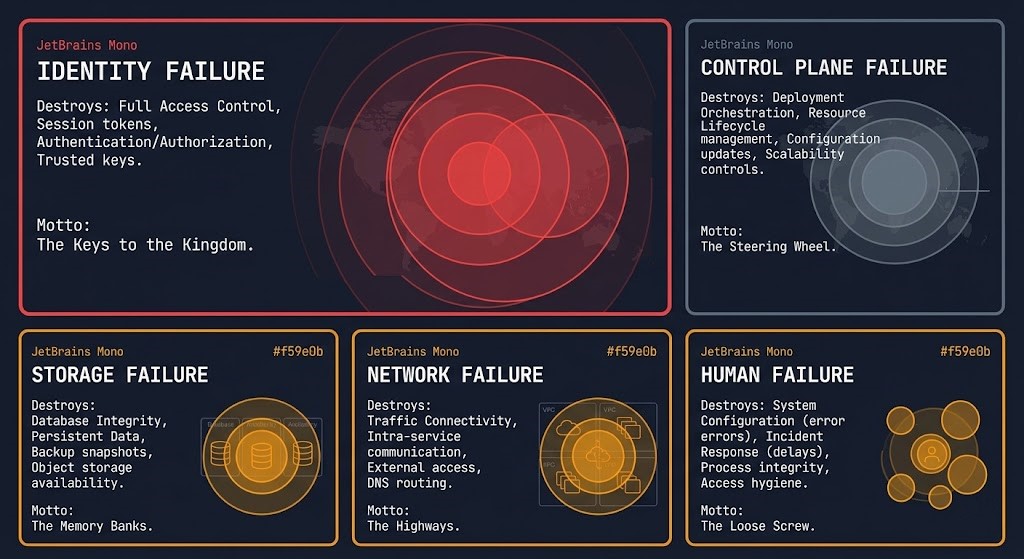
Every backup architecture has failure domains — the boundaries within which a single failure event can destroy recovery capability. Most architectures don’t map these explicitly. They surface during incidents.
The failure domain hierarchy is not equal. Every backup architecture fails at the highest-permission domain that remains unisolated. Map your permission boundaries before your blast radius finds them for you.
Identity failure is the highest-impact failure domain in modern backup architecture. A single compromised admin credential with deletion rights across the backup platform, snapshot infrastructure, and replication targets represents a blast radius that covers the entire protection plane. Identity failure is not a backup problem — it is an architecture decision made when backup admin credentials were placed in the same identity plane as production. Your identity system is your biggest single point of failure — and nowhere is that more consequential than in backup architecture.
Control plane failure is policy drift and misconfiguration operating silently. Retention windows shortened by accident or by an attacker during dwell. Backup jobs silently failing without alerting. Replication schedules that weren’t updated when workload topology changed. The backup platform reports green while the actual protection posture has drifted from the documented architecture. Configuration drift in the control plane is invisible until recovery surfaces it.
Storage failure covers corruption, mis-tiering, and media degradation. Bit rot in long-term retention archives. Data written to incorrect storage tiers with retrieval latency incompatible with the declared RTO. Deduplication metadata corruption that makes recovery impossible even when the backup data exists. The backup rehydration bottleneck covers how deduplication economics that look efficient in steady state become RTO killers under recovery pressure.
Network failure creates replication gaps — backup copies that are out of date because the replication path was interrupted without alerting. Gaps in replication consistency that only surface when a recovery attempt requires a specific point-in-time state that was never successfully replicated.
Human failure is the domain that architecture cannot fully eliminate but can constrain. Manual retention modifications. Accidental backup job deletion. Role assignments that give operational teams more access than execution requires. The blast radius of human failure is determined by how much access the humans in the environment have — which is an identity architecture decision, not an operational one.
Immutability — The Non-Negotiable Layer
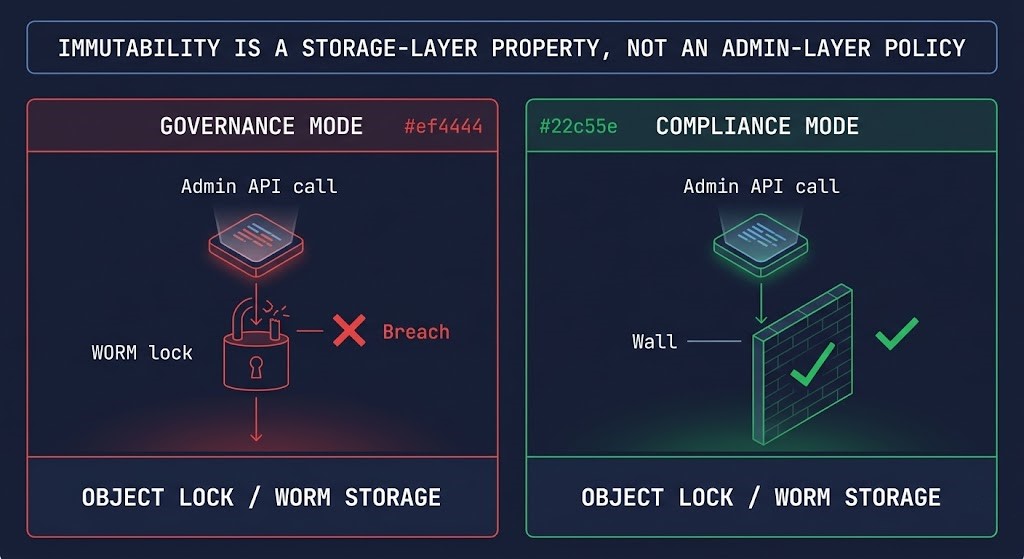
Immutability is the property that makes backup copies deletion-resistant under credential compromise. It is also the most misunderstood property in backup architecture — because most implementations that claim immutability are not immutable at the layer that matters.
WORM storage enforces immutability at the storage layer. A correctly implemented WORM policy means the data cannot be deleted or modified during the retention window by any operation, including API calls from admin credentials. The retention window is enforced by the storage system itself, not the backup management layer. This is the distinction that determines whether immutability survives a full control plane compromise — or collapses with it.
Object lock in S3, Azure Blob immutable storage, and equivalent mechanisms in GCS implement WORM at the object storage layer. The critical implementation detail that most architectures get wrong: governance mode vs compliance mode. Governance mode allows retention override by privileged accounts. Compliance mode does not. Most architectures deploy governance mode and describe it as immutable. It is deletion-resistant, not immutable. Backups are compromised first — and governance mode is exactly the gap that makes cyber vaulting a necessary architectural layer rather than a vendor upsell.
Snapshot immutability operates at the management layer, not the storage layer. HCI platforms and enterprise storage arrays offer snapshot lock capabilities that prevent snapshot deletion for a defined window. These are valuable — but a management plane compromise that can modify the snapshot lock policy is not a WORM guarantee.
The line that determines whether immutability is real: can any credential that a compromised environment could plausibly control reach the management API that governs retention? If yes — the immutability is delay, not protection. True immutability requires storage-layer enforcement that is not reachable from the identity plane of the environment being protected. That is a network isolation and identity architecture requirement, not a backup software configuration. Immutability is not a strategy — engineering recovery silos is.
Shared Responsibility in Backup Architecture
Backup architecture operates under a shared responsibility model — but the boundary is drawn differently than most teams assume, and the consequences of misreading it are worse than in any other infrastructure domain. A misread shared responsibility boundary in compute means a missed patch. In backup architecture, it means an unrecoverable incident.
> Physical media redundancy and replication
> Object lock and versioning primitives
> Platform availability SLAs
> Infrastructure-level encryption at rest
> Regional redundancy within the platform
> Snapshot API availability
> Identity isolation — backup admin ≠ production admin
> Backup orchestration security and role separation
> Recovery testing and application-layer validation
> SaaS workload backup coverage (M365, Salesforce, etc.)
> Cross-region and cross-provider replication policy
> Egress cost modeling at recovery scale
> Retention policy enforcement and audit trails
> Clean room recovery environment design
The provider delivers durable infrastructure. The architect delivers a recoverable system. Platform durability is not recovery assurance. Eleven nines of storage durability means data is unlikely to be lost due to hardware failure — it does not mean data is recoverable after a credential compromise that deletes it, or after a ransomware event that encrypts it, or after a retention policy modification that expired it.
SaaS platforms make this boundary invisibly dangerous. Microsoft 365, Salesforce, and equivalent platforms protect infrastructure availability. They do not protect your data from deletion, accidental overwrites, ransomware propagation through synced clients, or retention gaps between platform limits and your actual recovery requirements. The shared responsibility line for SaaS sits almost entirely on your side — and most organizations haven’t drawn it at all.
Data Integrity — The Layer Most Architectures Skip
A backup that exists is not a backup that recovers. Data integrity is the property that determines whether backup data produces usable state at the application layer — and it is the layer most backup architectures don’t validate until a recovery attempt exposes the gap.
Bit rot and silent corruption accumulate in long-term retention archives. Data written successfully degrades over time on certain media types. Without periodic hash validation against known-good checksums, corruption is invisible until recovery surfaces it under incident pressure. Hash validation pipelines run on a schedule, compare stored checksums against current data, and alert on deviation before the backup is needed — not during the incident that requires it.
Crash-consistent vs application-consistent is the distinction that determines whether a restored VM actually recovers the application. Crash-consistent snapshots capture disk state at a point in time — the equivalent of pulling the power cord. Databases with in-flight transactions, write caches not flushed to disk, application state not committed — all of these produce a restored VM that boots and an application that fails. Application-consistent backups use VSS on Windows, filesystem freeze on Linux, or database-native quiesce APIs to ensure the backup captures a state the application can recover from. For transaction databases, application consistency is non-negotiable — crash-consistent snapshots are not a database backup.
Backup verification pipelines go further than hash validation. They mount the backup, boot the recovered workload in an isolated environment, and run application-level health checks against the restored state. Automated verification pipelines do this on a defined schedule without requiring a manual recovery drill. The result is a continuously validated backup — not a file that has never been tested. A backup you haven’t verified is a file. Verification pipelines turn it into a recovery guarantee.
Backup Patterns That Actually Work
Cloud vs On-Premises Backup Architecture
Cloud and on-premises backup architectures have different failure modes, different cost structures, and different immutability implementations. Hybrid environments inherit both sets of problems — and add the egress cost model that neither side fully owns.
Cloud-native backup — S3, Azure Blob, GCS — provides object lock and versioning primitives that are the baseline for immutable cloud backup. The implementation challenge is not the technology — it is the identity architecture. Cloud-native backup that uses the same IAM roles as the production environment shares the blast radius of any credential compromise in that environment. Cloud-native backup security is an IAM architecture problem. The cross-region egress patterns that look clean during normal operations become cost events at recovery scale.
On-premises and HCI snapshot models provide fast local RTO and integrate natively with hypervisor platforms. The failure mode is credential shared with production — HCI admin access that covers both production VMs and the snapshot infrastructure protecting them. Snapshot protection on HCI platforms is the starting point, not the complete architecture. The Nutanix async and NearSync vs VMware SRM comparison covers how replication architecture maps to DR survivability in HCI environments.
Hybrid replication pitfalls surface when on-premises backup jobs replicate to cloud object storage and the recovery model assumes retrieval speeds that don’t exist at scale. Retrieval latency from cold storage tiers, combined with egress charges at recovery volume, produces a recovery timeline that was never tested and a cost event that was never budgeted. Model the recovery path against the actual retrieval tier — not the ingestion tier.
SaaS Is the Blind Spot
Cost Physics of Backup and Recovery
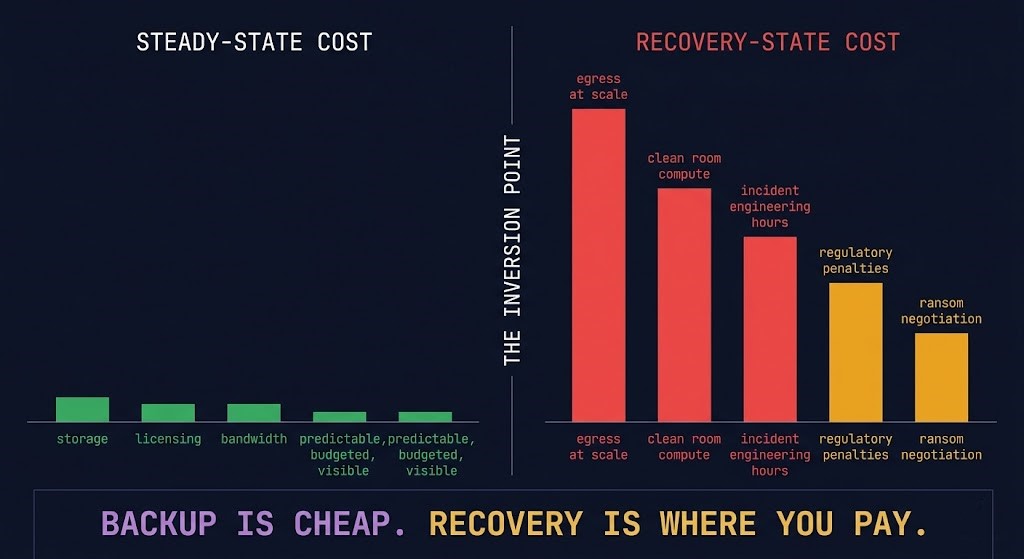
Backup has three cost models. Most organizations model the first, discover the second during incidents, and never fully account for the third until it triggers a board conversation.
Steady-state cost is predictable and visible: storage tiers, backup software licensing, replication bandwidth, hardware refresh cycles. These appear on every infrastructure budget and are well-understood by finance and operations alike.
Recovery cost is unmodeled until the incident triggers it. Egress from cloud object storage at recovery volume — restoring hundreds of terabytes under incident pressure at AWS standard rates generates cost that was never in the operating budget. Clean room compute that wasn’t provisioned. Engineering hours during unplanned outages billed at incident rates. The true cost of backup and the real physics of cloud egress cover exactly what the steady-state model consistently misses.
Failure cost is the business impact layer — the cost that dwarfs the other two. Regulatory penalties for missed RTO/RPO SLAs. Ransom negotiations conducted against a recovery timeline you can’t meet. Revenue loss during extended outages. Reputational damage with customers and partners. Failure cost is the reason backup architecture matters at the board level — and it is almost never modeled against the cost of the architecture that would have prevented it.
Backup is an operational expense. Recovery is a financial event. Failure is a business event.
The specific inversion to model before choosing architecture: cold storage tiers that look economical during normal operations become RTO-incompatible at recovery speed. Deduplication ratios that look efficient in the backup window become rehydration bottlenecks during recovery. The backup rehydration bottleneck covers exactly how this plays out against declared RTO commitments.
Recovery Testing — The Only Truth
Recovery testing is not a validation exercise. It is the only mechanism that determines whether a backup architecture actually works. Everything else — job completion metrics, storage utilization dashboards, replication lag monitoring — measures the protection plane. Recovery testing measures the recovery plane.
The specific failure that untested architectures produce: application-layer inconsistency that surfaces only under production load. The VM boots. The database service starts. The application fails on the first transaction because the restored state was crash-consistent, not application-consistent. The backup architecture worked. The recovery architecture didn’t exist. RTO reality covers why recovery drills are the only way to validate this before the incident that requires it.
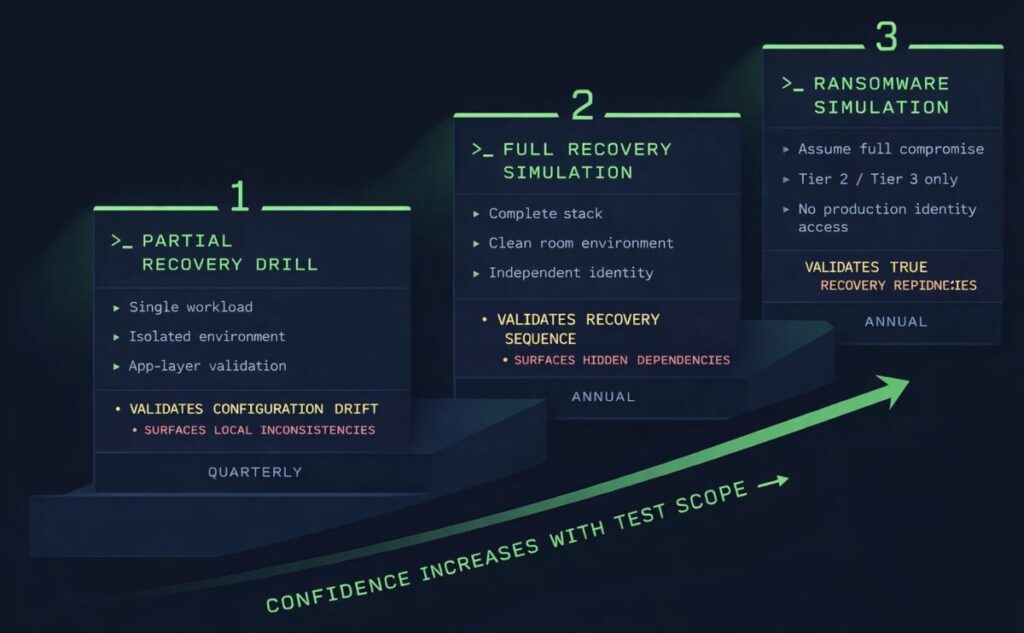
A minimum viable recovery testing program covers three scenarios at different frequencies and scopes.
Partial recovery drill — restore a single non-critical workload to an isolated environment and validate it at the application layer. Run quarterly for Tier 0 workloads, annually for Tier 1. The goal is to exercise the restore sequence, identify configuration drift between backup and production environments, and validate that application-consistent backups produce a recoverable state.
Full recovery simulation — restore the complete application stack in a clean room environment, in the correct sequence, against isolated identity and network infrastructure. Run annually for any workload with a declared RTO commitment. This is the test that surfaces the gaps — workload dependencies not documented, identity bootstrap sequences never designed, network isolation boundaries that produce connectivity failures during staged recovery.
Ransomware simulation — assume the production environment and protection plane are fully compromised. Recover only from Tier 2 or Tier 3 sources with no access to production identity systems. This is the test that validates whether the air-gapped recovery architecture is real or theoretical. If you haven’t run this test, you don’t know whether your most critical recovery capability actually works.
If you haven’t tested recovery, you don’t have a backup strategy. You have a backup operation. The RTO, RPO, and RTA framework covers how to use recovery metrics as architectural inputs — not post-incident measurements.
What Recovery Actually Looks Like Under Pressure
Recovery documentation typically describes what to recover. Almost none of it describes the environment recovery happens into — or the sequence that determines whether the recovered workload is actually usable before it reconnects to production. This is where the theory ends and the architecture begins.
The five-step recovery sequence under adversarial conditions:
Step 1 — Identity Bootstrap. Before any data is restored, establish a clean identity source that was never connected to the compromised environment. This means a minimal directory service, certificate authority, and secret store that exist independently of the production identity plane. Without this step, every credential used during recovery is potentially compromised. This is where disaster recovery architecture begins — not where backup ends.
Step 2 — Environment Isolation. Provision clean room compute and network with no path to the production environment or its identity systems. Every network connection from the recovery environment back to production is a re-infection vector until production is validated clean. Isolation is enforced at the network layer — not assumed from the absence of an explicit connection.
Step 3 — Data Restore from Immutable Source. Restore from Tier 2 or Tier 3 sources only — immutable object storage or air-gapped vault. Do not restore from Tier 1 local snapshots if the production environment is compromised. Verify hash checksums against stored values before mounting any restored volume. Application-consistent backup state is a prerequisite, not an assumption.
Step 4 — Application Validation. Every restored workload is validated at the application layer before any network path to production is re-established. A VM that boots is not a recovered application. An application that passes a defined health check against a known-good dataset is. Validation sequence: database integrity checks, application service health, synthetic transaction tests, dependency chain validation. Sequence matters — database tier before application tier, application tier before web tier.
Step 5 — Controlled Reintroduction. DNS updated only after full stack validation. Network paths to production re-established incrementally, not simultaneously. Monitoring established in the recovery environment before production traffic is routed. Any anomaly detected during reintroduction triggers isolation — not investigation while live traffic runs through a potentially compromised path.
A restore that succeeds but reconnects to a still-compromised network is not a recovery. It is a re-infection. This sequence is the architecture that prevents it — and it must be documented, tested, and executable by any engineer on the team, not just the one who designed it.
Decision Framework
| Workload Type | RPO Requirement | Recommended Pattern | Platform Examples | Avoid |
|---|---|---|---|---|
| Tier 0 Transaction DB | < 1 minute | CDP + immutable vault + identity isolation | Zerto, Veeam CDP, Rubrik | Snapshot-only — first deleted in any adversarial event |
| Tier 0 Identity Systems | < 15 minutes | Air-gapped copy + independent identity bootstrap | Cohesity FortKnox, tape + vault | Any pattern sharing identity plane with production |
| SaaS (M365, Salesforce) | Hours | Dedicated third-party backup | Veeam M365, Druva, Avepoint | Native platform retention — not a backup |
| Business-critical app | 1–4 hours | Snapshot + immutable object storage (compliance mode) | Veeam, Commvault, Rubrik | Governance mode object lock — overridable by admin |
| File services | 24 hours | Snapshot + async replication + object lock | Native HCI + S3 | Local-only snapshot with no offsite copy |
| Dev/test workloads | 24–48 hours | Snapshot with documented exception | Native hypervisor snapshot | Full CDP deployment — cost disproportionate to criticality |
| Hybrid on-prem + cloud | 4 hours | Replication + cloud vault + egress modeled | Cohesity, Commvault, Zerto | Cold storage tier with RTO-incompatible retrieval latency |
When This Architecture Works — When It Doesn’t
Tooling Reality
Architecture decisions don’t live in documentation — they live in the tools that execute against your environment. The backup platform you choose determines what recovery controls are actually available, what identity separation is architecturally possible, and what immutability guarantees are real vs marketing.
Platform selection drives architecture. Rubrik vs Veeam — appliance immutability vs infrastructure control — is the architectural split that determines whether your immutability model is hardware-enforced or software-enforced. Rubrik vs Cohesity covers the control plane scaling and ransomware recovery model differences between the two dominant enterprise platforms. The platform choice is a blast radius decision as much as a feature decision.
The tools that validate architecture in production: the Universal Cloud Restore Calculator models recovery time and cost across cloud storage tiers before an incident forces the calculation. The Veeam Immutable Storage Cost Estimator quantifies the cost delta between immutable and non-immutable storage configurations at production scale. The Real World Egress Calculator models egress cost at recovery volume — the number that surprises most teams during their first cloud recovery event. Use these before the incident. The alternative is calculating them during it.
Identity architecture ties directly to Cybersecurity Architecture. The credential isolation model that makes backup architecture survivable is the same zero-trust identity model that the cybersecurity pillar builds from. Air-gapped recovery intersects with Sovereign Infrastructure — the data residency and jurisdictional constraints that determine where recovery environments can legally operate. These aren’t adjacent concerns. They are the same architecture viewed from different angles.
Architect’s Verdict
Backup architecture fails at the recovery plane — not the protection plane. The copies exist. The jobs ran. The retention metrics are green. What doesn’t exist is a tested, isolated, provable path from backup data to recovered application under the conditions that actually trigger recovery: adversarial credential compromise, catalog deletion before encryption, replication of bad state to the DR site, SaaS data with no coverage at all.
The investment pattern that produces the most recoverable architectures is counterintuitive: less spend on copy volume, more spend on identity isolation and recovery testing. A single air-gapped, application-consistent, cryptographically validated backup copy in a separately administered vault is worth more than twelve crash-consistent snapshots in an environment that shares credentials with the production blast radius. Backup is an operational expense. Recovery is a financial event. The architecture that makes recovery deterministic is what justifies every dollar spent on backup infrastructure.
The R2C Recovery-First Backup Model exists because the industry default frames backup as a storage problem. It isn’t. It is a control plane problem, an identity architecture problem, and a recovery sequence problem. The control plane is what gets attacked. The identity plane is what determines blast radius. The recovery plane is the only truth — the only place where backup architecture either proves itself or fails the organization that built it.
The test is not whether the backup job completed. The test is whether the application recovered — in an isolated environment, against independent identity infrastructure, with the network path to production closed until validation completes. Run that test before the incident requires it. Everything else is assumption.
Backup architecture is one execution domain within the data protection system. The pages below cover the adjacent disciplines — each connects to the others. Backup without cybersecurity architecture is a target. Backup without disaster recovery is a plan that ends at restoration. Backup without sovereign infrastructure is a compliance gap waiting to surface.
Frequently Asked Questions
Q: What is the difference between a backup and a snapshot?
A: A snapshot is a point-in-time copy of data on the same storage platform as the production workload, managed by the same admin credentials. A backup is a copy on a separate system, with separate credentials, and ideally separate physical or logical infrastructure. Ransomware that compromises storage admin access deletes snapshots and the data they protect simultaneously. A properly architected backup survives that event.
Q: How often should backups be tested?
A: Tier 0 workloads — transaction databases, identity systems, core infrastructure — require quarterly application-level recovery testing at minimum. Tier 1 business-critical workloads require annual testing. The frequency matters less than what is tested: application-layer validation in an isolated environment, not job completion metrics.
Q: What is immutable backup and does it actually protect against ransomware?
A: Immutable backup stores data under a WORM policy that prevents modification or deletion during the retention window — including by admin credentials. Compliance mode enforces this at the storage layer. Governance mode allows privileged override and is not true immutability. Immutability prevents deletion but does not substitute for identity isolation — if the management plane is reachable from a compromised environment, immutability is delay, not protection.
Q: Can ransomware infect backups?
A: Yes — in two ways. If backup infrastructure shares credentials or network paths with the production environment, a compromised admin account can delete backup catalogs, shorten retention windows, and modify snapshot schedules before encryption runs. If backups are application-inconsistent, replication faithfully copies compromised state to the backup copy. Immutability and identity isolation address the first. Application-consistent backups with integrity validation address the second.
Q: What is the right RPO and RTO for backup?
A: RPO and RTO are architectural inputs derived from business requirements, not technical defaults. RPO drives backup frequency — a 1-hour RPO requires continuous data protection or sub-hourly snapshots. RTO drives tier architecture and media selection — a 4-hour RTO is incompatible with cold storage retrieval latency at scale. Both must be modeled against actual recovery infrastructure and validated through recovery testing, not assumed from vendor documentation.
Q: Do cloud providers handle backups automatically?
A: No. Cloud providers protect infrastructure availability under a shared responsibility model — they do not guarantee recovery of your specific data. S3, Azure Blob, and GCS provide the primitives for immutable backup architecture. The architecture that makes those primitives recoverable is your responsibility — including IAM isolation, object lock configuration, replication policy, and egress cost modeling for recovery at scale.
Q: What is an air gap and does it still work in cloud environments?
A: A true air gap means not reachable via network, not reachable via identity, not reachable via API, and not triggerable by any automated process a compromised environment controls. In cloud environments, logical air gaps implemented through separate accounts, separate identity providers, and separate management planes can approximate physical isolation — but only if the separation is enforced at every layer. Connected air gaps are compliance theater.