


AZURE CLOUD ARCHITECTURE
THE ENTERPRISE IDENTITY FABRIC. HYBRID BY DESIGN.
AWS abstracts infrastructure into services. GCP abstracts infrastructure into systems. Azure abstracts infrastructure into an enterprise control plane.
That distinction is not marketing. It is the architectural consequence of Azure’s origin. Microsoft Azure was not built as a greenfield cloud platform designed for new workloads. It was built as an extension of the enterprise estate that already runs the majority of the world’s organizations — Active Directory, Exchange, Windows Server, SQL Server, SharePoint — and progressively extended to encompass compute, storage, networking, and platform services. The result is a cloud platform where identity, device state, and application access policies are enforced consistently across Microsoft 365, Azure, and on-premises Active Directory from a single control plane.
That origin shapes everything about how Azure is architected correctly. Organizations that treat Azure as AWS-with-different-names consistently underperform on security, governance, and hybrid connectivity. They manage Microsoft Entra ID like an afterthought instead of the primary security perimeter. They provision subscriptions without a Management Group hierarchy and discover that governance at scale is impossible to retrofit. They deploy workloads without understanding that Azure is not designed environment-by-environment — it is deployed as landing zones with pre-defined governance, identity, and network topology baked in from the first resource.
The mental model is wrong. Azure rewards architects who engage with its actual design: a platform where Entra ID is the identity spine, where the Management Group hierarchy is the governance backbone, where hybrid connectivity to existing on-premises environments is a first-class architectural primitive, and where the Microsoft 365 and Azure estates operate as a unified identity domain rather than two separate systems that happen to share a directory.
This Azure cloud architecture guide covers how the platform actually works — global infrastructure, the resource hierarchy, identity as a control plane, landing zone architecture, core building blocks, hybrid connectivity, cost physics, and the Zero Trust framework that Microsoft has built more deeply into its platform than any other major cloud provider.
What Azure Cloud Architecture Actually Is
Azure is an extension of the Microsoft enterprise control plane — not a standalone cloud environment.
The most important architectural concept in Azure is one that does not exist in AWS or GCP in the same form: the tenant. An Azure tenant is a dedicated instance of Microsoft Entra ID — Microsoft’s cloud identity and access management service. Every Azure subscription, every Microsoft 365 deployment, every Dynamics instance belongs to a tenant. The tenant is not an account boundary. It is an identity domain boundary. All users, service principals, managed identities, and enterprise applications in an organization exist within the tenant. Access to every Azure resource is governed by identity objects that live in the tenant.
This matters architecturally because Azure security is identity-centric in a way that has no direct equivalent on other clouds. On AWS, a compromised EC2 instance needs to obtain IAM credentials to escalate privilege. On Azure, a compromised VM with a system-assigned Managed Identity already has an Entra ID identity — and the blast radius of that identity is determined entirely by the RBAC policies attached to it. Identity is not a layer configured on top of Azure. It is the primary architectural control plane.
The second defining characteristic is hybrid-first design. Microsoft’s enterprise customer base was operating on-premises Windows Server, Active Directory, and Exchange long before Azure existed. Azure was architected to extend that estate to the cloud — not to replace it. Azure Arc extends Azure management and governance to on-premises servers, Kubernetes clusters, and databases running outside Azure. Entra Connect synchronizes on-premises Active Directory to Entra ID. ExpressRoute provides private, dedicated connectivity between on-premises environments and Azure regions. Hybrid is not a capability Azure added later. It is the design assumption the platform was built on.
The third characteristic is the deliberate integration between Azure and Microsoft 365. Both services share the same Entra ID tenant, the same Conditional Access policies, the same Privileged Identity Management controls, and the same audit logging pipeline. An architect who designs Azure security in isolation from the Microsoft 365 estate is designing half a security model. Identity, device state, and application access policies are enforced consistently across Microsoft 365, Azure, and on-premises Active Directory — from a single control plane — when the environment is designed as a unified identity domain rather than managed as two separate systems.
Azure Global Infrastructure
Azure operates more than 60 geographic regions globally — more than any other major cloud provider. Each region is a distinct geographic area containing one or more data centers. Regions with Availability Zone support contain a minimum of three AZs — physically separate facilities within the same metropolitan area, on independent power grids, with separate cooling infrastructure and physical security perimeters, connected by low-latency private fiber.
Not all Azure regions support Availability Zones. For production workloads requiring zone-redundant architecture — zone-redundant SQL Database, Zone-Redundant Storage, zone-redundant Application Gateway — region selection must verify AZ availability before committing the deployment. Zone-redundant services require AZ-capable regions, and not every region qualifies.
Paired Regions as a Disaster Recovery Primitive. Azure Region Pairs are a concept with no direct equivalent on AWS or GCP. Each Azure region is paired with another region within the same geography — typically 300+ miles apart — forming a defined disaster recovery boundary. Azure platform updates are deployed to one region in the pair before the other, preventing simultaneous platform-level maintenance outages across both. For Azure-native services like Azure Storage GRS and Azure SQL Database geo-replication, replication aligns automatically to the defined region pair. Region pairs are not just a geographic construct — they define Azure’s default disaster recovery boundary, and workloads that leverage them benefit from Microsoft’s built-in update sequencing without additional configuration.
Azure Geographies group regions into high-level boundaries that preserve data residency and compliance within national or regulatory limits. For regulated workloads with data sovereignty requirements, Geography selection constrains which region pairs are eligible — the architecture decision is not just which region to deploy to, but which Geography satisfies the compliance constraint and which pair within that Geography provides the DR coverage required.
Identity as the Control Plane
In Azure, identity is not just authentication — it is the runtime enforcement layer for security, access, and governance across the entire estate.
AWS has IAM. GCP has its global network. Azure has Entra ID. The platform’s primary security perimeter is identity, and every architectural decision that touches access, privilege, or data protection is ultimately an Entra ID decision.
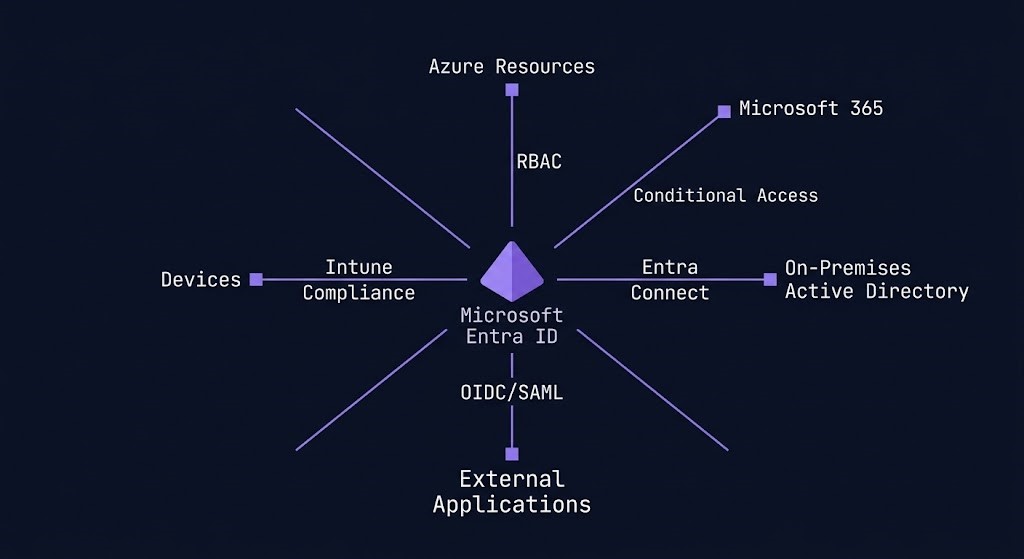
Microsoft Entra ID is the identity foundation of the Azure platform. Every user, service principal, managed identity, and enterprise application exists in Entra ID. Every Azure RBAC assignment resolves to an Entra ID identity. Every Conditional Access policy is enforced at the Entra ID authentication layer before a token is issued. A correctly configured Entra ID layer reduces the blast radius of a network compromise to near zero — an attacker who penetrates a VNet but carries no valid Entra ID identity with the right RBAC assignments cannot read data, cannot modify infrastructure, and cannot escalate privilege.
Conditional Access is the policy engine that governs how and when Entra ID issues authentication tokens. Policies can require MFA, restrict access by network location, block legacy authentication protocols, require compliant device state, enforce sign-in risk thresholds, and apply session controls — all evaluated at the authentication layer before a user or service reaches any Azure resource or Microsoft 365 service. Conditional Access is not a security hardening option. For enterprise Azure deployments, it is the baseline access control architecture. Every access decision passes through it.
Privileged Identity Management (PIM) provides just-in-time privileged access for Entra ID roles and Azure RBAC roles. Rather than assigning permanent Owner or Global Administrator access, PIM allows eligible users to activate privileged roles for time-limited windows with approval workflows, mandatory justification, and full audit trails. The architectural standard for production Azure environments is unambiguous: no permanent privileged role assignments. All privileged access via PIM with defined activation windows. Permanent Owner rights at the subscription level are the single highest-severity misconfiguration in most enterprise Azure environments — not because they are rare, but because they are common and their blast radius is subscription-wide.
Managed Identities are Azure’s mechanism for eliminating static credentials from application architecture. A system-assigned Managed Identity is tied to the lifecycle of a single Azure resource — when the resource is deleted, the identity is deleted. A user-assigned Managed Identity is a standalone identity object that can be attached to multiple resources. Both types allow Azure resources to authenticate to other Azure services using Entra ID tokens rather than stored credentials. There is no architectural justification for storing service credentials in application configuration files in Azure environments where Managed Identity is available.
The Azure Resource Hierarchy
Azure’s resource hierarchy is the governance backbone of the platform. The decisions made at the top of this hierarchy propagate automatically to every resource beneath it — making hierarchy design at the start significantly less expensive than governance retrofitting after the fact.
>_ AZURE RESOURCE HIERARCHY

Organization (Entra ID Tenant)
└── Root Management Group
    ├── Management Group (Platform)
    │   ├── Subscription (Identity)
    │   ├── Subscription (Management)
    │   └── Subscription (Connectivity)
    └── Management Group (Landing Zones)
        ├── Management Group (Production)
        │   ├── Subscription (App A — Prod)
        │   └── Subscription (App B — Prod)
        └── Management Group (Non-Production)
            ├── Subscription (App A — Dev)
            └── Subscription (App B — Dev)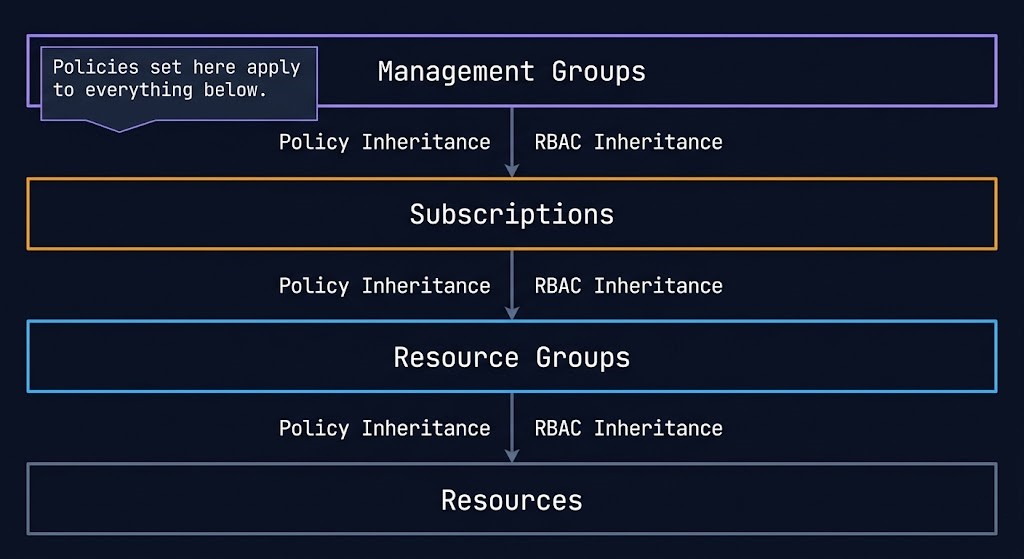
Management Groups sit at the top of the hierarchy, above subscriptions. Azure Policy and Azure RBAC applied at a Management Group level inherit to every subscription, resource group, and resource beneath it. A policy preventing public IP assignment applied at the root Management Group applies to every resource in the entire Azure estate without per-subscription configuration. This inheritance model is Azure’s primary mechanism for enforcing governance at scale — and the reason that organizations operating a flat subscription landscape without Management Group structure pay the governance debt every time a new policy needs to be deployed. The architectural implications of Azure Policy scope at Management Groups vs Subscriptions covers this decision in full, including when subscription-scope policies are the correct choice despite the inheritance advantage of Management Group scope.
Subscriptions are the billing boundary and a significant isolation boundary in Azure. Each subscription has its own billing cycle, its own resource quotas, and its own default limits. The common enterprise pattern is a subscription-per-workload or subscription-per-environment model, organized under Management Groups that enforce governance consistently.
Resource Groups are the deployment and lifecycle boundary within a subscription. Every Azure resource belongs to exactly one resource group. Resources in the same resource group share a lifecycle — they can be deployed, updated, and deleted as a unit. Resource groups are also a unit of RBAC assignment — granular access delegation without subscription-level exposure.
The contrast with other cloud providers is direct:
| Concept | AWS | GCP | Azure |
|---|---|---|---|
| Billing boundary | Account | Project | Subscription |
| Governance grouping | Organization | Folder | Management Group |
| Policy enforcement | SCP | Organization Policy | Azure Policy |
| Identity domain | Account-level IAM | Project-level IAM | Tenant-wide Entra ID |
| Hierarchy depth | 5 levels (OU) | 6 levels (Folder) | 6 levels (MG) |
The architectural implication: governance in Azure is most manageable when the Management Group structure mirrors the organizational structure — Platform, Landing Zones, Production, Non-Production — and policies are applied at the highest level where they should be universally enforced. Governance flows down, not across. Policies, RBAC assignments, and compliance rules inherit downward through the hierarchy, making top-level design decisions critical to long-term governance health.
Landing Zone Architecture
Azure environments are not designed account-by-account or project-by-project. They are deployed as landing zones — pre-defined environments with governance, identity, network topology, and security baseline configured before the first workload arrives.
This is the concept that most distinguishes Azure architecture from AWS and GCP architecture in practice. On AWS, you provision an account, configure guardrails via Organizations and SCPs, and build the workload environment within it. On GCP, you create a project within a Folder structure and enable the necessary APIs. On Azure, the Microsoft Cloud Adoption Framework (CAF) defines a landing zone architecture that provisions the entire governance and network foundation — Management Groups, policies, hub VNet, connectivity subscriptions, identity subscriptions — as a repeatable deployment unit before any application workload is deployed. The Azure Landing Zone vs AWS Control Tower deep dive maps the architectural differences between the two models in full.
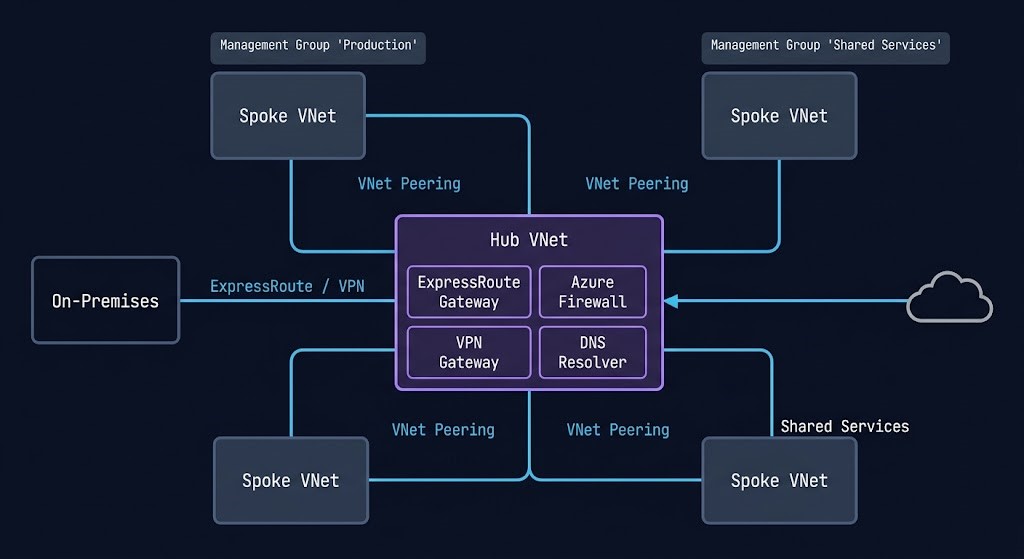
The Azure Landing Zone architecture has a defined structure:
Management Group hierarchy — Platform and Landing Zone management groups, with Production and Non-Production sub-groups beneath Landing Zones, organized to reflect the organization’s workload segmentation.
Platform subscriptions — three dedicated subscriptions for platform services: Identity (domain controllers, DNS), Management (monitoring, Log Analytics, backup), and Connectivity (hub VNet, ExpressRoute/VPN gateways, Azure Firewall). These subscriptions provide shared services to all workload landing zones.
Hub-and-spoke network topology — a central hub VNet in the Connectivity subscription containing shared network services — Azure Firewall, ExpressRoute/VPN gateways, DNS resolvers, and network monitoring. Workload spoke VNets peer to the hub and inherit routing through the hub firewall. East-west traffic between spokes and north-south traffic to the internet and on-premises both traverse the hub, providing centralized traffic inspection and policy enforcement. As landing zones scale, hub-and-spoke topology accumulates complexity — the Azure Landing Zone hub-and-spoke refactor guide covers the decision points for restructuring an established topology without disrupting production workloads.
Identity integration — Entra ID as the identity plane for all resources. Conditional Access policies, PIM, and Managed Identities are configured at the tenant level before workload landing zones are provisioned.
Policy baseline — Azure Policy initiatives assigned at the Management Group level enforce security baseline, tagging requirements, allowed regions, and resource configuration standards before any workload team can deploy a resource that violates them.
The Azure CAF landing zone accelerators — Terraform modules, Bicep templates, and the Azure Landing Zones portal experience — automate the provisioning of this entire foundation. Organizations that deploy workloads directly into subscriptions without a landing zone foundation consistently accumulate governance debt that becomes progressively more expensive to remediate as the environment scales.
Core Building Blocks
Azure Virtual Networks — Regional Isolation with Hub-and-Spoke Scale
Azure Virtual Networks are the network isolation boundary. Unlike GCP’s global VPC, Azure VNets are regional — a VNet exists within a single Azure region. Connecting VNets across regions requires Global VNet Peering or Azure Virtual WAN. The hub-and-spoke topology is the standard enterprise Azure network architecture: a central hub VNet containing shared services connected to multiple spoke VNets containing workloads. Traffic between spokes and to the internet transits the hub, providing centralized firewall inspection and policy enforcement.
Network Security Groups provide stateful layer-4 filtering at subnet and network interface level. Azure Firewall provides layer-4 through layer-7 filtering with FQDN rules, threat intelligence feeds, and centralized logging — the correct control for hub-and-spoke architectures where all traffic transits the hub. Application Gateway provides layer-7 load balancing with WAF capability for web application traffic. The common architectural mistake is NSG-only security without a centralized firewall, which distributes policy across hundreds of NSGs and makes consistent enforcement impossible to verify.
Azure Storage — Tiers, Redundancy, and the Access Model
Azure Storage provides four services under a single account model: Blob Storage for unstructured objects, Azure Files for SMB and NFS file shares, Queue Storage for message queuing, and Table Storage for NoSQL key-value data. The storage account is the management and billing unit.
Storage redundancy is a per-account decision with direct cost and availability implications. Locally Redundant Storage (LRS) maintains three synchronous copies within a single data center — lowest cost, lowest durability. Zone-Redundant Storage (ZRS) replicates across three Availability Zones. Geo-Redundant Storage (GRS) replicates to a secondary region asynchronously. Geo-Zone-Redundant Storage (GZRS) combines ZRS in the primary region with GRS replication to a secondary — highest durability for workloads with geographic redundancy requirements.
The access tier model — Hot, Cool, Cold, and Archive — maps to access frequency and retrieval latency. Mismatching data access patterns to storage tiers is the most consistent source of unexpected Azure storage costs. Archive tier provides the lowest storage cost with retrieval latency measured in hours — appropriate for compliance retention data that must be preserved but will rarely be accessed.
Azure Key Vault — Secrets, Keys, and Certificates as Architecture
Azure Key Vault is not an optional security hardening tool. In Azure, identity plus secrets plus policy defines the security model, and Key Vault is the secrets layer of that triad.
Key Vault stores and controls access to secrets (connection strings, API keys, passwords), cryptographic keys (used for encryption operations), and certificates (TLS/SSL certificates for applications). Access to Key Vault is governed by Entra ID RBAC — the same identity model that governs every other Azure resource. Applications authenticate to Key Vault using Managed Identities, not stored credentials. This completes the credential elimination story: Managed Identity authenticates the application to Key Vault, Key Vault provides the secret or key the application needs, and no credential is stored in configuration or code at any point in the chain.
Soft-delete and purge protection on Key Vault are not optional for production environments — they are the controls that prevent accidental or malicious deletion of keys from making encrypted data permanently inaccessible.
Azure Arc — Hybrid-Native Infrastructure Management
Azure Arc extends the Azure control plane to infrastructure running outside Azure — on-premises servers, Kubernetes clusters, SQL Server instances, and databases running on other clouds. Arc-enabled servers appear in the Azure portal alongside Azure VMs, can be targeted by Azure Policy, receive Defender for Cloud security posture assessment, and can use Managed Identities for authentication to Azure services.
Arc is what makes Azure genuinely hybrid-native rather than hybrid-capable. AWS Outposts and GCP Distributed Cloud extend their cloud infrastructure to on-premises locations. Arc goes further — it brings the Azure management and governance layer to infrastructure that was never designed for cloud management. A Windows Server 2019 running in a customer data center, Arc-enabled, becomes a manageable resource in the Azure hierarchy subject to the same Policy, RBAC, and monitoring as a VM in Azure East US. For organizations with significant on-premises estates that are not yet migrated, Arc provides the governance and security visibility of Azure without requiring migration as a prerequisite.
Shared Responsibility Model
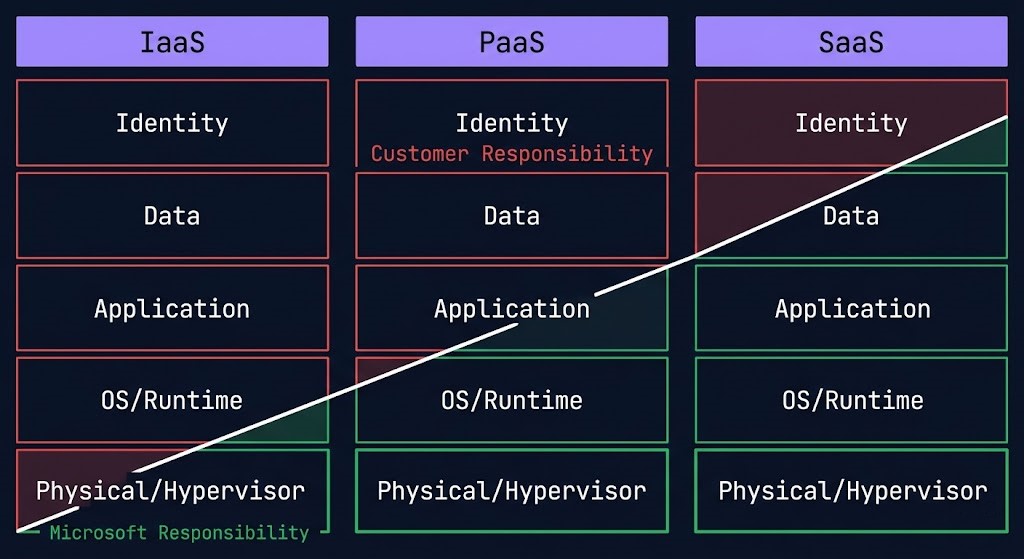
The Azure Shared Responsibility Model divides security obligations by service type — a boundary that shifts as you move up the stack from IaaS to PaaS to SaaS.
For Infrastructure as a Service — VMs, VNets, Storage — Microsoft secures the physical data center, hypervisor, and network fabric. The customer secures the guest OS, applications, data, and identity configuration. For Platform as a Service — App Service, AKS, Azure SQL — Microsoft additionally secures the OS and runtime. The customer secures application code, data, and identity governance. For Software as a Service — Microsoft 365, Dynamics — Microsoft secures the application layer. The customer secures data classification, access policy, and identity governance.
The architectural implication of the PaaS and SaaS shift: as you move up the stack, customer security responsibility concentrates increasingly in identity and data governance. Azure shifts responsibility most aggressively at the SaaS layer through Microsoft 365 — where identity, device posture, and application access are enforced centrally through Entra ID and Conditional Access rather than distributed across application-level controls.
Microsoft Defender for Cloud provides continuous security posture assessment across the Azure estate, generating a Secure Score and prioritized recommendations for closing the gap between current configuration and Microsoft’s security baseline. For regulated workloads, Defender for Cloud’s regulatory compliance view maps the current posture against specific frameworks — PCI-DSS, HIPAA, ISO 27001, CIS Benchmarks — without requiring separate assessment tooling.
Hybrid Connectivity
Azure assumes hybrid as the default, not the exception. The connectivity model reflects an organization extending an existing estate to the cloud rather than building cloud-first and retrofitting on-premises connectivity later.
| Model | Latency | Bandwidth | Use Case | Cost Model |
|---|---|---|---|---|
| ExpressRoute | Deterministic — dedicated private circuit, stays on Microsoft backbone | 50 Mbps to 100 Gbps | Production hybrid, latency-sensitive workloads, regulatory requirements prohibiting internet-path transmission | High — circuit port fee + data transfer |
| ExpressRoute Global Reach | Deterministic — on-premises to on-premises via Microsoft backbone | Inherits circuit bandwidth | On-premises site-to-site routing via Microsoft backbone without Azure as transit point | High — Global Reach add-on fee per circuit pair |
| Azure VPN Gateway | Variable — IPsec/IKE over public internet | 650 Mbps to 10 Gbps (SKU-dependent) | Branch office connectivity, development environments, backup path when ExpressRoute economics not justified | Low-medium — gateway SKU hourly + data transfer |
| Azure Virtual WAN | Deterministic — managed hub routing, ExpressRoute or VPN backed | Scales with attached circuits and VPN tunnels | Large-scale multi-region, multi-site, multi-VNet environments where manual hub-and-spoke management becomes untenable | Medium-high — hub deployment fee + connection units + data transfer |
| Azure Private Endpoint | Low — stays within VNet, no public internet traversal | VNet-native, no dedicated circuit | Private access to Azure PaaS services (Storage, SQL, Key Vault) via private IP within the VNet | Low — per endpoint hourly + data processed |
The decision framework is straightforward: ExpressRoute for production workloads with latency or regulatory constraints, VPN Gateway for branch and development connectivity, Virtual WAN for large-scale multi-region multi-site environments where manual routing management becomes untenable, and Private Endpoints for keeping PaaS service traffic off the public internet entirely.
The DNS configuration for private endpoints is one of the most common sources of operational failure in Azure hybrid architectures — private DNS zones must be linked to every VNet that needs to resolve the private endpoint, and the resolution chain breaks in specific hub-and-spoke configurations. The Azure Private Endpoint DNS recursive loop and subnet exhaustion guide covers the failure modes in detail. For organizations managing private endpoint DNS health at scale, the Azure Private Endpoint Auditor provides a structured audit framework.
For organizations managing Azure infrastructure alongside AWS or GCP resources, the Building a Portable Control Plane with Crossplane covers the Kubernetes-native multi-cloud IaC model that treats Azure resources as Kubernetes custom resources within a unified GitOps operational model.
Cost Physics
Azure’s cost model has one differentiator that no other cloud provider can match: license portability for existing Microsoft investments.
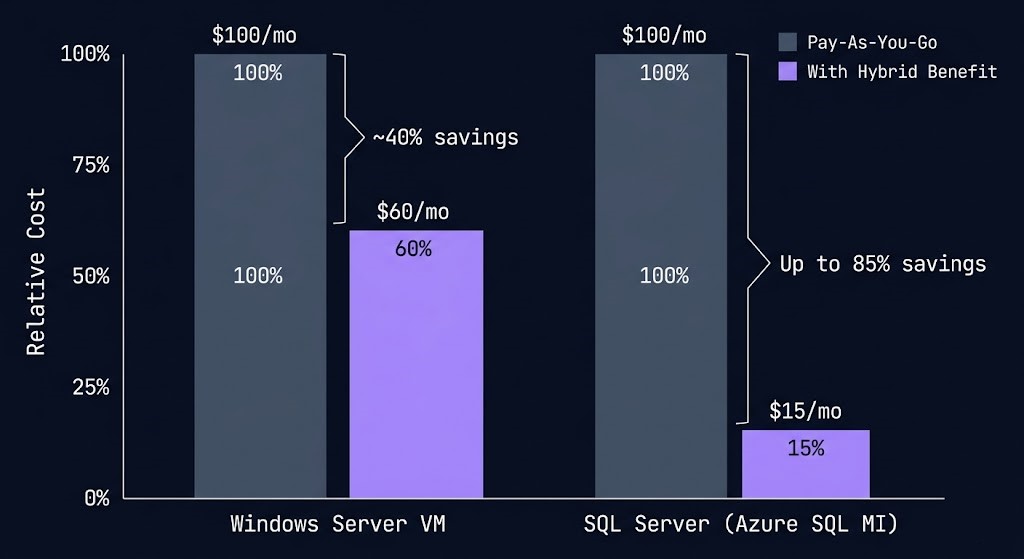
Azure Hybrid Benefit allows organizations with active Software Assurance coverage on Windows Server and SQL Server licenses to apply those licenses to Azure VMs rather than paying the full Azure VM rate that includes OS licensing. For a Windows Server VM, Azure Hybrid Benefit reduces the compute cost by approximately 40%. For SQL Server, the discount reaches up to 85% on Azure SQL Database and SQL Managed Instance compared to pay-as-you-go rates. For Microsoft-first enterprises with significant Windows and SQL Server estates, Azure Hybrid Benefit changes the cost comparison between Azure and other cloud providers fundamentally — the effective price of Azure compute for licensed workloads is not the listed Azure price.
Reserved Instances provide up to 72% discount over pay-as-you-go pricing for one-year or three-year commitments on specific VM families. Azure Reservations can be scoped to a single subscription or shared across all subscriptions in a billing account — the shared scope is the correct architecture for enterprises with multiple subscriptions running the same workload types, as it allows the reservation to automatically apply wherever the eligible VM type runs without manual assignment.
Azure Savings Plans provide a more flexible commitment model than Reserved Instances — a fixed hourly spend commitment that applies automatically to eligible compute usage across VM families, regions, and operating systems. Where Reserved Instances require commitment to specific VM sizes and regions, Savings Plans provide discount portability as workloads evolve. For environments with variable workload profiles or planned migrations between VM families, Savings Plans reduce the risk of reservation stranding.
Dev/Test pricing provides significantly reduced rates for non-production workloads running under Visual Studio subscriptions. For enterprises with active Visual Studio subscriptions, the Dev/Test pricing model applies to development and testing environments without reservation commitment — reducing the cost of maintaining parallel non-production environments.
The cost architecture recommendation: apply Azure Hybrid Benefit first on all eligible Windows and SQL workloads — it requires no commitment and the discount is immediate. Layer Reserved Instances or Savings Plans for stable baseline compute. Use Dev/Test pricing for non-production environments. Model the combined effect before comparing Azure costs to AWS or GCP for Microsoft-licensed workload migrations — the true Azure cost for these workloads is materially lower than the list price comparison suggests. Azure Policy can enforce cost governance at the resource level — enforcing CostCenter tags via Azure Policy provides a practical implementation pattern for ensuring every resource carries the tagging required for accurate cost attribution.
Compute Decision Tree
Azure offers multiple overlapping compute abstractions — selecting the right one is critical to avoiding operational complexity that compounds as environments scale.
| Workload Type | Right Abstraction | Why | Avoid |
|---|---|---|---|
| Legacy apps, full OS control, Windows licensing | Azure Virtual Machines (+ VMSS for autoscaling) | Full OS control, Windows Server and SQL Server Hybrid Benefit applies, custom VM sizes available | VMs for stateless workloads without OS-level requirements — higher management overhead without the advantage |
| Containerized workloads requiring Kubernetes orchestration | Azure Kubernetes Service (AKS) | Entra ID integration, node pool flexibility, GPU support, DaemonSets, full Kubernetes API access | AKS when node management is not required — Container Apps removes the cluster management overhead entirely |
| Web applications and APIs with managed runtime | Azure App Service | Managed runtime for .NET, Node.js, Python, Java — no OS management, built-in autoscaling, integrated deployment slots | App Service for workloads requiring custom OS configuration or container-level control — use AKS or Container Apps |
| Event-driven, short execution, no persistent state | Azure Functions | Per-invocation billing, scale to zero, native triggers for Storage, Service Bus, Event Hub, HTTP | Functions for long-running or stateful workloads — execution timeout limits apply; use Container Apps for complex execution |
| Containerized workloads without Kubernetes management overhead | Azure Container Apps | Serverless containers on Kubernetes — no node management, scale to zero, KEDA-based autoscaling, Dapr integration | Container Apps for workloads requiring DaemonSets, GPU nodes, or direct Kubernetes API access — use AKS |
| Single-container tasks, no orchestration required | Azure Container Instances | Fastest container start, per-second billing, no cluster or orchestration layer — correct for isolated single-run jobs | ACI for multi-container applications or workloads requiring scaling, service discovery, or persistent networking |
| High-performance batch, HPC, or GPU training | Azure Batch / AKS with Spot VMs | Spot VM discounts up to 90% for fault-tolerant batch; AKS handles rescheduling on eviction; Azure Batch for large-scale parallel jobs | On-Demand VMs for stateless batch workloads — the Spot cost differential is too large to justify without hard state requirements |
The operational difference between AKS and Container Apps deserves explicit framing. AKS gives you a Kubernetes cluster — you manage node pools, OS upgrades, scaling configuration, and cluster networking. Container Apps runs on Kubernetes internally but abstracts the cluster away entirely — you deploy container workloads and define scaling rules without touching a node, a kubeconfig, or a Helm chart. For teams that need container orchestration but do not need Kubernetes-level control, Container Apps reduces operational overhead significantly. For teams that need node-level customization, DaemonSets, GPU workloads, or specific Kubernetes networking plugins, AKS is the correct abstraction.
The Azure Hybrid Benefit cost consideration applies specifically to Virtual Machines running Windows Server or SQL Server. Container-based workloads on AKS, App Service, Functions, and Container Apps run on Linux nodes by default and do not benefit from Windows Server license portability — this cost advantage concentrates in VM-based deployments.
Zero Trust and Governance
Azure has the most deeply integrated Zero Trust architecture of the three major cloud providers — not because Microsoft invented Zero Trust, but because Microsoft’s enterprise product estate provided more surface area to implement it across than AWS or GCP had at equivalent maturity.
Azure’s Zero Trust model is enforced primarily through identity and device context, not network position. A request from inside a corporate network that fails device compliance is denied the same as a request from an unknown IP. Network position is not trust. Identity and device state are trust.
The Zero Trust implementation operates across five control surfaces:
Identity — Entra ID Conditional Access enforces Zero Trust at the authentication layer. Every access request is evaluated against policy — device compliance, network location, user risk score, sign-in risk — before a token is issued.
Devices — Microsoft Intune provides device management and compliance enforcement that integrates directly with Conditional Access. A device must be enrolled, compliant with defined security policies, and pass health attestation before Conditional Access grants access to sensitive resources.
Applications — Microsoft Defender for Cloud Apps provides visibility into SaaS application usage, enforces session controls on cloud applications, and detects anomalous access patterns across the application estate. For hybrid environments accessing both Azure-hosted and third-party SaaS applications, Defender for Cloud Apps is the control plane that makes the application layer visible to the Zero Trust policy engine.
Data — Microsoft Purview provides data governance, classification, and sensitivity labeling across the Azure and Microsoft 365 estate. A sensitivity label applied to a document travels with it regardless of where it moves — Purview’s policy engine enforces access controls and encryption based on that label without requiring network-based data loss prevention.
Infrastructure — Microsoft Defender for Cloud provides continuous security posture assessment across Azure resources, hybrid environments via Azure Arc, and multi-cloud environments. Microsoft Sentinel is the SIEM and SOAR layer that ingests signals from Defender for Cloud, Entra ID, Microsoft 365, and third-party sources into a unified security operations platform.
Azure Policy is the governance automation layer that enforces configuration standards across the entire estate. Policies can audit, deny, and auto-remediate. Policy Initiatives group related policies into compliance frameworks — Microsoft publishes built-in initiatives for CIS Benchmarks, NIST SP 800-53, ISO 27001, PCI-DSS, and HIPAA. Assigning the appropriate Policy Initiative at the Management Group level is the baseline governance configuration for regulated workloads. For teams building highly opinionated governance models, the governance BSD jail pattern covers an architectural approach to isolating workloads within strict policy boundaries that constrains what resources can do rather than just what they can access.
When Azure Is the Right Call
Azure’s genuine architectural strengths align with a specific profile. For organizations that match this profile, Azure is not one option among equals — it is the architecturally correct choice.
Organizations where Windows Server, SQL Server, Active Directory, Microsoft 365, and Teams are the operational standard. Azure Hybrid Benefit reduces compute costs materially. Entra ID eliminates a separate identity federation layer. The Microsoft 365 and Azure estates operate from a single identity control plane — the operational and cost advantages compound in environments where Microsoft is already the dominant vendor.
Regulated industries, financial services, healthcare, and government — where access control, privileged identity management, and audit logging are non-negotiable compliance requirements. Azure’s Conditional Access, PIM, and Defender for Cloud provide more deeply integrated identity governance than any other major cloud platform. Zero Trust is not a feature you configure in Azure — it is the default design pattern the platform is built around.
Organizations with significant on-premises estates not migrating entirely to cloud. Azure Arc brings Azure governance and management to on-premises infrastructure without requiring migration. ExpressRoute provides private backbone connectivity. Entra Connect synchronizes on-premises Active Directory to Entra ID. The hybrid story on Azure is not a connectivity feature — it is a design philosophy the platform was built around from the start.
Azure has more compliance certifications than any other cloud provider — including certifications specific to government, healthcare, financial services, and defense verticals. For workloads with hard compliance constraints that limit which cloud provider is eligible, Azure’s certification coverage is often the determining factor before the architecture conversation begins.
When To Consider Alternatives
Workloads requiring the breadth of AWS’s 200+ service catalogue — niche managed services, specific compliance certifications only available on AWS, or ecosystems with deep AWS-specific tooling. AWS has the deepest service catalogue of any cloud provider and the broadest global Region footprint. When service availability or Region coverage is the constraint, evaluate AWS first.
When Kubernetes is a strategic platform or data analytics, streaming, and ML are core business functions. GCP’s GKE release channels, Autopilot, and Workload Identity deliver lower operational overhead than AKS for Kubernetes-first teams. The BigQuery + Pub/Sub + Dataflow + Vertex AI integration is a native system that Azure’s equivalent stack cannot match for pure data platform architectures.
For net-new architectures built entirely on Linux without Microsoft licensing leverage, Azure’s primary cost differentiator — Hybrid Benefit — does not apply. The price-performance advantage narrows significantly against AWS Graviton and GCP custom machine types. Without the Microsoft stack and its associated licensing benefits, the architectural case for Azure weakens unless identity governance or hybrid connectivity requirements are the primary constraint.
Applications with global consumer user bases where network latency is a product quality metric and the workload has no Microsoft stack dependency. GCP’s Premium Tier routing on the Google backbone and global VPC provide a structural network advantage for globally distributed low-latency services that Azure’s regional VNet model requires more configuration to approximate.
You’ve seen how Azure is architected. The pages below cover what sits beside it — competing platforms, hybrid connectivity, cost governance, and the infrastructure disciplines that determine where Azure belongs in your environment.
Architect’s Verdict
Azure wins where identity, governance, and hybrid integration matter more than architectural purity.
It is not the most elegant cloud platform. The service naming is inconsistent, the portal surface area is vast, and the overlap between compute abstractions requires deliberate architectural decisions that AWS and GCP resolve more cleanly. But elegance is not the criterion enterprises buy infrastructure against.
Azure is the most complete enterprise operating environment available — because it is the only cloud platform where identity governance, device posture, data classification, application access policy, and infrastructure management operate from a single control plane that already governs the Microsoft 365 estate most enterprises depend on. That integration is not a feature. It is the architecture.
For organizations where Windows, SQL Server, Active Directory, and Microsoft 365 are the operational standard — Azure is not a cloud option. It is the natural extension of the infrastructure already running the business.
You’ve Studied the Landing Zone.
Now Validate What’s Actually Deployed.
Azure Landing Zone design, Management Group hierarchy, Entra ID integration, and policy scope — the architecture is clear on paper. The gap between the reference architecture and what’s running in your environment is where incidents originate. The audit closes that gap.
Azure Architecture Audit
Vendor-agnostic review of your Azure environment — Landing Zone design, Management Group and Policy scope, Entra ID governance, hub-and-spoke network topology, and Private Endpoint DNS configuration. Whether you’re building greenfield or inheriting an existing environment, the audit surfaces what needs fixing before it fails.
- > Landing Zone and Management Group hierarchy review
- > Azure Policy scope and governance gap analysis
- > Private Endpoint DNS and network topology audit
- > Entra ID integration and RBAC model validation
Architecture Playbooks. Every Week.
Field-tested blueprints from real Azure environments — Private Endpoint DNS recursive loop failures, hub-and-spoke refactor case studies, Landing Zone governance drift, and the policy scope patterns that enterprise Azure environments get wrong at scale.
- > Azure Landing Zone & Governance Architecture
- > Private Endpoint & DNS Failure Patterns
- > Entra ID & RBAC at Enterprise Scale
- > Real Failure-Mode Case Studies
Zero spam. Unsubscribe anytime.
Frequently Asked Questions
Q: What makes Azure cloud architecture different from AWS and GCP for enterprise workloads?
A: Azure’s differentiator is identity integration depth and hybrid-first design — not service breadth or network architecture. Microsoft Entra ID governs every Azure resource, every Microsoft 365 service, and every on-premises Active Directory object from a single identity plane. No other major cloud provider integrates identity across cloud and on-premises at this depth. Azure Hybrid Benefit changes the cost economics for Microsoft-licensed workloads in ways AWS and GCP cannot match. And Azure’s compliance certification coverage — more certifications than any other cloud provider — is the determining factor for regulated industries with hard compliance constraints.
Q: What is the Azure Landing Zone and why does it matter architecturally?
A: An Azure Landing Zone is a pre-configured environment that establishes governance, identity, network topology, and security baseline before the first workload is deployed. It provisions the Management Group hierarchy, platform subscriptions (Identity, Management, Connectivity), hub VNet, Azure Firewall, ExpressRoute/VPN gateways, and Policy baselines as a repeatable deployment unit. Organizations that deploy workloads directly into subscriptions without a landing zone foundation accumulate governance debt — inconsistent policy enforcement, ad-hoc network topology, and missing security baselines — that becomes progressively more expensive to remediate as the environment scales. The Azure Cloud Adoption Framework landing zone accelerators automate this foundation in Terraform and Bicep.
Q: How does Azure Hybrid Benefit actually change cost calculations?
A: Azure Hybrid Benefit allows organizations with Software Assurance coverage on Windows Server and SQL Server to apply those licenses to Azure VMs instead of paying the Azure rate that includes OS licensing. For Windows Server VMs, the discount is approximately 40% off the standard VM rate. For SQL Server workloads on Azure SQL Database and SQL Managed Instance, the discount reaches up to 85% compared to pay-as-you-go. For a Microsoft-first enterprise migrating a Windows and SQL Server estate to Azure, the true cost of Azure compute is materially lower than any list price comparison against AWS or GCP suggests. The calculation should always be modeled with Hybrid Benefit applied before drawing cost conclusions.
Q: What is the most common Azure governance failure?
A: A flat subscription landscape without Management Group hierarchy. Organizations provision subscriptions directly under the root Management Group with no folder organization, which means every policy must be applied per-subscription rather than inheriting from a Management Group. As the subscription count grows, policy enforcement diverges between subscriptions, compliance becomes impossible to assess centrally, and governance remediation requires touching every subscription individually. The fix is establishing the Management Group hierarchy before the subscription count exceeds five — after that, the retrofit cost increases linearly with subscription count.
Q: How does Azure handle identity for workloads that need to access other Azure services?
A: Through Managed Identities — system-assigned or user-assigned Entra ID identities that Azure resources use to authenticate to other Azure services without stored credentials. An AKS cluster with a Managed Identity can read secrets from Key Vault, write to Storage, and query an Azure SQL Database using Entra ID tokens rather than connection strings containing passwords. The correct architecture eliminates static credentials entirely: Managed Identity authenticates the workload to Azure services, Key Vault stores any secrets the workload needs to access non-Azure dependencies, and no credential appears in configuration files or environment variables. This architecture pattern is not optional for production Azure environments — it is the baseline.
Q: When does Azure’s compliance certification advantage matter most?
A: For regulated industries where cloud provider eligibility is a compliance constraint rather than a performance or cost decision. Healthcare workloads subject to HIPAA, financial services workloads subject to PCI-DSS and SOC 2, and government workloads subject to FedRAMP and DISA IL requirements each have specific certification requirements that constrain which cloud providers are eligible to host them. Azure’s certification coverage — including Azure Government for US government workloads — is broader than AWS or GCP across these regulated verticals. For workloads where the compliance constraint is the primary selection criterion, Azure’s certification coverage is often the factor that makes the decision before the architecture conversation begins.
Q: How does Azure compare to AWS for AI and ML workloads?
A: For enterprises already invested in the Microsoft stack, Azure’s AI integration advantage is the Azure OpenAI Service — enterprise-grade access to OpenAI models with the data privacy, compliance, and Entra ID governance of the Azure platform. Azure Machine Learning provides end-to-end ML lifecycle management. For GPU compute, Azure offers NVIDIA H100 and A100 instances comparable to AWS and GCP. The primary Azure AI advantage is not raw GPU availability — it is the integration between Azure OpenAI, Azure AI Search, Azure Blob Storage, and Entra ID that allows enterprise AI architectures to be built within the same identity and governance boundary as the rest of the Azure estate. For organizations where data sovereignty, compliance, and enterprise identity governance are constraints on AI architecture, Azure’s integrated stack reduces the complexity of satisfying those constraints relative to assembling equivalent controls on AWS or GCP.