


NUTANIX AHV
Invisible Infrastructure. Distributed Intelligence.
Nutanix AHV is the hypervisor most architects never see — and that’s the point.
Unlike ESXi, which sits visibly between the hardware and the VMs it runs, AHV is embedded inside the Nutanix HCI stack. The storage, compute, networking, and virtualisation lifecycle are unified under a single management plane. The hypervisor doesn’t compete with the platform — it disappears into it.
That design philosophy is either a strength or a constraint depending on where you’re starting from. For architects evaluating AHV for the first time, this page covers how the stack actually works — DSF, CVM, Flow, Prism Central, LCM — and the extended platform capabilities that most evaluation guides skip: Files and Objects, NCM, GPT-in-a-Box, AKE Kubernetes, and NC2 hybrid extension. For architects already running AHV and managing the Day-2 reality, the same framework applies to operational decisions around cluster sizing, CVM health, lifecycle cadence, and deciding whether Nutanix Move is the right migration execution path.
Both paths converge at the same question: is AHV the right long-term platform for your specific environment?
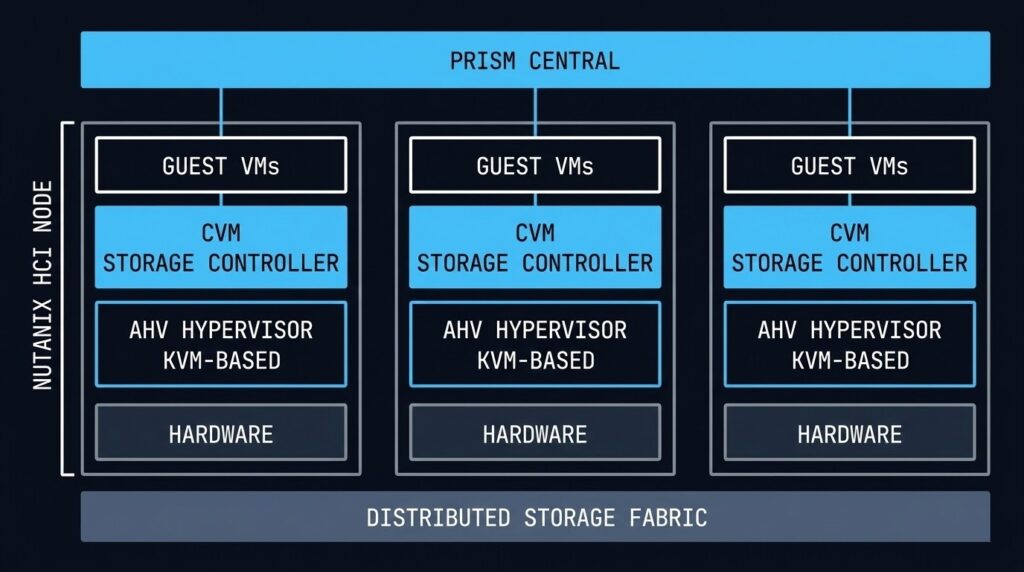
What AHV Actually Is — And What It Isn’t
AHV is a Type-1 hypervisor built on KVM — the same kernel-based virtualisation layer that runs production workloads across Linux systems globally. What Nutanix adds on top of KVM is the integration layer: the Controller VM that handles all storage I/O, the AHV Turbo path that bypasses traditional I/O bottlenecks, and the Prism management plane that unifies the entire lifecycle.
The “Un-Hypervisor” framing Nutanix uses in their marketing is accurate in one specific sense: AHV is included in the Nutanix licence. There is no separate hypervisor cost, no per-socket vSphere tax, no NSX add-on required for micro-segmentation. Flow is built in. LCM handles firmware, hypervisor, and CVM updates as a single operation. The hypervisor is not a separate product you manage — it’s a component of the platform you manage.
What AHV is not: a drop-in replacement for every vSphere capability. Type-2 hypervisor features, specific third-party ecosystem integrations, and workloads with hard dependencies on vSphere-specific APIs or tools require honest evaluation before migration. The decision framework below covers this directly. If you’re coming from vSphere specifically, Beyond the VMDK covers the execution physics gap in detail before you commit to the migration path.
The Physics: Distributed Storage Fabric
Every architectural decision in AHV flows from one principle: data locality. The Distributed Storage Fabric (DSF) keeps a VM’s data on the same physical node as the VM itself. Read I/O never traverses the network. Write I/O is distributed for redundancy but the primary copy stays local.
The practical result is that AHV eliminates the storage network as a latency variable for read-heavy workloads. There is no SAN fabric to tune, no FC zoning to manage, no iSCSI initiator to configure. The storage is the cluster. If you want to see how this translates to real I/O numbers under load, the AHV vs vSAN 8 I/O Benchmark documents the DSF data locality advantage against vSAN read performance under sustained workloads.
Read latency penalty — data locality keeps reads on the same node as the VM
Replication factor — 2 or 3 copies distributed across nodes, no external storage required
Per node — every host has its own Controller VM managing local storage I/O independently
The tradeoff is that DSF requires you to think about storage capacity and performance at the node level. Unlike a SAN where storage and compute scale independently, AHV scales both together. Adding storage means adding nodes. For environments with highly asymmetric compute-to-storage ratios — dense GPU workloads, or pure compute burst clusters — this can be an inefficient scaling model.
When the HCI Model Isn’t the Whole Story: Disaggregated Storage and Compute-Only Nodes
The DSF data locality model described above is the architecture Nutanix was built on. It is also no longer the only architecture Nutanix supports — and that distinction matters for any honest evaluation of the platform.
Starting with the NX-NPX programme, Nutanix introduced compute-only nodes: AHV nodes that run VMs but carry no local storage, instead connecting to an external storage array over the network. The supported external platforms include Dell PowerStore and Pure Storage FlashArray — enterprise SAN hardware that many organisations already own and operate.
This is a significant architectural shift from the original HCI premise. The DSF data locality guarantee — reads from local SSD, no network traversal — no longer applies to VMs running on compute-only nodes. I/O goes over the network to the external array, exactly as it does in a traditional vSphere + SAN environment. The CVM still exists on compute-only nodes but its role changes: it becomes a coordination and management layer rather than the primary storage controller.
Why Nutanix made this move — and why it’s commercially rational:
The honest answer is that a significant portion of enterprises evaluating AHV as their vSphere exit path have substantial SAN investments with years of remaining lifecycle. Telling them to abandon a functioning Pure FlashArray or Dell PowerStore in order to adopt HCI is a deal-breaker in many procurement conversations. Compute-only nodes eliminate that objection — organisations can adopt AHV, migrate their VMs, unify their management plane under Prism Central, and continue running their existing SAN until it reaches end-of-life naturally.
It is a commercial concession. It is also a principled architectural evolution: the platform now supports the full spectrum from pure HCI to disaggregated compute-and-storage, with a consistent management layer across both models.
What this means for your architecture decision:
- + Read I/O from local SSD — no network latency on reads
- + No separate storage infrastructure to manage or licence
- + Single vendor lifecycle — firmware, hypervisor, storage updated by LCM
- – Storage and compute scale together — asymmetric ratios are inefficient
- – Requires retiring existing SAN investment on adoption
- + Leverage existing Dell PowerStore or Pure FlashArray investment
- + Scale compute and storage independently — purpose-built ratios
- + Adopt AHV management plane without retiring storage hardware
- – Data locality is gone — all I/O traverses the network to external array
- – Two vendor lifecycles to manage — array firmware outside LCM scope
- – Network fabric becomes a latency variable again — fabric design matters
The deeper architectural question — one that Nutanix’s own storage ecosystem partners have raised publicly — is whether disaggregated AHV is a meaningfully different proposition from running vSphere on the same external array. The management plane unification is real: Prism Central, LCM, Flow, and NCM work identically regardless of whether storage is local DSF or an external FlashArray. But the core HCI performance story — data locality, no SAN fabric, no FC zoning — no longer applies. You’re back to tuning fabric MTU, managing array queue depth, and monitoring network I/O paths. The Prism pane is cleaner than vCenter. The physics underneath is familiar.
For most organisations adopting compute-only nodes as a transitional architecture — running AHV on external storage while the SAN lifecycle closes out, then migrating to pure HCI nodes at refresh — this is a rational path. For organisations considering compute-only nodes as a permanent architecture, the honest question is whether the management plane unification alone justifies the AHV licence cost over staying on vSphere with the same array. That’s a question worth asking before the procurement conversation rather than after.
For a deeper look at how the external storage integration actually works in practice — including the observability gaps between Prism and the array — see Breaking the HCI Silo.
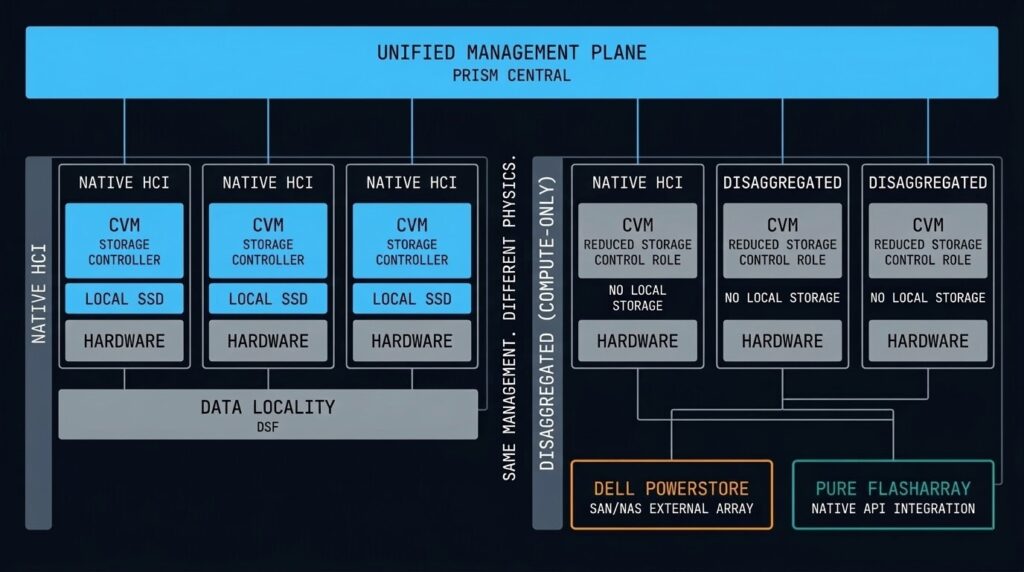
The CVM: Why Every Node Is Its Own Storage Controller
The Controller VM is the most important architectural component most AHV architects spend the least time understanding — until it causes a problem.
Every Nutanix node runs a CVM as a privileged VM that directly manages storage I/O for that node. The CVM is what makes data locality work: guest VMs send I/O requests to the local CVM, which handles the read from local SSD or services the write across the cluster. The guest VM never talks directly to the storage hardware.
This design has two critical architectural implications:
CVM failure handling: If a CVM fails or becomes unavailable, the cluster automatically redirects storage I/O from that node to CVMs on other nodes. The guest VMs on that node continue to operate — they simply take a latency hit while remote I/O services their requests. This is transparent to the application but not free: remote I/O adds latency and increases inter-node traffic. A degraded CVM that is limping rather than fully failed is often harder to detect than a clean failure.
CVM resource allocation: The CVM competes with guest VMs for CPU and memory on the same physical host. Nutanix publishes recommended CVM sizing, but under-resourcing the CVM in favour of maximising VM density is a common Day-2 problem. If your CVM is consistently CPU-throttled or memory-pressured, every VM on that node pays the I/O latency penalty.
AHV Turbo I/O and Networking Performance
AHV Turbo is Nutanix’s answer to the I/O overhead introduced by the traditional hypervisor kernel path. In a standard KVM environment, a guest VM’s storage request passes through multiple software layers before reaching the storage controller. Each context switch adds latency. Under sustained I/O load — transactional databases, high-frequency write workloads — that overhead compounds.
The Turbo I/O path allows the guest VM to communicate with the CVM through a more direct channel, reducing the number of context switches required per I/O operation. The practical result is near-bare-metal storage throughput for workloads that stay within the AHV performance envelope.
Networking in AHV is managed through Open vSwitch (OVS), which provides the foundation for Flow micro-segmentation and handles VLAN configuration, bonding, and traffic shaping at the host level. For environments running 25GbE or above, the OVS configuration and MTU settings require careful attention — misconfigured MTU in a high-throughput environment is one of the most common sources of unexplained performance degradation that doesn’t immediately point to networking as the cause.
Security: Flow Micro-Segmentation and Hardened by Default
AHV’s security model is built around two principles: the hypervisor should be hardened at the platform level without requiring manual configuration, and network security should follow workloads rather than IP addresses.
Hardened by Default: Nutanix SCMA (Security Configuration Management Automation) continuously monitors the cluster against a known-good security baseline and automatically remediates unauthorised changes. Secure Boot ensures the AHV bootloader is cryptographically verified at startup. SSH access to the hypervisor is disabled after initial deployment. The attack surface of the hypervisor itself is minimal by design.
Flow Micro-Segmentation: Traditional firewalls protect network perimeters. Flow protects individual VMs — even from other VMs on the same host. Security policies are applied based on VM categories (by application tier, environment, or any custom tag) rather than IP addresses. When a VM migrates to a different node, its security policy travels with it. When you add new VMs to a category, they automatically inherit the policy.
- Policy tied to IP address
- VM migration breaks policy
- East-west traffic uncontrolled inside the segment
- Lateral movement between same-host VMs is unrestricted
- Policy tied to VM category
- Policy follows the VM on migration
- East-west traffic controlled at the VM level
- Lateral movement blocked even on the same host
The practical limitation of Flow is policy complexity at scale. As VM count grows and categories proliferate, the policy matrix requires disciplined governance. Flow works best when the category taxonomy is designed upfront — retrofitting micro-segmentation policies onto an established environment with ad-hoc VM naming is significantly harder than building the category model before deployment.
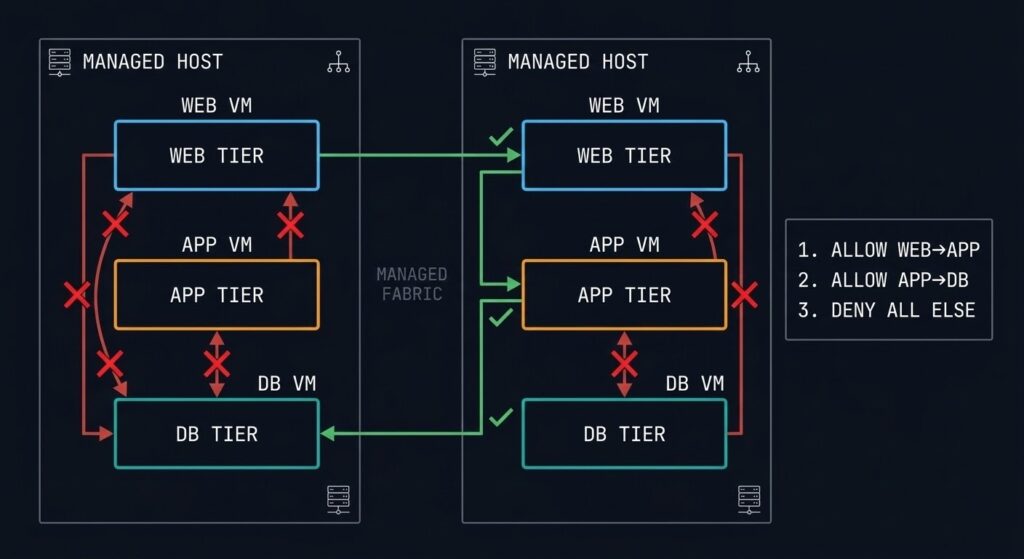
Prism Central: One Pane for the Entire AHV Estate
Prism Central is the centralised management plane for Nutanix environments. A single Prism Central instance can manage multiple clusters — on-premises, in cloud (via NC2), and across geographically distributed sites — from one interface.
The architectural significance of Prism Central is that it elevates management above the individual cluster. Capacity planning, VM provisioning, policy management, and performance analysis all happen at the estate level. For Day-2 operations at scale, this eliminates the per-cluster management overhead that makes multi-site vSphere environments expensive to operate.
Prism’s machine learning layer (X-FIT) builds a behavioural baseline for every cluster and flags anomalies before they become incidents. It’s not infallible — the baseline period requires several weeks of normal operations before predictions become reliable — but it genuinely reduces the noise-to-signal ratio for operations teams managing dense clusters.
The operational dependency to understand: Prism Central itself is a VM (or a scale-out 3-VM cluster for large estates). It must be treated as a critical infrastructure component with its own availability, backup, and recovery requirements. A Prism Central outage doesn’t take down the clusters it manages — VMs continue to run — but it removes all visibility and management capability until it’s restored.
Lifecycle Management: Non-Disruptive Updates as a Platform Feature
Nutanix LCM (Lifecycle Manager) is one of the most operationally significant architectural decisions Nutanix made: firmware updates, hypervisor patches, CVM upgrades, and NCC health checks are orchestrated as a single coordinated operation rather than four separate maintenance windows.
The mechanics: LCM performs a rolling upgrade across the cluster, live-migrating VMs off each node before updating it, then migrating VMs back. The cluster remains available throughout. For most environments, an LCM cycle runs overnight without a maintenance window and completes before the business day starts.
Real-world constraints to plan around:
- LCM requires all CVMs to be healthy before it will proceed. A partially degraded cluster will block the upgrade until the degraded node is remediated.
- Large clusters with high VM density take longer to migrate workloads off each node. Plan LCM cycles around peak traffic windows, not just calendar maintenance windows.
- The Nutanix LCM version compatibility matrix is real and occasionally restrictive. Skipping LCM versions to catch up after a long gap can require intermediate upgrade steps that add time to the cycle.
For architects inheriting an AHV environment that hasn’t been kept current, the LCM backlog is usually the first operational debt to address.
Files, Objects, and Unified Storage
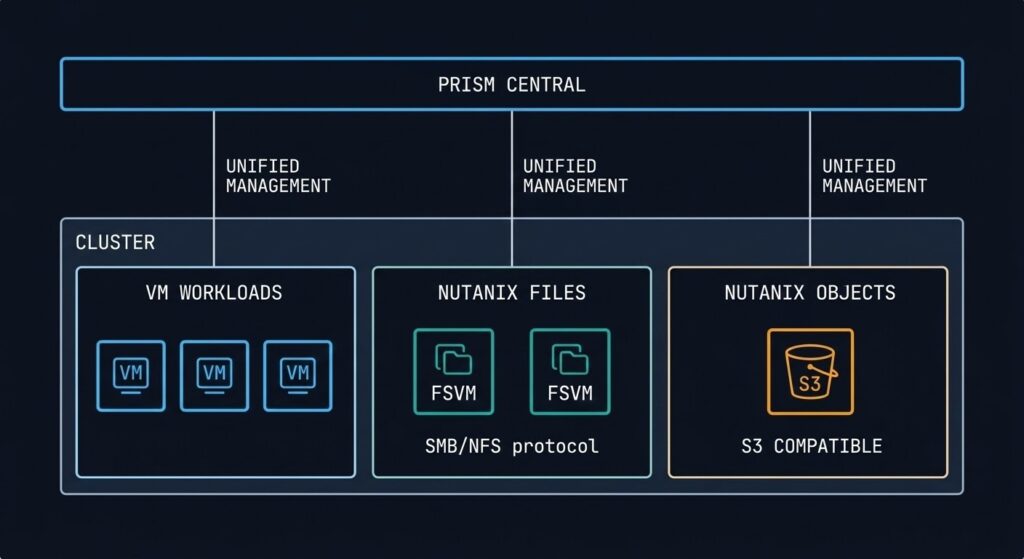
The storage story in AHV extends beyond block I/O. Nutanix delivers file and object storage as native platform services — no additional array, no separate NAS gateway, no third-party object store required.
Nutanix Files is an SMB/NFS file server service that runs on the same cluster as your VMs. It’s not a separate appliance — it’s a set of File Server VMs (FSVMs) provisioned from Prism and managed by LCM. For environments that need shared file storage for applications, home directories, or departmental shares, Files eliminates the dedicated NAS entirely. The architectural consideration: FSVMs consume cluster resources and must be sized accordingly. Files is not a replacement for high-performance NAS in environments with very high metadata-intensive workloads, but for most general enterprise file service requirements, the integration simplicity justifies it.
Nutanix Objects delivers S3-compatible object storage on-cluster. The primary use cases are backup targets (native integration with Veeam and other tools), unstructured data repositories, and log archival. Running your backup target on the same cluster as your production workloads requires a resilience conversation — an Objects store on an independent cluster or dedicated Nutanix nodes is the architecture to aim for if Objects is serving as your primary backup landing zone.
SMB/NFS file service native to the cluster. Managed by Prism, updated by LCM. No dedicated NAS hardware required.
- > SMB 3.0 + NFSv4 support
- > Ransomware protection via anomaly detection
- > Tiering to Objects or cloud
- > FSVM resource allocation separate from VM pool
S3-compatible object storage on-cluster. Native backup target integration. No separate object store infrastructure required.
- > S3-compatible API
- > Native Veeam + Commvault integration
- > WORM + immutability policies
- > Cross-cluster replication for DR
NCM: Cloud Management, Cost Governance, and Automation
Nutanix Cloud Manager (NCM) is the operational intelligence and automation layer that sits above Prism Central. If Prism Central is the single pane of glass for your AHV estate, NCM is what you add when you need cost visibility, self-service provisioning, and cross-cloud governance at scale.
NCM has three primary operational functions:
Cost Governance (formerly Beam): NCM provides multi-cloud cost visibility — Nutanix on-premises plus AWS, Azure, and GCP. It identifies idle resources, right-sizing opportunities, and reserved instance coverage gaps. For organisations running both on-premises AHV and cloud workloads, NCM’s cost governance eliminates the need for a separate FinOps toolchain for the Nutanix-managed footprint. See the FinOps Truth series for how this fits into the broader cloud spend problem.
Self-Service (formerly Calm): NCM delivers a Kubernetes-style application blueprint model for VM workloads — infrastructure-as-code for the AHV estate without requiring Terraform expertise from every application team. Blueprints define the full application stack (VMs, networking, storage, policies), and users provision from a service catalogue. For ops teams managing a high volume of VM provisioning requests, Calm-based blueprints replace ticket-based provisioning with policy-governed self-service.
Intelligent Operations (formerly Xi Beam / Flow Analytics): Workload analysis, anomaly detection, and capacity forecasting integrated directly into the management plane.
GPT-in-a-Box: On-Premises AI Inference Infrastructure
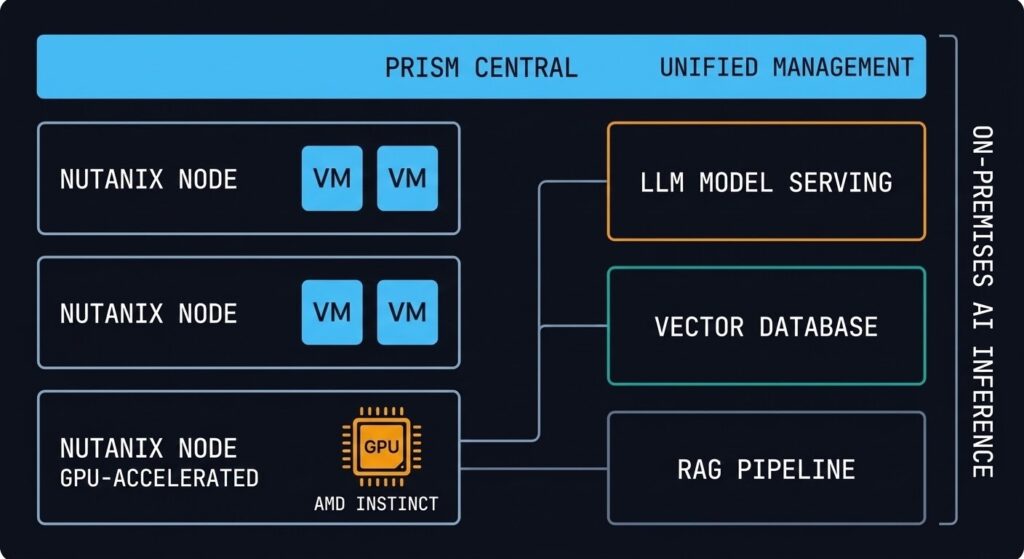
Nutanix GPT-in-a-Box is the platform’s answer to the AI infrastructure question that every enterprise is currently asking: how do you run large language model inference on-premises without building a hyperscaler GPU cluster?
The architecture pairs Nutanix AHV nodes with AMD Instinct GPUs (the AMD partnership is central to the current hardware configuration), running the full inference stack — model serving, vector database, and retrieval-augmented generation (RAG) pipeline components — on the same HCI platform as the rest of the enterprise workload estate. The management model is Prism-based, the lifecycle is LCM-managed, and the networking model is the same OVS/Flow stack as every other AHV workload.
The architectural positioning is important to understand correctly: GPT-in-a-Box is designed for inference, not training. Training large models on HCI hardware is not the use case — it requires purpose-built training clusters at scale. The target workload is inference for enterprise-internal applications: private LLM deployments, RAG-augmented knowledge bases, code generation assistants, and document processing pipelines where data sovereignty or regulatory requirements preclude sending queries to public cloud AI APIs.
For architects evaluating AI infrastructure today, the honest framing is: GPT-in-a-Box solves the “we need on-premises inference and we already have Nutanix” problem efficiently. It is not a competitive answer to purpose-built GPU inference clusters for high-throughput consumer-scale AI workloads.
Kubernetes on Nutanix: AKE and NKP
Nutanix offers two distinct Kubernetes paths depending on the operational model your team is targeting.
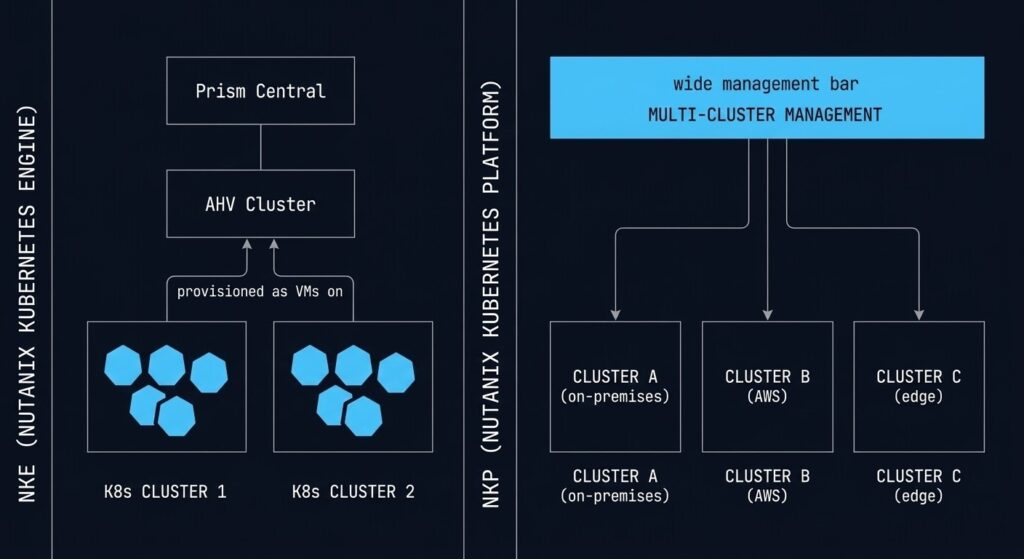
Nutanix Kubernetes Engine (NKE, formerly Karbon) provisions and manages Kubernetes clusters directly on AHV. From a Prism Central blueprint, you define worker node count, Kubernetes version, and storage class — NKE provisions the cluster as VMs on your AHV infrastructure. Lifecycle management, including Kubernetes version upgrades, is handled through the same LCM framework as the rest of the platform. For teams that want to run containers without leaving the Nutanix operational model, NKE is the path.
Nutanix Kubernetes Platform (NKP, formerly D2iQ/Kommander) is the enterprise multi-cluster Kubernetes management layer — cluster fleet management, GitOps integration, policy enforcement, and observability at scale. NKP is the platform for organisations that are running Kubernetes seriously: multiple clusters, multiple environments, and a platform engineering team responsible for the Kubernetes estate rather than individual application teams self-managing clusters.
The architectural decision between NKE and NKP isn’t about cluster creation — it’s about operational model. NKE is the right answer for teams adding a few Kubernetes workloads to an AHV environment. NKP is the right answer for teams building a Kubernetes platform that needs to be governed, audited, and scaled independently. If your organisation is deep in the container migration journey, the Drift Slayer IaC & Kubernetes series addresses the operational patterns for keeping Kubernetes environments in a known-good state at scale.
Nutanix Move: How the Migration Actually Happens
The architectural decision to adopt AHV is separate from the operational question of how you get there. Nutanix Move is the answer to the second question.
Move is a free migration tool that handles VM conversion from vSphere (ESXi), Hyper-V, and AWS EC2 to AHV. It manages the VMDK-to-AHV disk conversion, VM inventory import, scheduled cutover, and seed-sync (initial replication with delta-sync for cutover) from a single web interface. For the majority of straightforward VM workloads, Move handles the conversion without manual intervention.
The honest limitations:
What Move handles well: Standard VMs without complex storage layouts, VMs with consistent snapshot depth, workloads where a brief cutover window is acceptable. Move works particularly well for bulk migration of application tier VMs where the workload can tolerate a maintenance window.
What Move does not handle: VMs with very deep or inconsistent snapshot trees (consolidation required before Move), workloads with hard VMDK-to-datastore topology dependencies, and any VM using VAIO filters or third-party I/O interception. These require manual assessment and preparation before Move can proceed. The HCI Migration Advisor surfaces these friction points from your RVTools export before you start the Move process — use it first.
Post-Move validation: Move handles the conversion. The execution architecture — workload sequencing, CVM sizing validation, networking cutover, and post-migration performance baseline — is what Beyond the VMDK and the vSphere to AHV Migration Strategy cover in detail.
NC2: Extending AHV to AWS and Azure
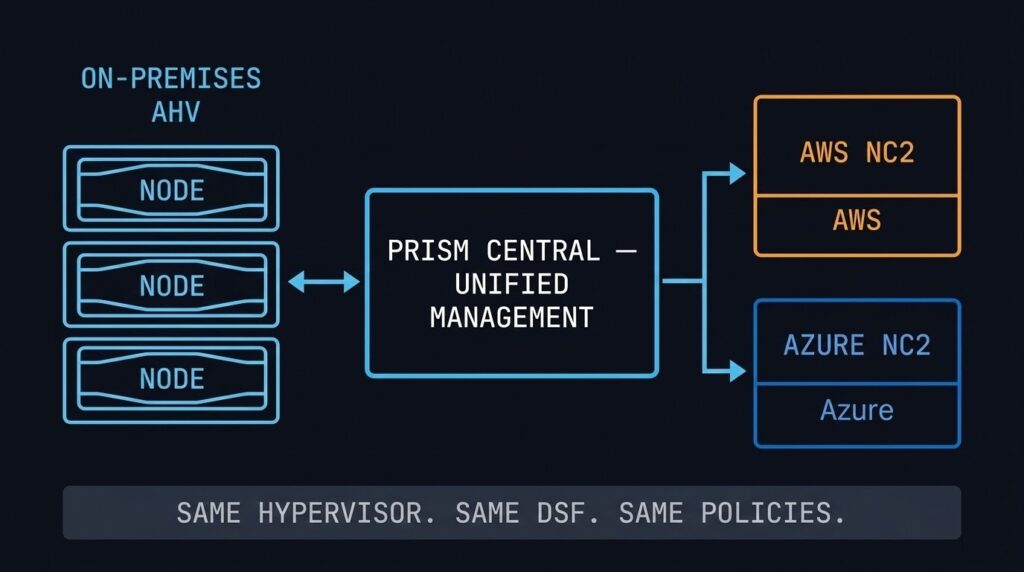
Nutanix Cloud Clusters (NC2) runs the AHV stack on bare-metal instances in AWS and Azure. The same hypervisor, the same DSF, the same Prism Central management plane — in the public cloud. From an operational perspective, an NC2 cluster looks and behaves like an on-premises AHV cluster.
The architectural value is consistency: workloads running on AHV on-premises can be extended or migrated to NC2 without re-platforming. The same VM format, the same networking model, the same Flow security policies. Disaster recovery, cloud bursting, and data centre evacuation scenarios all become significantly simpler when the source and destination speak the same stack.
NC2 runs on bare-metal cloud instances, which carry a significant cost premium over standard cloud VMs. NC2 is cost-effective for DR standby environments that don’t run 24/7, defined burst windows, and cloud migration staging. It is not a cost-competitive model for permanently running production workloads that could use native cloud services instead. For the multi-cloud cost visibility question, NCM’s cost governance module gives you the cross-cloud spend analysis to make that call with real numbers rather than estimates.
Who Should Choose AHV
Broadcom’s licensing changes make vSphere significantly more expensive at renewal. AHV is the most operationally similar migration target — same enterprise support model, managed migration tooling via Nutanix Move, and a hypervisor included in the licence.
Teams that want to reduce operational complexity — fewer vendors, fewer management planes, fewer maintenance windows — benefit from the integrated AHV model. LCM eliminates most of the per-component patching overhead. NCM adds cost governance and self-service without a third-party toolchain.
New infrastructure deployments without existing SAN investment or hypervisor dependencies. AHV delivers compute, storage, networking, file service, object storage, and Kubernetes in one platform from day one.
Organisations requiring on-premises LLM inference — for data sovereignty, regulatory compliance, or latency requirements — can run GPT-in-a-Box on AMD GPU-accelerated AHV nodes without a separate AI infrastructure stack.
Who Should Consider Alternatives
If your storage and compute scale independently on dedicated SAN hardware with years of remaining lifecycle, the AHV HCI model requires adding nodes to scale either dimension. Proxmox or continued vSphere use may be more cost-effective until the SAN lifecycle ends.
Applications with hard dependencies on vSphere-specific APIs, VAIO filters, or SRM integration require a migration and code path audit before AHV is viable. Run the dependency audit — via the HCI Migration Advisor or a manual RVTools review — before the platform decision, not after.
AHV requires Nutanix hardware and licensing. Teams looking for a no-licence-cost hypervisor path should evaluate Proxmox or KVM. The operational overhead is higher, but the entry cost is significantly lower. See the Alternate Stacks page for that architecture.
AHV Decision Framework
| Scenario | AHV Verdict | Why |
|---|---|---|
| Broadcom renewal approaching, no hard vSphere API dependencies | Strong Fit | Most operationally similar migration target, licence included, Move tool for execution |
| Greenfield HCI deployment, no existing SAN | Strong Fit | Purpose-built for this model — compute, storage, files, objects, K8s, AI in one platform |
| Heavy SRM or VAIO filter dependencies | Audit First | Run HCI Migration Advisor before committing — dependency complexity may be significant |
| Significant existing SAN with remaining lifecycle | Evaluate Timing | AHV may be the right long-term destination — time the transition to SAN end-of-life to reduce cost overlap |
| Existing Dell PowerStore or Pure FlashArray with remaining lifecycle | Compute-Only Path | NX-NPX compute-only nodes let you adopt AHV and Prism without retiring the array — migrate to pure HCI at storage refresh |
| Budget-constrained, strong Linux/open-source team | Consider Proxmox | Proxmox delivers KVM-based HCI without licence cost — operational overhead is the tradeoff |
| On-premises AI inference required (data sovereignty) | Strong Fit | GPT-in-a-Box on AMD GPU nodes — LLM inference without a separate AI infrastructure stack |
| Hybrid cloud extension required (AWS/Azure) | Strong Fit | NC2 runs the same AHV stack in AWS and Azure — no re-platforming, same management plane |
WHERE DO YOU GO FROM HERE?
This page is the AHV architecture and decision layer. The pages below cover migration execution, platform alternatives, the broader virtualization context, and the data protection architecture that every AHV environment needs.
You’ve Seen the Architecture.
Now Validate Your Migration.
Whether you’re evaluating AHV as your vSphere exit destination or already running it and managing Day-2 complexity, the next step is the same: validate your specific environment against the architecture. The triage session does that.
AHV Migration & Platform Audit
Vendor-agnostic review of your vSphere environment, Broadcom exposure, and AHV migration readiness. CVM sizing, dependency audit, workload sequencing, and timeline scoped to your renewal window.
- > vSphere dependency and API audit
- > CVM sizing and cluster capacity model
- > Workload sequencing and migration timeline
- > AHV vs Proxmox vs stay decision support
Architecture Playbooks. Every Week.
Field-tested blueprints from real AHV and HCI environments — migration physics, CVM sizing failures, vSphere exit decisions, and the operational patterns that separate stable clusters from problem environments.
- > AHV Migration Physics & Execution
- > Broadcom Exit Strategy Updates
- > HCI Platform Analysis & Comparisons
- > Real Failure-Mode Case Studies
Zero spam. Unsubscribe anytime.
Frequently Asked Questions
Q: What is the difference between Nutanix AHV and VMware ESXi?
A: Both are Type-1 hypervisors, but they are architecturally different in scope. ESXi is a standalone hypervisor that requires separate products for storage (vSAN), networking (NSX), management (vCenter), and lifecycle management. AHV is a component of the integrated Nutanix HCI stack — storage (DSF), management (Prism), micro-segmentation (Flow), and lifecycle management (LCM) are included in the platform licence. The operational model is unified in AHV; in ESXi it is composed from separate products with separate upgrade cycles.
Q: How does the Nutanix CVM affect VM performance?
A: The CVM handles all storage I/O for the local AHV host. Under normal conditions, the CVM’s data locality design means guest VMs read from local SSD with minimal latency. If the CVM is under-resourced — insufficient CPU or memory — it becomes a bottleneck for every VM on that host. CVM health monitoring should be a first-class operational metric, not an afterthought.
Q: Is AHV a good replacement for vSphere after the Broadcom acquisition?
A: For most enterprise environments without deep vSphere-specific API dependencies, yes — AHV is the most operationally similar migration target. The management model, enterprise support structure, and lifecycle tooling are comparable. The key prerequisite is a dependency audit: applications using SRM, VAIO filters, or vSphere-specific backup APIs need to be evaluated before migration. The HCI Migration Advisor can quantify readiness before you commit.
Q: What workloads are not suited for Nutanix AHV?
A: AHV is not optimal for workloads requiring independent storage and compute scaling — the HCI model scales both together. Dense GPU compute clusters, workloads with very high storage-to-compute ratios, and environments with significant remaining SAN lifecycle may find the HCI model inefficient. Proxmox or continued vSphere use may be more cost-effective until the infrastructure lifecycle aligns with an HCI transition.
Q: What is Nutanix NC2 and when does it make sense?
A: NC2 (Nutanix Cloud Clusters) runs the AHV stack on bare-metal instances in AWS and Azure. It makes sense for DR standby environments, defined burst windows, and cloud migration staging — scenarios where consistency with on-premises AHV is worth the bare-metal instance cost premium. It is not cost-competitive for permanently running production workloads that could use native cloud services.