


VMWARE VSPHERE
TThe Enterprise Standard. Hardened Isolation. Legacy Mastery.
VMware vSphere is still the most technically mature enterprise hypervisor on the market. Two decades of production hardening, the deepest third-party ecosystem in the industry, and a management layer that enterprise teams have built operational muscle memory around — none of that disappeared when Broadcom completed its acquisition.
What changed is the commercial model. And the commercial model changed everything about how you evaluate vSphere as a long-term infrastructure decision.
This page serves two readers. If you are an architect evaluating vSphere for the first time, you will find the honest technical depth here — how ESXi actually works, what the full stack costs to operate, and where vSphere genuinely outperforms alternatives. If you are already running vSphere and trying to determine whether to stay, migrate, or build a runway, you will find that framework here too.
Both readers need to start in the same place: understanding what Broadcom actually changed, and what it didn’t.
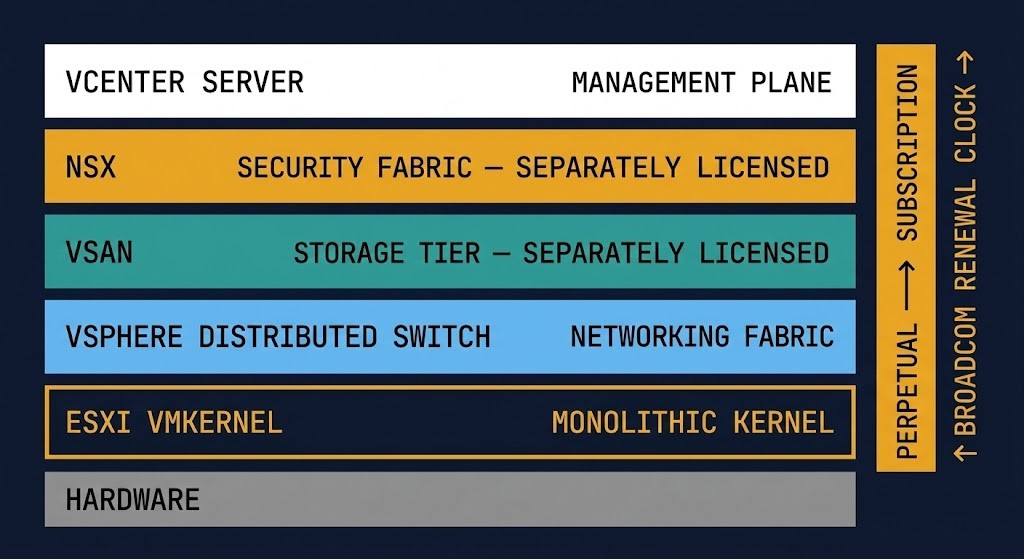
What Broadcom Actually Changed
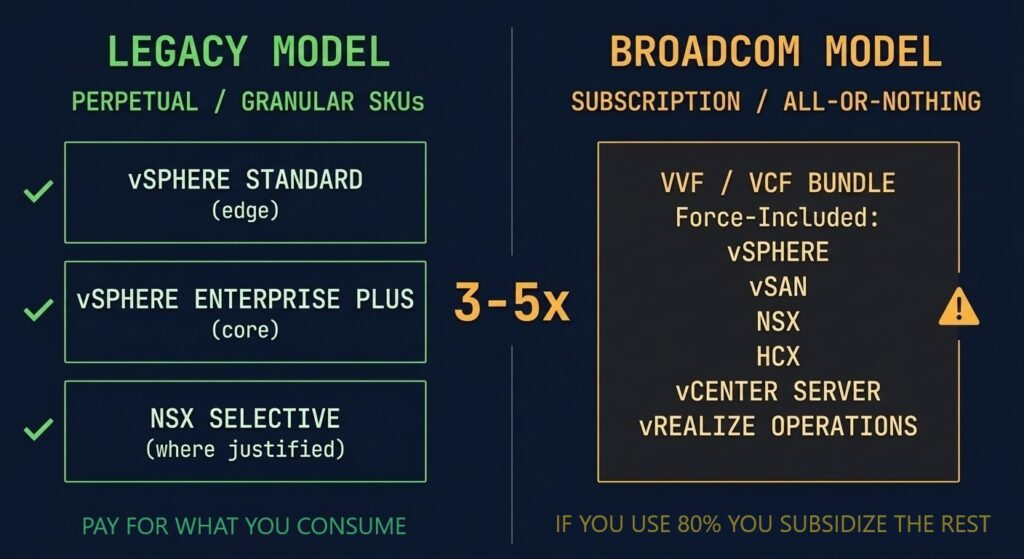
The licensing shift is a surface event. The architecture shift is what matters.
Before the Broadcom acquisition, vSphere’s commercial model matched its technical architecture. You could license vSphere Standard for edge workloads, Enterprise Plus for core infrastructure, and NSX selectively where micro-segmentation was justified. The granularity meant you paid for what you consumed. The perpetual model meant your infrastructure investment amortised over time in a way you could plan around.
Broadcom eliminated that model. VVF and VCF are all-or-nothing subscription bundles. If you don’t consume 80% of what’s in the bundle, you are subsidising Broadcom’s portfolio strategy with your infrastructure budget. And unlike perpetual licensing, the cost compounds at every renewal — at a rate Broadcom sets unilaterally.
What didn’t change: the ESXi kernel is still the most battle-tested hypervisor in the enterprise. DRS, HA, vMotion, and the depth of third-party integrations built around vCenter are still genuinely valuable. The technical platform is not the problem. The commercial dependency it creates is.
The four changes that affect every vSphere environment:
Cost explosion for dense clusters
The per-core subscription model penalises high-core-count CPUs. The hardware density strategy that previously lowered your cost-per-VM now directly increases your Broadcom exposure. Mid-size enterprises are reporting 3–5× cost increases versus legacy perpetual licensing for equivalent workloads.
Forced platform adoption
VVF and VCF are all-or-nothing. If your environment uses ESXi and vCenter but not vSAN or NSX, you are paying for the full bundle while consuming roughly 40% of it. Granular SKU licensing — the model that let you pay for what you consumed — is gone.
Reduced ecosystem access
Broadcom restructured VMware’s partner program, eliminating many smaller resellers and solution providers. The managed service providers, VARs, and specialist integrators your organisation relied on for vSphere support may no longer be authorised. Procurement and support channels have narrowed significantly.
Operational changes and EOLs
Broadcom end-of-lifed or sunset several VMware products outside the core VVF/VCF bundle — including vRealize rebranding to Aria, retirement of standalone NSX editions, and consolidation of support tiers. If your environment depends on products outside the core bundle, audit their support status before your next renewal.
→ Full Broadcom Exit Strategy → Post-Broadcom Migration Series
The ESXi Architecture — What Actually Makes It Different
Two decades of production hardening created a hypervisor that no open-source alternative has fully replicated.
ESXi is a Type-1 bare-metal hypervisor built on VMware’s proprietary VMkernel — a purpose-built, monolithic kernel that controls all hardware access including CPU scheduling, memory management, and I/O. It is not a general-purpose Linux kernel with virtualisation bolted on. Every code path is optimised for one job: running multiple workloads with deterministic resource isolation on shared physical hardware.
This architecture has two consequences that matter in practice. The VMkernel’s strict control over hardware access is why vSphere achieves higher consolidation ratios on dense workloads than most alternatives. It is also why ESXi has an exceptional security track record — the attack surface of a purpose-built microkernel is fundamentally smaller than a general-purpose OS running a hypervisor on top.
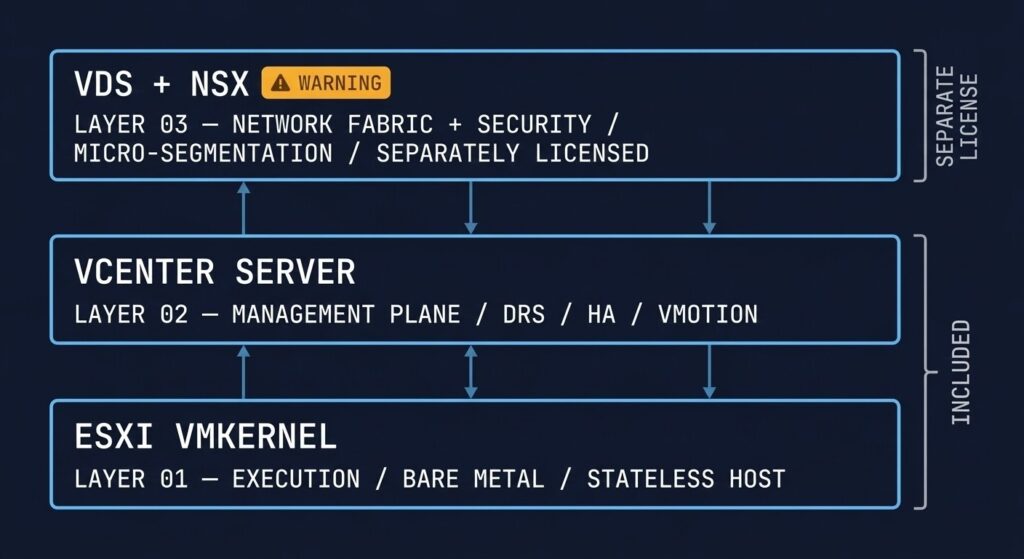
The three layers that make vSphere what it is:
ESXi → The Execution Layer
The hypervisor kernel runs directly on bare metal. It is stateless by design — the configuration lives in vCenter, not on the host. Host failure is a compute event, not a data event. The minimal footprint reduces both the attack surface and the blast radius of any host-level compromise. This stateless architecture is one of the most underappreciated design decisions in enterprise infrastructure.
vCenter → The Management Plane
This is where cluster-wide intelligence lives: DRS for workload balancing across hosts, HA for automated VM restart on host failure, and vMotion for zero-downtime live migration. Without vCenter, ESXi hosts operate independently and lose all cluster features. vCenter availability is a prerequisite for cluster operations — a dependency that matters when evaluating the architecture’s resilience posture.
vDS + NSX → The Network Fabric
The vSphere Distributed Switch centralises network policy across all hosts in a cluster. NSX extends this into a full software-defined security fabric — distributed firewall, micro-segmentation, and logical switching that operates at the virtual NIC level. NSX is where vSphere’s security story becomes genuinely differentiated — and where the licensing complexity and migration risk concentrate.
The vSphere Stack — What You’re Actually Paying For
The hypervisor is one layer. The bill is six layers.
vSphere is not a product — it is a stack of components, each with its own licensing cost, operational complexity, and dependency chain. When Broadcom consolidated these into VVF and VCF bundles, they made this explicit. Understanding the stack is not an academic exercise. It determines what you are actually committed to, what you would need to replace, and where your switching costs are concentrated.
| Layer | Function | Reality |
|---|---|---|
| ESXi | Hypervisor kernel — runs VMs on bare metal | Base platform — included in VVF/VCF |
| vCenter | Cluster control — DRS, HA, vMotion | Required — no cluster features without it |
| vSAN | Hyperconverged storage — replaces SAN/NAS | Often bundled — VCF only, not in base VVF |
| NSX | Enterprise networking — SDN + micro-segmentation | Enterprise networking — major cost driver in VCF |
| Aria | Automation and lifecycle management | Cost multiplier — bundled but frequently underutilised |
| Support & SKU | Production support, patches, compliance | Recurring — Broadcom controls renewal pricing unilaterally |
If your environment uses ESXi and vCenter but not vSAN or NSX, you are paying for the full VCF bundle while consuming roughly 40% of it. That is the bundle strategy working as designed.
Operational Complexity
VMware environments grow complex quickly. Most organisations underestimate what they are actually operating.
The technical capability that makes vSphere powerful for large enterprise workloads is the same reason it requires specialist operational depth across multiple disciplines. Unlike integrated HCI stacks where compute, storage, and networking are managed through a single pane, a full vSphere deployment requires distinct expertise in each component layer — and each layer has its own failure modes, upgrade dependencies, and certification requirements.
A representative production vSphere stack:
The operational reality is that vSphere’s component architecture requires skills across ESXi, vCenter, vSAN, NSX, and Aria — often different engineers, different certification tracks, and different upgrade cadences. Integrated stacks like Nutanix AHV eliminate this by design: compute, storage, and networking management converge in a single plane. This is not just a cost comparison — it is a different operational model. The engineering hours freed from coordination overhead are real budget recovered.
Which Workloads Fit VMware Best
vSphere is the right platform for specific workload classes. Knowing which ones prevents both under-investment and over-commitment.
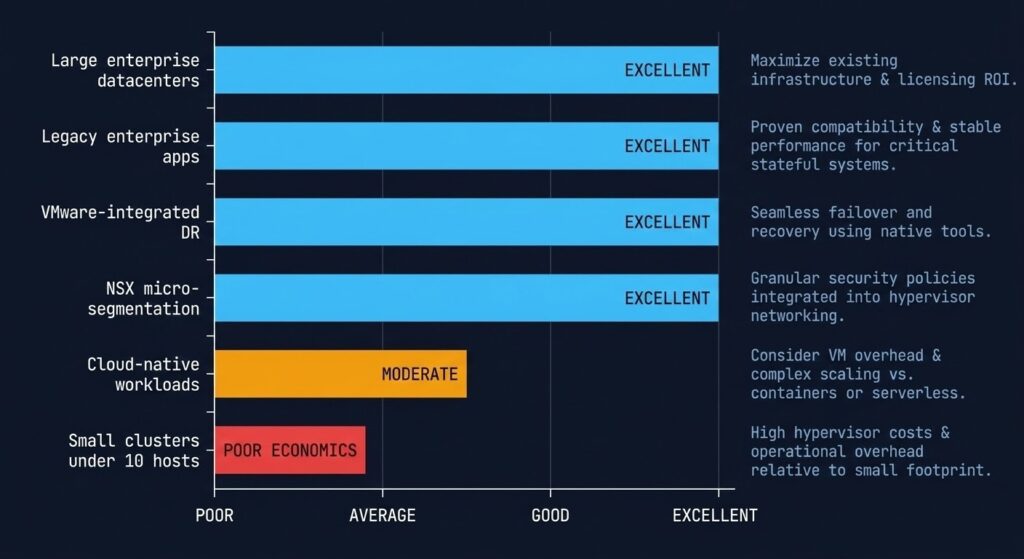
Not every workload justifies the Broadcom subscription overhead. The environments where vSphere’s technical depth is genuinely differentiated are large, complex, and have specific operational or regulatory requirements that alternatives cannot yet match at equivalent scale. Outside those use cases, the cost-benefit calculation has shifted materially.
| Workload Type | Fit | Notes |
|---|---|---|
| Large enterprise datacenters | Excellent | DRS scheduling, HA policy depth, and vMotion maturity are unmatched at scale. The technical case is strongest when cluster counts exceed what open-source management tooling handles well. |
| Legacy enterprise apps | Excellent | ISV certification coverage on vSphere is broader than any alternative. If your ERP, database, or middleware vendor certifies on vSphere but not on AHV or Proxmox, that dependency is a real constraint — not a preference. |
| VMware-integrated DR | Excellent | SRM with vSphere Replication is a mature, tested DR orchestration stack. If your RTO/RPO commitments are contractual and runbooks are built on SRM, re-engineering DR is a non-trivial switching cost to model explicitly. |
| NSX micro-segmentation environments | Excellent | NSX distributed firewalling at scale is technically differentiated. If your security model is built on thousands of east-west policy rules, alternative platforms are not yet equivalent in operational maturity for this use case specifically. |
| Cloud-native workloads | Moderate | vSphere with Tanzu exists, but Kubernetes workloads don’t need vSphere. If you’re running stateless, containerised workloads, you are paying for hypervisor capabilities you are not using. This workload class is a candidate for cloud or bare-metal exit independent of the Broadcom event. |
| Small clusters (<10 hosts) | Poor economics | The per-core subscription cost at small scale eliminates the economic case entirely. A 3-node cluster running VVF or VCF carries the same per-core overhead as a 30-node cluster but receives none of the DRS and scheduling benefits that justify the cost. Proxmox or AHV CE are the right answers here. |
Who Should Stay on vSphere
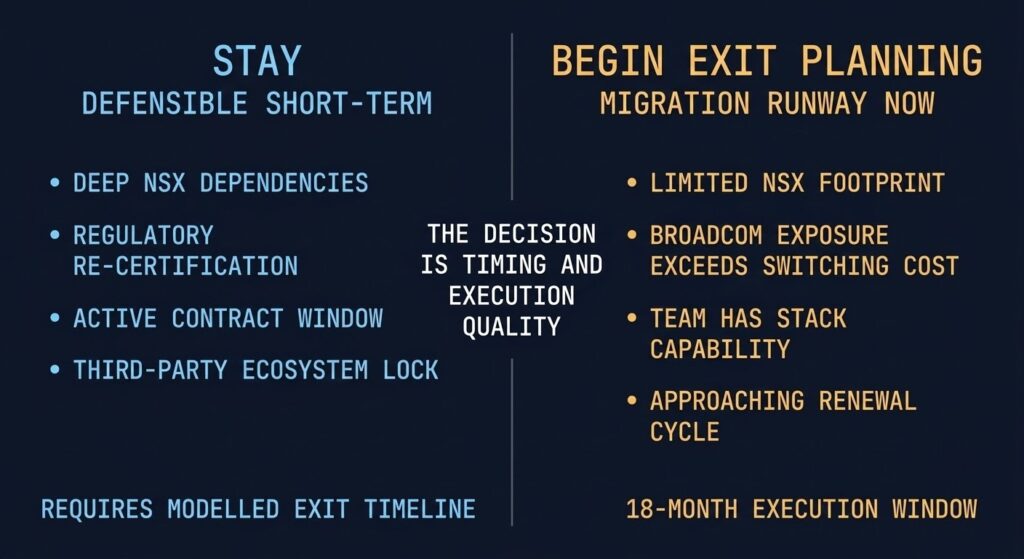
Staying on vSphere is a defensible position. It requires a clear rationale and a defined exit timeline.
Not every organisation should be mid-migration right now. There are legitimate technical and commercial reasons to remain on vSphere — but only when those reasons are explicit and time-bounded, not when staying is simply the path of least resistance.
If your security model is built on NSX micro-segmentation with hundreds of distributed firewall rules, logical switching topologies, and east-west policy enforcement — that is not portable in a single sprint. Re-engineering it on AHV Flow or an alternative requires dedicated engineering time that may exceed your current Broadcom exposure in the short term. Model the switching cost before committing to a timeline.
Environments in finance, healthcare, and government frequently operate under validated configurations — specific ESXi versions, vSAN builds, and NSX policies certified against a compliance framework. Migrating to a new hypervisor resets that validation process. If re-certification takes 6–12 months, the migration runway needs to account for it before you sign anything.
If you are 12–18 months into a multi-year ELA, the financial math of breaking the contract versus running it to completion while building a parallel migration environment may favour staying for the contract term. The key discipline: use the remaining contract window to build the target platform — not to defer the decision.
Backup platforms, monitoring stacks, and ISV applications with vSphere-native integrations — VADP, VMware Tools dependencies, vCenter plugin architectures — create switching costs that are often invisible until you start the migration. Audit your third-party dependency map before setting a timeline. The gaps surface there, not in the hypervisor conversion itself.
The rule: Staying on vSphere is defensible when the switching cost is higher than the subscription exposure for a defined period. It is not defensible as a permanent position. Every organisation still on vSphere needs a modelled exit timeline — even if that timeline is three years from now.
Who Should Be Planning the Exit
If none of the stay criteria apply to your environment, the question is not whether to migrate — it is how fast you can execute safely.
The organisations that should be actively building their exit runway share a common profile: their NSX footprint is limited or non-existent, their workload density doesn’t require the specific DRS bin-packing optimisations that vSphere provides at scale, and their team has the operational capability to run an alternative stack.
For these environments, every renewal cycle spent on Broadcom subscriptions is a migration runway you are not building. The 18-month execution window for a production-safe migration means the decision made at this renewal determines whether you are free at the next one.
Three exit paths, each with different physics:
→ Nutanix AHV — For organisations needing enterprise support SLAs, a managed migration toolset (Nutanix Move), and storage convergence without a separately licensed tier. The commercial negotiation is currently in the buyer’s favour.
→ Proxmox / KVM — For engineering-led organisations where 5-year TCO is the primary constraint and the team has the Linux operational depth to own the full stack without a vendor safety net.
→ Hybrid Cloud Exit — For specific workload classes where Broadcom’s pricing event is the forcing function for a cloud migration that was already overdue. This is the right exit path for stateless and bursty workloads — not a blanket migration strategy.
→ Full Exit Path Analysis — Broadcom Exit Strategy → Technical Execution Layer — Post-Broadcom Series
The Honest TCO Reality
The five-year TCO model for vSphere changed the day Broadcom announced mandatory subscriptions.
Most vSphere TCO comparisons focus on the hypervisor license cost. That is the wrong unit of analysis. The total cost of operating vSphere in 2026 includes the subscription tier, the hardware footprint required to run the stack efficiently, the operational overhead of managing a component architecture versus an integrated one, and the engineering time locked into VMware-specific tooling that doesn’t transfer to alternative platforms.
VVF and VCF are per-core subscription models. Mid-size enterprises running 2-socket hosts with modern core counts are reporting 3–5× cost increases versus legacy perpetual licensing. The per-core model penalises high-core-count CPUs — the same hardware density strategy that previously reduced cost now increases your annual Broadcom exposure.
Unlike perpetual licensing where cost was fixed at purchase, subscription pricing is subject to renewal changes that Broadcom sets unilaterally. Negotiated discounts from the initial subscription are not guaranteed at renewal. Organisations that signed 3-year deals at discounted rates are already reporting significant increases at first renewal.
vSphere’s component architecture requires specialist skills across ESXi, vCenter, vSAN, and NSX — often different engineers with different certification tracks. The operational cost of maintaining this depth is a recurring budget line that integrated stacks like AHV eliminate by design. Model the headcount and training cost as part of your 5-year TCO, not just the license line.
Any migration from vSphere creates a period of dual spend — VMware subscriptions running in parallel with new platform acquisition costs. This window must be modelled explicitly before migration starts. Organisations that treat it as a rounding error find it in their Q3 budget review. Plan for 6–12 months of overlap as a baseline assumption.
The Decision Framework
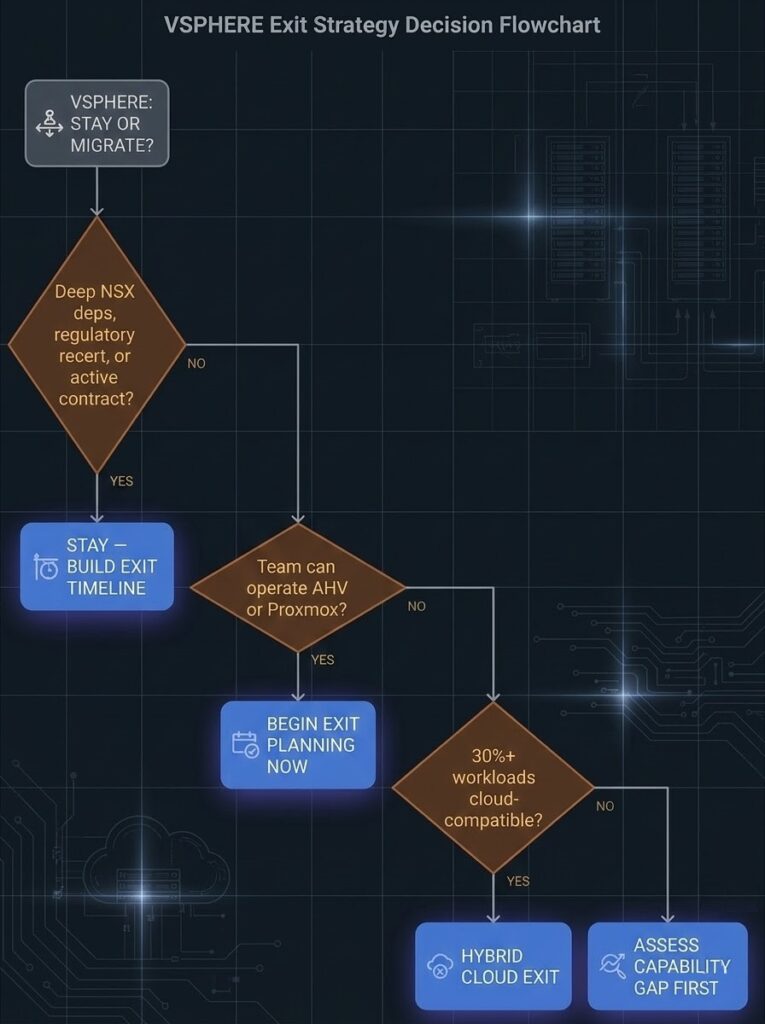
Three questions that clarify the stay-vs-migrate decision for your specific environment.
| Question | If Yes → | If No → |
|---|---|---|
| Does your environment have deep NSX dependencies, regulatory re-certification requirements, or active contract obligations that make immediate migration high-risk? | Stay — build a modelled exit timeline. Use the runway to de-risk the migration, not to defer it indefinitely. | Continue to next question. |
| Does your team have the operational capability to run an integrated HCI stack (Nutanix AHV) or an open-source stack (Proxmox/KVM)? | Begin exit planning now. The 18-month execution window means this renewal determines whether you are free at the next one. | Assess the capability gap first. Team upskilling or a managed migration path via Nutanix Move may be the right first step before committing to a timeline. |
| Are 30%+ of your workloads stateless, bursty, or already cloud-compatible? | Model a hybrid cloud exit for that workload class. Cloud exit for the wrong workloads accelerates spend — classify before committing. | On-prem hypervisor replacement is the right frame. Evaluate AHV vs. Proxmox based on team capability and support requirements. |
The stay-vs-migrate decision is not binary. It is a timing and execution quality question. The right answer depends on your switching costs, your team capability, and how much migration runway you have before your next renewal locks you in for another cycle.
WHERE DO YOU GO FROM HERE?
This page is the architecture and decision layer. The pages below are the exit execution layer, the platform alternatives, and the broader virtualization context.
You’ve Seen the Architecture.
Now Model Your Exposure.
Whether you’re evaluating vSphere for the first time or building an exit runway, the next step is the same: understand your actual Broadcom cost exposure and what a migration would require. Both conversations start with a triage session.
Unbiased Infrastructure Audit
Vendor-agnostic review of your vSphere environment, your actual Broadcom exposure, and the viable exit paths for your specific stack. No preferred platform. No sales agenda — just the honest architecture conversation your environment needs.
- > Current stack and dependency audit
- > Broadcom cost exposure modelling
- > Exit path recommendation with timeline
- > Stay vs. migrate decision support
Architecture Playbooks. Every Week.
Field-tested blueprints from real infrastructure environments — migration physics, failure-mode analysis, HCI platform breakdowns, and the Broadcom exit decisions architects are actually making. No sponsored content. No vendor marketing. Just the architecture intel your team needs to make better decisions.
- > Virtualization & Migration Physics
- > Broadcom Exit Strategy Updates
- > HCI Platform Analysis
- > Real Failure-Mode Case Studies
Zero spam. Unsubscribe anytime.
Frequently Asked Questions
Q: Is VMware vSphere still worth deploying in 2026?
A: For organisations with specific requirements — deep NSX security models, regulatory environments requiring certified configurations, or large enterprise workloads demanding deterministic DRS scheduling — vSphere remains technically justified. The question is not whether vSphere is technically capable. It is whether the Broadcom subscription model makes it commercially sustainable for your five-year infrastructure plan. For most mid-market organisations, the answer is increasingly no.
Q: What is the difference between VVF and VCF?
A: VMware vSphere Foundation (VVF) covers ESXi, vCenter, and vSphere Distributed Switch — the core compute and basic networking tier. VMware Cloud Foundation (VCF) adds vSAN, NSX, and Aria Operations. If you were previously running vSphere Standard, VVF is the closest equivalent. If you were running Enterprise Plus with NSX, VCF is required — and carries significantly higher per-core cost. Both are per-core annual subscriptions with no perpetual option.
Q: How difficult is it to migrate from VMware vSphere to Nutanix AHV?
A: The hypervisor conversion is well-handled by Nutanix Move tooling — VMDK-to-AHV conversion, VM inventory import, and cutover sequencing are mature processes. The complexity concentrates in three areas: NSX policy re-engineering onto AHV Flow (the hardest part), RBAC mapping from vCenter to Prism, and CVM tax modelling for storage performance validation. Budget significantly more engineering time for networking than for compute conversion
Q: Can you run VMware vSphere without NSX?
A: Yes. NSX is not required for vSphere operation — the vSphere Distributed Switch handles standard networking without it. NSX is required for micro-segmentation, distributed firewalling, and logical switching that crosses host boundaries. Environments running vSphere without NSX have a significantly simpler migration path to alternative hypervisors, as the network policy re-engineering burden is substantially reduced.
Q: What happens to VMware support under Broadcom?
A: Broadcom consolidated VMware support tiers and eliminated some legacy support options. Production support is now included in the VVF/VCF subscription bundles. The critical change is that Broadcom has end-of-lifed or sunset several VMware products outside the core bundles — including standalone NSX editions and some vRealize configurations. Any environment relying on products outside the core bundle should audit their support status before the next renewal cycle.