Cloud FinOps for Engineers: Escaping the Lift-and-Shift Cost Trap
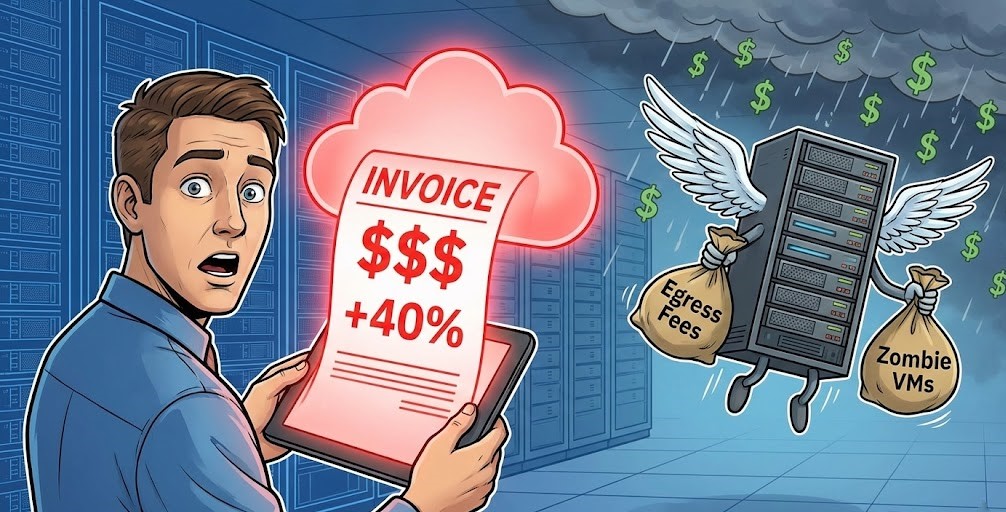
Cloud FinOps for engineers isn’t an accounting discipline — it’s an architectural one. You’ve successfully migrated your first workload. The Terraform applied cleanly, the latency is within bounds, and the cutover was silent. Then, 30 days later, the first hyperscaler bill arrives. It is 40% higher than your strict estimate.
Welcome to the “Lift and Shift” trap.
For traditional sysadmins, hardware capacity was a sunk cost. If you bought a physical server with 1TB of RAM, it cost the exact same whether you utilized 1% or 99% of it. In the cloud, applying that static logic to a consumption-based execution model is a financial death sentence.
This guide introduces FinOps—not as an accounting buzzword, but as a critical engineering discipline. We will cover the silent physics that destroy cloud budgets and how to architect for cost determinism before you ever execute terraform apply.
Cloud FinOps for Engineers: It’s Not Just “Saving Money”
FinOps (Financial Operations) is the practice of bringing financial accountability to the variable spend model of the cloud.
- Old Way: Finance approves a budget $\rightarrow$ IT buys hardware $\rightarrow$ Engineers deploy.
- Cloud Way: Engineers deploy $\rightarrow$ Finance gets a bill $\rightarrow$ Panic ensues.
FinOps bridges that gap. It forces engineers to treat cloud cost as a primary architectural constraint alongside CPU, RAM, and IOPS — not a line item to optimize after deployment.
The “Silent Killers” of Your First Cloud Bill
Most “sticker shock” comes from three specific engineering oversights — and Cloud FinOps for engineers means modeling all three before the first workload migrates, not after the bill arrives.
1. Data Egress Fees (The Hidden Tax)
Ingress (putting data in) is usually free. Egress (taking data out) is where hyperscalers make their margins.
- The Mistake: Replicating backups from Cloud A to Cloud B without calculating the per-GB transfer fee.
- The Fix: Keep data processing in the same region as the storage. If you must move data, use a transfer appliance or dedicated connect circuits for lower per-GB rates. The cross-region egress trap between S3, NAT, and VPC peering is one of the most common sources of unexpected spend in hybrid environments.
2. Zombie Resources (Unattached EBS & IPs)
When you terminate an EC2 instance or VM, the storage volume (EBS/Managed Disk) and Static IP often persist unless you explicitly flagged them to delete on termination.
- The Cost: A 500GB SSD volume sitting unattached costs the same as one attached to a production database.
- The Fix: Implement “Tagging” policies immediately. If a resource lacks an
OwnerorProjecttag, a script should flag it for deletion.
3. Over-Provisioning (The “Just in Case” Tax)
On-prem, we provision for peak load plus 20% buffer. In the cloud, this is wasteful.
- The Fix: Right-sizing. Use CloudWatch or Azure Monitor to check actual RAM/CPU utilization. If your instance averages 10% CPU, cut the instance size in half. This principle is similar to how you’d approach on-prem sizing—understanding your workload’s actual needs is key. For a deeper look at right-sizing methodologies, the same principles that govern cloud egress cost architecture apply to compute provisioning — model the actual consumption curve, not the peak assumption.
The Storage Tiering Opportunity
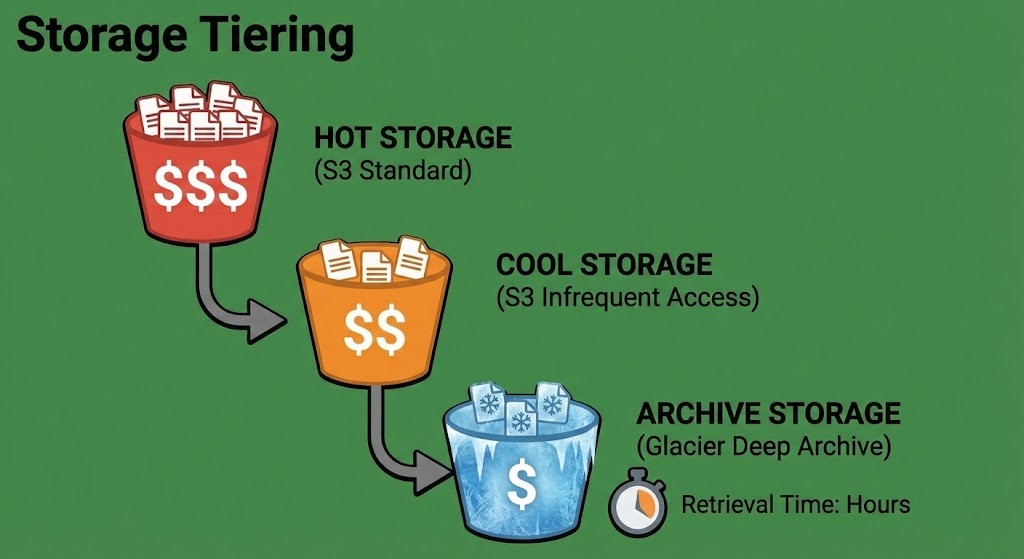
Perhaps the easiest “quick win” for engineers is storage optimization. Cloud storage isn’t just one bucket; it’s a ladder of tiers—from “Hot” (milliseconds access) to “Deep Archive” (12+ hour retrieval).
Moving 100TB of log data from S3 Standard to S3 Glacier Deep Archive can drop your monthly storage bill by over 90% without deleting a single byte — but calculating your true backup costs requires modeling retrieval frequency and rehydration overhead, not just storage price.
Architect’s Verdict: Cost is an Architecture Decision
Cloud FinOps for engineers is the discipline that prevents a successful migration from becoming a budget incident. In 2025, a cloud architect who can’t discuss costs is like a structural engineer who doesn’t understand material strengths. By adopting basic FinOps principles—tagging resources, right-sizing instances, and watching egress flows—you prevent the bill from becoming a surprise.
Your goal isn’t to spend zero; it’s to ensure every dollar spent returns value to the business. For those looking to transition their career and master these skills, our Cloud Engineer Roadmap 2025 provides a clear path forward.
- ✓ Model egress costs before migration — not after the first bill arrives
- ✓ Enforce tagging policy at resource creation — untagged resources are invisible spend
- ✓ Right-size based on actual CloudWatch/Azure Monitor utilization — not peak assumptions from on-prem
- ✓ Move cold data to archive tiers immediately — S3 Standard is the most expensive place to store anything you access less than once a month
- ✓ Treat cost as a first-class architectural metric alongside CPU, RAM, and IOPS
- ✗ Apply on-prem peak-plus-20% provisioning logic to cloud instances — it’s a direct budget leak
- ✗ Assume terminated instances clean up their storage volumes and IPs — they don’t unless explicitly configured
- ✗ Replicate backups cross-region without calculating the per-GB transfer fee first
- ✗ Leave log data in S3 Standard because migration to Glacier “takes time” — the monthly delta compounds
- ✗ Let FinOps become a finance team responsibility — cost architecture is an engineering decision made at design time
Additional Resources:
View 1 more resource
Editorial Integrity & Security Protocol
This technical deep-dive adheres to the Rack2Cloud Deterministic Integrity Standard. All benchmarks and security audits are derived from zero-trust validation protocols within our isolated lab environments. No vendor influence.

R.M.
Senior Solutions Architect with 25+ years of experience in HCI, cloud strategy, and data resilience. As the lead behind Rack2Cloud, I focus on lab-verified guidance for complex enterprise transitions. View Credentials →
Get the Playbooks Vendors Won’t Publish
Field-tested blueprints for migration, HCI, sovereign infrastructure, and AI architecture. Real failure-mode analysis. No marketing filler. Delivered weekly.
Select your infrastructure paths. Receive field-tested blueprints direct to your inbox.
- > Virtualization & Migration Physics
- > Cloud Strategy & Egress Math
- > Data Protection & RTO Reality
- > AI Infrastructure & GPU Fabric
Zero spam. Includes The Dispatch weekly drop.
Architecture Audit Services
Fixed-scope audits for Zero-Trust Azure, VMware migration readiness, and recovery posture — no discovery call required to start.
>_ View Audit Services>_Related Posts
Your Kubernetes Cluster Isn’t Out of CPU — The Scheduler Is Stuck
Compute Tier 1 Authority Cascades to ➔ >_ Architect’s Brief 60-second read before you commit to the full post · Full post: 9 min Generating brief… [Storage] [Network] 🚨 Failure Signature Detected Grafana shows cluster CPU utilization is under 50%, but pods are stuck in Pending. Events show: 0/10 nodes are available: 10 Insufficient cpu….
Your Identity System Is Your Biggest Single Point of Failure
Part 2 of the Rack2Cloud’s Cloud Fragility Series >_ Cloud Fragility Series 01 Multi-Cloud Cascading Failure Risks 02 Your Identity System Is Your Biggest Single Point of Failure [CURRENT] 03 Vendor Lock-In Happens Through Networking — Not APIs 04 Your Cloud Bill Quietly Increased in 2026 — Here’s Where the Money Is Actually Going >_…
Your Identity Provider Was Never Your Spend Boundary
Every enterprise cloud governance program assumes a spend boundary sits somewhere between identity and money — a checkpoint that catches compromised access before it becomes compromised spend. It doesn’t exist. Not as a distinct control. Not as a separate policy layer. Not anywhere in the architecture most organizations have actually built. >_ Architect’s Brief 60-second…
Your Identity Controls Passed. Your Authorization Chain Failed.
A credential chain functioned exactly as it was designed to. No firewall failed. No exploit executed. No malware bypassed a control. A red team walked past physical and social barriers using nothing more exotic than a plausible pretext, and came out the other side holding network admin credentials — issued correctly, authorized correctly, working exactly…
Your DR Test Passed. The Assumptions Didn’t.
DR plan failure rarely happens where you tested. It happens at the assumptions the exercise never reached — the dependencies that weren’t in scope, the runbook written for last year’s architecture, the authority chain nobody tested at 2am.
Your Cloud Provider Is Not Your HA Strategy
A Tactical Playbook for Architecting, Testing, and Automating Real Multi-Cloud & Multi-Region Resilience We’ve previously explored why cloud SLAs fail as guarantees in our deep dive, Cloud SLA Failure & Resilience Strategy. This article focuses on how to survive those failures in practice — architecturally, operationally, and financially. >_ Architect’s Brief 60-second read before you…