The Container Runtime Benchmark 2026: containerd vs CRI-O vs crun for High-Density Nodes
The “Shim Tax” is Killing Your ROI
Container runtime memory overhead is the hidden cost most teams never model until it shows up as a density ceiling they can’t explain. If you are running standard Kubernetes clusters on top of VMware or cloud VMs, you are paying a tax on every single pod you launch — and in high-density environments, it’s quietly consuming 2GB to 4GB of RAM per node just to keep the lights on.
That RAM isn’t available for your application. In a 100-node cluster, that’s 400GB of wasted memory — roughly $15,000 per year in cloud costs purely for runtime overhead. Not networking. Not storage. The container wrapper itself.
This benchmark breaks down exactly where that overhead originates, compares containerd, CRI-O, and crun against real density metrics, and shows you how to reclaim it without restructuring your cluster architecture.
The Architecture: High-Level vs. Low-Level
To understand where the waste originates, you need to understand the two-layer runtime model Kubernetes uses:
Layer 1 — The Manager (High-Level Runtime): containerd or CRI-O. This daemon pulls images and sets up networking. It is the orchestration layer — it tells the system what to run.
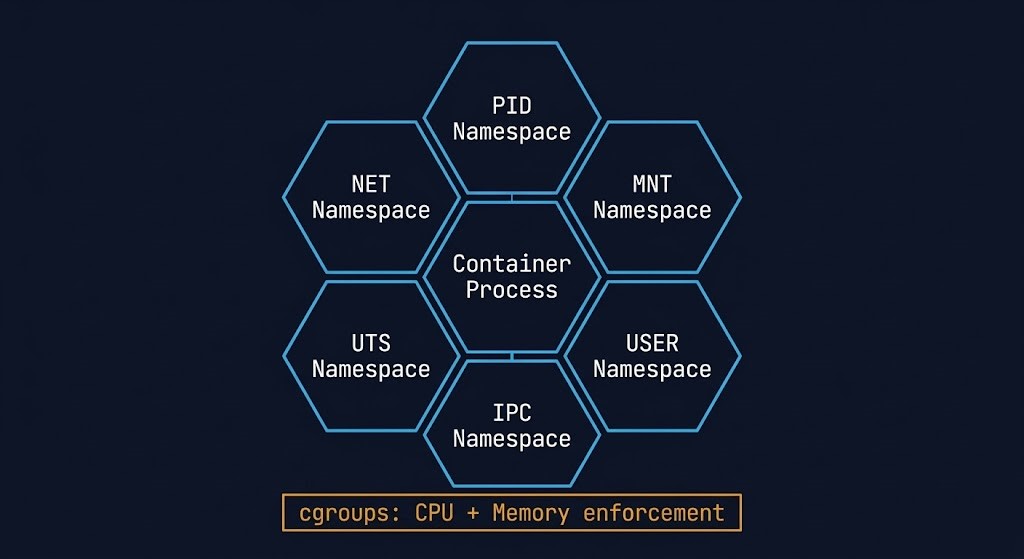
Layer 2 — The Executor (Low-Level Runtime): runc or crun. This process actually talks to the Linux kernel to create namespaces and cgroups. It is the execution layer — it makes containers actually run.
The density problem lives entirely in Layer 2. runc is the default low-level runtime, written in Go. Every container it spawns carries a Go runtime overhead. At scale, those overheads stack into a serious density ceiling.
The Shim Tax: Why runc Kills Node Density
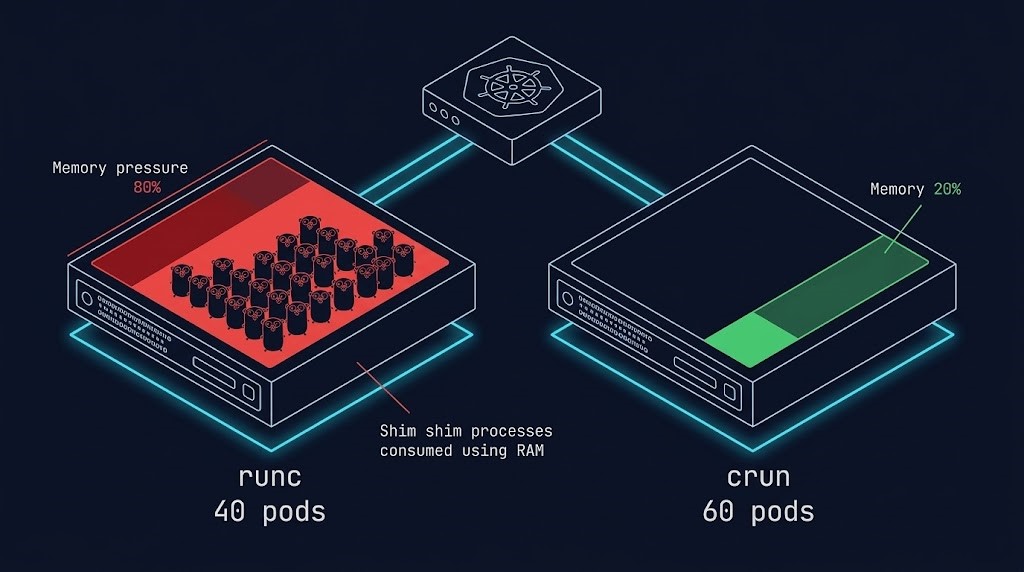
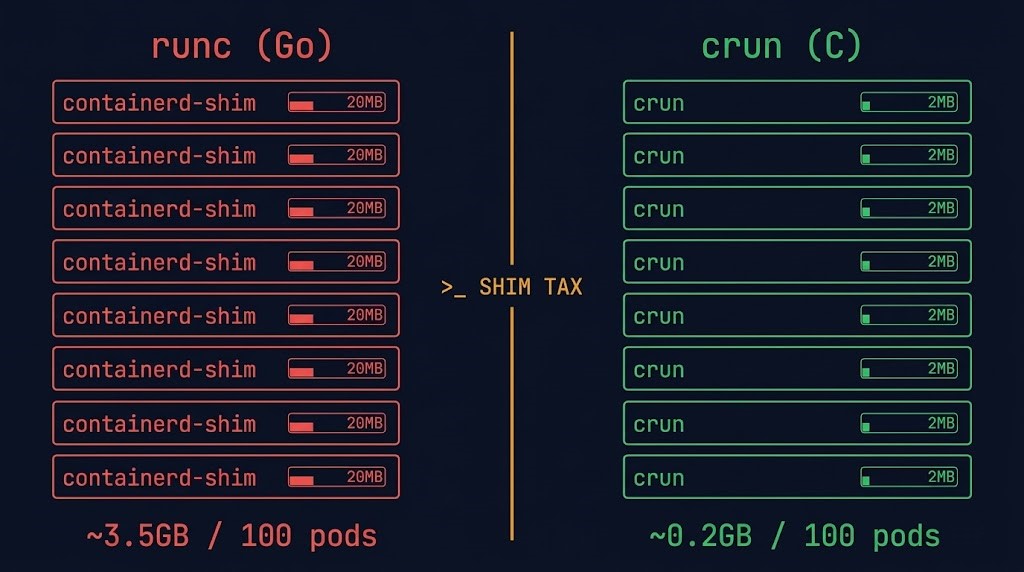
When you run 1,000 containers using runc, you are also running 1,000 shim processes to manage them. Each shim consumes memory. Each shim is a Go process with garbage collection overhead. At 100 nodes, the math compounds fast.
This is where the containerd vs CRI-O vs crun 2026 comparison becomes a financial decision, not just a technical preference. crun solves this at the architecture level. Written in C with zero garbage collection overhead, it starts closer to the metal and carries a fraction of the per-container cost.
| Metric | Legacy (runc + Docker) | Modern (crun + CRI-O) |
| Language | Go (Memory Heavy) | C (Lightweight) |
| Per-Pod Overhead | ~15MB – 35MB | ~1MB – 2MB |
| 100 Pod Overhead | ~3.5 GB RAM | ~0.2 GB RAM |
| Cold Start Time | ~150ms | ~5ms |
| VMware Impact | Hits RAM limit early | Maximizes Core Usage |
The Result: Switching to crun allows you to reclaim ~3GB of RAM per node. That is enough space to run 20 more pods per node without buying a single extra CPU license.
In a post-Broadcom VMware environment where licensing is tied directly to core count, pod density is the only lever that doesn’t multiply your software bill. Use the VMware Core Calculator to model exactly how much a density improvement from 40 to 60 pods per node saves against your current licensing tier.
War Story: The “Zombie” Node
A Fintech firm was seeing massive node instability at scale. They were running a legacy Docker setup where the daemon had become a single point of failure.
When the Docker daemon crashed under load, it took every container on the node with it. The processes were technically still running, but the kubelet had lost track of them. Zombie Nodes — alive but unrecoverable without a restart.
The fix was architectural, not configurational. Migrating to CRI-O + crun decoupled the management layer from the execution layer entirely. If the management daemon restarts, containers keep running. The execution layer has no dependency on the management layer’s health.
That decoupling is the difference between an amateur setup and a resilient architecture. It also directly maps to the broader Modern Infrastructure principle of eliminating single points of failure at every layer of the stack — not just at the VM or storage level.
The Financial Math: Density as a Licensing Strategy
In 2026, with VMware’s mandatory per-core licensing model, density is the only optimization metric that directly reduces software spend. Every additional pod you fit on an existing node is a pod that doesn’t require you to move into the next licensing tier.
The math is straightforward:
- Legacy setup (runc + Docker): ~3.5GB RAM overhead per 100 pods
- Optimized setup (crun + CRI-O): ~0.2GB RAM overhead per 100 pods
- Reclaimed per node: ~3.3GB — approximately 20 additional pods
- At 100 nodes: 2,000 additional pod slots with zero new hardware
For teams evaluating a full infrastructure modernization path, the Modern Infrastructure & IaC Learning Path covers container orchestration, Terraform lifecycle management, and Day-2 operations as a structured progression.
Architect’s Verdict
- Audit your overhead: Run
topon a worker node. If you see hundreds ofcontainerd-shimprocesses consuming 20MB each, you have a density problem worth quantifying. - Switch the runtime: The containerd vs CRI-O vs crun decision comes down to this step — configure your Kubelet to use crun.
- Recalculate licensing exposure: Use the VMware Core Calculator to model your savings from increasing pod density before your next renewal window.
Stop paying for the container wrapper. Pay for the application inside it.
Additional Resources:
For deeper technical context on the concepts covered in this guide:
Editorial Integrity & Security Protocol
This technical deep-dive adheres to the Rack2Cloud Deterministic Integrity Standard. All benchmarks and security audits are derived from zero-trust validation protocols within our isolated lab environments. No vendor influence.

R.M.
Senior Solutions Architect with 25+ years of experience in HCI, cloud strategy, and data resilience. As the lead behind Rack2Cloud, I focus on lab-verified guidance for complex enterprise transitions. View Credentials →
Get the Playbooks Vendors Won’t Publish
Field-tested blueprints for migration, HCI, sovereign infrastructure, and AI architecture. Real failure-mode analysis. No marketing filler. Delivered weekly.
Select your infrastructure paths. Receive field-tested blueprints direct to your inbox.
- > Virtualization & Migration Physics
- > Cloud Strategy & Egress Math
- > Data Protection & RTO Reality
- > AI Infrastructure & GPU Fabric
Zero spam. Includes The Dispatch weekly drop.
Need Architectural Guidance?
Unbiased infrastructure audit for your migration, cloud strategy, or HCI transition.
>_ Request Triage Session