The Rack2Cloud Method: A Strategic Guide to Kubernetes Day 2 Operations
Why Your Cluster Keeps Crashing: The 4 Laws of Kubernetes Reliability
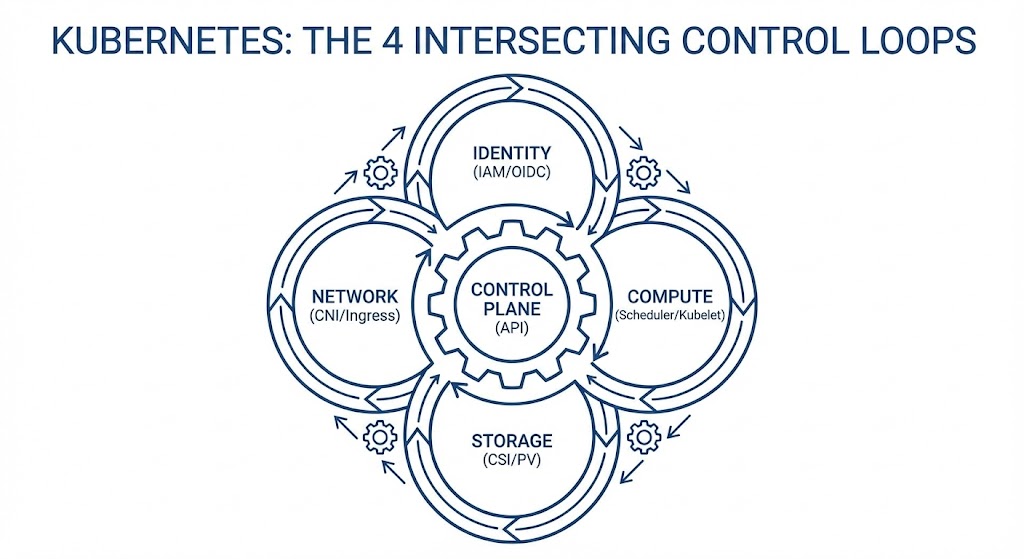
Kubernetes is not a platform. It is a set of four intersecting control loops.
Day 0 is easy. You run the installer, the API server comes up, and you feel like a genius. Day 1 is magic. You deploy Hello World, and it scales. Day 2 is a hangover.
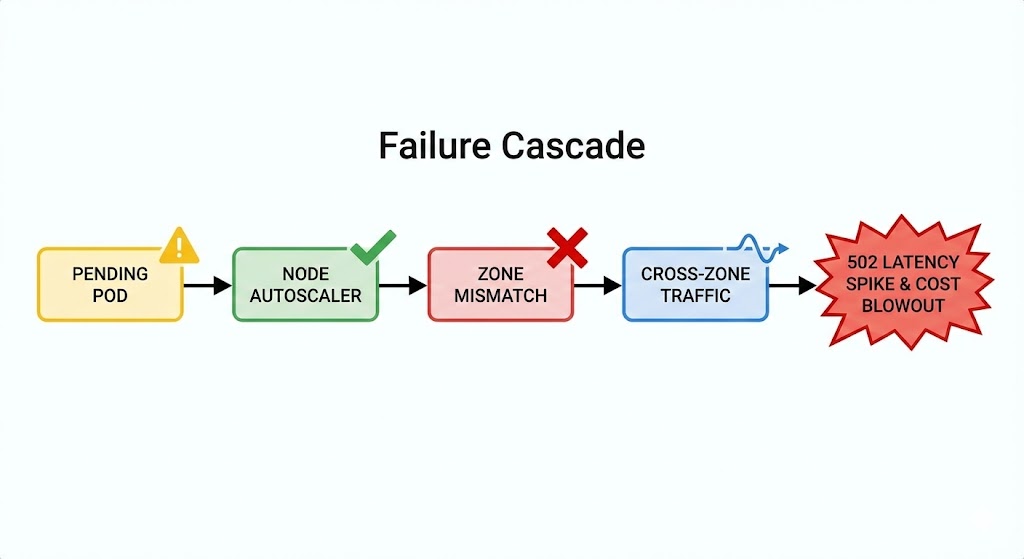
On Day 2, the pager rings. A Pending Pod triggers a node scale-up, which triggers a cross-zone storage conflict, which saturates a NAT Gateway, causing 502 errors on the frontend. Most teams treat these incidents as “random bugs.” They are not. Kubernetes failures are never random — every production incident comes from violating the physics of four intersecting control loops.
This is the strategic pillar of the Rack2Cloud Diagnostic Series. It synthesizes the lessons from all four technical deep dives into a unified operational framework. Start with any of the four diagnostic guides below, or read this first to understand the system before diving into the failures.
The System Model: 4 Intersecting Loops
We need to fix your mental model. Kubernetes is not a hierarchy — it is a mechanism. Incidents happen at the seams where these loops grind against each other.
- Identity Loop: Authenticates the request — ServiceAccount → AWS IAM / Azure Entra ID
- Compute Loop: Places the workload — Scheduler → Kubelet
- Storage Loop: Provisions the physics — CSI → EBS / Azure Disk / PD
- Network Loop: Routes the packet — CNI → IP Tables → Ingress
When you see a “Networking Error” like a 502, it is often a Compute decision (scheduling on a full node) colliding with a Storage constraint (zonal lock-in). The symptom is in one loop. The cause is in another. Single-domain debugging will always fail you.
The scheduler contention that drives the Compute Loop failures — and why your cluster “looks fine” at 40% utilization while workloads queue — is the same physics covered in CPU Ready vs CPU Wait and Resource Pooling Physics. The run queue problem doesn’t stop at the VM layer — it continues into the Kubernetes scheduler layer.
The Azure Context: The Rack2Cloud Method Goes AKS
This methodology is cloud-agnostic by design — but its application is highly specific to each platform’s primitives. Shortly after this framework was published, Petro Kostiuk — Senior DevOps Engineer, 3x Azure Certified — took the Rack2Cloud Method and translated it into a practical Azure-native operational model.
His analysis, published as The Rack2Cloud Method: Kubernetes Day 2 Operations (Azure Edition), maps each of the four control loops to the specific AKS primitives engineers work with daily:
- Identity Loop → AKS: Microsoft Entra ID, AKS Workload Identity, Managed Identity for ACR pulls — replacing the static secret anti-pattern that causes ImagePullBackOff in every environment
- Compute Loop → AKS: Node pool separation (system/user), KEDA alongside Cluster Autoscaler, PriorityClass and PodDisruptionBudgets as the scheduling budget system
- Network Loop → AKS: Azure CNI (or Cilium), NAT Gateway/SNAT capacity planning, Private Endpoints and DNS hygiene — because “service reachable” never means “network healthy”
- Storage Loop → AKS: Azure Disk/Files CSI with
WaitForFirstConsumer, zone-aware StatefulSets — because compute teleports and data has gravity in every cloud
Petro’s Azure Day 2 readiness checklist — covering Workload Identity, zone-aware storage classes, RED + USE telemetry, and incident loop classification — is integrated into the diagnostic playbook download below.
The control plane autonomy implications of this architecture — specifically what happens to the Identity Loop when your AKS cluster loses external Entra ID reachability — maps directly to the sovereign infrastructure problem covered in the Sovereign Infrastructure Strategy Guide.
The Domino Effect: A Real-World Escalation
Here is why you need to understand the whole system.
- 09:00 AM: A Pod goes Pending — Compute Issue
- 09:01 AM: Cluster Autoscaler provisions a new Node in us-east-1b
- 09:02 AM: The Pod lands on the new Node
- 09:03 AM: The Pod tries to mount its PVC. Fails. The disk is in us-east-1a — Storage Issue
- 09:05 AM: The app tries to connect to the database. Because of the zonal split, traffic crosses the AZ boundary
- 09:10 AM: Latency spikes. The NAT Gateway gets saturated — Network Issue
Result: A Storage constraint manifested as a Network outage. The team blamed the application. The fix was a StorageClass configuration.
Stop debugging symptoms. Audit the loops. Select a failure domain below to access the deep-dive diagnostic protocols for AWS, Azure, and GCP:
Pillar 1: Identity is Not a Credential
The Law: Identity must be ephemeral, scoped, and auditable.
In Day 1, you hardcode AWS Keys or Azure credentials into Kubernetes Secrets. By Day 365, this is a breach waiting to happen. The symptom is always ImagePullBackOff or broken permission handshakes — but the cause is always the same: long-lived static credentials that should never have existed.
Production Primitives:
- IRSA / AKS Workload Identity: Never put a cloud access key in a Pod. Map an IAM Role or Managed Identity directly to a Kubernetes ServiceAccount via OIDC
- ClusterRoleBinding: Audit these weekly. If you have too many cluster-admins, you have no security model — you have a liability
The full diagnostic protocol for Identity Loop failures — OIDC handshake tracing, IRSA misconfiguration patterns, and the exact kubectl commands to surface broken permission chains — is in Part 1: ImagePullBackOff: It’s Not the Registry (It’s IAM).
Pillar 2: Compute is Volatile
The Law: Treat scheduling as a financial budget. If budgets are wrong, the scheduler lies.
You think of Nodes as servers. Kubernetes thinks of Nodes as a pool of CPU and RAM liquidity. If you don’t define your spend, the Scheduler freezes your assets. The cluster isn’t full — it’s fragmented. That distinction is everything.
Production Primitives:
- Requests & Limits: Mandatory. If they’re missing, the scheduler is guessing — and it will guess wrong at the worst possible time
- PriorityClass: Define critical vs batch explicitly. When the cluster is full, who dies first should be a deliberate architectural decision, not an accident
- PodDisruptionBudget: You must tell Kubernetes “you can kill 1 replica, but never 2” — or it will make that decision without you
The full scheduler fragmentation diagnostic — including the node utilization vs scheduling pressure gap, bin-packing failure patterns, and topology spread constraint configuration — is in Part 2: Your Cluster Isn’t Out of CPU — The Scheduler Is Stuck.
Pillar 3: The Network is an Illusion
The Law: Validate the entire network path, not just the final endpoint.
Kubernetes networking is a stack of abstractions — an Overlay Network wrapping a Cloud Network wrapping a Physical Network. “Service reachable” has never meant “network healthy.” The 502 is downstream. The cause is upstream.
Production Primitives:
- Readiness Probes: If these are misconfigured, the Load Balancer sends traffic to dead pods and calls it a day
- NetworkPolicy: Default deny. The frontend should not be able to talk directly to the billing database under any circumstances
- Ingress Annotations: Tune your timeouts and buffers. Defaults are for demos —
proxy-read-timeoutand buffer sizes are not optional for production
The full MTU path validation protocol — including the exact commands to surface MTU mismatches, overlay encapsulation overhead calculation, and the NAT Gateway SNAT exhaustion diagnostic — is in Part 3: It’s Not DNS (It’s MTU): Debugging Kubernetes Ingress. For teams evaluating CNI selection and whether a service mesh is still necessary in 2026, Service Mesh vs eBPF in Kubernetes: Cilium vs Calico Networking Explained covers the architectural decision the Network Loop makes unavoidable.
Pillar 4: Storage Has Gravity
The Law: Compute moves fast. Data has mass.
A 1TB disk cannot move across an Availability Zone in milliseconds. The Compute scheduler teleports the Pod to Zone B. The storage driver left the disk anchored in Zone A. Deadlock. This is not a Kubernetes bug — it is physics.
Production Primitives:
volumeBindingMode: WaitForFirstConsumer: The single most important StorageClass setting for EBS, Azure Disk, and GCP PD storage. Forces storage provisioning to wait until the scheduler has picked a node- topologySpreadConstraints: Force the scheduler to spread pods across zones before they bind storage — not after
- StatefulSet: Never use a Deployment for a database. The operational model is fundamentally different
The full data gravity diagnostic — including Volume Node Affinity Conflict resolution, StatefulSet rollout failure patterns, and the zone topology configuration that prevents cross-AZ storage deadlocks — is in Part 4: Storage Has Gravity: Debugging PVCs & AZ Lock-in.
The 5th Element: Observability
YYou cannot fix what you cannot see. Without observability, Kubernetes replaces simple outages with complex mysteries.
Two telemetry lenses — both required:
- RED (Services): Rate, Errors, Duration — is the application happy?
- USE (Infrastructure): Utilization, Saturation, Errors — is the node happy?
The Golden Rule of Logs: Log parsing is dead. Every log line must carry structured context: trace_id, span_id, pod_name, node_name, namespace, zone. Without these fields, cross-loop incident analysis is guesswork.
The IaC governance framework for deploying Prometheus alert rules, structured logging pipelines, and observability-as-code is in the Modern Infrastructure & IaC Learning Path.
The Maturity Ladder
Where is your team today? And how do you get to the next level?
| Stage | Behavior | Architecture Pattern | The Learning Path |
| Reactive | SSH into nodes to debug. | Manual YAML editing. | Start Here |
| Operational | Dashboards & Alerts. | Helm Charts & CI/CD. | Modern Infra & IaC Path |
| Architectural | Guardrails (OPA/Kyverno). | Policy-as-Code. | Cloud Architecture Path |
| Platform | “Golden Paths” for devs. | Internal Developer Platform (IDP). | Mastery |
Moving from Operational to Architectural requires two things simultaneously: policy-as-code guardrails that prevent the anti-patterns, and structured learning that builds the mental model before the incident does. The Modern Infrastructure & IaC Learning Path covers the pipeline and governance layer. The Cloud Architecture Learning Path covers the multi-region control plane design layer.
The Rack2Cloud Anti-Pattern Table
Share this with your team. If you see the Symptom, stop blaming the wrong cause.
| Symptom | What Teams Blame | The Real Cause |
ImagePullBackOff | The Registry / Docker | Identity (IAM/IRSA) |
Pending Pods | “Not enough nodes” | Fragmentation & Missing Requests |
| 502 / 504 Errors | The Application Code | Network Translation (MTU/Headers) |
| Stuck StatefulSet | “Kubernetes Bug” | Storage Gravity (Topology) |
Conclusion: From Operator to Architect
Kubernetes is not a platform you install. It is a system you operate.
The difference between a frantic team and a calm team isn’t the tools they use — it’s the laws they respect. Identity must be ephemeral. Scheduling is a budget. Network is eventual consistency. Data has gravity.
Violate any one of these laws and the other three will compound the failure until a human gets paged.
Stop Chasing Symptoms. Start Architecting.
The complete Kubernetes Day 2 Diagnostic Playbook consolidates all four loop diagnostic protocols — IAM handshakes, Scheduler physics, MTU path validation, and Data Gravity — into a single offline reference.
Now includes Petro Kostiuk’s Azure Day 2 Readiness Checklist — covering AKS Workload Identity, zone-aware storage classes, KEDA autoscaling governance, and loop-to-loop incident classification.
↓ Download The Kubernetes Day 2 Diagnostic PlaybookCLUSTER FAILING THE CHECKLIST?
If your cluster is failing two or more checklist items simultaneously, you don’t have individual configuration gaps — you have a cross-loop architectural problem. Let’s map it before the next incident does.
Consult an ArchitectFrequently Asked Questions (Day 2 Ops)
Q: What is the difference between Day 1 and Day 2 operations?
A: Day 1 is about installation and deployment (getting the cluster running and shipping the first app). Day 2 is about lifecycle management (backups, upgrades, security patching, observability, and scaling). Day 2 is where 90% of the engineering time is spent.
Q: Why do Kubernetes nodes get stuck in a “NotReady” state?
A: This is usually a Compute Loop failure. The Kubelet may be crashing due to resource starvation (missing Requests/Limits), or the CNI plugin (Network Loop) may have failed to allocate IP addresses. Check the Kubelet logs on the node itself.
Q: How do I prevent “Volume Node Affinity Conflicts”?
A: This is a Storage Gravity issue. To fix it, you must use volumeBindingMode: WaitForFirstConsumer in your StorageClass. This forces the storage driver to wait until the Scheduler has picked a node before creating the disk, ensuring the disk and node are in the same Availability Zone.
Q: What is the “Double Scheduler” problem?
A: In stateful workloads, Kubernetes effectively has two schedulers: the Compute Scheduler (which places pods based on CPU/RAM) and the Storage Scheduler (which places disks based on capacity). If they don’t coordinate, you end up with a Pod in Zone A and a Disk in Zone B.
Additional Resources
Editorial Integrity & Security Protocol
This technical deep-dive adheres to the Rack2Cloud Deterministic Integrity Standard. All benchmarks and security audits are derived from zero-trust validation protocols within our isolated lab environments. No vendor influence.

R.M.
Senior Solutions Architect with 25+ years of experience in HCI, cloud strategy, and data resilience. As the lead behind Rack2Cloud, I focus on lab-verified guidance for complex enterprise transitions. View Credentials →
Get the Playbooks Vendors Won’t Publish
Field-tested blueprints for migration, HCI, sovereign infrastructure, and AI architecture. Real failure-mode analysis. No marketing filler. Delivered weekly.
Select your infrastructure paths. Receive field-tested blueprints direct to your inbox.
- > Virtualization & Migration Physics
- > Cloud Strategy & Egress Math
- > Data Protection & RTO Reality
- > AI Infrastructure & GPU Fabric
Zero spam. Includes The Dispatch weekly drop.
Need Architectural Guidance?
Unbiased infrastructure audit for your migration, cloud strategy, or HCI transition.
>_ Request Triage Session