

All-NVMe Ceph for AI: When Distributed Storage Actually Beats Local ZFS
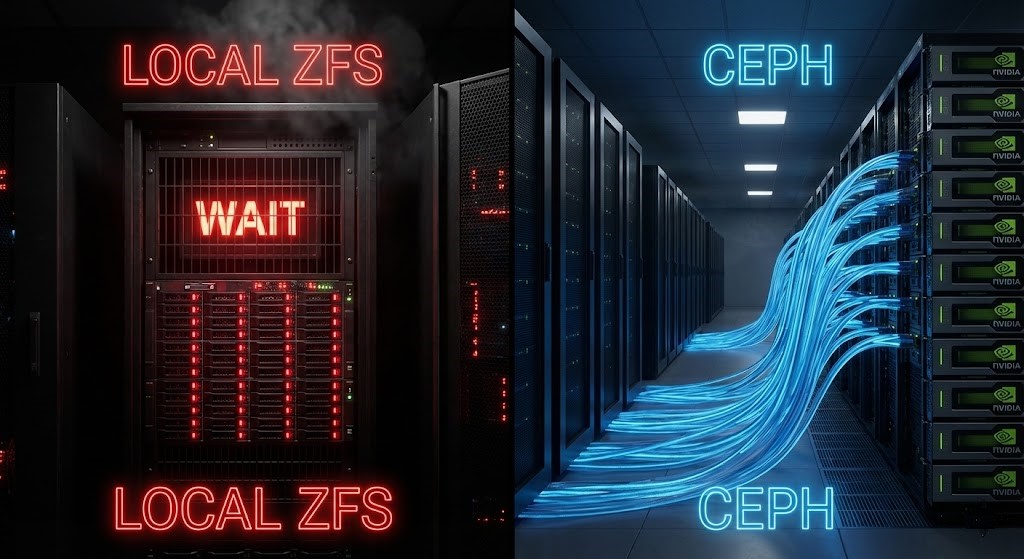
The case for Ceph NVMe AI training storage doesn’t start with a spec sheet comparison. It starts with a scale threshold. There is a belief in infrastructure circles that refuses to die: “Nothing beats local NVMe.” And for a single box running a transactional database, that’s mostly true.
And for a single box running a transactional database, that’s mostly true. If you are minimizing latency for a single SQL instance, keep your storage close to the CPU.
But AI clusters aren’t single boxes. And as we detailed in the ZFS vs Ceph vs NVMe-oF: Choosing the Right Storage Backend, once you reach petabyte scale, latency stops being your primary metric during the training read phase.
AI training is synchronized, parallel, and massive. The bottleneck isn’t nanosecond-level latency anymore. It is aggregate throughput under parallel pressure.
That is where an All-NVMe deployment of Ceph — even using Erasure Coding EC 6+2 — can outperform mirrored local ZFS. Not because it’s faster on a spec sheet. Because it scales during dataset distribution.
This becomes the dominant physics reality once the dataset no longer fits comfortably inside a single node’s working set. Below that threshold, local NVMe still wins. Above it, the problem stops being storage latency and becomes synchronization bandwidth.
That crossover point is usually reached long before teams expect it — often when dataset size exceeds the aggregate ARC and page cache of a node rather than the raw capacity of the disks.
For the broader storage architecture decision framework — how ZFS, Ceph, and NVMe-oF map to different workload profiles across virtualization and AI infrastructure — see the Storage Architecture Learning Path before committing to a topology.
The Symptom Nobody Attributes to Storage
The first sign this problem exists usually isn’t a disk alert. It’s this: your training job runs fine for the first few minutes. Then, at the start of every epoch, throughput collapses. GPU utilization drops from 95% to 40%. CPU usage spikes in kworker. Disks show 100% busy — but only on some nodes.
You restart the job and it improves for exactly one epoch. So you blame the framework. You blame the scheduler.
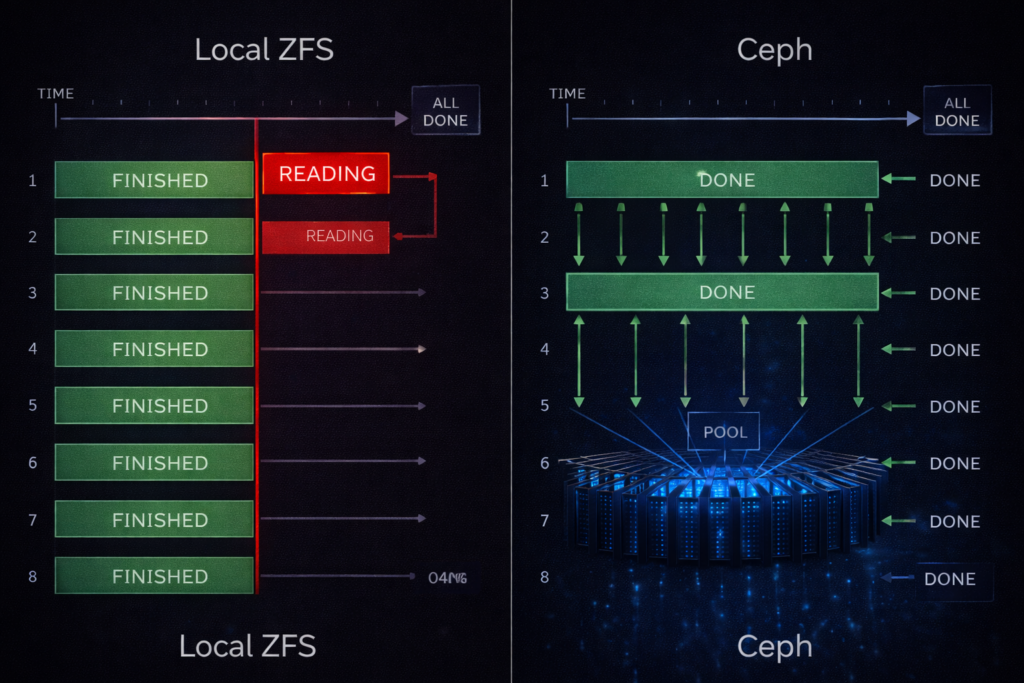
But what’s actually happening is synchronized dataset re-reads. Each node is independently saturating its own local storage while the rest of the cluster waits at a barrier. The GPUs aren’t slow. They’re waiting for data alignment across workers.
The same barrier synchronization problem appears one layer up the stack in Kubernetes — a pod waiting at a resource barrier while the scheduler fragments CPU across NUMA nodes. The diagnostic approach is identical: the worst participant governs the whole cluster. See Your Cluster Isn’t Out of CPU — The Scheduler Is Stuck for how the same worst-case-governs principle applies to compute scheduling.
The Lie We Tell Ourselves About Local NVMe
A modern AI training node looks perfect on paper: 2–4 Gen4/Gen5 NVMe drives, ZFS mirror or stripe, 6–12 GB/s sequential read per node, sub-millisecond latency. On a whiteboard, that architecture is beautiful.
But now multiply it. Take that single node and scale it to an 8-node cluster with 64 GPUs crunching a 200TB training dataset. Suddenly you don’t have one fast storage system. You have eight isolated islands.
Distributed training does not average performance. It inherits the slowest participant. Local storage scales per node. AI training scales per barrier. That architectural mismatch is the silent killer of GPU efficiency. Barrier synchronization is the heartbeat of distributed training — if one node misses a beat, the whole cluster pauses.
For teams evaluating on-premises AI infrastructure against public cloud GPU options, the 40% utilization threshold at which repatriation becomes cost-effective is covered in the Sovereign AI: The Case for Private Infrastructure guide. The storage architecture decision here is inseparable from the build-vs-rent calculation.
Why AI Workloads Break “Local Is Best”
DDeep learning frameworks like PyTorch and TensorFlow do not behave like OLTP databases. Their I/O patterns are hostile to traditional storage logic: streaming shards of massive sequential reads, multiple parallel workers per GPU, full dataset re-reads on every epoch cycle, and a read storm where every GPU demands data simultaneously.
The most misleading metric in AI storage is average throughput. What matters is synchronized throughput at barrier time. With local ZFS, you are forced into duplicate datasets or caching gymnastics that collapse under scale. Neither is elegant at 100TB+.
The egress cost of staging and distributing 100TB+ datasets — particularly in hybrid environments where training data lives in object storage — compounds the throughput problem significantly. The Physics of Data Egress covers the bandwidth cost modeling that should precede any decision to stage datasets locally vs pull from cloud storage at training time.
The Ceph NVMe AI Training Storage Pattern That Works
IIn production GPU clusters, the architecture that consistently delivers saturation-level throughput during training reads looks like this: 6–12 dedicated storage nodes separate from compute, NVMe-only OSDs, 100/200GbE non-blocking spine-leaf fabric, BlueStore backend, EC 6+2 pool for large datasets.
The goal here is not latency dominance. The goal is aggregate cluster bandwidth. If you have eight storage nodes capable of delivering 3 GB/s each, you don’t care about the 3 GB/s. You care about the 24 GB/s shared across the cluster simultaneously — shared, striped, and resilient.
The architectural separation between compute and storage nodes in this pattern is the same disaggregated model that applies to HCI environments running mixed virtualization and AI workloads. The Breaking the HCI Silo guide covers how Nutanix compute-only nodes connect to external Ceph or NVMe-oF fabric using this same separation principle.
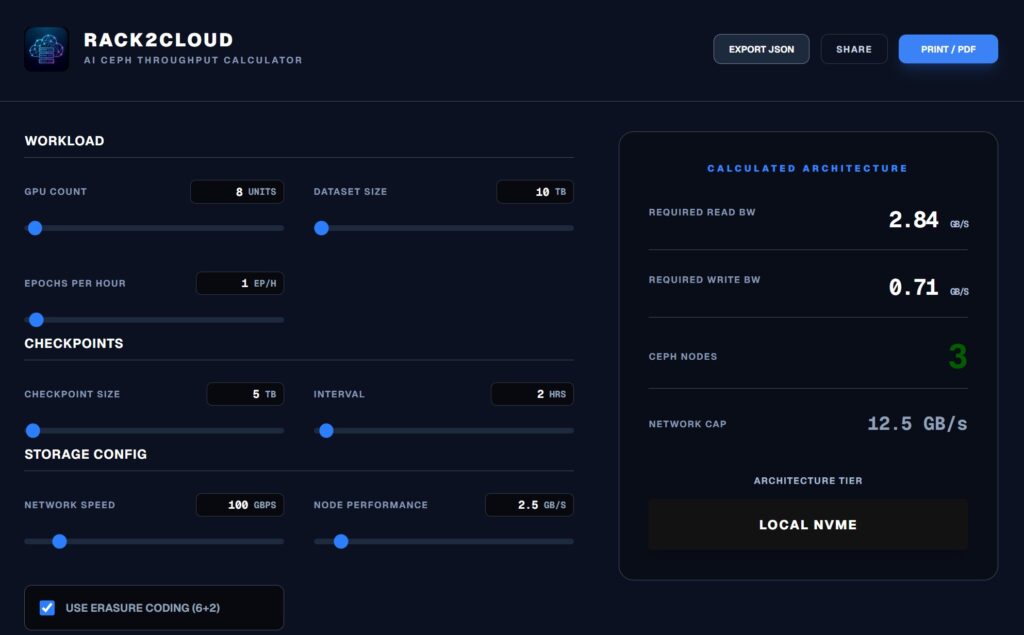
Run the AI Ceph Throughput Calculator:
If the calculator shows your “Required Read BW” exceeding your network cap, adding more local NVMe won’t save you. You need to widen the pipe.
Real Benchmark Methodology
If we want to move this from opinion to authority, we need methodology. Before running either test in production, validate the configuration on isolated infrastructure. A DigitalOcean storage-optimized Droplet provides a safe environment to rehearse fio test parameters and BlueStore tuning values before applying them to bare metal OSD nodes.
The Local ZFS Test (Per Node)
Running a standard fio test on a local Gen4 mirror:
Bash
fio --name=seqread \
    --filename=/tank/testfile \
    --rw=read \
    --bs=1M \
    --iodepth=32 \
    --numjobs=8 \
    --size=100G \
    --direct=1 \
    --runtime=120 \
    --group_reporting
Typical result: 7–9 GB/s read per node. On a whiteboard, that looks strong. But across 8 nodes, you don’t get a unified 64 GB/s throughput pool. You get 8 independent pipes — and distributed training only moves as fast as the slowest one.
The Ceph EC 6+2 Test
Infrastructure: 8 OSD nodes, 4 NVMe per node, 100GbE fabric. Profile: Erasure Code 6+2 — 6 data chunks, 2 parity.
Step 1: Create the Profile
Bash
ceph osd erasure-code-profile set ec-6-2 \
    k=6 m=2 \
    crush-failure-domain=host \
    crush-device-class=nvme
Step 2: Tune BlueStore (ceph.conf) Defaults won’t cut it for high-throughput AI.
Ini, TOML
[osd]
osd_memory_target = 8G
bluestore_cache_size = 4G
bluestore_min_alloc_size = 65536
osd_op_num_threads_per_shard = 2
osd_op_num_shards = 8
Per OSD node you might only see 2–4 GB/s. But across the cluster you are seeing 20–30+ GB/s of aggregate, sustained read throughput. The GPUs are no longer fighting per-node silos. They are pulling from a massive shared bandwidth fabric.
For the IaC framework that encodes these BlueStore tuning values as enforced policy — preventing configuration drift from silently reverting OSD memory targets after cluster updates — see the Modern Infrastructure & IaC Learning Path.
The EC 6+2 Performance Reality
Yes, erasure coding adds a write penalty. But training datasets are read-dominant once staged. With large object sizes of 1MB or greater, EC read amplification is negligible compared to dataset parallelism overhead. Checkpoint write bursts remain a separate storage class problem — typically solved with a dedicated low-latency NVMe tier.
Why Rebuild Behavior Matters More Than Latency
Benchmarks happen on healthy systems. Training happens on degraded ones.
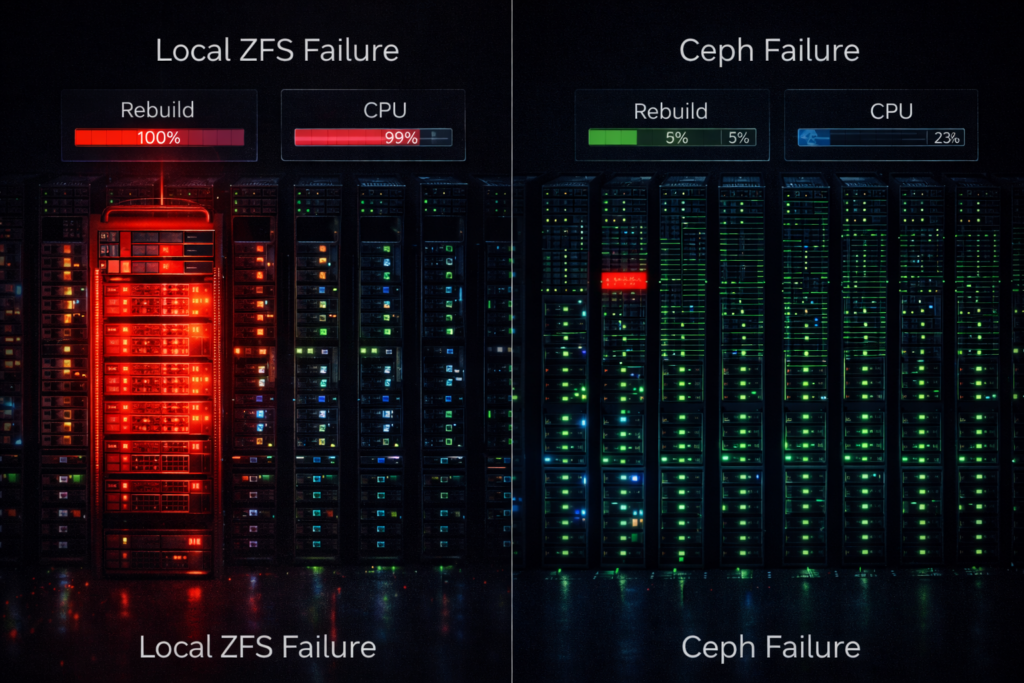
In a mirrored local ZFS layout, a single NVMe failure turns one node into a rebuild engine. The controller saturates, latency spikes, and that node misses synchronization barriers. The entire training job slows to the speed of the worst node.
Ceph distributes reconstruction across the cluster. No node becomes the designated victim. Your training run continues at approximately 85% speed instead of collapsing entirely.
ZFS rebuilds crush a single node. Ceph rebuilds are a whisper across the entire cluster.
The same rebuild behavior distinction applies in Metro cluster contexts — a single-node rebuild event that saturates a local ZFS host maps directly to the P99.9 latency spike that triggers Metro arbitration. The variance modeling framework in The Physics of Disconnected Cloud covers how to model worst-case rebuild impact on synchronous
Capacity Math at Scale
FinLocal mirror: 50% usable capacity. Ceph EC 6+2: 75% usable capacity. At 500TB scale, that 25% delta funds additional GPUs.
More importantly, it creates architectural separation: Ceph for training dataset distribution, a low-latency tier for checkpoint persistence, and vault storage for immutable backups. Each layer solves a different failure mode. For the immutable backup architecture that protects the vault storage tier — and how it integrates with Ceph’s snapshot model — see Immutable Backups 101.
The Architect’s Verdict
Eventually every AI cluster discovers the same thing: storage stops being about speed. It becomes about coordination.
That is why Ceph NVMe AI training storage at scale isn’t a compromise — it’s the architecture that matches the actual physics of distributed training.And once datasets exceed the working memory of a node, synchronized movement beats isolated speed.
Architects working through the full AI storage constraint model — data locality, pipeline latency, checkpoint architecture, and the Data Availability Boundary — will find the structured reading sequence in the Storage & Data Pipeline Architecture stage of the AI Architecture Learning Path.
For the complete AI infrastructure architecture — from GPU cluster design through data pipeline tuning through sovereign deployment for regulated environments — continue with the Storage Architecture Learning Path for the specific tuning required for BlueStore NVMe backends at scale.
Additional Resources
View 4 more resources
Editorial Integrity & Security Protocol
This technical deep-dive adheres to the Rack2Cloud Deterministic Integrity Standard. All benchmarks and security audits are derived from zero-trust validation protocols within our isolated lab environments. No vendor influence.

R.M.
Senior Solutions Architect with 25+ years of experience in HCI, cloud strategy, and data resilience. As the lead behind Rack2Cloud, I focus on lab-verified guidance for complex enterprise transitions. View Credentials →
Get the Playbooks Vendors Won’t Publish
Choose the architecture problems you care about. Get field-tested playbooks and frameworks delivered to your inbox.
- > AI Infrastructure & Inference Economics
- > Cloud Strategy & Hidden Cost Models
- > Virtualization & Deterministic Migration
- > Kubernetes, IaC & Modern Infrastructure
- > Data Protection & Recovery Engineering
Zero spam. Includes The Dispatch weekly drop.
Need Architectural Guidance?
Independent review before major infrastructure decisions.
- > Validate assumptions
- > Identify hidden dependencies
- > Quantify migration risk
- > Challenge vendor narratives
Triage · Advisory · Fractional · Direct Hire