

Storage Has Gravity: Debugging Kubernetes PVCs & AZ Lock-in
- Events show:
1 node(s) had volume node affinity conflict. - Stateful pods are stuck in
Pendingindefinitely after a node drain or upgrade. - Events show:
Multi-Attach error for volume "pvc-xxxx": Volume is already used by node. - Stateful rollouts are stuck, or failovers are taking exceptionally long.
This is Part 4 — the final part — of the Rack2Cloud Diagnostic Series. If you haven’t read the strategic overview of how all four loops interact, start with The Rack2Cloud Method: A Strategic Guide to Kubernetes Day 2 Operations.
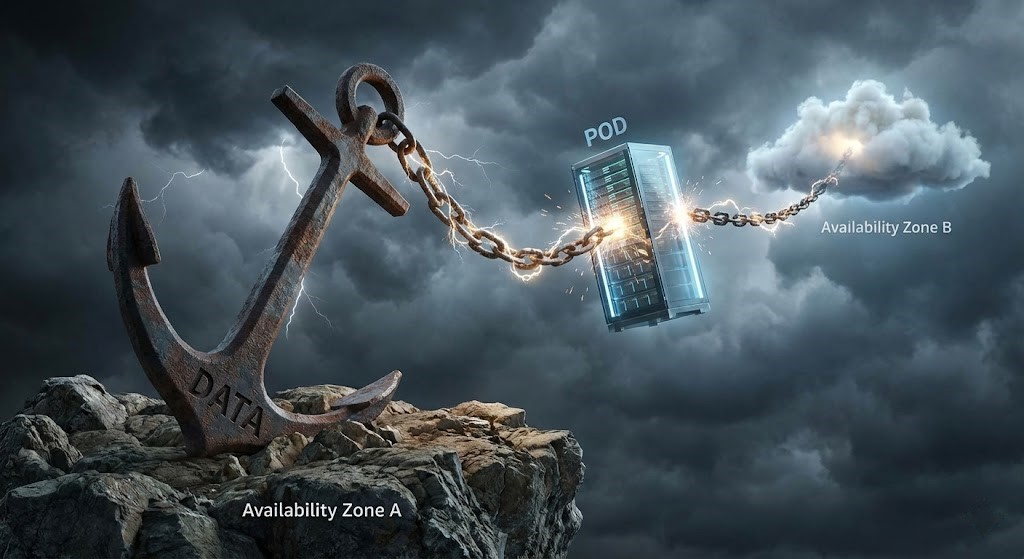
Why Your Pod is Pending in Zone B When Your Disk is Stuck in Zone A
You have a Kubernetes PVC stuck in Pending. Your StatefulSet — Postgres, Redis, Jenkins — won’t schedule. You drain a node for maintenance. The Pod tries to reschedule somewhere else. And then nothing. It sits in Pending indefinitely.
The error: 1 node(s) had volume node affinity conflict
Or at 3 AM: pod has unbound immediate PersistentVolumeClaims, persistentvolumeclaim "data-postgres-0" is not bound, failed to provision volume with StorageClass, Multi-Attach error for volume "pvc-xxxx": Volume is already used by node.
Welcome to Cloud Physics. We spend so much time treating containers as cattle — disposable, movable — that we forget data is not a container. You can move a microservice in the blink of an eye. You cannot move a 1TB disk in the blink of an eye.
The same data gravity principle that governs Kubernetes PVC placement governs storage architecture decisions at the infrastructure layer. The egress cost implications of cross-AZ storage traffic — and when it makes sense to repatriate stateful workloads on-premises — are covered in The Physics of Data Egress.
The Mental Model: The Double Scheduler
Most engineers think Kubernetes schedules a Pod once. For stateful workloads, it schedules twice:
- Storage Scheduling: Where should the disk exist?
- Compute Scheduling: Where should the code run?
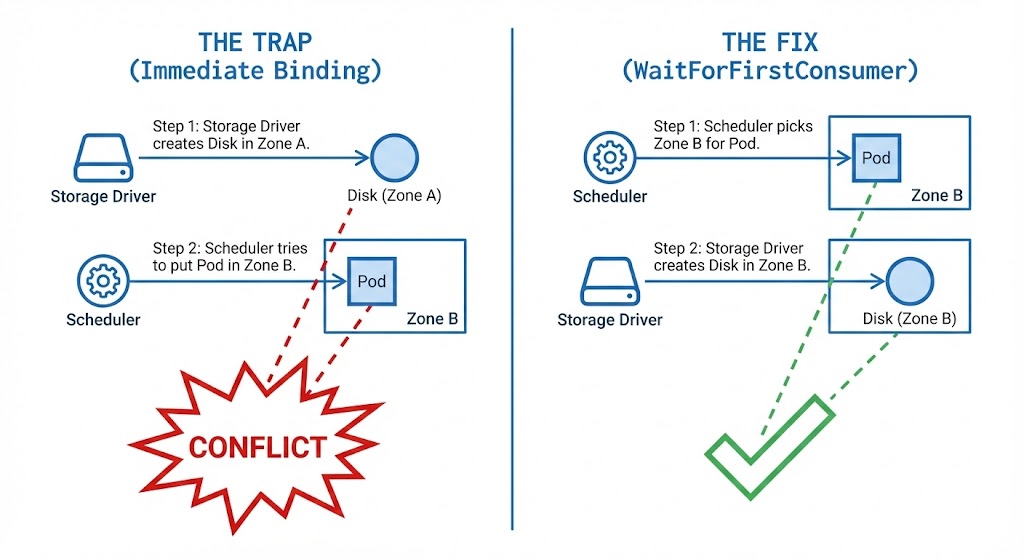
If these two decisions happen independently — which is exactly what happens with the default StorageClass configuration — you get a deadlock. The Storage Scheduler picks us-east-1a because it has free disk quota. The Compute Scheduler picks us-east-1b because it has free CPU. The Pod cannot start because the cable doesn’t reach.
This is the same cross-loop failure pattern that appears throughout this series — a decision in one loop (Storage) creating an impossible constraint for another loop (Compute). In Part 2 it was policy fragmentation. Here it’s physical zone lock-in. Same diagnostic approach: identify which loop made the constraining decision first, then work backward.
The Trap: Immediate Binding
The #1 cause of storage lock-in is a default setting called volumeBindingMode: Immediate. It exists for legacy reasons and single-zone clusters where location doesn’t matter. In a multi-zone cloud deployment, it is a trap.
The Failure Chain:
- You create the PVC
- The Storage Driver wakes up immediately — “I need to make a disk. I’ll pick
us-east-1a.” - The disk is created in
1aand physically anchored there - You deploy the Pod
- The Scheduler sees
1ais fragmented but1bhas free CPU - Conflict: Pod wants
1b, disk is locked in1a - The Scheduler cannot move the Pod to the data. The cloud provider cannot move the data to the Pod
The IaC governance pattern that prevents this from re-occurring after every cluster upgrade — enforcing WaitForFirstConsumer in all StorageClass definitions as policy-as-code — is in the Modern Infrastructure & IaC Learning Path.
The Fix: WaitForFirstConsumer
Teach the storage driver patience. Don’t create the disk until the Scheduler has picked a node for the Pod.
How it works:
- You create the PVC → Storage Driver: “Request received. Waiting.” (Status: Pending)
- You deploy the Pod → Scheduler: “Placing on Node X in
us-east-1b. Free CPU confirmed.” - Storage Driver: “Pod is going to
1b. Creating disk in1b.” - Result: Pod and disk in the same zone. No conflict.
The Hidden Trap — Gravity Wins Forever: WaitForFirstConsumer only solves the Day 1 problem. Once the disk is created in us-east-1b, it is anchored there permanently. If you later need to move the workload and 1b is full, the Pod will not fail over to 1a — it will hang until space frees up in 1b. Plan your zone capacity before the disk is provisioned, not after.
In sovereign and disconnected environments, the zone gravity problem becomes more severe — if the zone containing your data becomes network-partitioned, the workload cannot be relocated regardless of compute availability elsewhere. The Sovereign Infrastructure Strategy Guide covers the control plane autonomy and storage replication architecture required to survive this scenario.
As Petro Kostiuk highlights in his Azure Edition of the Rack2Cloud Method, when compute moves fast but data gets left behind, you have a Storage Loop failure — and the Azure-specific failure path differs from AWS in one critical way.
- The Primitives: Azure Disk/Files CSI driver, StorageClass with
WaitForFirstConsumer, StatefulSets, and zone-aware placement policy - The Anti-Pattern: Treating stateful pods like stateless web pods — and relying on Cluster Autoscaler to add a node in any zone without considering where existing disks live
- The Symptom: Volume node affinity conflicts, stuck stateful rollouts, and long failovers — often triggered when the autoscaler adds a node in a different zone than the existing Azure Disk
- The Day 2 Rule: Compute moves fast. Data has gravity. Use zone-aware StorageClasses with
WaitForFirstConsumeron every stateful workload — no exceptions.
The Multi-Attach Illusion: RWO vs RWX
Engineers assume: “If a node dies, the pod will just restart on another node immediately.” This is the Multi-Attach Illusion.
Most cloud block storage — AWS EBS, Google Persistent Disk, Azure Disk — is ReadWriteOnce (RWO). The disk can only attach to one node at a time.
| Mode | What Engineers Think | The Reality |
| RWO (ReadWriteOnce) | “My pod can move anywhere.” | Zonal Lock. The disk must detach from Node A before attaching to Node B. |
| RWX (ReadWriteMany) | “Like a shared drive.” | Network Filesystem (NFS/EFS). Slower, but can be mounted by multiple nodes. |
| ROX (ReadOnlyMany) | “Read Replicas.” | Rarely used in production databases. |
If your node crashes hard, the cloud control plane may still believe the disk is attached to the dead node. The new Pod cannot start because the old node hasn’t released the lock. The result is Multi-Attach error — and the only resolution is waiting for the cloud provider’s node timeout (typically 6–10 minutes) or forcibly deleting the dead pod to break the attachment lock.
For stateful workloads where this failover window is unacceptable, the architectural answer is replication over relocation — a Primary/Replica setup like Postgres Patroni that fails over to a running replica rather than waiting for a volume to detach, travel, and reattach.
The Slow Restart: Why Databases Take Forever to Come Back
You’ve rescheduled the Pod. The node is in the correct zone. But the Pod sits in ContainerCreating for 5 minutes. This is not a bug. It’s physics:
- Kubernetes tells the Cloud API: “Detach
vol-123from Node A” - Cloud API: “Working on it…” — wait 1–3 minutes
- Cloud API: “Detached.”
- Kubernetes tells Cloud API: “Attach
vol-123to Node B” - Linux Kernel: “New block device detected. Mounting filesystem…”
- Database: “Replaying journal logs…”
The detach/attach cycle is an inherent property of cloud block storage. The Cloud Restore Calculator models this recovery time as part of RTO planning — if your database failover SLA is tighter than the detach/attach window, the architecture needs replication, not just redundancy.
The Rack2Cloud Storage Triage Protocol
If your stateful pod is Pending, stop guessing. Run this sequence to isolate the failure domain in four phases.
Phase 1: The Claim State
Goal: Is Kubernetes even trying to provision storage?
Bash
kubectl get pvc <pvc-name>
- ✅ Status is Bound → Move to Phase 2.
- ❌ Status is Pending → Run
kubectl describe pvc <name>. Look forwaiting for a volume to be createdor cloud quota errors. If usingWaitForFirstConsumer, the PVC will stay Pending until a Pod is deployed — this is expected behavior, not a bug.
Phase 2: The Attachment Lock
Goal: Is an old node holding the disk hostage?
Bash
kubectl describe pod <pod-name> | grep -A 5 Events
- ✅ Normal scheduling events → Move to Phase 3.
- ❌
Multi-Attach errororVolume is already used by node→ The cloud control plane thinks the disk is still attached to a dead node. Wait 6–10 minutes for the provider timeout, or forcibly delete the previous dead pod to break the attachment lock.
Phase 3: The Zonal Lock (The Smoking Gun)
Goal: Are the physics impossible?
Bash
# 1. Get the Pod's assigned node (if it made it past scheduling)
kubectl get pod <pod-name> -o wide

# 2. Get the Volume's physical location
kubectl get pv <pv-name> --show-labels | grep zone
- ✅ Node and PV in the same zone → Move to Phase 4.
- ❌ Zone mismatch → Deadlock confirmed. The Pod cannot run on that Node. You must drain the wrong node to force rescheduling, or ensure compute capacity exists in the zone where the PV actually lives.
Phase 4: Infrastructure Availability
Goal: Does the required zone even have servers?
Bash
# Replace with the zone where your PV is stuck
kubectl get nodes -l topology.kubernetes.io/zone=us-east-1a
- ✅ Nodes listed and Ready → Scheduling should succeed — check for policy constraints from Part 2’s Compute Loop blocking placement.
- ❌ No resources found, or all NotReady → Your cluster has lost capacity in that zone. Check Cluster Autoscaler logs and your cloud provider’s AZ health dashboard.
requiredDuringScheduling anti-affinity for StatefulSets — if the preferred zone is full, you’ve created a self-imposed deadlock. Use preferredDuringScheduling so the scheduler has an escape path when topology constraints can’t be satisfied.Summary: Respect the Physics
Stateless apps are water — they flow wherever there’s room. Stateful apps are anchors. Once they drop, that’s where they stay.
- Use
WaitForFirstConsumerto prevent Day 1 zone fragmentation - Ensure your Autoscaling Groups cover all zones so there’s always a node available wherever your data lives
- Never treat a database Pod like a web server Pod
- Plan replication architecture before the first disk is provisioned — not after the first 3 AM incident
This completes the Rack2Cloud Diagnostic Series. Your Identity, Compute, Network, and Storage loops are mapped. The next step is the strategic layer — how all four loops are governed, monitored, and kept from grinding against each other as your platform scales. That framework is in The Rack2Cloud Method: A Strategic Guide to Kubernetes Day 2 Operations.
Series Complete. Take the Protocols Offline.
The complete Kubernetes Day 2 Diagnostic Playbook consolidates all four loop protocols — IAM handshake tracing, Scheduler fragmentation diagnostics, MTU path validation, and Storage triage — into a single offline reference. Includes Petro Kostiuk’s Azure Day 2 Readiness Checklist covering AKS Workload Identity, zone-aware storage classes, and loop-to-loop incident classification.
↓ Download The Kubernetes Day 2 Diagnostic PlaybookMaster the Day-2 operations of Kubernetes by diagnosing the foundational failures the documentation doesn’t cover.
Additional Resources
View 4 more resources
Editorial Integrity & Security Protocol
This technical deep-dive adheres to the Rack2Cloud Deterministic Integrity Standard. All benchmarks and security audits are derived from zero-trust validation protocols within our isolated lab environments. No vendor influence.

R.M.
Senior Solutions Architect with 25+ years of experience in HCI, cloud strategy, and data resilience. As the lead behind Rack2Cloud, I focus on lab-verified guidance for complex enterprise transitions. View Credentials →
Get the Playbooks Vendors Won’t Publish
Choose the architecture problems you care about. Get field-tested playbooks and frameworks delivered to your inbox.
- > AI Infrastructure & Inference Economics
- > Cloud Strategy & Hidden Cost Models
- > Virtualization & Deterministic Migration
- > Kubernetes, IaC & Modern Infrastructure
- > Data Protection & Recovery Engineering
Zero spam. Includes The Dispatch weekly drop.
Need Architectural Guidance?
Independent review before major infrastructure decisions.
- > Validate assumptions
- > Identify hidden dependencies
- > Quantify migration risk
- > Challenge vendor narratives
Triage · Advisory · Fractional · Direct Hire