

TPU Logic for Architects: When to Choose Accelerated Compute Over Traditional CPUs
This is Part 1 of the Rack2Cloud AI Infrastructure Series.
To understand how to deploy these models outside the data center, read Part 2: The Disconnected Brain: Why Cloud-Dependent AI is an Architectural Liability.
TPU Logic for Architects:
When to Choose Accelerated Compute Over Traditional CPUs
For years, cloud architecture treated compute power like a basic utility—run low on performance, just throw in more CPU cores. That got the job done for web apps and batch processing. But then AI came along, especially Large Language Model (LLM) training, and flipped the script. Suddenly, all that expensive silicon sits around doing nothing if your memory, interconnects, or data pipelines can’t keep up.
In hyperscale AI, compute isn’t just about raw power—it’s about physics. You have to think about memory bandwidth, where your data lives, and how all the pieces talk to each other. If you try to scale the old way, you end up bleeding money: you’ll see top-tier GPUs stuck waiting on software, CPUs that can’t keep up with accelerators, and clusters left twiddling their thumbs while slow pipelines catch up.
Here’s the bottom line – the so-called AI Architectural Law:
You don’t buy AI silicon to crunch numbers faster. You buy it to erase the gap between your data and those matrix operations.
That changes everything about how you build your infrastructure. So, in this article, I’ll walk through the real-world tradeoffs between TPUs and GPUs, show you where each shines (and where they really don’t), and connect these choices to core ideas like data gravity, cloud costs, and the reality of spinning up resources on demand.
The Compute Illusion
Cloud architects used to believe scaling meant just adding more CPUs or memory. If a workload slowed down, just toss in more and let auto-scaling do its thing. But AI training—especially at today’s scale—breaks that model:
- CPUs can’t keep accelerators fed.
- Networks turn into chokepoints.
- Memory delays kill your utilization.
Picture this: you spin up a whole fleet of high-end GPU instances to train your transformer model, and then you realize they’re only running at about 35% utilization. Why? The CPUs and network can’t keep up, so you’re burning through tens of thousands of dollars a day just to let your GPUs twiddle their thumbs.
(And yes, this kind of meltdown actually happens. I’ve seen it across real cloud deployments.)
So, the problem isn’t the hardware. It’s the assumptions we bring to the table.
Architectural Law: Accelerated Compute is a Memory & Interconnect Problem
AI accelerators aren’t your average processors—they’re built to rip through matrix math. But here’s the catch: their real-world speed depends on three things:
- Memory bandwidth: How quickly can you feed data into the accelerator?
- Interconnect topology: How smoothly can all those nodes talk to each other during distributed training?
- Data locality: How close is your dataset to your compute? If it’s far away, latency and data transfer costs add up fast.
That’s why just looking at raw specs—TFLOPS, number of cores, all that—misses the bigger picture.
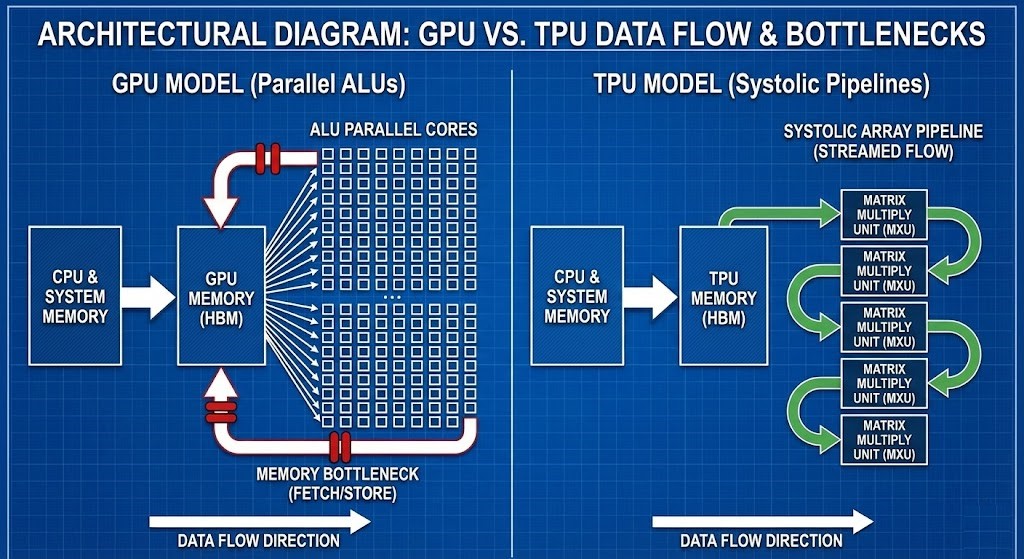
Two Processor Philosophies: Brute Force vs. Pipeline Efficiency
| Dimension | GPU Model (Parallel ALUs) | TPU Model (Systolic Pipelines) |
| Architecture Type | Thousands of parallel ALUs | Systolic array ASIC |
| Memory Access Pattern | Fetch → Compute → Writeback | Streamed pipeline, minimized fetch |
| Strength | Flexible workloads, broad ecosystem | Optimized for large static math |
| Weakness | Starves without bandwidth/determinism | Vendor lock‑in, workload rigidity |
| Best Fit | Variable workloads across clouds | Massive transformer training |
GPU Model — Parallelism at Scale
GPUs run the show with thousands of ALUs working side by side, cranking through loads of calculations at once. But here’s the catch: they still need a steady stream of data from memory and the CPU. When the data pipeline can’t keep up, GPUs just sit there, wasting time and money instead of speeding up training.
TPU Model — Application-Specific Efficiency
TPUs take a different route. They’re custom-built ASICs, tuned specifically for tensor operations. Data flows through their systolic array like water through pipes—no unnecessary trips to memory. This design means they’re incredibly fast at chewing through matrix math, but you can’t just use them anywhere. They’re tied to certain clouds and jobs.
Google’s TPUs really shine with transformer models and big batch sizes. The efficiency boost is hard to ignore. Honestly, it just goes to show: picking the right hardware architecture matters, a lot.
The Bottleneck Matrix
Understanding where bottlenecks occur helps architects anticipate outcomes:
| Bottleneck Source | Effect on Training Pipeline |
| CPU Data Preparation | GPU/TPU starved; expensive silicon sits idle |
| GPU Memory Bandwidth (HBM) | Smaller batch sizes; slower convergence |
| Interconnect Fabric | Multi‑node scaling failure; AllReduce stalls |
| Workload Mismatch (custom ASIC) | ASICs under‑utilized for branching logic |
Outcome: You aren’t choosing between NVIDIA and Google—you’re choosing which constraint you’re willing to manage.
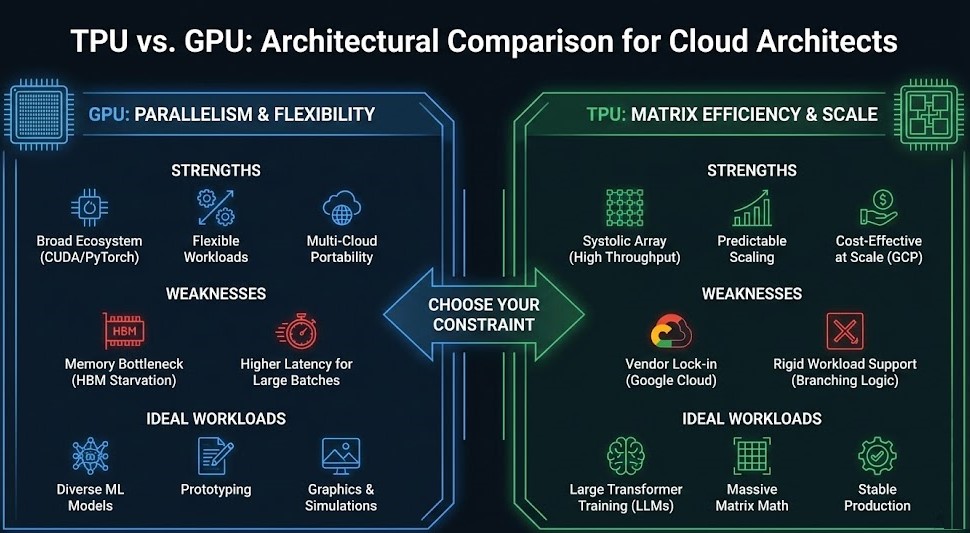
Choose Your Constraint
When to Choose GPU Architecture
Best for:
- Framework portability across clouds
- Multi‑vendor ecosystem (PyTorch, CUDA, tensor cores)
- Mixed workloads with dynamic control paths
Risk Profile:
You manage complex memory and network stacks. Interconnect engineering (RDMA, NVLink, NVSwitch) is critical. (Reference: Rack2Cloud’s GPU Cluster Architecture explores this in depth.)
When to Choose TPU Architecture
Best for:
- Google Cloud ecosystem
- Static graph workloads (e.g., TensorFlow with XLA)
- Large transformer pretraining with predictable scaling
Risk Profile:
Vendor lock‑in (proprietary cloud accelerator) and not ideal for workloads with irregular branching logic. Google’s TPU infrastructure provides high memory bandwidth and cost‑effective scaling.
That lock-in risk isn’t theoretical. Google TPU Rationing Is Not a Supply Story. It’s an Authority Story covers what happened when Google’s own TPU supply couldn’t cover its internal research, its products, and its Cloud customers at once — customers who committed to the TPU ecosystem found their allocation deprioritized behind Google’s own workloads, by Google’s own declared policy. Choosing TPU means accepting that Google’s allocation authority sits above your own capacity planning.
Data Gravity: The Ultimate Architect Constraint
Even the most efficient silicon is useless if your data is in another region or silo. This ties directly to Rack2Cloud’s AI Infrastructure Pillar and Data Gravity logic – compute must be adjacent to data to avoid:
- Egress fees
- Latency penalties
- Inefficient pipelines
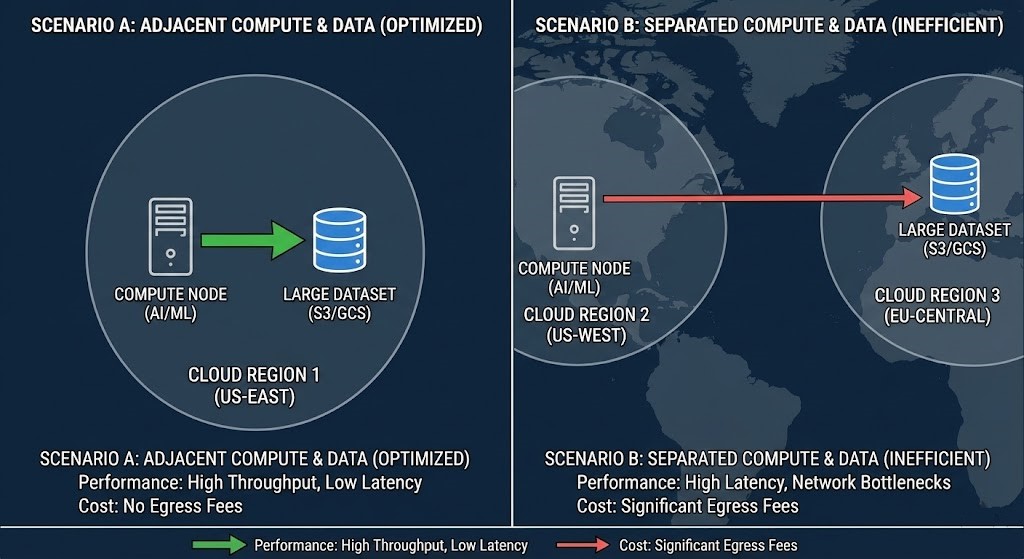
If your dataset resides far from compute, network latency will overwhelm any gains from custom accelerators. This architectural reality is discussed in the AI Infrastructure Strategy Guide and AI Architecture Learning Path.
Operational Realities: Beyond the Math
Choosing an accelerator is half the battle. Architects must also ensure that:
- Infrastructure is ephemeral: Don’t bake expensive nodes into static estates.
- Provisioning automation: Aligns with workload duration.
- Billing models: (spot vs. reserved) Don’t cripple production jobs.
These principles directly extend the Modern Infrastructure & IaC Strategy Guide into the AI era.
Decision Flow: TPU vs. GPU (Architect Mode)
Step 1: What workloads dominate?
- Static LLM training → TPU
- Diverse ML workloads with branching logic → GPU
Step 2: Which ecosystem are you tied to?
- Vendor‑agnostic cloud/edge → GPU
- Google Cloud & Vertex AI → TPU
Step 3: Can data be co‑located?
- Yes → Proceed
- No → Relocate data or reconsider compute choice
Architect’s Verdict
Hyperscale AI isn’t won by procuring the fastest chips — it’s won by designing an architecture where silicon never waits for data. Whether you choose GPU or TPU, your infrastructure must respect:
- Memory bandwidth physics
- Network determinism
- Data gravity constraints
- Automated ephemerality
Master these, and you architect efficient intelligence — not just performance.
Additional Resources
Internal References
Editorial Integrity & Security Protocol
This technical deep-dive adheres to the Rack2Cloud Deterministic Integrity Standard. All benchmarks and security audits are derived from zero-trust validation protocols within our isolated lab environments. No vendor influence.

R.M.
Senior Solutions Architect with 25+ years of experience in HCI, cloud strategy, and data resilience. As the lead behind Rack2Cloud, I focus on lab-verified guidance for complex enterprise transitions. View Credentials →
Get the Playbooks Vendors Won’t Publish
Choose the architecture problems you care about. Get field-tested playbooks and frameworks delivered to your inbox.
- > AI Infrastructure & Inference Economics
- > Cloud Strategy & Hidden Cost Models
- > Virtualization & Deterministic Migration
- > Kubernetes, IaC & Modern Infrastructure
- > Data Protection & Recovery Engineering
Zero spam. Includes The Dispatch weekly drop.
Need Architectural Guidance?
Independent review before major infrastructure decisions.
- > Validate assumptions
- > Identify hidden dependencies
- > Quantify migration risk
- > Challenge vendor narratives
Triage · Advisory · Fractional · Direct Hire