GPU Cluster Architecture: Engineering the Hardware Stack for Private LLM Training
Private AI infrastructure is systems engineering, not optimization. If you treat a GPU cluster like a standard virtualization farm, you will fail. I have seen deployments where millions of dollars in H100s sat idle 40% of the time because the architect underestimated the network fabric or the storage controller’s ability to swallow a checkpoint.
The private LLM training hardware decisions that determine cluster efficiency aren’t made at the GPU level — they’re made at the interconnect, storage, and facilities layer. This post focuses on the physical realities of those decisions. If your GPUs are waiting, your architecture is failing.
For the specific configuration details — BIOS settings, RoCEv2 tuning, scheduler trade-offs — the companion post The Manual Nvidia Forgot: H100 Cluster Configuration Guide covers those in depth.
The Compute Layer: SXM vs. PCIe
The first question every CFO asks is why they can’t buy the PCIe version — it’s cheaper and fits in existing Dell R760s. As an architect, your job is to explain why that is a trap for training workloads.
The Interconnect Bottleneck
In distributed training, GPUs do not work in isolation. They spend a significant percentage of every cycle syncing gradients via All-Reduce operations. The interconnect bandwidth between GPUs determines how much of each cycle is actually spent computing versus waiting.
- PCIe Gen5: Caps out at roughly 128 GB/s bi-directional — shared with everything else on the bus.
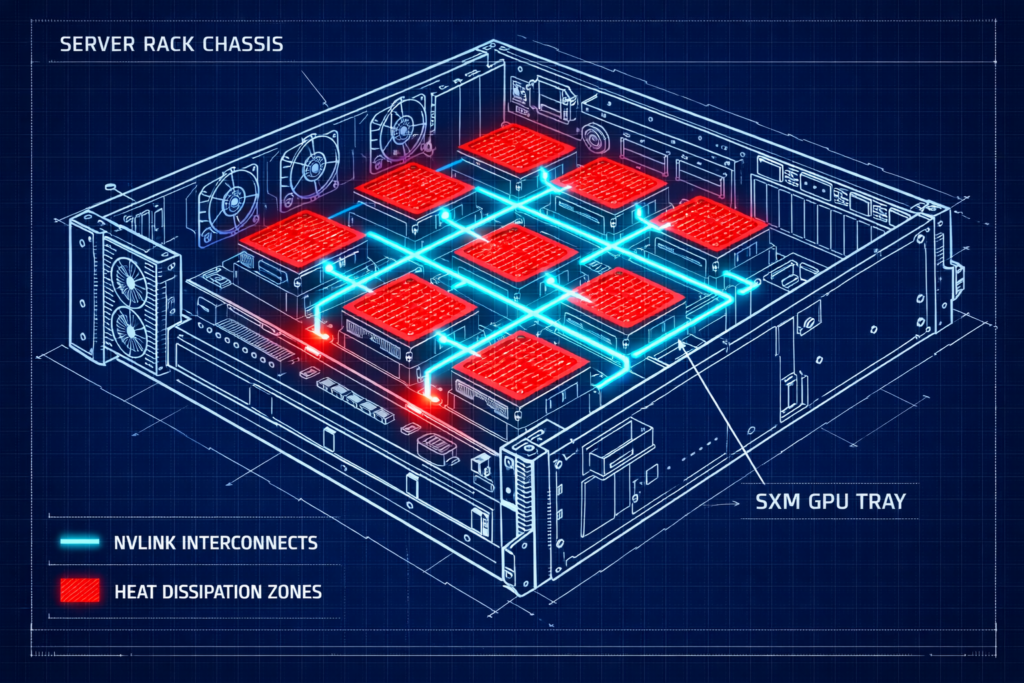
- NVLink (SXM5): Delivers ~900 GB/s of GPU-to-GPU bandwidth inside the node via the NVIDIA HGX H100 architecture — dedicated, point-to-point.
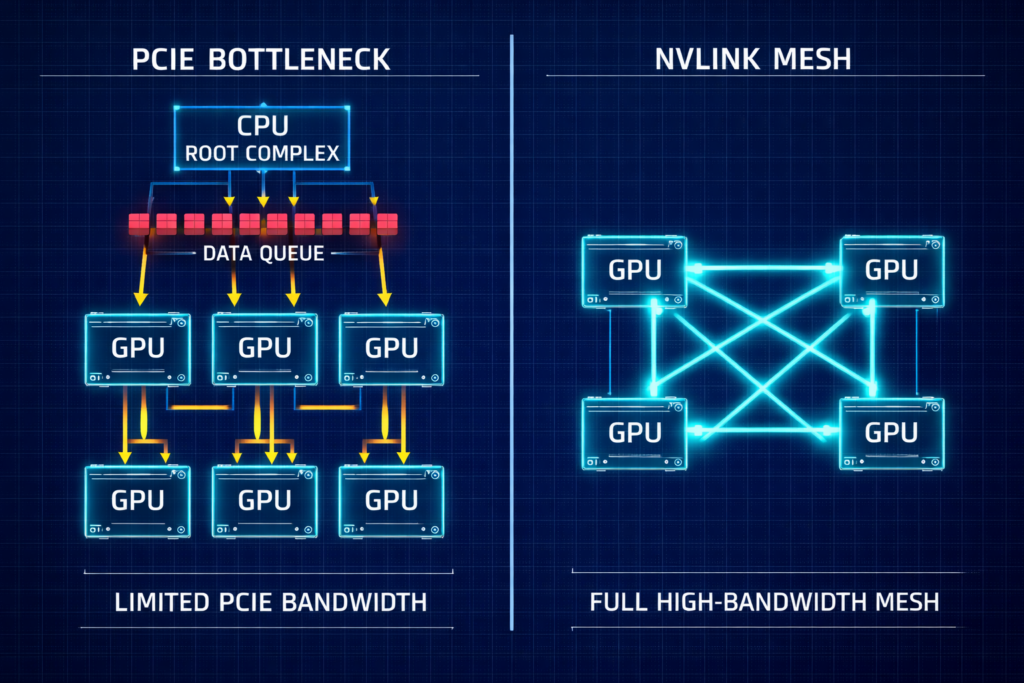
For 70B+ parameter models, PCIe latency becomes the dominant factor in total training time. You aren’t paying for compute — you are paying for your expensive GPUs to wait for data to traverse a bottleneck.
The decision framework is straightforward: use SXM5 (HGX) for foundation model training or heavy fine-tuning. Use PCIe for inference fleets or lightweight LoRA fine-tuning where the interconnect isn’t the constraint. Mixing the two in a training cluster creates scheduling and topology complexity that rarely pays off.
The Fabric: RoCEv2 vs. InfiniBand for Private LLM Training Hardware
InfiniBand — The Pure Choice
If you have the budget and the specialized talent, InfiniBand is the gold standard. It offers native credit-based flow control with effectively zero packet loss, extremely low deterministic latency, and superior collective communication via NCCL and SHARP. For hyperscale training at 1000+ GPU scale, it remains the reference architecture.
The drawback is operational: InfiniBand is an island. It requires specialized tooling, and engineers who understand it at production depth are rare and expensive. For most enterprise organizations, the talent gap is the real cost.
RoCEv2 — The Pragmatic Choice
RDMA over Converged Ethernet runs on standard Ethernet switches — Spectrum-4, Arista, Cisco. This is what I recommend for most enterprise builds because your existing network team can support it. The ecosystem is mature, the tooling is standard, and the operational overhead is manageable.
Field Note: I have seen a single silent switch buffer overflow stall a training run for 40% of its duration. The network looked “up,” but pause frames were choking the throughput. Monitoring priority pause frames is mandatory, not optional.
RoCEv2 requires perfect tuning of PFC (Priority Flow Control) and ECN (Explicit Congestion Notification). The failure mode is silent — the network appears healthy while pause frames destroy throughput. For the full fabric physics breakdown at scale, see GPU Fabric Physics 2026: Why 800G Isn’t Enough for 100k-GPU Training. For a direct comparison of the two fabric options, InfiniBand Is Losing the Fabric War covers the architectural trade-offs in detail.
The deterministic networking model that underpins both options is covered in Deterministic Networking: The Missing Layer in AI-Ready Infrastructure.
Storage: The Checkpoint Problem
LLM training crashes are inevitable. You survive them by writing checkpoints — snapshots of model weights — every 30–60 minutes. This isn’t just about saving data; it’s about saving progress. The storage subsystem that handles checkpoints is one of the most underspecified components in most private LLM training hardware builds.
- The math: A 175B model checkpoint is ~2.5TB (weights + optimizer states + metadata).
- The target: You need this write to finish in under 60 seconds to minimize GPU idle time.
- The requirement: Your storage subsystem must sustain ~40 GB/s write throughput per node.
Storage profiling before you sign the GPU PO: Simulate checkpoint bursts on your storage array before committing. Use fio to simulate 2–4TB sequential writes, test concurrency across multiple nodes simultaneously, check tail latency to ensure metadata storms don’t throttle throughput, and validate your topology — local NVMe scratch combined with a parallel filesystem is the most common production pattern.
For the full storage backend decision framework, The Storage Wall: ZFS vs. Ceph vs. NVMe-oF for AI Training Clusters covers the trade-offs in depth. For the all-NVMe case specifically, see All-NVMe Ceph for AI: When Distributed Storage Actually Beats Local ZFS.
High-performance storage references for AI training:
Decision Framework: Private LLM Training Hardware Build Tiers
| Tier | Use Case | GPU Spec | Network | Storage |
| Sandbox | Prototyping, <13B models | 4x H100 NVL (PCIe) | 400GbE (Single Rail) | Local NVMe RAID |
| Enterprise | Fine-tuning 70B, RAG | 8x H100 SXM5 (1 Node) | 800GbE RoCEv2 | All-Flash NAS (NetApp/Pure) |
| Foundry | Training from scratch | 32+ H100 SXM5 (4+ Nodes) | 3.2Tb InfiniBand/Spectrum-X | Parallel FS (Weka/VAST) |
Facilities: The Silent Killer
Private LLM training hardware doesn’t behave like standard 2U servers. The facilities requirements are a different category entirely, and underestimating them is one of the most common and expensive mistakes in early-stage AI infrastructure builds.
- Power: Expect ~10.2 kW per chassis. A 4-node Foundry-tier cluster requires ~40 kW of dedicated power — more than most enterprise racks are provisioned for.
- Cooling: If your ambient inlet temperature exceeds 25°C, your GPUs will throttle. Thermal management isn’t a nice-to-have — it’s a performance constraint.
- Rack density: Without rear-door heat exchangers or Direct Liquid Cooling (DLC), a standard 42U rack is effectively a 15U rack for HGX chassis. You simply cannot evacuate the heat fast enough.
Power, cooling, and rack density hitting a hard wall here isn’t an isolated hardware-procurement problem — it’s one of four independent layers (alongside accelerator lead times and upstream memory supply) all exhibiting the same constraint pattern at once. That multi-layer physical signal is the same stage virtualization’s own consolidation era ran through, when rack power and cooling budgets stopped being abstract line items and started forcing refresh-cycle decisions. AI infrastructure is hitting it now, roughly two decades later, on a different resource.
Architect’s Verdict
Private AI infrastructure is a discipline of failure management. The failures aren’t random — they almost always trace back to one of four categories: network misconfiguration, storage bottlenecks, power and cooling underestimation, or scheduler topology ignorance.
If you’re building a Sandbox or Enterprise tier cluster: The interconnect is your first constraint. Get RoCEv2 lossless configuration correct before the first training job runs. A misconfigured fabric produces results that look like model instability — you’ll waste weeks debugging the wrong layer. Start with nvidia-smi topo -m and work backwards from the topology before touching anything else.
If you’re building a Foundry tier: Storage is your second constraint after the fabric. Run the checkpoint math against your current storage throughput before you sign the GPU PO. If your checkpoint write time exceeds 10 minutes, you have a storage problem that will cost you real GPU hours across every training run. Fix it in procurement, not in production.
If you’re presenting this to a CFO: The PCIe vs. SXM decision is not a cost optimization — it’s a training time decision. PCIe saves money on day one and loses it progressively across every training run at 70B+ parameter scale. Model that math explicitly before the conversation.
That procurement conversation increasingly happens inside a vendor-coordinated deal rather than an open hardware order. Vertical Integration Is Turning AI Stacks Into A Competitive Moat covers what changes when the interconnect and capacity decisions in this post arrive bundled into a single relationship instead of assembled piece by piece.
Once your cluster is training, the next architecture problem is inference cost. AI Inference Is the New Egress covers what happens to your cost model when you move from training to production serving.
The GPU Orchestration & CUDA pillar is the full reference for GPU infrastructure architecture. The Distributed AI Fabrics pillar goes deeper on multi-node fabric design. The AI Infrastructure Architecture page is the complete pillar reference.
Additional Resources
View 11 more resources
Editorial Integrity & Security Protocol
This technical deep-dive adheres to the Rack2Cloud Deterministic Integrity Standard. All benchmarks and security audits are derived from zero-trust validation protocols within our isolated lab environments. No vendor influence.

R.M.
Senior Solutions Architect with 25+ years of experience in HCI, cloud strategy, and data resilience. As the lead behind Rack2Cloud, I focus on lab-verified guidance for complex enterprise transitions. View Credentials →
Get the Playbooks Vendors Won’t Publish
Field-tested blueprints for migration, HCI, sovereign infrastructure, and AI architecture. Real failure-mode analysis. No marketing filler. Delivered weekly.
Select your infrastructure paths. Receive field-tested blueprints direct to your inbox.
- > Virtualization & Migration Physics
- > Cloud Strategy & Egress Math
- > Data Protection & RTO Reality
- > AI Infrastructure & GPU Fabric
Zero spam. Includes The Dispatch weekly drop.
Architecture Audit Services
Fixed-scope audits for Zero-Trust Azure, VMware migration readiness, and recovery posture — no discovery call required to start.
>_ View Audit Services>_Related Posts
ZFS vs Ceph vs NVMe-oF: Choosing the Right Storage Backend for Modern Virtualization
I still have nightmares about a storage migration I ran back in 2014. >_ Architect’s Brief 60-second read before you commit to the full post · Full post: 7 min Generating brief… We were moving off a monolithic SAN and onto an early “software-defined” storage platform. The sales engineers promised infinite scalability and self-healing magic….
Your Vendor Review Process Never Saw The Real Supplier
Every vendor review process assumes it’s evaluating a supplier — but a scan finding foreign-origin code embedded in more than one in eight mobile apps used by US military personnel makes the actual assumption visible: organizations review the company they bought from, not the code that arrived inside what they bought. >_ Architect’s Brief 60-second…
Your Monitoring Didn’t Miss the Incident. It Was Never Designed to See It.
I’ve watched observability vs monitoring play out as a live incident more times than I can count. >_ Architect’s Brief 60-second read before you commit to the full post · Full post: 10 min Generating brief… The dashboard was green. The on-call engineer was not paged. The monitoring system did exactly what it was designed…
Your Kubernetes Cluster Isn’t Out of CPU — The Scheduler Is Stuck
Compute Tier 1 Authority Cascades to ➔ >_ Architect’s Brief 60-second read before you commit to the full post · Full post: 9 min Generating brief… [Storage] [Network] 🚨 Failure Signature Detected Grafana shows cluster CPU utilization is under 50%, but pods are stuck in Pending. Events show: 0/10 nodes are available: 10 Insufficient cpu….
Your Identity System Is Your Biggest Single Point of Failure
Part 2 of the Rack2Cloud’s Cloud Fragility Series >_ Cloud Fragility Series 01 Multi-Cloud Cascading Failure Risks 02 Your Identity System Is Your Biggest Single Point of Failure [CURRENT] 03 Vendor Lock-In Happens Through Networking — Not APIs 04 Your Cloud Bill Quietly Increased in 2026 — Here’s Where the Money Is Actually Going >_…
Your Cloud Provider Is Not Your HA Strategy
A Tactical Playbook for Architecting, Testing, and Automating Real Multi-Cloud & Multi-Region Resilience We’ve previously explored why cloud SLAs fail as guarantees in our deep dive, Cloud SLA Failure & Resilience Strategy. This article focuses on how to survive those failures in practice — architecturally, operationally, and financially. >_ Architect’s Brief 60-second read before you…