

Stop the Bleed: Azure Policy to Enforce ‘CostCenter’ Tags
I’ve spent too many Sunday nights staring at an $80k Azure bill, trying to figure out which “Dev Test” environment grew a pair of legs and started running P3v3 instances. If you can’t attribute a resource to a CostCenter, you aren’t managing a cloud; you’re sponsoring a black hole.
I don’t care if you’re using our Azure Cost Optimization Tool or manual spreadsheets—without a mandatory tag, your FinOps data is garbage.
The Solution: JSON Policy Definition
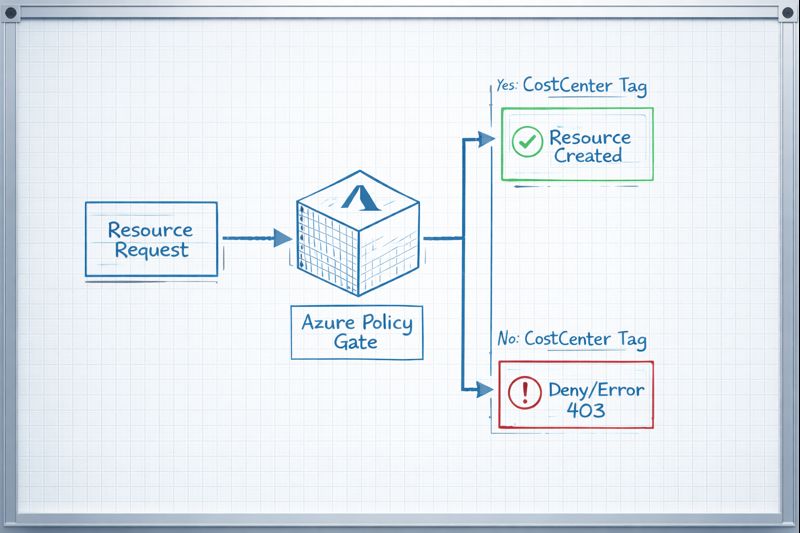
Copy this into the Azure Portal or your Terraform azurerm_policy_definition block. This specific logic checks for the existence of the key and denies the deployment if it’s absent.
JSON
{
  "properties": {
    "displayName": "Enforce CostCenter Tag",
    "policyType": "Custom",
    "mode": "Indexed",
    "description": "Denies the creation of resources if the 'CostCenter' tag is missing.",
    "parameters": {},
    "policyRule": {
      "if": {
        "field": "tags['CostCenter']",
        "exists": "false"
      },
      "then": {
        "action": "deny"
      }
    }
  }
}
How to Deploy (The 60-Second Path)
- Navigate to Policy in the Azure Portal.
- Definitions > + Policy Definition.
- Location: Select your root Management Group (don’t play whack-a-mole with Subscriptions).
- Paste the JSON above.
- Assign: Create an Assignment. I recommend setting the Enforcement Mode to
Enabledonly after running a compliance scan to see who you’re about to break.
Day 2 Operations: CapEx vs. OpEx Implications
| Feature | Cost Impact | Operational Effort |
| Deny Policy | Reduces OpEx by preventing “Shadow IT” spend. | High (will break legacy CI/CD pipelines). |
| Audit Policy | Zero immediate savings; provides visibility. | Low (passive reporting). |
| Auto-Remediation | Saves engineer time (OpEx). | Medium (requires Managed Identity setup). |
Architect’s Note: If you deploy this with
denyon a Monday morning, your Slack will explode with Terraform “403 Forbidden” errors. Ensure your Service Principals have the tags defined in their variables before you pull the trigger.
Additional Resources
Editorial Integrity & Security Protocol
This technical deep-dive adheres to the Rack2Cloud Deterministic Integrity Standard. All benchmarks and security audits are derived from zero-trust validation protocols within our isolated lab environments. No vendor influence.

R.M.
Senior Solutions Architect with 25+ years of experience in HCI, cloud strategy, and data resilience. As the lead behind Rack2Cloud, I focus on lab-verified guidance for complex enterprise transitions. View Credentials →
Get the Playbooks Vendors Won’t Publish
Field-tested blueprints for migration, HCI, sovereign infrastructure, and AI architecture. Real failure-mode analysis. No marketing filler. Delivered weekly.
Select your infrastructure paths. Receive field-tested blueprints direct to your inbox.
- > Virtualization & Migration Physics
- > Cloud Strategy & Egress Math
- > Data Protection & RTO Reality
- > AI Infrastructure & GPU Fabric
Zero spam. Includes The Dispatch weekly drop.
Need Architectural Guidance?
Unbiased infrastructure audit for your migration, cloud strategy, or HCI transition.
>_ Request Triage Session