

Breaking the HCI Silo: Nutanix Integration with Dell PowerFlex & Pure Storage
The Post-Broadcom Reality: Keeping the SAN
Nutanix compute only nodes with external storage represent a fundamental shift in how enterprises can exit VMware without abandoning their existing storage investments. The premise of Hyperconverged Infrastructure was to kill the Storage Area Network in favor of distributed, direct-attached storage — one vendor, one platform, one throat to choke.
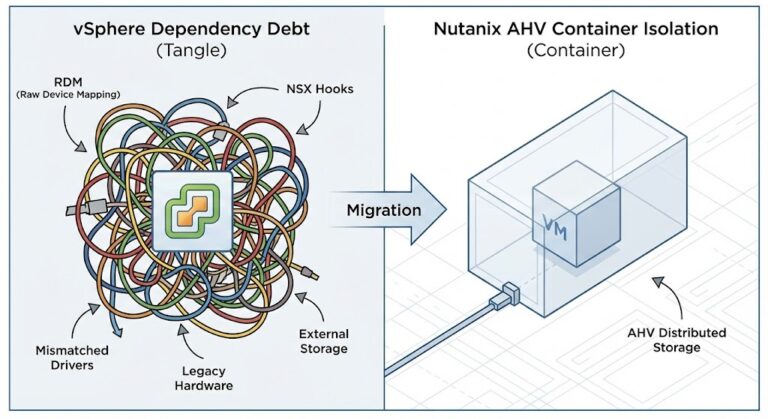
The post-Broadcom VMware landscape broke that premise. Enterprises desperately want to migrate away from ESXi, but they cannot abandon multi-million dollar investments in Pure Storage FlashArrays or Dell PowerFlex clusters that are still under support contract and performing well. In response, Nutanix fundamentally altered its architecture — breaking the HCI silo to support compute-only nodes running AHV that connect natively to external storage arrays.
This guide details the physics of that disaggregated architecture, the supported hardware, and the exact migration strategies to execute the pivot. This post is part of the broader Virtualization Architecture pillar. For the kernel-level physics of what changes when you move from ESXi to AHV, see Part 1 of the Post-Broadcom Migration Series.
The Controversy: Why Nutanix SEs Push Back
When this article was first published, it generated significant debate in the Nutanix practitioner community — including direct pushback from Nutanix field engineers. Their argument, paraphrased:
“Disaggregated HCI defeats the entire value proposition. The whole point of Nutanix is converged compute and storage — data locality, CVM-managed I/O, predictable latency. When you bolt on an external array, you’re rebuilding the 3-tier architecture you just paid to escape.”
They’re not wrong. The disaggregated model reintroduces network-dependent storage paths, eliminates the CVM’s data locality advantage, and requires your network fabric to carry storage traffic that was previously local to the node. These are real architectural costs.
The honest framing: Nutanix compute only nodes with external storage are a pragmatic compromise for enterprises that need to exit VMware without a forklift replacement of working storage infrastructure. They are not the architectural ideal — full HCI convergence remains the best-practice recommendation. But in the real world, the choice is rarely between perfect HCI and disaggregated HCI. It is between disaggregated AHV and another Broadcom renewal at a 140% price increase.
But here’s the counterargument — and why this architecture exists despite the internal objections:
- Real-world procurement doesn’t start from zero. Most enterprises evaluating Nutanix in 2026 have 2-5 years left on a Pure or Dell support contract. A forklift replacement of working storage to satisfy HCI purity is a CFO conversation nobody wins
- Workload physics sometimes demand it. A 50-node Nutanix cluster running a 200TB Oracle database may genuinely need PowerFlex’s linear IOPS scaling — which a standard NX node mesh cannot match at that density
- The alternative is staying on VMware. If disaggregated AHV is the only politically viable migration path, it is architecturally superior to another Broadcom renewal at 140% increase
The honest architect’s position: disaggregated Nutanix is a pragmatic compromise, not a best-practice recommendation. Use it where the alternative is worse. Build toward full HCI where the roadmap allows. The performance comparison between converged and disaggregated models under write saturation is covered in the Nutanix AHV vs vSAN 8 ESA Saturation Benchmark.
The Architecture Shift: Compute-Only Nodes
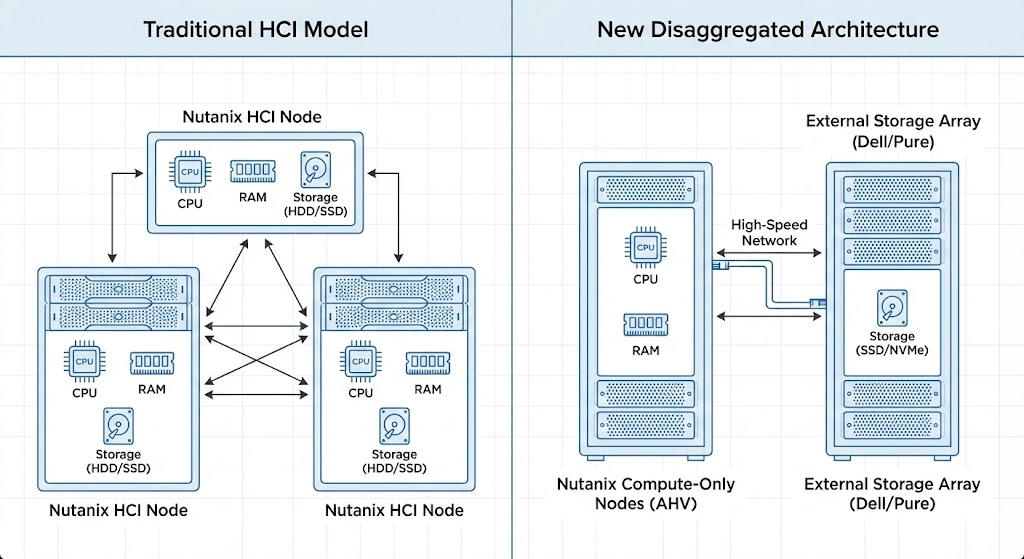
Traditionally, expanding a Nutanix cluster meant buying a node with both CPU and disk capacity. The disaggregated architecture breaks this constraint — allowing Nutanix AHV to run on server nodes with no local data storage capacity whatsoever.
These Compute Nodes act as stateless hypervisors. They connect to external storage arrays over high-speed IP networks to store VM data. The result: independent scaling of compute (AHV nodes) and storage (Dell/Pure arrays) — critical for AI workloads and massive databases where storage growth consistently outpaces compute needs.
The Critical Limitation: No Local Storage for Data
This is the architectural rule that catches new engineers by surprise — and the one the Nutanix SEs arguing against this model are most justified in emphasizing.
If you deploy a Dell PowerEdge R760xd as a Nutanix Compute-Only node (NCI-C) connected to external Pure or Dell storage:
- Drive bays remain empty: You cannot populate those 24 NVMe bays and add them to a Nutanix storage pool. The Distributed Storage Fabric (DSF) is disabled on compute-only nodes
- Wasted potential: Any storage capacity physically present in the chassis is unusable for VM data — it sits idle
- Boot drives only: Local storage is limited to the hypervisor boot OS and logs — typically a low-capacity M.2 SSD, BOSS card, or SATADOM
The hardware procurement implication:
- ❌ Bad choice: Dell R760xd with 24x 2.5″ drive bays — paying for chassis real estate you cannot use
- ✅ Good choice: Dell R660 or Cisco UCS C220 — 1U compute-dense server with minimal drive bays that remain empty
In a disaggregated Nutanix environment, server value lives entirely in CPU cores and RAM density. This is a hardware sizing mistake that is expensive to undo after purchase.
Dell PowerFlex Integration
Dell was the first major third-party vendor to integrate with Nutanix’s disaggregated model — combining Nutanix’s cloud platform management with PowerFlex’s software-defined storage architecture.
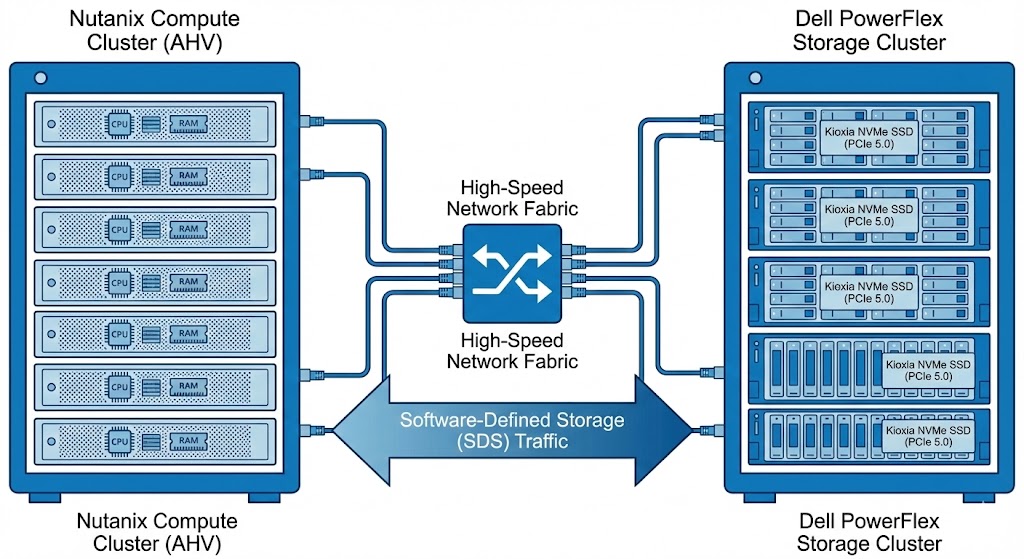
Unlike a traditional iSCSI mount, the integration is deeply engineered. Compute nodes use network HBAs to mount virtual disks from the PowerFlex array, appearing to AHV as local disks — allowing Nutanix to apply its data services on top of PowerFlex’s storage fabric.
PowerFlex’s defining characteristic is linear scalability. As storage nodes are added, IOPS and bandwidth increase predictably — making it the right choice for massive high-performance databases that would saturate a standard HCI mesh at scale. Enterprise-grade Kioxia NVMe SSDs (PCIe 5.0) shift the bottleneck from storage to the network fabric, which is where it belongs at this tier.
Ideal for: Environments requiring millions of IOPS and sub-millisecond latency at database scale, where standard HCI node density cannot keep pace with storage growth.
Pure Storage Integration
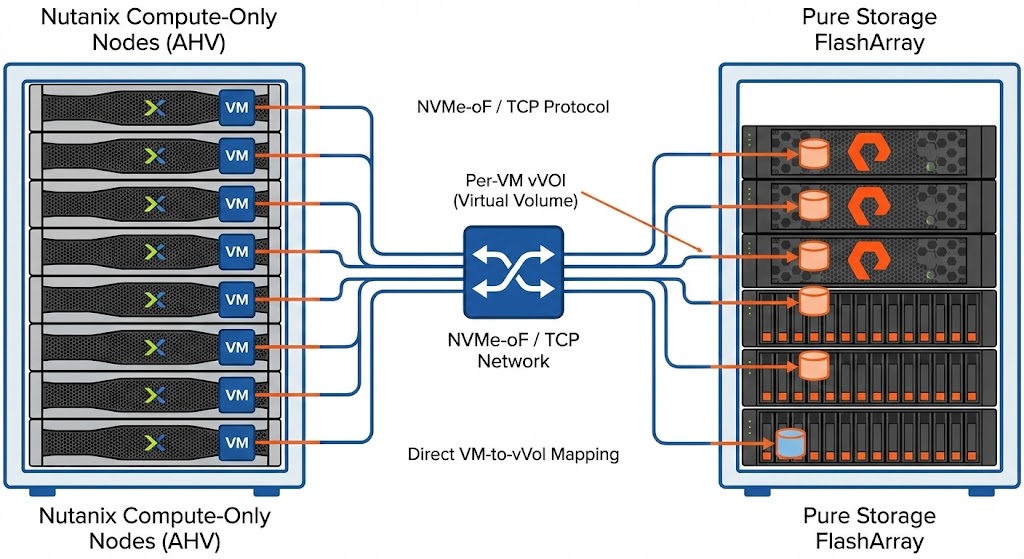
Announced at .NEXT 2025, the Pure Storage partnership allows Nutanix AHV to run directly on top of Pure FlashArray — using NVMe over TCP to map individual Nutanix VMs directly to their own vVols on the array.
Technical Specifics
- Supported models: FlashArray X and FlashArray XL only — entry-level C-series and S-series are not supported at launch
- Protocol: Exclusively NVMe-oF/TCP — bypassing legacy iSCSI and NFS paths for low latency and high throughput
- VM-level granularity: Each Nutanix VM receives its own dedicated Virtual Volume (vVol). Snapshots, replication, and data reduction operate at the VM level rather than at a generic LUN level
Key Limitations
- No native Nutanix hardware: Restricted to third-party compute nodes — Dell, Cisco, HPE. Nutanix NX-series appliances are excluded
- Strict protocol requirement: Network fabric must support NVMe-oF/TCP — legacy switching infrastructure may require upgrades
The NVMe-oF/TCP requirement has direct implications for your network architecture. MTU consistency, buffer allocation, and switch queue depth all affect replication stability — the same physics that govern Metro cluster environments, covered in The Physics of Disconnected Cloud.
Supported Compute Hardware
Since Nutanix NX appliances are excluded from these specific external storage integrations, you must bring your own compute (BYOC) from supported OEM partners.
| Vendor | Platform | Key Features |
| Dell | PowerEdge (XC Series) | The most mature ecosystem for Nutanix. Supports broad configuration options including high-density GPU nodes for AI workloads. |
| Cisco | UCS C-Series | Leverages Cisco Intersight for management. Popular in enterprises that want to reuse existing UCS Fabric Interconnect investments. |
| HPE | ProLiant (DX Series) | HPE’s DX series is factory-integrated with Nutanix software, offering a near-native experience similar to Nutanix NX. |
The integration supports mixing hardware generations — older Dell R740s alongside newer R760s — provided all nodes meet the AHV Hardware Compatibility List. For a lab environment to test this architecture before committing to production hardware, a DigitalOcean bare metal node provides a cost-effective way to validate AHV deployment patterns and network configuration before your OEM hardware arrives.
Migration Strategies: Nutanix Move
The In-Place Migration Strategy (Brownfield)
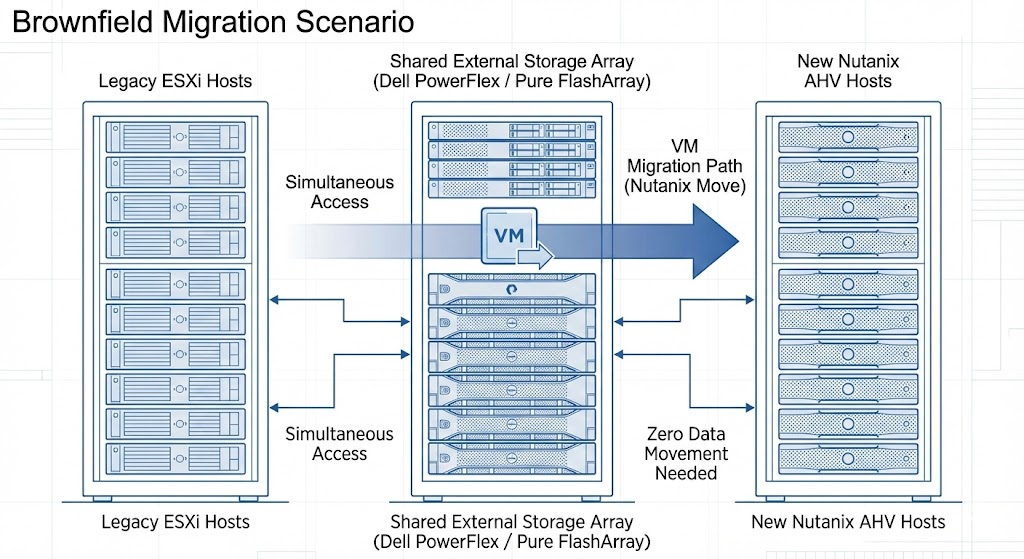
The biggest migration fear is the forklift upgrade — buying a new array just to copy data. If you already own a supported Pure or Dell array serving VMware, you don’t need one.
- Carve out capacity: Create a new Storage Container for Nutanix on your existing array alongside current VMFS datastores
- Dual-connect: The array connects to old ESXi hosts (FC/iSCSI) and new AHV hosts (NVMe-oF/TCP or SDC) simultaneously
- Execute the Move: Use Nutanix Move to migrate VMs — source and destination on the same physical array makes transfer highly efficient
- Decommission: Delete old VMFS LUNs to reclaim capacity once migration is complete
For the full execution sequence including pre-flight validation, snapshot debt audit, and cutover timing, see the vSphere to AHV Migration Strategy guide.
Repurposing Existing Compute (vSAN Pivot)
If you have existing Dell or Cisco servers running VMware vSAN, you don’t need to replace them — re-image them:
- Evacuate the ESXi host from your cluster and wipe it
- Re-image bare metal with Nutanix AHV, booting from local BOSS card or M.2
- Connect the new compute node to your external storage array
- Do not populate drive bays for storage — the node is compute-only
This vSAN pivot is one of the most cost-effective Broadcom exit paths available — reusing existing hardware while eliminating the VMware licensing dependency entirely. The full strategic framework is in the Broadcom Year Two: Stay or Go Architecture Guide.
The Architect’s Verdict
Nutanix is no longer just an HCI vendor. By decoupling compute from storage, they’ve created a migration path that works within real enterprise constraints — existing arrays, existing hardware, existing support contracts.
The Nutanix SEs who pushed back aren’t wrong about the tradeoffs. But they’re arguing from a greenfield perspective. Most enterprise migrations don’t start from greenfield — they start from a desk covered in renewal quotes and a CFO asking why the virtualization bill just tripled.
Use disaggregated Nutanix where the alternative is a worse outcome. Build toward full HCI convergence where the roadmap and budget allow. Validate every sizing assumption before purchasing a single node.
For the complete structured path — from Broadcom exit decision through hypervisor migration through Day-2 operations on AHV — see the Modern Virtualization Learning Path and the HCI Architecture Learning Path.
Additional Resources:
Editorial Integrity & Security Protocol
This technical deep-dive adheres to the Rack2Cloud Deterministic Integrity Standard. All benchmarks and security audits are derived from zero-trust validation protocols within our isolated lab environments. No vendor influence.

R.M.
Senior Solutions Architect with 25+ years of experience in HCI, cloud strategy, and data resilience. As the lead behind Rack2Cloud, I focus on lab-verified guidance for complex enterprise transitions. View Credentials →
Get the Playbooks Vendors Won’t Publish
Field-tested blueprints for migration, HCI, sovereign infrastructure, and AI architecture. Real failure-mode analysis. No marketing filler. Delivered weekly.
Select your infrastructure paths. Receive field-tested blueprints direct to your inbox.
- > Virtualization & Migration Physics
- > Cloud Strategy & Egress Math
- > Data Protection & RTO Reality
- > AI Infrastructure & GPU Fabric
Zero spam. Includes The Dispatch weekly drop.
Need Architectural Guidance?
Unbiased infrastructure audit for your migration, cloud strategy, or HCI transition.
>_ Request Triage Session