


HCI ARCHITECTURE PATH
THE PHYSICS OF CONVERGENCE, STORAGE LOCALITY, AND DISTRIBUTED RESILIENCY.
Why HCI Architecture Really Matters
People love to call Hyperconverged Infrastructure (HCI) “plug-and-play.” Sounds simple, right? But here’s the truth: HCI is the most intense, tightly-packed part of modern virtualization. It’s where hypervisor scheduling, distributed storage controllers, and network fabrics all meet—and sometimes clash—at full speed.
Now, if you’re used to the old three-tier setup, HCI flips the script. Compute and storage live together in a single fault domain. Sure, that makes things easier to manage, but it also means your architecture is way more sensitive. When compute and storage start wrestling over CPU cycles, RAM, PCIe lanes, and network buffers, the struggle isn’t hypothetical anymore. It’s real, it happens fast, and you can see it in the numbers.
This guide isn’t about marketing claims or promises of “linear scalability.” Forget the sales pitch. We’re diving into what actually happens when all these layers converge and get pushed to their limits. No fluff—just hard mechanics.
Who Should Read This
If you want to go beyond just running clusters and actually design for convergence, this is for you.
- Virtualization Engineers: You’re building dense clusters where compute and storage ride together on every node.
- Storage Architects: You’re moving from old-school SANs to distributed storage fabrics.
- Platform & Cloud Architects: You’re weighing HCI against disaggregated setups, especially for latency-sensitive or regulated workloads.
Heads up: You’ll need a solid grasp of hypervisor scheduling and storage algorithms. If you’re not there yet, check out the [Modern Virtualization Learning Path] first.
The 4 Phases of HCI Architecture Mastery
Phase 1: The Controller Tax & Storage Locality
Storage isn’t hiding behind a SAN anymore. It’s right inside your compute nodes, fighting for the same CPU, RAM, and cache as your VMs.
Every HCI platform drops a storage controller (CVM or kernel service) on your nodes. That controller grabs:
- CPU cores
- Memory
- Network bandwidth
- Cache
This is what we call the Controller Tax.
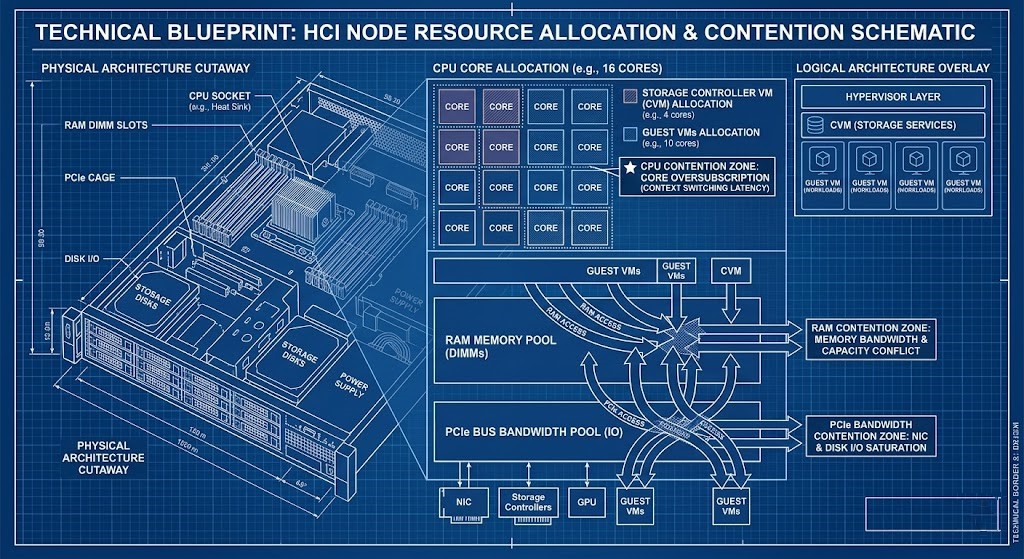
You need to know:
- How local data compares to remote read penalties.
- How storage load amplifies CPU ready time.
- What happens to memory when you reserve it, or when ballooning kicks in.
- How PCIe lanes get crowded (think NVMe vs. NIC).
Architectural Deep Dives:
- The CVM Tax: What happens when you oversize or undersize controller VMs
- The Storage Handshake Is Over: HCI rewrites the rules
Goal: You’ll be able to model controller overhead before your cluster starts falling apart.
Phase 2: Distributed Resiliency & The East-West Network Shift
With old SANs, most traffic moved north-south. In HCI, it’s all about east-west. Replication (RF2/RF3) and Erasure Coding push loads of data sideways across nodes.
Every time you write:
- The VM sends I/O.
- The local controller gets it.
- Data is copied or encoded.
- Other nodes confirm it’s safe.
Network traffic explodes.
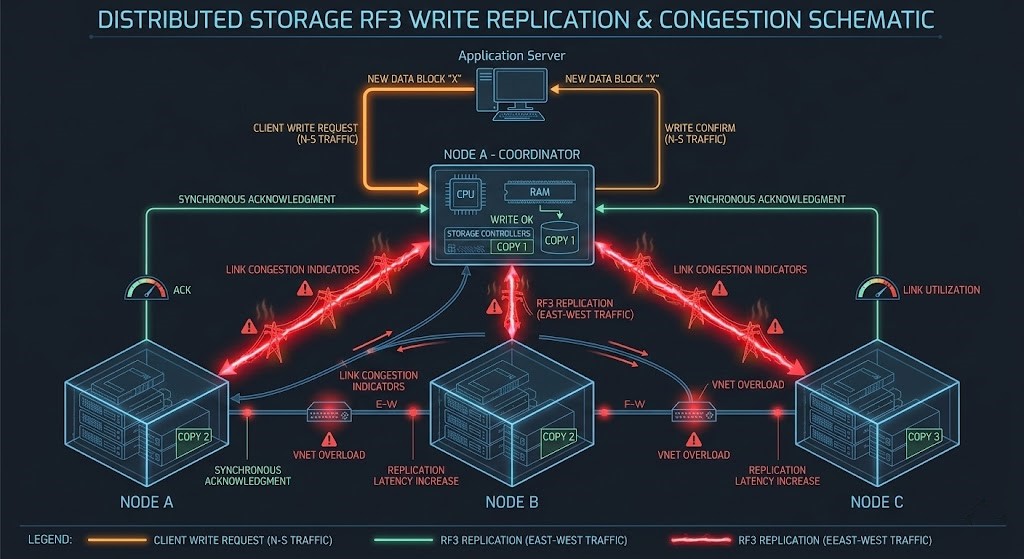
You need to model:
- How replication multiplies writes.
- How much extra bandwidth erasure coding eats.
- How microbursts during rebuilds can hammer the network.
- Where east-west saturation hits.
>_ Engineering Action: If you’re stretching clusters across sites, latency suddenly becomes critical. Use our Metro Latency Monitor to get a handle on inter-site behavior before you go live.
Architectural Deep Dives:
Goal: You’ll design networks that handle replication storms without dropping packets.
Phase 3: Sizing for Failure (N+1 Reality)
Don’t size for everything working perfectly. Size for when things break. If a node goes down:
- Rebuild traffic floods east-west links.
- CPU usage spikes from all the extra work.
- The rest of the nodes take on more load.
- Storage gets shuffled across fewer devices.
It’s not a “maybe.” It’s going to happen—guaranteed, sooner or later.
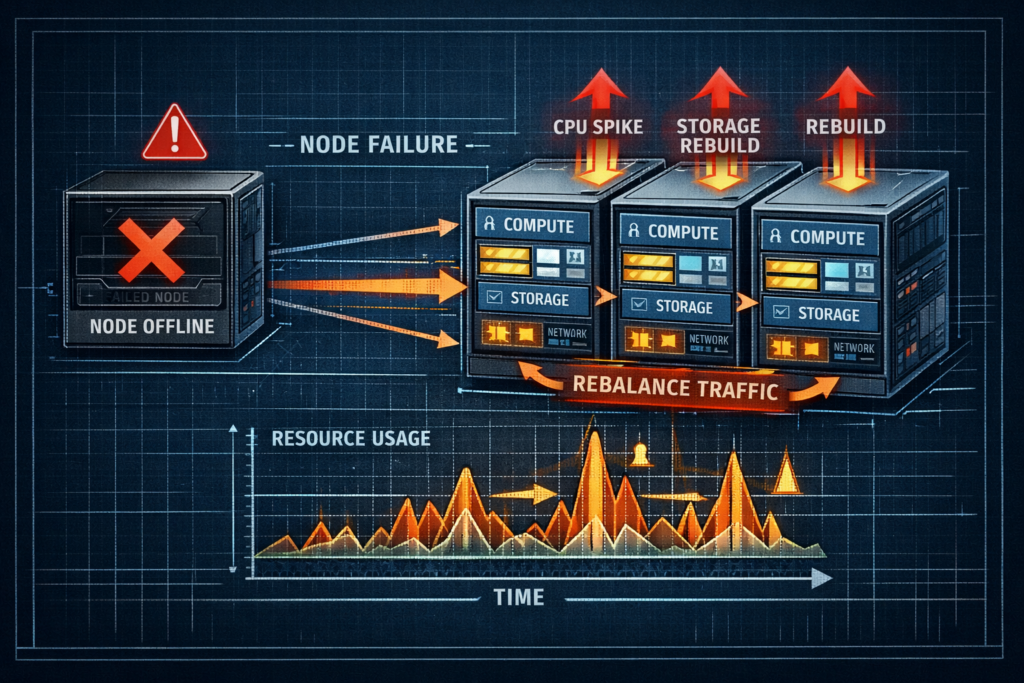
You need to plan for:
- N+1 and N+2 headroom on compute.
- How long rebuilds take when things are busy.
- How write amplification ramps up during failures.
- What happens to capacity in smaller clusters.
Unlike the endless scaling you hear about with public cloud, HCI clusters have hard physical limits.
- Compare: In public cloud, you scale out elastically. In HCI, you’re stuck with physical boundaries and can’t just wish away capacity limits. (See: The Physics of Data Egress: How to Burn $180k in a Weekend)
Goal: You’ll stop clusters from spiraling out of control when a node fails.
Phase 4: Operational Determinism & Upgrade Physics
Vendors love to promise one-click upgrades. Architects know better—upgrades mean:
- Rolling node evacuations.
- Temporary drops in replication factor.
- Firmware dependencies.
- Extra storage rebalancing traffic.
Every upgrade is basically a controlled failure.
You need to plan:
- How to contain the blast radius of upgrades.
- How to keep firmware and hypervisor in sync.
- How to schedule lifecycle management.
- How much buffer you need during rolling maintenance.
Goal: Upgrades become a smooth transition between stable states, not a gamble.
Vendor Implementations Through an Architectural Lens
| Platform | Controller Model | Economic Model | Ideal Use Case |
| VMware vSAN | Kernel-integrated SDS | Core-aligned licensing | Enterprise HCI |
| Nutanix AOS | Controller VM (CVM) | Bundled stack economics | Integrated scale-out clusters |
| Proxmox + Ceph | Distributed open SDS | Open-source + hardware flexibility | Sovereign / cost-sensitive |
The algorithms differ. The physics do not.
Continue the Virtualization Architecture Path
HCI is not an isolated design choice. It intersects directly with:
- Modern Virtualization Learning Path
- Storage Architecture Learning Path
- Networking Architecture Learning Path
- Modern Compute Learning Path
- Performance Modeling Learning Path
- Data Protection & Resiliency Learning Path
Convergence multiplies architectural consequences.
Architect FAQ
Q: What is the difference between data locality and distributed storage?
A: Data locality keeps read I/O on the same node as compute. Distributed storage ensures durability across nodes. HCI attempts to balance both—often with tradeoffs under stress.
Q: How much CPU overhead does an HCI controller require?
A: It depends on workload and replication model, but architects should reserve dedicated cores and memory rather than relying on opportunistic scheduling.
Q: Why is east-west bandwidth critical for HCI?
A: Because every write operation may traverse multiple nodes. Insufficient lateral bandwidth causes write latency amplification and rebuild instability.
Canonical Engineering Resources
For raw implementation detail, architects should always validate marketing claims against primary engineering documentation:
DETERMINISTIC HCI AUDIT
Compute and storage are no longer isolated. Stop guessing at your controller tax, east-west network saturation, and failure rebuild penalties. Run your environment through our deterministic calculators to validate your convergence architecture.
LAUNCH THE ENGINEERING WORKBENCH