Kubernetes ImagePullBackOff: It’s Not the Registry (It’s IAM)
ImagePullBackOffon AKS, EKS, or GKE.- ACR/ECR authentication is intermittently failing.
- The issue magically resolves after a node or pod restart.
- You are attempting cross-subscription or cross-account registry access.
The Lie
By 2026, when your pod hits an ImagePullBackOff, the registry is usually fine. The image tag is there, the repo is up — nothing is wrong on that end.
But your Kubernetes node is leading you on.
ImagePullBackOff is Kubernetes saying “I tried to pull the image, it didn’t work, and now I’m going to wait longer before I try again.” It doesn’t tell you what really happened. The real issue: your token died quietly in the background.
So you burn hours checking Docker Hub, thinking it’s down. Meanwhile, the actual problem is that your node’s IAM role can’t talk to the cloud provider’s authentication service.
This is Part 1 of the Rack2Cloud Diagnostic Series — the Identity Loop. If you haven’t read the strategic overview of how all four loops interact and cascade into each other, start with The Rack2Cloud Method: A Strategic Guide to Kubernetes Day 2 Operations.
What You Think Is Happening
You type kubectl get pods. You see the error and your mind jumps to the usual suspects:
- Maybe the image tag is off — was it v1.2 or v1.2.0?
- Maybe the registry is down
- Maybe Docker Hub is rate-limiting you
But if the registry were down, you’d see connection timeouts. If you are seeing ImagePullBackOff, it usually means the connection worked — but the authentication handshake failed.
What’s Actually Going On
Forget the network. The problem lives in the Credential Provider.
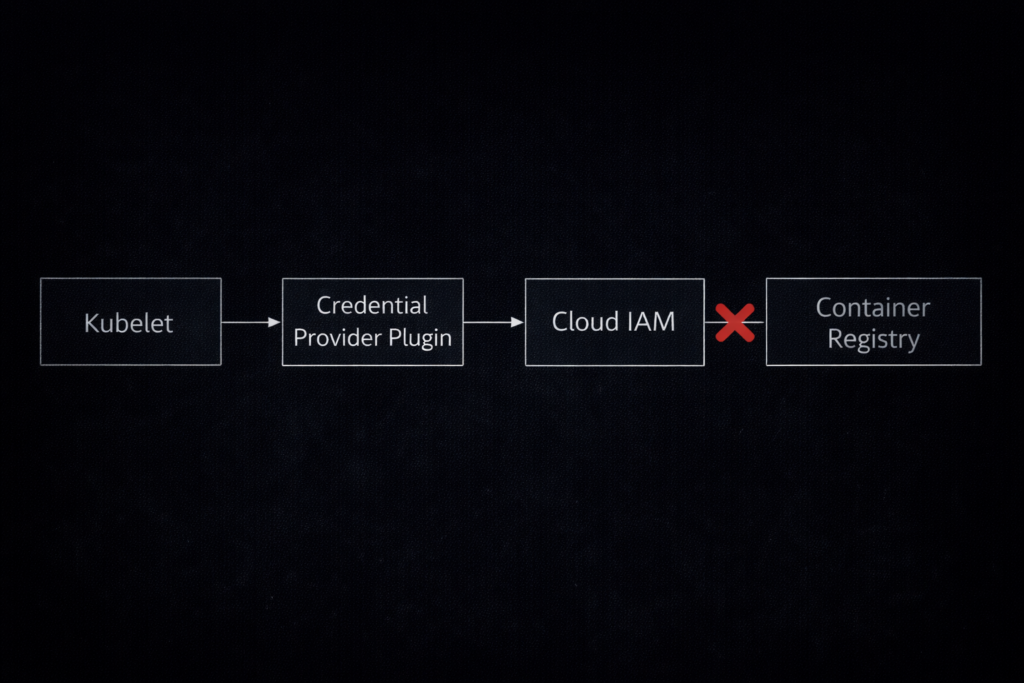
Ever since Kubernetes removed the in-tree cloud providers — the “Great Decoupling” — kubelet doesn’t know how to talk to AWS ECR or Azure ACR by itself. Now it leans on an external helper: the Kubelet Credential Provider.
The four-step cryptographic handshake:
- Request: Kubelet spots your image:
12345.dkr.ecr.us-east-1.amazonaws.com/app:v1 - Exchange: It asks the Credential Provider plugin for a short-lived auth token from the cloud (AWS IAM or Azure Entra ID)
- Validation: The cloud checks if your Node’s IAM Role is legitimate
- Pull: With a valid token, kubelet hands it to the registry
If Step 3 fails — expired token, clock out of sync, instance metadata service down — the registry throws back a 401 Unauthorized. Kubelet sees “pull failed” and gives you the generic error. The registry is innocent.
The identity federation mechanics at play here — specifically OIDC token refresh behavior and what happens when the external identity endpoint becomes unreachable — are the same control plane dependency problem discussed in the Sovereign Infrastructure Strategy Guide. In a sovereign or air-gapped environment, this failure mode becomes permanent rather than transient.
The 5-Minute Diagnostic Protocol
Stop guessing. Here’s how you get to the root of it fast.
Step 1: Look for Real Error Strings
Forget the status column. You want the actual error message.
Bash
kubectl describe pod <pod-name>
Keep an eye out for:
- The Smoking Gun:
rpc error: code = Unknown desc = failed to authorize: failed to fetch anonymous token: unexpected status: 401 UnauthorizedTranslation: “I reached the registry, but my credentials didn’t work.”
- The “No Auth” Error:
no basic auth credentialsTranslation: Kubelet didn’t even try to authenticate—maybe your imagePullSecrets or ServiceAccount setup is missing.
Step 2: Test Node Identity Directly
If kubectl isn’t clear, skip Kubernetes and SSH into the node.You’re likely running containerd (Docker Shim is gone), so skip docker pull. Use crictl instead. (See our guide on Kubernetes Node Density for why containerd matters).
Bash
# SSH into the node
crictl pull <your-registry>/<image>:<tag>
- If
crictlworks: The node’s IAM setup is fine. The problem is in your Kubernetes ServiceAccount or Secret. - If
crictlfails: The node itself is misconfigured—could be IAM or network.
Step 3: Check Containerd Logs
If crictl fails, dig into the runtime logs. That’s where you’ll find the real error details.
Bash
journalctl -u containerd --no-pager | grep -i "failed to pull"
Step 4: Double-Check IAM Policies
Make sure your node’s IAM role really has permission to read from the registry.
- AWS: Look for
ecr:GetAuthorizationTokenandecr:BatchGetImage. - Azure: Make sure the
AcrPullrole is assigned to the Kubelet Identity.
Running Day 2 operations as a system of intersecting control loops is critical for Azure environments. As Petro Kostiuk breaks down in his Azure Edition of the Rack2Cloud Method, when ImagePullBackOff strikes on AKS, you are experiencing a cascading Identity Loop failure.
- The Primitives: Microsoft Entra ID for human access, AKS Workload Identity for pods, Managed Identity for ACR pulls and Azure API access
- The Anti-Pattern: Static secrets for cloud access inside pods
- The Gotcha — Propagation Delay: Azure role assignments (like AcrPull) take up to 10 minutes to propagate. If Terraform just finished, wait — or verify manually:
az aks show -n <cluster> -g <rg> --query "identityProfile.kubeletidentity.clientId" - The Day 2 Rule: Identity must be ephemeral, scoped, and auditable.
Cloud-Specific Headaches
AWS EKS: The Instance Profile Trap
Random 401s on some nodes but not others. The cause: the node’s Instance Profile is missing the AmazonEC2ContainerRegistryReadOnly policy. The fix: attach it. The reason it’s intermittent: not all node groups inherit the same instance profile, especially after autoscaler-provisioned nodes launch from a different launch template.
Azure AKS: Propagation Delay
Cluster spins up with Terraform, deploy immediately, it fails. The cause: Azure role assignments (AcrPull) take up to 10 minutes to propagate globally. The fix: wait, or verify the identity manually:
Bash
az aks show -n <cluster> -g <rg> --query "identityProfile.kubeletidentity.clientId"Google GKE: Scope Mismatch
You’re sure the Service Account is right, but you still get 403 Forbidden.
- The Cause: If the VM was made with the default Access Scopes (Storage Read Only), it literally can’t talk to the Artifact Registry API.
- The Fix: You need Workload Identity, or you need to recreate the node pool with the
cloud-platformscope.
The 2026 Failure Pattern: Token TTL & Clock Drift
Service Account looks right but you still get 403 Forbidden. The cause: if the VM was created with default Access Scopes (Storage Read Only), it cannot reach the Artifact Registry API regardless of IAM. The fix: Workload Identity, or recreate the node pool with the cloud-platform scope.
The 2026 Failure Pattern: Token TTL and Clock Drift
This is where senior engineers get blindsided. Cloud credentials have short lifetimes by design:
- AWS EKS: tokens expire every 12 hours
- GCP: metadata tokens expire every 1 hour
If your node’s clock drifts — NTP broke, or the Instance Metadata Service gets saturated — kubelet cannot refresh the token. A node that has been healthy for 12 hours suddenly starts rejecting new pods with ImagePullBackOff. The cluster looks fine. The IAM policies haven’t changed. The problem is time.
Monitor node-problem-detector for NTP and IMDS health. Clock drift is a control plane problem — the same reason time authority is treated as a sovereign infrastructure concern in air-gapped environments. See the Sovereign Infrastructure Strategy Guide for the full time authority failure mode analysis.
The Private Networking Trap
If IAM is confirmed clean but pulls still fail, the problem is network — specifically a misconfigured VPC Endpoint policy silently dropping registry traffic.
For environments using AWS PrivateLink or Azure Private Endpoints, a policy gap doesn’t produce a connection error — it just times out. The Azure Private Endpoint Auditor surfaces these silent drops for Azure-hosted workloads before they surface as 3 AM ImagePullBackOff incidents.
The test that disambiguates network vs IAM in 30 seconds:
Bash
curl -v https://<your-registry-endpoint>/v2/
- Hangs / Timeout: Networking issue — Security Group or PrivateLink missing
- 401 Unauthorized: IAM issue — network is fine, auth is wrong
- 200 OK: The repo exists — you likely have a typo in the image tag
Production Hardening Checklist
Don’t just fix it. Proof it.
docker pull tests a different runtime than your cluster is using. Use crictl pull on the node directly — it’s the only result that actually matters.Final Thought
ImagePullBackOff is rarely a Docker problem. It is almost always an Identity problem. If you are debugging this by staring at the Docker Hub UI, you are looking at the wrong map.
Stop checking the destination. Start auditing the handshake.
Continue to Part 2: Your Cluster Isn’t Out of CPU — The Scheduler Is Stuck, where the same pattern — a symptom in one loop caused by a failure in another — plays out in the Compute Loop.
Master the Day-2 operations of Kubernetes by diagnosing the foundational failures the documentation doesn’t cover.
Stop Chasing Symptoms. Start Auditing the Handshake.
The complete Kubernetes Day 2 Diagnostic Playbook covers all four loop failure protocols — IAM handshake tracing, Scheduler physics, MTU path validation, and Data Gravity — in a single offline reference. Includes Petro Kostiuk’s Azure Day 2 Readiness Checklist.
↓ Download The Kubernetes Day 2 Diagnostic PlaybookAdditional Resources
Editorial Integrity & Security Protocol
This technical deep-dive adheres to the Rack2Cloud Deterministic Integrity Standard. All benchmarks and security audits are derived from zero-trust validation protocols within our isolated lab environments. No vendor influence.

R.M.
Senior Solutions Architect with 25+ years of experience in HCI, cloud strategy, and data resilience. As the lead behind Rack2Cloud, I focus on lab-verified guidance for complex enterprise transitions. View Credentials →
Get the Playbooks Vendors Won’t Publish
Field-tested blueprints for migration, HCI, sovereign infrastructure, and AI architecture. Real failure-mode analysis. No marketing filler. Delivered weekly.
Select your infrastructure paths. Receive field-tested blueprints direct to your inbox.
- > Virtualization & Migration Physics
- > Cloud Strategy & Egress Math
- > Data Protection & RTO Reality
- > AI Infrastructure & GPU Fabric
Zero spam. Includes The Dispatch weekly drop.
Need Architectural Guidance?
Unbiased infrastructure audit for your migration, cloud strategy, or HCI transition.
>_ Request Triage Session