

The “Lift-and-Shift” Lie: Why “Like-for-Like” Architectures Fail in a Post-Broadcom World
A VMware to HCI migration strategy built on “keep it exactly the same” is how 60% of virtualization migrations fail to meet their ROI targets. The Board approved the budget, you selected your destination — Nutanix AHV, maybe Proxmox — and the mandate came down: “Just move everything over.”
That sentence—“Just move everything over”—is why 60% of virtualization migrations are currently failing to meet their ROI targets.
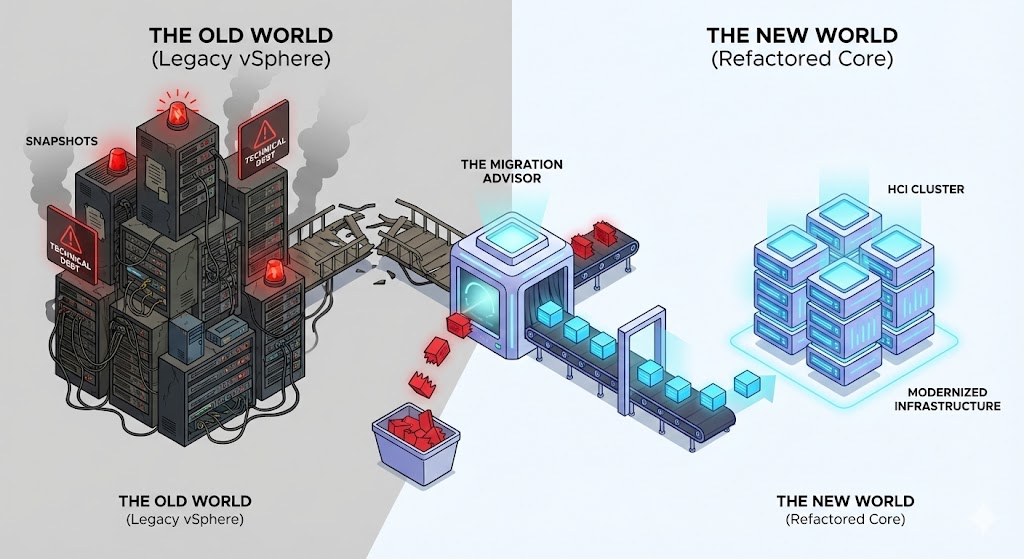
I recently audited a Fortune 500 retailer that was six months behind on their VMware exit. They treated Nutanix AHV exactly like vSphere. They mapped every ESXi host to an equivalent AHV node. They tried to recreate every NSX-T security tag manually. They essentially spent millions of dollars to build a “worse vCenter.”
In 2026, we have to stop treating these migrations as a copy-paste exercise. It is a refactoring event. If you lift-and-shift your legacy technical debt onto a modern HCI platform, you aren’t modernizing—you’re just moving your trash to a more expensive house.
The “Density Paradox”: Why 1:1 Compute Mapping Fails
The first mistake architects make is sizing the new environment based on the hardware of the old one, rather than the workload.
The Trap: “We have 50 ESXi hosts with 64 cores each. Therefore, we need 50 AHV nodes with 64 cores each.”
The Reality: Your old ESXi hosts were likely 30% over-provisioned to account for “vSphere bloat” and inefficient schedulers. Modern HCI stacks (like Nutanix) handle I/O data locality differently.
- Optimization: Don’t map cores. Map effective IOPS and RAM working sets.
- The Fix: If you simply replicate your old cluster count, you will overspend on licensing by ~40%.
The “Dirty Data” Problem: Migrating Garbage
The single biggest cause of failed cutovers isn’t the hypervisor compatibility—it’s the state of your VMs.
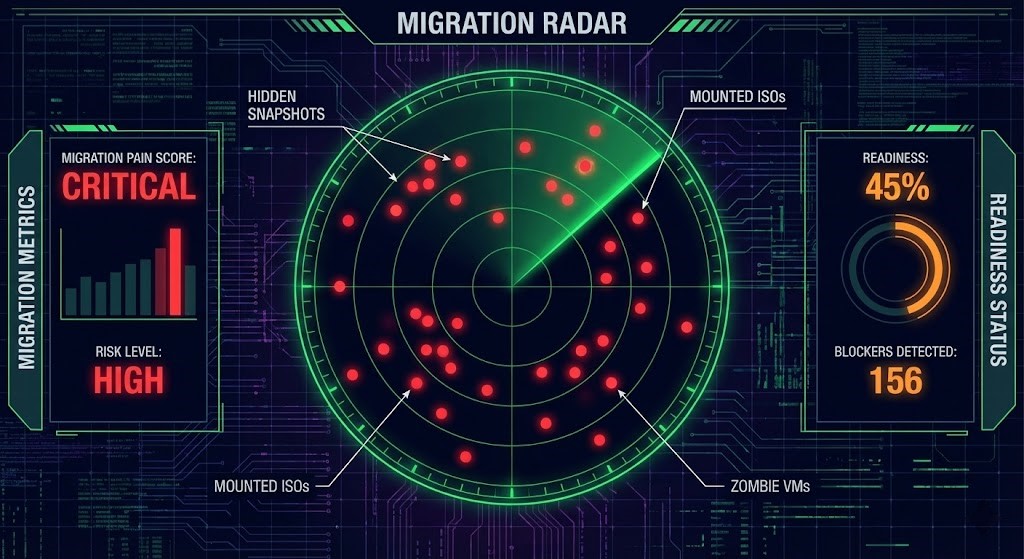
When you trigger a bulk migration (using Nutanix Move or similar tools), the migration engine expects a clean state. It does not expect:
- Snapshot Chains: VMs running on a 2-year-old snapshot delta.
- Mounted ISOs: A Linux VM with a locked install ISO from 2024.
- Zombie VMs: Powered-off machines that haven’t been touched in 18 months but are still consuming storage credits.
The “War Story”: We had a cutover scheduled for a Sunday night. 400 production VMs. At 2:00 AM, the migration batch failed. Why? Because 15 critical database servers had mounted ISOs from a previous patch cycle, causing the hypervisor lock to reject the snapshot request. We spent the next 4 hours manually unmounting disks while the CIO watched over our shoulders.
The Solution: Audit Before You Move You cannot rely on vCenter’s “Health” badge. It lies. You need a forensic audit of the internal VM state.
We built the HCI Migration Advisor specifically for this “Pre-Flight” check.
- What it does: It ingests your RVTools export and flags every “migration blocker” (snapshots, ISOs, Zombies) that native tools miss.
- The Output: A Migration Pain Score. If your score is above 50, do not schedule the truck roll. You aren’t ready.
- The Win: Run the remediation scripts before you start the migration tool. Clean the environment, then move it.
Before the pre-flight audit runs, there is a prior problem: most VMware estates cannot accurately reconstruct their own dependency surface from configuration state alone. Snapshot chains and zombie VMs show up in the audit because they are visible artifacts. The licensing dependencies, integration authorities, and behavioral assumptions that VMware accumulated over a decade are not — they are invisible until something tries to cross the platform boundary and fails. VMware Licensing Pressure Created a Dependency Audit Problem maps why that dependency surface becomes unrecoverable once the migration is in motion.
The pre-flight audit surfaces the technical blockers. The harder problem is the operating model assumptions that pass the audit cleanly and break anyway — not because the environment was dirty, but because the assumptions about how the new platform behaves were wrong. The Proxmox Migration Assumptions That Break at Cutover documents where those assumptions fail on the Proxmox path.
The Network Trap: NSX-T vs. Native Flow
The second biggest failure point is networking. Broadcom’s NSX-T is a complex, overlay-heavy beast. Trying to rebuild that logic line-by-line in Nutanix Flow or standard VLANs is a fool’s errand.
The Decision:
- Stop Translating: Do not try to replicate every “Security Group.”
- Start Refactoring: Ask, “What is the intent of this rule?”
- Old: “Allow SG-Web to SG-App over Port 443.”
- New: “Category: Web talks to Category: App.”
If you are drowning in firewall rules, use the NSX-T to Flow Translator to interpret the intent of your legacy policy and map it to a modern, category-based model. Do not migrate rules that haven’t been hit in 180 days. Leave them behind.
Architect’s Verdict
A VMware to HCI migration strategy only succeeds when you treat it as a refactoring event, not a file transfer. You are standing at a cliff. You can build a bridge to a better architecture, or you can jump with a backpack full of rocks.
The lift-and-shift approach migrates your zombies, your snapshot chains, and your any/any firewall rules. You pay the Broadcom Tax and the Migration Tax. The refactored approach audits usage, sanitizes state, and simplifies policy — you arrive on the new platform leaner, faster, and cheaper.
Before you migrate a single VM, audit your debt.
Additional Resources:
Editorial Integrity & Security Protocol
This technical deep-dive adheres to the Rack2Cloud Deterministic Integrity Standard. All benchmarks and security audits are derived from zero-trust validation protocols within our isolated lab environments. No vendor influence.

R.M.
Senior Solutions Architect with 25+ years of experience in HCI, cloud strategy, and data resilience. As the lead behind Rack2Cloud, I focus on lab-verified guidance for complex enterprise transitions. View Credentials →
Get the Playbooks Vendors Won’t Publish
Choose the architecture problems you care about. Get field-tested playbooks and frameworks delivered to your inbox.
- > AI Infrastructure & Inference Economics
- > Cloud Strategy & Hidden Cost Models
- > Virtualization & Deterministic Migration
- > Kubernetes, IaC & Modern Infrastructure
- > Data Protection & Recovery Engineering
Zero spam. Includes The Dispatch weekly drop.
Need Architectural Guidance?
Independent review before major infrastructure decisions.
- > Validate assumptions
- > Identify hidden dependencies
- > Quantify migration risk
- > Challenge vendor narratives
Triage · Advisory · Fractional · Direct Hire