Azure Management Groups vs. Subscriptions: Where Should Policy Live?
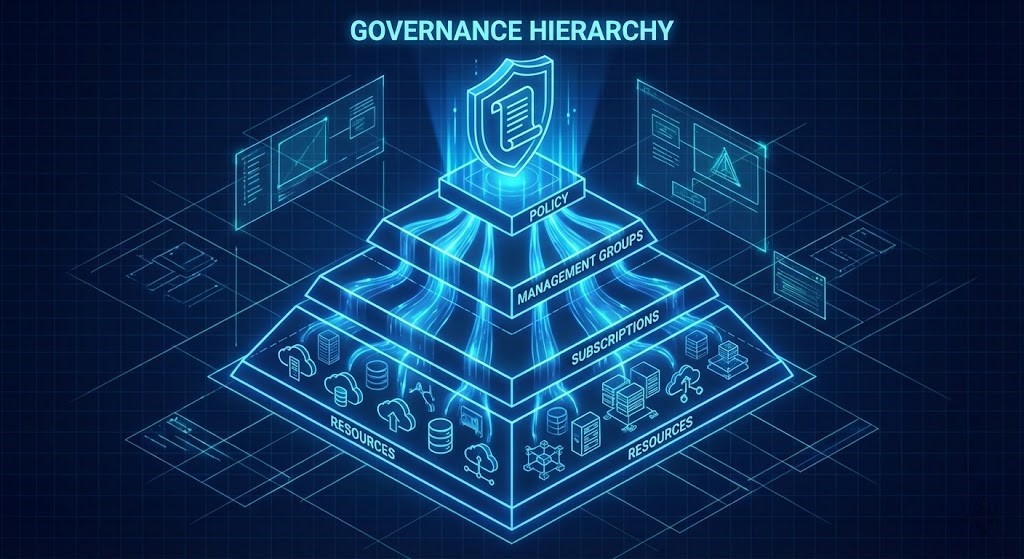
Azure Management Groups vs. Subscriptions is not an academic debate — it is the governance decision that will either save your operations team or quietly bury them in manual remediation work. I once audited an Azure tenant for a mid-sized enterprise that had grown through acquisition. They had 65 subscriptions and zero Management Groups. When I asked how they enforced their “US Regions Only” rule, they proudly showed me a spreadsheet listing 65 separate Azure Policy assignments, one for every single subscription.
When they needed to expand to Europe, it took three engineers a solid week to update, test, and validate policy changes across the board. It was pure, unadulterated operational friction.
The fundamental misunderstanding wasn’t what Azure Policy does, but where it should live. If you are assigning policies at the subscription level, you aren’t architecting — you’re creating future technical debt. This is the same governance logic that underpins the Azure Landing Zone vs. AWS Control Tower comparison: the question is always where control lives in the hierarchy, not just whether it exists.
Azure Management Groups vs. Subscriptions: The Cascade of Power
Think of Azure’s hierarchy like a corporate organizational chart.
- Tenant Root Group: The CEO.
- Management Groups: The VP / Division level (e.g., “Production,” “Non-Prod,” “Legacy Acquisitions”).
- Subscriptions: The specific Department or Cost Center.
- Resource Groups: The filing cabinets.
- Resources: The files.
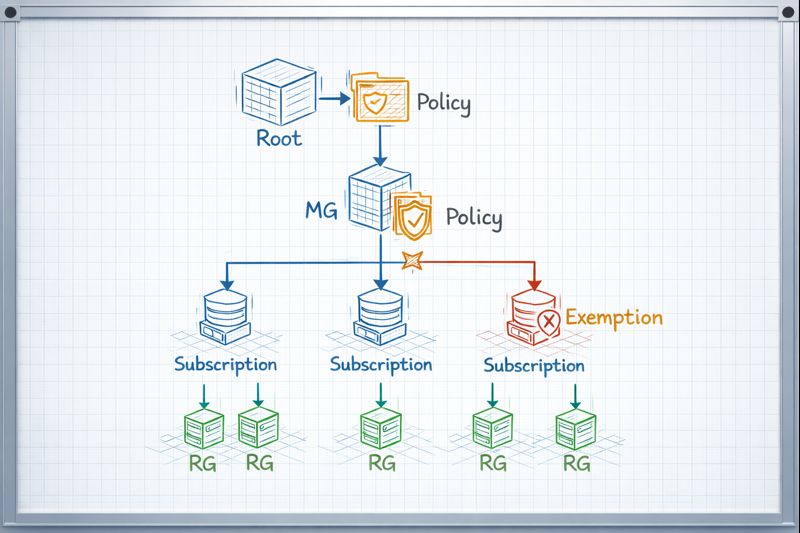
If the CEO issues a mandate—”No one flies First Class”—they don’t send an individual memo to every single employee. They issue the policy once at the top, and it inherits down through every division and department automatically.
In Azure, if you assign an “Allowed Locations” policy to a “Production” Management Group, every current and future subscription placed inside that group automatically inherits that rule. You do it once.
graph TD
    Root[Tenant Root Group] --> ProdMG[Production Management Group]
    Root --> NonProdMG[Non-Prod Management Group]
    ProdMG -- Policy: 'Deny-Public-IP' Applied Here --> SubA[Subscription A (ERP)]
    ProdMG --> SubB[Subscription B (Web App)]
    SubA --> RG1[Resource Group 1]
    RG1 -- Policy Inherited --> VM1[Virtual Machine]
The Battle: Where to Assign?
Here is the framework I use to decide where a policy assignment belongs. The Azure Management Groups vs. Subscriptions decision maps directly to operational overhead — get it wrong and you pay the tax on every future change.
| Feature | Management Group Scope | Subscription Scope | Resource Group Scope |
| Use Case | Global Governance. Rules that apply to everyone (e.g., Tagging standards, Allowed Regions, Security benchmarks). | Specific Workload Rules. Exceptions or unique requirements for a single billing unit (e.g., PCI compliance for a payment app). | Testing/Sandbox. Very rare in production. Usually for temporary testing of a policy. |
| Operational Overhead | Low. Assign once, govern many. | High. Must repeat assignment for every new subscription. | Extreme. Unmanageable at scale. |
| Inheritance | Flows down to all Subscriptions and RGs beneath it. | Flows down to all RGs beneath it. | Flows down to resources inside it. |
| Exemptions | Can be overridden by explicit exemptions at lower levels. | Can be overridden by exemptions at RG level. | N/A |
The pattern is consistent with how Azure Governance Needs More Unix: The BSD Jail Pattern for Landing Zones frames the same problem — the goal is constrained inheritance, not flat assignment.
Day 2 Operations: CapEx vs. OpEx
While Azure Policy itself has no direct CapEx cost, the placement of those policies dictates your OpEx. This is where the Azure Management Groups vs. Subscriptions debate becomes a financial one.
Subscription-Level Sprawl (High OpEx): Every new subscription requires manual setup or complex automation scripts to apply baseline policies. Auditing requires scanning dozens of separate scopes. Remediation requires touching each subscription independently. At 65 subscriptions, the operational cost compounds with every team that provisions infrastructure.
Management Group Hierarchy (Low OpEx): Landing Zones are automatically governed the moment a subscription is dropped into the correct Management Group. Day 2 operations are significantly leaner because the governance structure exists independent of the workloads. The policy is in the container, not the content.
For teams running Zero-Trust Azure Architecture, the Management Group model is the prerequisite — you cannot enforce a consistent zero-trust posture if policy assignment is scattered across subscription-level silos. The same principle applies when modeling Azure Private Endpoint DNS Issues — governance scope determines where remediation policies can fire.
The connection to cost architecture is direct. Governance sprawl is one of the least-discussed contributors to cloud cost overruns — see Cloud Cost Is Now an Architectural Constraint for the FinOps framing.
Architect’s Verdict
Stop treating subscriptions as islands. In the Azure Management Groups vs. Subscriptions decision, Management Groups win for 90% of enterprise use cases — specifically for any guardrail that applies universally, including tagging standards, allowed regions, VM SKU restrictions, and security benchmarks.
Develop a Management Group hierarchy aligned with your business archetypes — environment type, regulatory classification, risk tier — not your org chart. Apply broad policies high up. Reserve Subscription-level assignments for specific exceptions or unique workload requirements that genuinely don’t fit the broader mold. Reserve Resource Group scope for temporary testing only.
The goal is governance that scales without engineers. If adding a new subscription requires a human to manually apply 12 policy assignments, the architecture has already failed.
Additional Resources
Editorial Integrity & Security Protocol
This technical deep-dive adheres to the Rack2Cloud Deterministic Integrity Standard. All benchmarks and security audits are derived from zero-trust validation protocols within our isolated lab environments. No vendor influence.

R.M.
Senior Solutions Architect with 25+ years of experience in HCI, cloud strategy, and data resilience. As the lead behind Rack2Cloud, I focus on lab-verified guidance for complex enterprise transitions. View Credentials →
Get the Playbooks Vendors Won’t Publish
Field-tested blueprints for migration, HCI, sovereign infrastructure, and AI architecture. Real failure-mode analysis. No marketing filler. Delivered weekly.
Select your infrastructure paths. Receive field-tested blueprints direct to your inbox.
- > Virtualization & Migration Physics
- > Cloud Strategy & Egress Math
- > Data Protection & RTO Reality
- > AI Infrastructure & GPU Fabric
Zero spam. Includes The Dispatch weekly drop.
Architecture Audit Services
Fixed-scope audits for Zero-Trust Azure, VMware migration readiness, and recovery posture — no discovery call required to start.
>_ View Audit Services>_Related Posts
Your Kubernetes Cluster Isn’t Out of CPU — The Scheduler Is Stuck
Compute Tier 1 Authority Cascades to ➔ >_ Architect’s Brief 60-second read before you commit to the full post · Full post: 9 min Generating brief… [Storage] [Network] 🚨 Failure Signature Detected Grafana shows cluster CPU utilization is under 50%, but pods are stuck in Pending. Events show: 0/10 nodes are available: 10 Insufficient cpu….
Your Identity System Is Your Biggest Single Point of Failure
Part 2 of the Rack2Cloud’s Cloud Fragility Series >_ Cloud Fragility Series 01 Multi-Cloud Cascading Failure Risks 02 Your Identity System Is Your Biggest Single Point of Failure [CURRENT] 03 Vendor Lock-In Happens Through Networking — Not APIs 04 Your Cloud Bill Quietly Increased in 2026 — Here’s Where the Money Is Actually Going >_…
Your Identity Provider Was Never Your Spend Boundary
Every enterprise cloud governance program assumes a spend boundary sits somewhere between identity and money — a checkpoint that catches compromised access before it becomes compromised spend. It doesn’t exist. Not as a distinct control. Not as a separate policy layer. Not anywhere in the architecture most organizations have actually built. >_ Architect’s Brief 60-second…
Your Identity Controls Passed. Your Authorization Chain Failed.
A credential chain functioned exactly as it was designed to. No firewall failed. No exploit executed. No malware bypassed a control. A red team walked past physical and social barriers using nothing more exotic than a plausible pretext, and came out the other side holding network admin credentials — issued correctly, authorized correctly, working exactly…
Your DR Test Passed. The Assumptions Didn’t.
DR plan failure rarely happens where you tested. It happens at the assumptions the exercise never reached — the dependencies that weren’t in scope, the runbook written for last year’s architecture, the authority chain nobody tested at 2am.
Your Cloud Provider Is Not Your HA Strategy
A Tactical Playbook for Architecting, Testing, and Automating Real Multi-Cloud & Multi-Region Resilience We’ve previously explored why cloud SLAs fail as guarantees in our deep dive, Cloud SLA Failure & Resilience Strategy. This article focuses on how to survive those failures in practice — architecturally, operationally, and financially. >_ Architect’s Brief 60-second read before you…