

Immutability Is Not a Strategy: Engineering Recovery Silos for Ransomware Survival

“Immutability” is a feature flag. Survival is an architecture.
I watched a company with perfect “Object Lock” backups lose everything because they managed their production cluster and their backup vault through the same Single Sign-On (SSO) provider. The attacker didn’t break the AES-256 encryption. They just hijacked the admin session, reset the retention policy, and deleted the keys.
If your backup console and your production environment share the same root of trust, you don’t have an air gap. You have a single point of failure with a “WORM” sticker on it.
We need to stop buying “immutable” checkboxes and start engineering Recovery Silos. Here is how to build an architecture that actually survives a compromised admin credential.
The Fallacy of the “Immutable” Checkbox
In the architect’s world, we often confuse “durability” with “recoverability.” Standard immutable storage (like S3 Object Lock or Azure Blob WORM) is great for compliance. It stops accidental deletion.
But in a targeted attack, the management plane is the target.
I argue that true immutability requires a hard decoupling of the backup source and the recovery silo. You need a “Pull” architecture. The recovery silo should live in its own sovereign cloud account or physical cage. It reaches out, grabs the data, and then “slams the door” (shuts down the network interface).
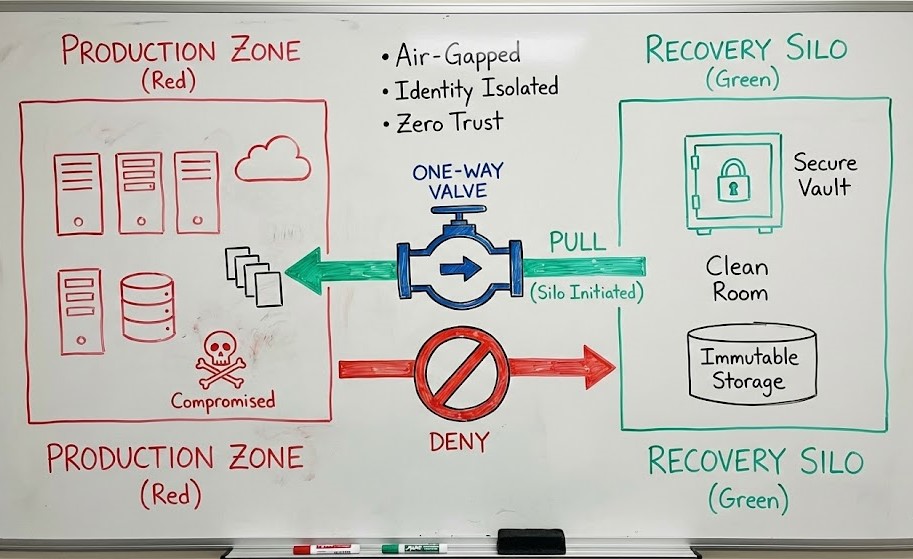
If you are currently “Pushing” backups from Prod to a Vault, you have built a highway for ransomware to travel on.
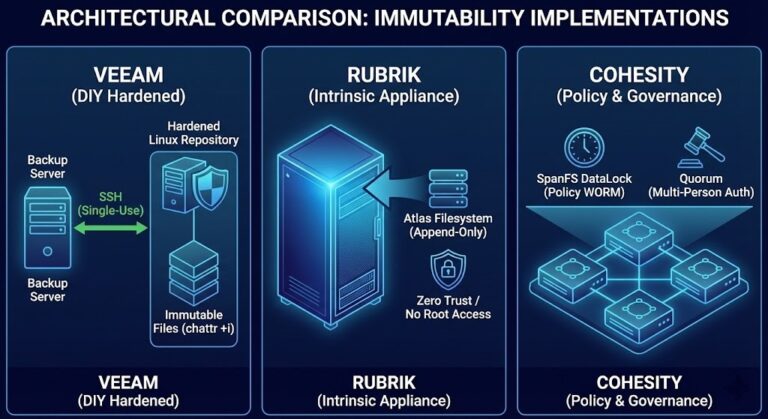
Architectural Decision Matrix: Feature vs. Silo
| Feature | Standard S3/Blob Object Lock | Hardened Linux Repository (XFS) | Managed Recovery Silo (Vault) |
| Governance Mode | Yes (Soft Policy) | No (Root access risk) | Yes (Dual-Key Authorization) |
| Identity Isolation | Shared IAM/AD | Local Auth | Out-of-Band (OOB) Identity |
| RTO Capability | Slow (Restore needed) | Fast (Mountable) | Immediate (Clean Room) |
| Connectivity | Persistent / Direct | Persistent | Ephemeral / Pull-Only |
Operationalizing the Silo: Day 2 Operations
Defining the silo is easy; running it is hard. This is the “So What Now?” gap where most architectures fail. A silo isn’t just a bucket; it’s a living, breathing operational environment.
Here is how I operationalize a “Good” silo using Rack2Cloud’s Deterministic Principles.
1. Identity Scoping & Zero-Trust Access
Stop using Active Directory for your backup infrastructure. I’ve seen entire enterprises fall because the backup server was domain-joined.
- The Pattern: Your recovery silo should exist on a completely separate Identity Provider (IdP). We often recommend that if you use Entra ID for Prod, you utilize a separate tenant, Okta, or local hardware-backed auth for the Silo.
- The Protocol: Implement Dual-Party Authorization (DPA) for any retention changes. Admin A initiates; Admin B (who is not in the same reporting structure) approves via a physical hardware key (e.g., YubiKey).
2. The “Clean Room” Requirement
If you have 500TB of data and your only plan is “Restore to Production,” failure becomes the default outcome.
When ransomware strikes, your production environment is a crime scene.
You cannot restore data there until forensics is complete. Therefore, the Silo must have its own compute.
- The Strategy: Automate a “Sandbox Mount.”
- The Operation: Every night, the silo should spin up a micro-VM, mount the latest immutable snapshot, and scan the filesystem for high-entropy (encrypted) files. This validates that the data inside the lock isn’t already encrypted.
Financial Analysis: The Cost of Being “Right”
We need to talk about the Hidden Tax of Immutability. Engineering a proper silo is not free.
- CapEx Considerations: You are essentially building a secondary, miniature data center (or a dedicated Cloud AWS Account with reserved compute). This requires redundant networking and compute resources for the “Clean Room” validation processes.
- OpEx Implications: Licensing for “Premium” security features in tools like Veeam or Rubrik can add a 20-30% markup.
The Trade-off: Compare this OpEx against the $4.45M average cost of a data breach (IBM 2024 Report). At scale, every hour shaved off recovery time is worth more than the entire annual storage bill. The ROI on a silo isn’t found in “savings”—it’s found in the “avoidance of catastrophic business failure.”
Conclusion: Build for the Worst Day
Don’t buy a feature; engineer a fortress. A recovery silo is a living entity that requires continuous testing.
If you haven’t performed a “Clean Room” recovery test this quarter—where you spin up a critical app inside the isolated environment—your immutability is a theory, not a fact.
Would you like me to draft a 5-step technical validation checklist for your current backup management plane to identify “identity leaks” between Prod and Backup?
External Research
- NIST SP 800-209: Security Guidelines for Storage Infrastructure
- AWS Documentation: Using S3 Object Lock & Compliance Mode
- Sheltered Harbor: Financial Sector Resilience Standards
Editorial Integrity & Security Protocol
This technical deep-dive adheres to the Rack2Cloud Deterministic Integrity Standard. All benchmarks and security audits are derived from zero-trust validation protocols within our isolated lab environments. No vendor influence.

R.M.
Senior Solutions Architect with 25+ years of experience in HCI, cloud strategy, and data resilience. As the lead behind Rack2Cloud, I focus on lab-verified guidance for complex enterprise transitions. View Credentials →
Get the Playbooks Vendors Won’t Publish
Field-tested blueprints for migration, HCI, sovereign infrastructure, and AI architecture. Real failure-mode analysis. No marketing filler. Delivered weekly.
Select your infrastructure paths. Receive field-tested blueprints direct to your inbox.
- > Virtualization & Migration Physics
- > Cloud Strategy & Egress Math
- > Data Protection & RTO Reality
- > AI Infrastructure & GPU Fabric
Zero spam. Includes The Dispatch weekly drop.
Need Architectural Guidance?
Unbiased infrastructure audit for your migration, cloud strategy, or HCI transition.
>_ Request Triage Session