

COMPUTE ARCHITECTURE PATH
MODERN COMPUTE, CPU TOPOLOGIES, AND PERFORMANCE ENGINEERING.
Why Compute Architecture Matters
Compute is where software actually hits the hardware — the main stage for execution.
When you misjudge CPU layout, memory placement, or how your workloads get scheduled, your whole infrastructure turns unpredictable. You start fighting for resources, latency goes haywire, and scaling just makes things shakier.
This learning path cuts through the noise. You’ll learn how to build compute environments that behave predictably — whether you’re working with bare-metal, virtual machines, hyperconverged setups, or in a hybrid cloud.
Who This Path Is Designed For
This is for people stepping up from running systems to engineering for real performance:
- Infrastructure and Systems Engineers who run hardware and clusters.
- Platform and SRE Engineers squeezing out more compute and hunting down failures.
- Architects and Consultants designing dense clusters that need to stay fast and steady.
Note: You’ll need to already know your way around hardware and have some virtualization basics before starting this path.
The 4 Phases of Compute Architecture Mastery
Phase 1: CPU & Memory Topology — Execution Physics
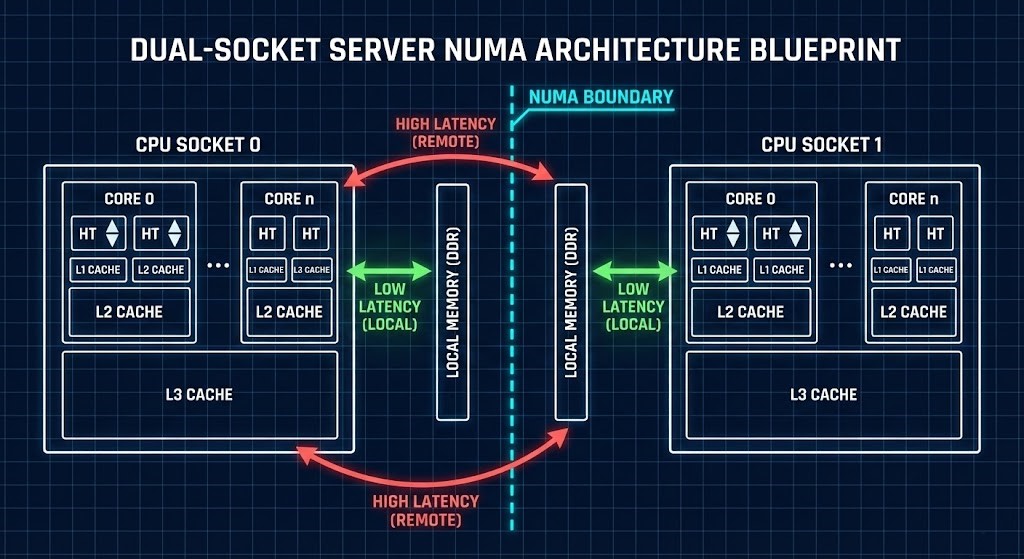
Everything starts at the CPU socket. Modern CPUs aren’t all the same. You’re dealing with multiple cores, threads, layers of cache, NUMA boundaries, and tricky scheduling.
You need to know:
- NUMA and how it splits memory.
- How L1/L2/L3 caches really work.
- What hyperthreading does to workloads.
- Core-to-core latency.
- When memory bandwidth gets maxed out.
- The real differences between ARM and x86.
Your win: You’ll be able to predict how your workloads perform before you ever hit “deploy.”
Phase 2: Virtual Compute & Scheduling Determinism
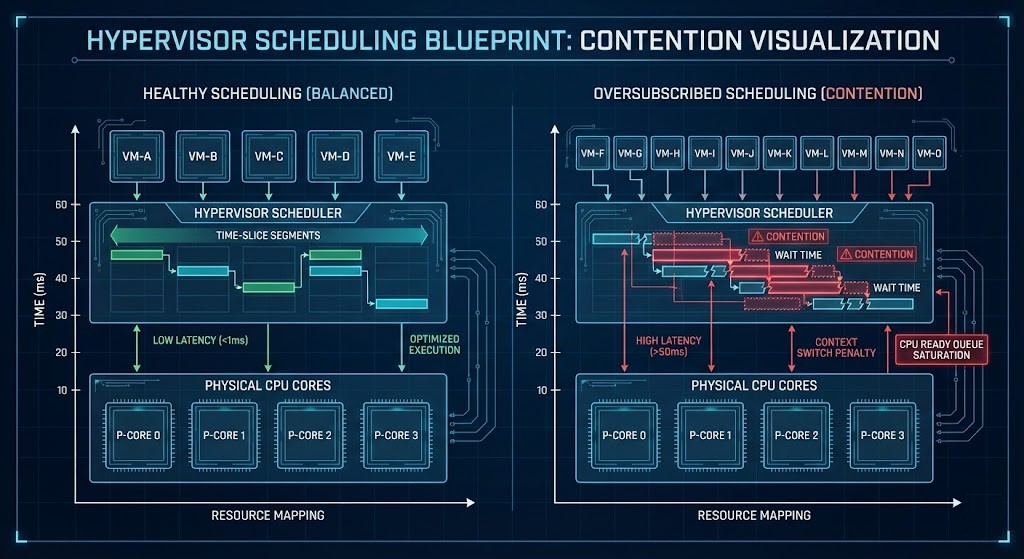
Once you go virtual, the hypervisor’s in charge. While you can dive deep into how these abstraction layers actually manage resources in our Modern Virtualization Learning Path, the rule remains the same: whether you’re using VMware vSphere, Nutanix AHV, or KVM, the underlying CPU physics don’t change — just the way control happens.
Schedulers decide:
- How CPU time is split up.
- Which virtual CPUs map to physical ones.
- Where contention hits.
- How memory ballooning plays out.
- Oversubscription and when it gets risky.
>_ Deep Dive Spoke: Stop guessing why your VMs are stuttering. Read our definitive guide: CPU Ready vs CPU Wait: Why Your Cluster Looks Fine But Feels Slow.
Workbench Tool:
- HCI Migration Advisor: Changing your hypervisor requires knowing your exact hardware and snapshot constraints. Run automated readiness checks for vSphere to AHV migrations before you move a single workload.
Your win: No more noisy neighbors. No more surprise contention.
Phase 3: High-Density & Distributed Compute Under Stress
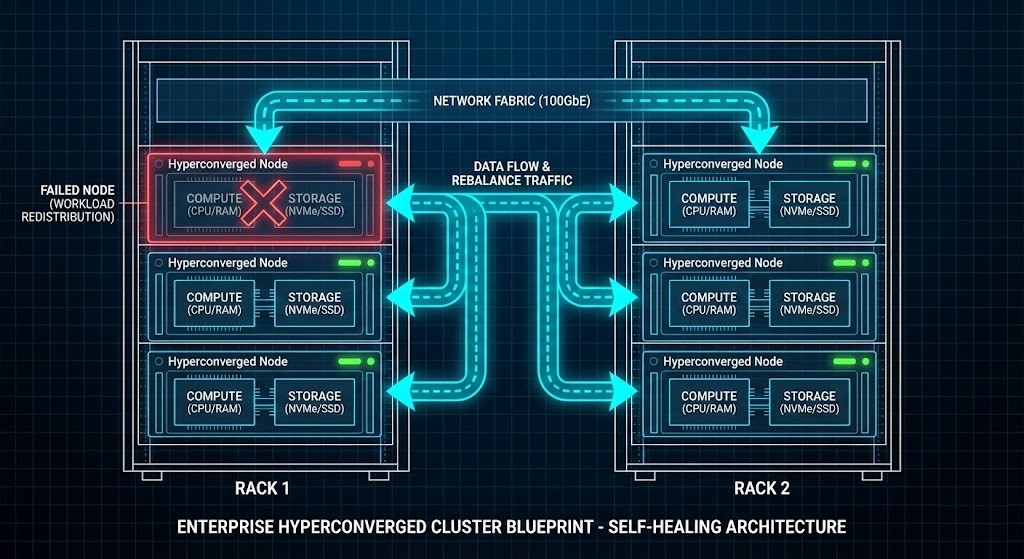
Most compute lives in a crowd — clusters, hyperconverged platforms, distributed systems. Packing more compute in makes you more efficient, but you have to manage bigger risks.
You’ll learn how to model:
- How compute and storage couple up in HCI.
- Where your data actually lives in scale-out setups.
- Latency between nodes.
- How to keep failure domains tight.
- How rack-level outages can spread.
>_ Deep Dive Spoke: Master the physics of distributed voting and cluster survival in our technical fix: Proxmox 2-Node Quorum & HA Architecture Fix.
Workbench Tool:
- Metro Latency Monitor: Distributed compute lives and dies by network physics. Validate your exact RTT thresholds to ensure Nutanix Metro Availability stability across failure domains.
The result: Your clusters scale up without spinning out of control.
Phase 4: Operational & Autonomous Compute
The real test is in production. As you mature, your compute goes from reactive to self-managing.
Day-2 operations mean:
- Baseline telemetry and performance.
- Spotting anomalies before they blow up.
- Firmware upgrades that don’t cause chaos.
- Rotating hardware without downtime.
- Capacity forecasting so you’re never caught short.
Your outcome: Compute that stabilizes itself, not just reacts.
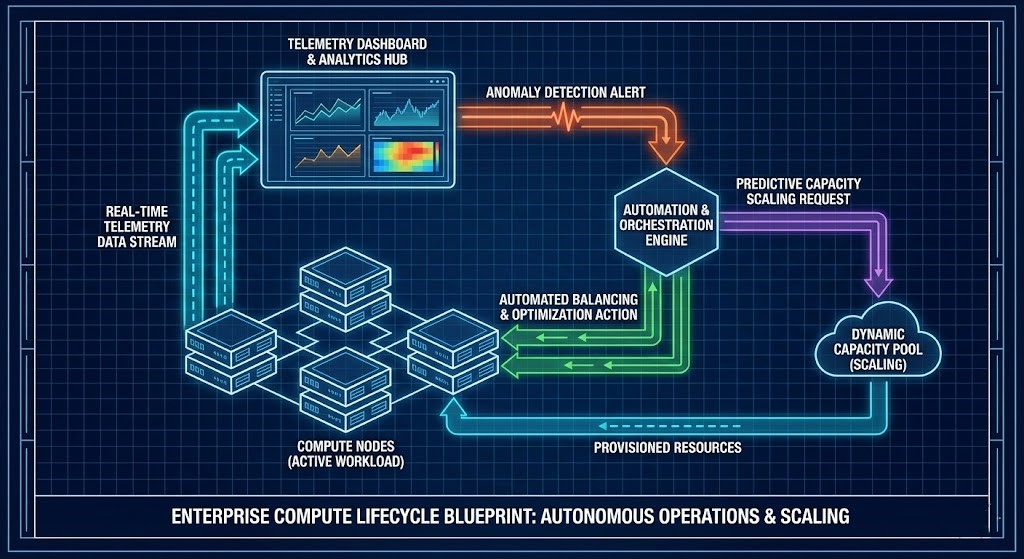
The Compute Maturity Model
| Stage | What It Looks Like |
| Isolated | Bare metal, everything sized by hand. |
| Virtualized | Basic resource sharing. |
| Orchestrated | Placement governed by policies. |
| Deterministic | NUMA-aware, resources mathematically reserved. |
| Autonomous | Self-balancing thanks to real-time telemetry. |
Vendor Implementations Through an Architectural Lens
No matter the platform, the physics stay the same. Here is how the major players approach the compute layer:
| Platform | Scheduling Model | Economic Model | Ideal Use Case |
| vSphere | Centralized control plane | Core-based licensing | Enterprise virtualization |
| AHV | Distributed control | Bundled HCI economics | Integrated hyperconverged |
| KVM | Kernel-native scheduler | Open-source economics | Custom and sovereign stacks |
>_ Engineering Action: Moving workloads requires precise financial modeling. Calculate your exact Broadcom VVF/VCF core-to-license exposure using our VMware Core Calculator in the Engineering Workbench.
Continue the Architecture Path
Compute does not exist in a vacuum. Once you have mastered the execution physics on this page, your next step is to master the software that controls it. Continue mastering the stack:
- Modern Virtualization Learning Path
- Storage Architecture Learning Path
- Modern Networking Learning Path
- HCI Architecture Learning Path
- Performance Modeling Learning Path
- Hyperconverged Infrastructure (HCI) Learning Path
- Infrastructure as a Software Asset: Why You Need CI/CD
Frequently Asked Questions
Q: Is this path aligned with A+ or Network+?
A: Yes, while we move into advanced architecture, we assume the foundational knowledge provided by CompTIA A+ (Hardware) and Network+ (Connectivity) is already in place.
Q: Is this path vendor-neutral?
A: Yes, we use Nutanix AHV, VMware vSphere, and KVM as examples, but the underlying Physics of Compute apply to all x86 and ARM-based platforms.
Q: Do I need a lab for this?
A: Highly recommended. You cannot truly understand CPU affinity or NUMA-aware scheduling without observing the performance impact in a controlled environment.
DETERMINISTIC COMPUTE AUDIT
Compute is the engine of your infrastructure. Stop guessing at your NUMA boundaries, CPU scheduling constraints, and cluster latency. Run your environment through our deterministic calculators to validate your architecture.
LAUNCH THE ENGINEERING WORKBENCH