

RTO Reality: Why Your Backups Mean Nothing Without a Recovery Drill
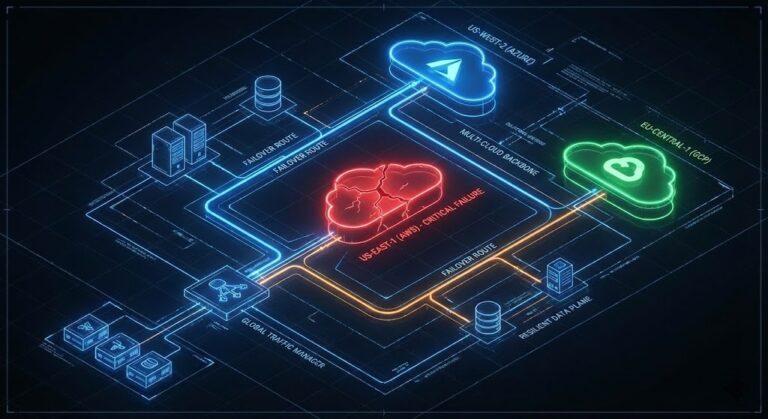
Backups are your insurance premium; recovery is cashing the claim. After 15+ years in production war rooms—from Nutanix HCI clusters to hybrid cloud migrations—I’ve watched “green” backup dashboards lie spectacularly. The bits sit safe on disk, but real Recovery Time Objective (RTO) crumbles under hydration speeds, API throttling, or the engineer with the encryption keys stuck mid-Atlantic.
If your last full-stack recovery drill was over six months ago, you don’t have disaster recovery—you have hope. This guide delivers a battle-tested framework, RTO math formulas, and a 30-day playbook to turn slideware promises into measured operational truth.
Think Like an Architect. Build Like an Engineer.
Core Concepts: RTO, RPO, and Why Drills Are Non-Negotiable
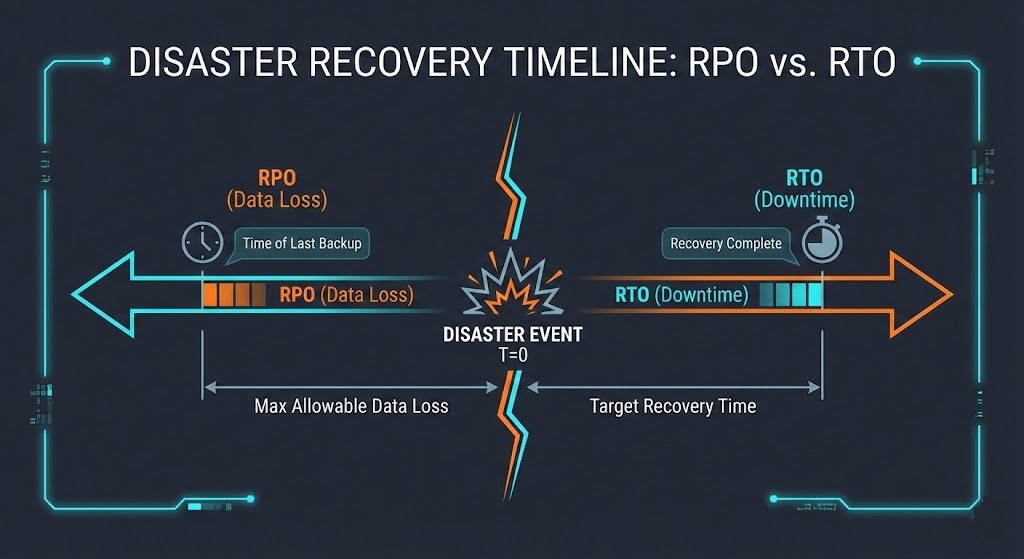
Recovery Time Objective (RTO) measures maximum acceptable downtime before business impact spirals. Recovery Point Objective (RPO) caps data loss windows. Both sound simple on paper, but 70% of DR plans fail their first real test.
RTO/RPO Calculation Table
| Metric | Definition | Formula | Real-World Example |
| RTO | Max downtime tolerance | $Max Loss \div Hourly Cost$ | $2.5k tolerance \div $10k/hr = 15 min RTO |
| RPO | Max data loss window | $Trans. Lost \times Avg Value$ | 15 min CRM data = $50k revenue gap |
The Hydration Tax Formula
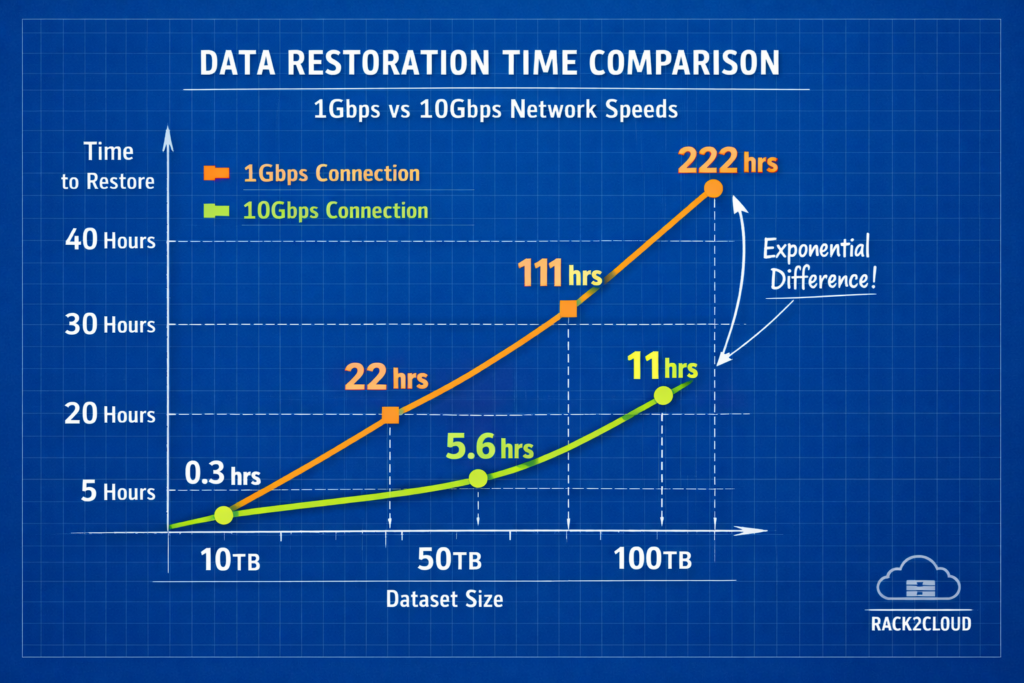
Most architects spec RTO based on storage array IOPS. This is a rookie mistake. The bottleneck is the pipe.

- The Math: Moving 10 TB over a 1 Gbps link at 80% efficiency takes ~22 hours.
- The Cost: Cloud egress fees for a 100 TB burst can exceed $9,000.
The Arithmetic of Failure: 4 Hidden RTO Killers
1. Network Bottlenecks
Public cloud to on-prem? Your Direct Connect or VPN is the straw. I once audited a FinTech firm claiming a 2-hour RTO. During a drill, the Direct Connect saturated during the DB restore. The actual time was 18 hours.
2. Configuration Drift (IaC Gaps)
Daily DevOps changes nuke static backups. If your data restores fine but your Terraform state is six months old, you are in for 48 hours of “YAML hell.”
Fix Snippet: Vault your State
Don’t just backup the database; backup the instructions to build the database server.
Terraform
resource "aws_s3_bucket_object" "iac_backup" {
  bucket = "dr-vault-${var.env}"
  key    = "terraform.tfstate"
  source = data.local_file.tfstate.content
}
3. Human Latency
Technical restoration is often only 50% of the downtime. The rest is administrative friction.
The Drill Script:
Use this bash script during your next tabletop exercise to measure “Administrative Gap.”
Bash
#!/bin/bash
# Rack2Cloud Human Latency Tracker
start=$(date +%s)
echo "🚨 P0 Alert: Primary DC offline ($(date))"
read -p "Acknowledge Alert? [Enter]" ack_time
# Simulate escalation delay
sleep 2
read -p "Break-glass access obtained? [Enter]" perms_time
end=$(date +%s)
echo "Human latency: $((end-start))s | Target: <300s"
4. Post-Restore Friction
Moving the data is Phase 1. Database consistency checks, log replays, and DNS propagation often take longer than the transfer itself.
The Recovery Drill Framework: 30-Day Playbook
Tabletop talk dies in a fire. Run this sequence for honest RTO.
Step 1: Dependency Mapping
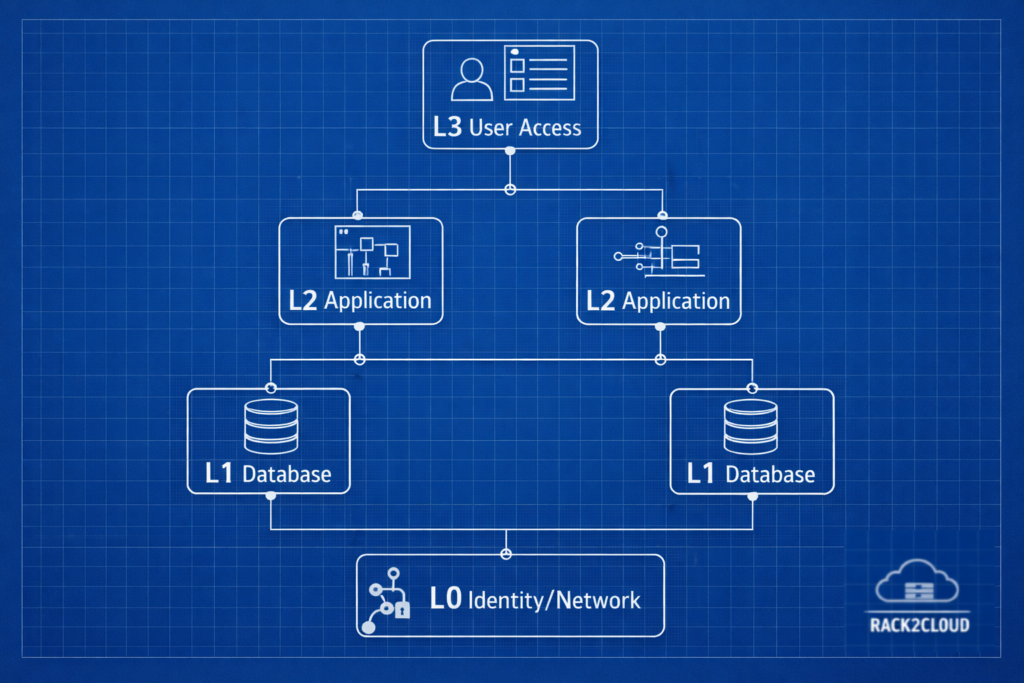
You cannot restore everything at once without crashing the storage controller.
| Level | Components | Sequence | RTO Target | Tools |
| L0 | Networking/DNS/IdP | 1st (Parallel) | <30 min | AD/Okta, Route53 |
| L1 | Databases/State | Post-L0 | 30–90 min | PostgreSQL PITR |
| L2 | App Tier | Post-L1 | 1–4 hours | K8s / Helm |
| L3 | Edge/Access | Last | 4 hours | ALB / NGINX |
Step 2: The Clean Room Restore
Never pollute production. Use an isolated VPC or air-gapped rack.
- Day 1-5: Provision an air-gapped sandbox (Isolated VPC).
- Day 10: Test L0/L1 restoration.
- Day 20: Run a full-stack timing exercise.
- Day 30: Automate one friction point found during the drill.
Decision Matrix:
Backup vs. Replication Matrix
If your business demands an RTO under 1 hour, standard backups are mathematically impossible for large datasets.
| Dimension | Standard Backup | Block Replication |
| RTO | Hours to Days | Seconds to Minutes |
| Cost | Low (Cold Object Storage) | High (Active Compute) |
| Integrity | High (Air-gapped) | Medium (Replicates Corruption) |
| Best For | Compliance, Ransomware | Critical Apps (L0/L1) |
Vendor Decision Matrix
When RTO < 1 hour, standard backups won’t cut it. You need block-level replication.
FAQ: Answers for Architects and SREs
Q: How often should we drill?
A: Full-stack simulations semi-annually; functional single-tier restores monthly; Tabletop Exercises (TTX) quarterly. Untested plans decay ~30% per year due to drift.
Q: What is a realistic RTO for 100TB?
A: Over a standard 1Gbps link, it is 22+ hours. To achieve <4 hours, you need a 10Gbps dedicated pipe or active-active replication.
Q: Veeam vs. Cohesity for fast RTO?
A: From field experience: Cohesity wins on mass-restore speed (SpanFS) for large clusters. Veeam excels at granular, portable VM recovery.
Q: How do we handle Ransomware recovery?
A: Never restore to production immediately. Restore from immutable snapshots (Rubrik/Cohesity) into a Clean Room, scan for Indicators of Compromise (IOCs), then switch DNS.
Architect’s Verdict: Three Non-Negotiable Calls
After auditing 50+ DR plans across finance, media, and manufacturing, here’s what separates “tested” from “theoretical”:
- If RTO < 4 hours: Replicate L0/L1 actively (Cohesity for scale, Veeam for hybrid). Back up the rest immutably (Rubrik). No exceptions—backups alone won’t scale.
- Your Real RTO = Tech Time + 32 min Human Overhead. Measure it. Most teams discover they’re 2x their SLA after the first drill.
- Drill or Die: Tabletop quarterly, functional monthly, full-stack every 6 months. Static docs rot; automation (or decay) is your only options.
Additional Resources and Research
If you want to go deeper or cross-check your own DR strategy, these external resources are worth your time:
- RTO & RPO Fundamentals
- Disaster Recovery Drills and Checklists
- Consilien – Disaster Recovery Drills: How to Prepare Your Team for the Unexpected.
- Trilio – Disaster Recovery Plan Checklist.
- Arcserve – IT Disaster Recovery Planning: A Checklist.
- Backup vs. Replication and RTO Strategy
- N2WS – Backup vs Replication: 6 Key Differences and How to Choose.
- Trilio – Backup vs. Replication: Key Differences Explained.
- Microsoft Learn – Redundancy, replication, and backup.
Editorial Integrity & Security Protocol
This technical deep-dive adheres to the Rack2Cloud Deterministic Integrity Standard. All benchmarks and security audits are derived from zero-trust validation protocols within our isolated lab environments. No vendor influence.

R.M.
Senior Solutions Architect with 25+ years of experience in HCI, cloud strategy, and data resilience. As the lead behind Rack2Cloud, I focus on lab-verified guidance for complex enterprise transitions. View Credentials →
Get the Playbooks Vendors Won’t Publish
Field-tested blueprints for migration, HCI, sovereign infrastructure, and AI architecture. Real failure-mode analysis. No marketing filler. Delivered weekly.
Select your infrastructure paths. Receive field-tested blueprints direct to your inbox.
- > Virtualization & Migration Physics
- > Cloud Strategy & Egress Math
- > Data Protection & RTO Reality
- > AI Infrastructure & GPU Fabric
Zero spam. Includes The Dispatch weekly drop.
Need Architectural Guidance?
Unbiased infrastructure audit for your migration, cloud strategy, or HCI transition.
>_ Request Triage Session