

ALTERNATIVE STACKS
Beyond Proprietary. Engineering for Sovereignty.
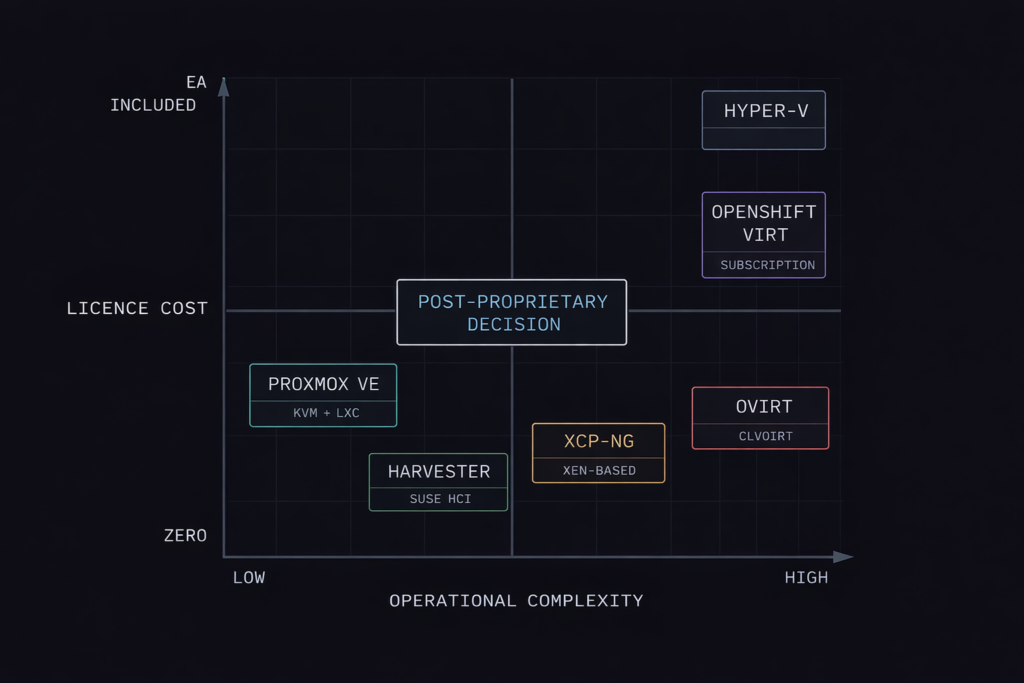
The post-Broadcom landscape has made one thing clear: the hypervisor is no longer a default decision.
For a decade, the answer was VMware. For the last two years, that answer has been under active re-evaluation across every enterprise that received a Broadcom renewal notice. Some are moving to Nutanix AHV — the most operationally similar commercial replacement. Others are taking a harder look at the alternative: sovereign infrastructure built on open-source hypervisors, community-vetted codebases, and no per-core licensing clock running in the background.
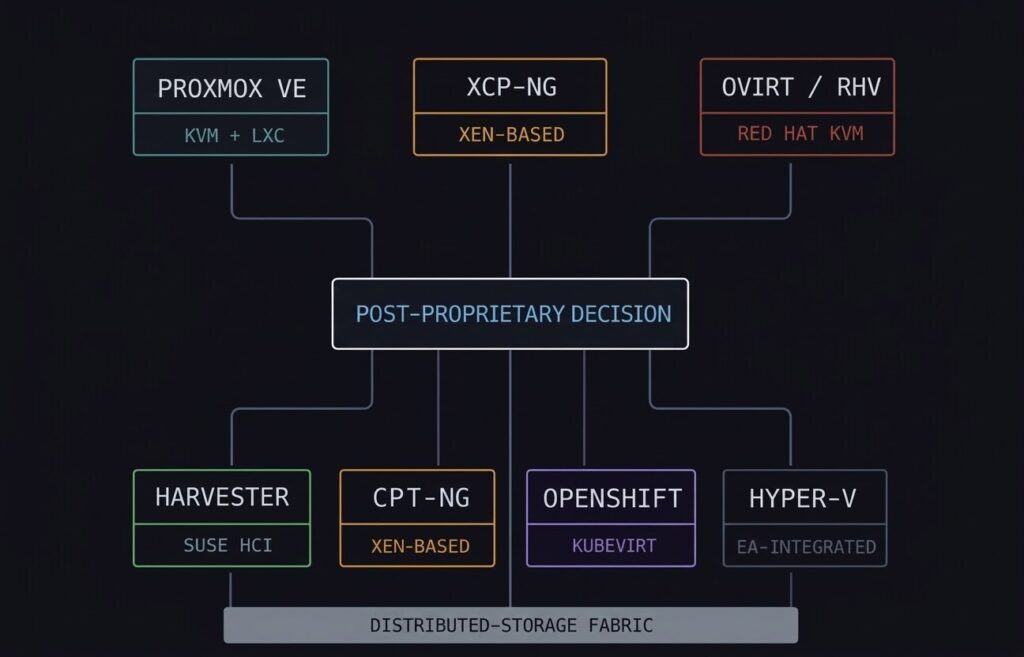
This page covers the full alternative hypervisor landscape — not just Proxmox. The platforms range from Proxmox VE (the most widely adopted open-source option) to XCP-ng (the enterprise-ready Xen fork), oVirt and Red Hat Virtualization (the RHEL-shop KVM path), Harvester (SUSE’s open-source HCI answer to Nutanix), OpenShift Virtualization (KVM inside Kubernetes for container-native environments), and Hyper-V (the EA-integrated Windows path). For organisations whose destination isn’t a hypervisor at all — converging VMs and containers under Kubernetes — that path has its own dedicated coverage under Cloud Native: Kubernetes Cluster Orchestration.
The honest framing upfront: open-source does not mean free. The licence cost is zero. The operational cost — Linux expertise, community support dependencies, DIY lifecycle management — is real and needs to be in the TCO model before the platform decision is made. The Proxmox vs VMware Migration Playbook covers that calculation in detail.
The Physics: Linux Kernel and KVM
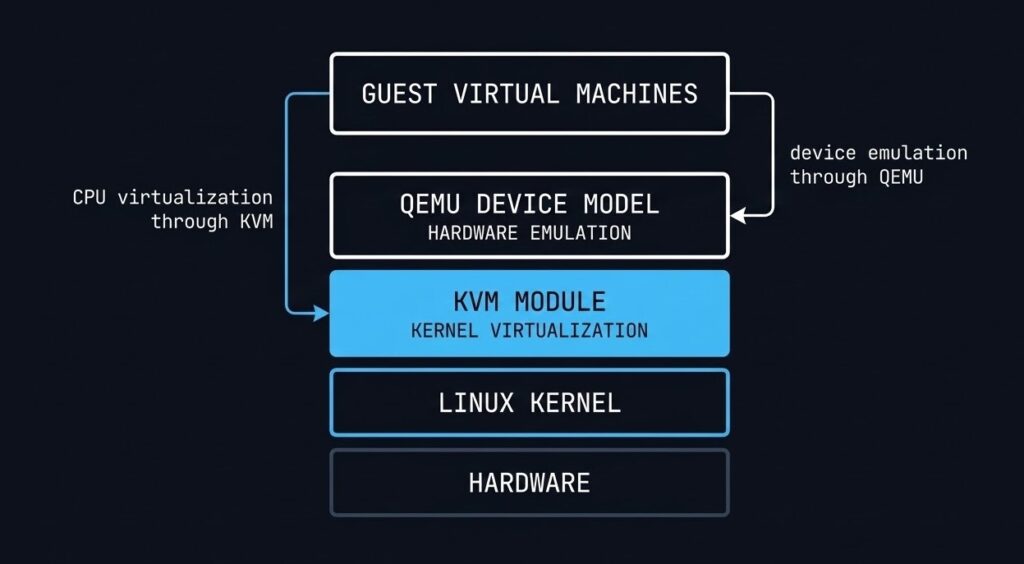
Every open-source hypervisor covered on this page — except Hyper-V and XCP-ng — is built on the same foundation: KVM, the Kernel-based Virtual Machine module that turns the Linux kernel itself into a Type-1 hypervisor.
KVM is not a separate hypervisor binary sitting between the hardware and the OS. It is a loadable kernel module that exposes hardware virtualisation extensions — Intel VT-x and AMD-V — directly to the Linux scheduler. Each VM runs as a standard Linux process. Memory isolation is handled by the same kernel mechanisms that isolate any two Linux processes. CPU scheduling uses the native Linux CFS scheduler. The performance ceiling for KVM-based VMs is effectively the performance of the Linux kernel itself — which is why KVM forms the virtualisation layer underneath AWS, GCP, and every major public cloud.
QEMU sits alongside KVM to handle hardware emulation for guest operating systems — virtual NICs, storage controllers, BIOS/UEFI. KVM handles the CPU and memory virtualisation at hardware speed. QEMU handles the device model in software. Together they form the virtualisation engine that every KVM-based platform in this guide builds on top of.
XCP-ng uses the Xen hypervisor instead of KVM — a distinct Type-1 architecture where the hypervisor itself sits below the host OS rather than being a kernel module within it. The architectural implications are covered in the XCP-ng section below. Hyper-V uses Microsoft’s own Type-1 hypervisor architecture, also covered separately.
Proxmox VE: The Flagship Sovereign Path
Proxmox VE is the most widely deployed open-source virtualisation platform in the post-Broadcom evaluation cycle — and for good reason. It delivers KVM-based VM hosting and LXC container management in a single Debian-based platform with a built-in web UI, cluster management, Ceph storage integration, and HA orchestration. The licence cost is zero. Enterprise subscription support is available but optional.
The Proxmox architecture is built around three components that work together: KVM + QEMU for VM execution, LXC for lightweight container workloads where full VM isolation isn’t required, and the Proxmox Cluster File System (pmxcfs) — a database-driven filesystem that synchronises cluster configuration across all nodes in real time. Add Ceph and you have a fully hyperconverged stack without a single proprietary component.
What Proxmox handles well: General-purpose VM workloads, mixed VM and container environments, SMB and mid-market infrastructure, home labs at enterprise scale, and Broadcom exit migrations where the team has Linux expertise. The Proxmox vs VMware Migration Playbook covers the migration execution path in detail. For lab testing and proof-of-concept Proxmox deployments, DigitalOcean droplets provide a cost-effective starting point before committing to bare-metal hardware.
Where Proxmox requires honest assessment: Enterprise support is community-first unless you’re on a paid subscription. The management plane doesn’t scale to thousands of VMs with the same operational maturity as vCenter or Prism Central. RBAC, audit logging, and compliance reporting require additional tooling or scripting. Proxmox is not a drop-in vSphere replacement for a 2,000-VM enterprise environment — it is the right answer for a 50–200 VM environment with a competent Linux operations team.
2-Node HA — The Quorum Problem: One of the most common Proxmox Day-2 issues is the 2-node cluster quorum failure. Corosync requires a majority quorum to elect a cluster primary — with two nodes, a single node failure results in a split-brain condition where neither node has quorum and VMs stop. The fix is a QDevice (Quorum Device) — a lightweight third witness on a separate machine that provides the tiebreaker vote without hosting any VMs. The Proxmox 2-Node HA and Quorum Fix covers the full configuration. If you’re deploying a 2-node Proxmox cluster without planning for quorum, you’re building a single point of failure that looks like HA until it isn’t.
Ceph: The Storage Layer That Makes Proxmox HCI
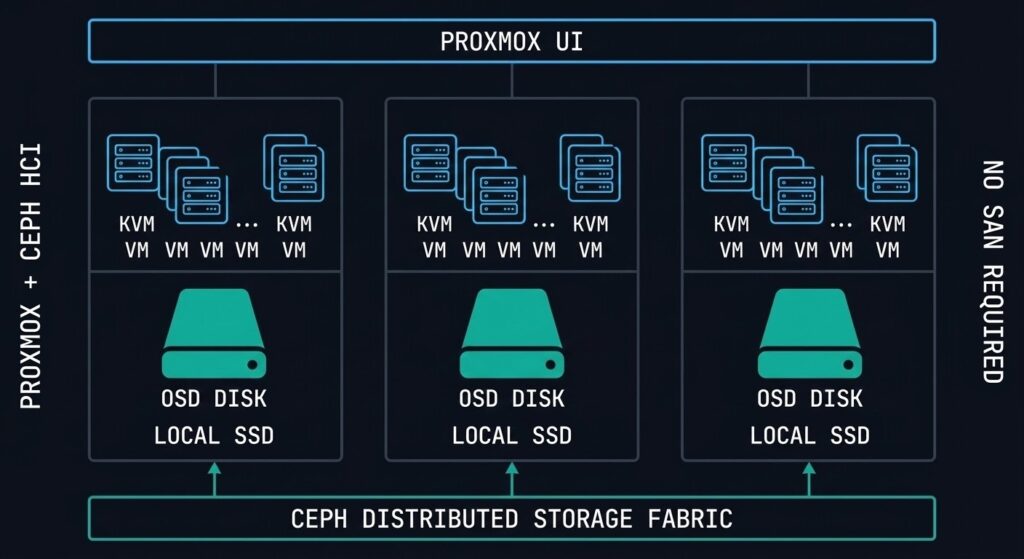
Proxmox without Ceph is a hypervisor platform. Proxmox with Ceph is a hyperconverged infrastructure stack. The distinction matters architecturally because Ceph is what enables live migration, HA VM restart, and shared storage — without a SAN.
Ceph is a distributed object store that presents block (RBD), file (CephFS), and object (RGW/S3) interfaces from the same storage cluster. In a Proxmox-Ceph deployment, each node contributes its local SSDs or HDDs to the Ceph cluster. VMs store their disks as RBD images on Ceph. Because the data is distributed and replicated across nodes, live migration moves the VM execution without moving the storage — the new host simply accesses the same Ceph RBD image the old host was using.
Minimum nodes for a production Ceph cluster — RF2 requires at least 3 OSDs on separate nodes
Replication factor — 2 or 3 copies across OSDs. RF3 tolerates 2 simultaneous node failures
Minimum recommended network for Ceph — dedicated storage network separate from VM traffic is strongly advised
The critical operational distinction between Ceph and Nutanix DSF is data locality. Nutanix DSF keeps read I/O local to the node running the VM by design. Ceph has no native data locality guarantee — read I/O may traverse the network to a node that holds the replica. For read-heavy workloads in a latency-sensitive environment, this is a meaningful performance difference. Ceph’s performance ceiling is set by your network fabric and OSD drive speeds — tune both before declaring your cluster production-ready.
ZFS is the alternative storage path for Proxmox environments that don’t need shared storage across nodes — single-node deployments, edge clusters, or environments where each node is self-contained. ZFS on Proxmox delivers excellent data integrity, native snapshotting, and replication, but live migration and HA VM restart require shared storage. ZFS and Ceph serve different architectural requirements — they are not interchangeable.
XCP-ng: Enterprise Xen for the Post-VMware Era
XCP-ng is the community-driven, open-source fork of Citrix XenServer — and in 2026 it is one of the most underrated Broadcom exit options in enterprise infrastructure conversations.
The Xen hypervisor uses a fundamentally different architecture from KVM. Where KVM is a Linux kernel module, Xen sits below the host OS entirely. The hypervisor boots first, then launches Domain 0 (dom0) — a privileged Linux VM that handles hardware drivers and management functions. Guest VMs run as unprivileged domains (domU) that communicate with hardware through dom0. This architecture creates a stronger isolation boundary between guest VMs and the hardware than a kernel module approach — dom0 can be hardened independently, and a compromised guest VM cannot directly access hardware even if it escapes its VM boundary.
XCP-ng + Xen Orchestra: XCP-ng without Xen Orchestra (XO) is like vSphere without vCenter — functional at the host level but operationally limited. XO is the web-based management platform for XCP-ng clusters: VM lifecycle management, live migration, backup orchestration, and performance monitoring. Xen Orchestra Community Edition is open source and free. The Xen Orchestra from the Sources (XOA) appliance is available as a paid subscription with enterprise support.
Where XCP-ng fits best: Regulated environments where the dom0 isolation architecture is a compliance requirement, organisations already familiar with Citrix XenServer looking for a supported open-source migration path, and environments that need strong VM isolation guarantees without the commercial overhead of a proprietary hypervisor.
The honest limitation: The Xen ecosystem is smaller than the KVM ecosystem. Driver support, third-party tool integrations, and community documentation depth are narrower than Proxmox. For environments with exotic hardware profiles or specific third-party integrations, verify XCP-ng compatibility before committing.
oVirt and Red Hat Virtualization: The RHEL-Shop KVM Path
oVirt is the upstream open-source project that Red Hat Virtualization (RHV) is built on — the same relationship as Fedora to RHEL, or CentOS Stream to RHEL. If your organisation runs a significant RHEL footprint and is evaluating a vSphere exit, oVirt/RHV is the natural KVM path that integrates with your existing Red Hat entitlements, identity management, and support contracts.
The oVirt architecture centres on the oVirt Engine — a Java-based management server that provides a web UI and REST API for managing hosts, VMs, storage domains, and networks across the cluster. Hosts run RHEL or CentOS Stream with the KVM/QEMU stack and communicate with the Engine via the VDSM (Virtual Desktop and Server Manager) daemon. Storage integration supports NFS, iSCSI, FC, and GlusterFS — GlusterFS being Red Hat’s distributed filesystem answer to Ceph for shared storage.
The RHV end-of-life consideration: Red Hat announced end-of-life for Red Hat Virtualization in 2026. Organisations on RHV are actively evaluating migration paths — OpenShift Virtualization (covered in the next section) is Red Hat’s stated successor for KVM-based VM workloads within the Red Hat ecosystem. Upstream oVirt continues as a community project. For new deployments, oVirt is a viable open-source platform — for existing RHV environments, the migration path to OpenShift Virtualization needs to be in the planning horizon.
Harvester: SUSE’s Open-Source HCI Answer to Nutanix and vSAN
Harvester is the most direct open-source competitor to Nutanix AHV and VMware vSAN in the alternative hypervisor landscape — and it is genuinely underrepresented in infrastructure evaluation conversations.
Built by SUSE and based on KubeVirt running on top of Kubernetes (K3s), Harvester delivers a full HCI stack: KVM-based virtualisation, Longhorn distributed block storage (SUSE’s open-source equivalent of Nutanix DSF), and a unified management UI — all running on commodity hardware with no proprietary components. The management plane is Rancher, SUSE’s Kubernetes management platform, which means Harvester environments integrate natively with Rancher-managed Kubernetes clusters for organisations converging VM and container workloads.
The architectural positioning: Harvester is the answer to the question “what if we want HCI economics and operational simplicity but can’t justify Nutanix licensing?” The Longhorn storage layer provides distributed block storage with replication across nodes — similar in concept to Nutanix DSF but without the data locality guarantee. Like Ceph, Longhorn I/O may traverse the network depending on replica placement.
Where Harvester fits: Organisations already running Rancher for Kubernetes management who want to bring VM workloads into the same operational plane. Greenfield HCI deployments where open-source licensing is a hard requirement. Teams evaluating a unified VM + container platform without committing to a commercial vendor.
The honest limitation: Harvester is younger and less battle-tested than Proxmox or XCP-ng at enterprise scale. The community is growing but smaller than the Proxmox ecosystem. For production deployments, SUSE’s commercial support subscription is strongly recommended.
OpenShift Virtualization: KVM Inside Kubernetes
OpenShift Virtualization is Red Hat’s implementation of KubeVirt — the CNCF project that runs KVM-based virtual machines as first-class Kubernetes objects. VMs are defined as Kubernetes custom resources, scheduled by the Kubernetes scheduler, and managed by the same GitOps and CI/CD tooling as containerised workloads.
The architectural significance is the convergence model. Instead of running a separate hypervisor platform for VMs and a separate Kubernetes cluster for containers, OpenShift Virtualization runs both on the same platform. A VM and a container pod can share the same namespace, the same network policy, the same storage class, and the same observability stack. For organisations with a significant investment in OpenShift and a roadmap to migrate VM workloads toward containers over time, this eliminates the need for a parallel hypervisor infrastructure during the transition period.
What this is not: OpenShift Virtualization is not a general-purpose vSphere replacement for a Windows-heavy enterprise environment with 500 legacy VMs and no Kubernetes expertise. The operational model requires Kubernetes fluency. VM lifecycle management through virtctl and YAML manifests is a different skillset from vCenter or Proxmox UI administration. The platform is best suited for organisations that are already OpenShift-native and want to bring remaining VM workloads into the same operational model rather than maintaining two separate platforms.
Hyper-V: The EA-Integrated Windows Path
Hyper-V is not a competitive choice for greenfield infrastructure in 2026. It is, however, a relevant platform for a specific and well-defined organisational profile — and misrepresenting it as either a primary enterprise hypervisor or a completely irrelevant legacy platform does architects a disservice.
The Hyper-V value proposition is narrow but real: organisations with active Microsoft Enterprise Agreements where Hyper-V is included at no additional cost, Windows-centric workload footprints where the VM guest OS is Windows Server in 90%+ of cases, and environments where Azure integration via Azure Arc or Azure Stack HCI is a strategic direction. In those specific circumstances, Hyper-V’s EA economics and native Windows ecosystem integration — Hyper-V Replica, Storage Spaces Direct, Azure hybrid licensing — make it a defensible platform choice.
Where the honest limitations are: Hyper-V’s management story outside the Windows ecosystem is weak. Linux VMs run on Hyper-V but the tooling, driver support, and operational integration are not at the same level as KVM-native platforms. At scale, System Center Virtual Machine Manager (SCVMM) is the management layer — and SCVMM is itself a separately licensed, separately maintained product that adds operational complexity. For organisations not already deep in the Microsoft EA and Azure ecosystem, Hyper-V offers no compelling advantage over Proxmox or AHV.
The Nutanix vs VMware vs Hyper-V comparison covers the three-way decision framework for environments sitting at this crossroads.
Security: Linux Hardening Across All Platforms
The security model for KVM-based platforms is not a single feature — it is a layered stack of Linux kernel security mechanisms that operate independently and cumulatively. Understanding which layer does what prevents both over-reliance on a single control and under-appreciation of the combined posture.
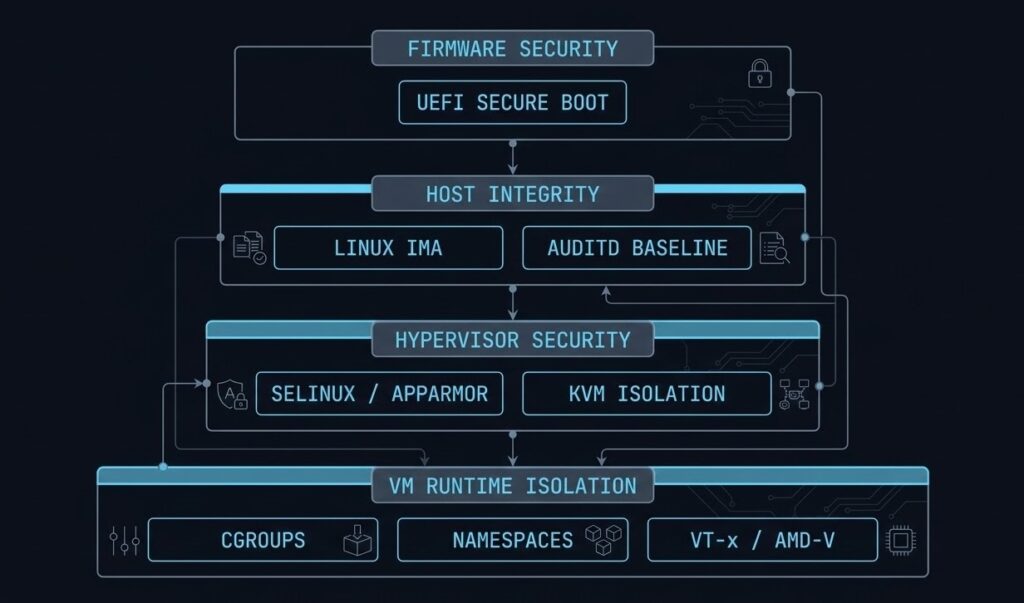
AppArmor and SELinux enforce mandatory access controls on the QEMU process itself. In a default Proxmox deployment, AppArmor profiles restrict what the QEMU process can read, write, execute, and access on the host filesystem. If a VM escapes its virtualisation boundary and compromises the QEMU process, AppArmor limits the blast radius to what the QEMU profile permits — not the full host filesystem. SELinux provides equivalent controls in RHEL-based environments (oVirt, OpenShift Virtualization).
Linux IMA (Integrity Measurement Architecture) maintains a cryptographic log of every file executed on the host. If an attacker modifies a hypervisor binary or kernel module, IMA detects the change at the next measurement cycle. Combined with UEFI Secure Boot — which verifies the bootloader and kernel at startup — the host integrity chain extends from firmware through the running hypervisor.
Namespaces and cgroups provide the runtime isolation boundary between VMs. Each KVM VM runs in isolated namespaces (PID, network, mount, IPC) with cgroup resource limits that prevent any single VM from exhausting host CPU or memory. These are the same primitives that isolate containers — the difference is that KVM adds a hardware-enforced boundary at the CPU level via Intel VT-x/AMD-V that containers do not have.
- UEFI Secure Boot — bootloader + kernel verified at startup
- Linux IMA — cryptographic measurement of executed binaries
- SCMA-equivalent via auditd + custom baselines
- vTPM — guest-level encryption and secure key storage
- AppArmor / SELinux — MAC on QEMU process
- Linux namespaces — PID, network, mount, IPC isolation
- cgroups — CPU and memory resource hard limits per VM
- Hardware VT-x/AMD-V — CPU-enforced guest boundary
Observability: Building the Telemetry Stack You Actually Need
The observability gap between open-source hypervisors and commercial platforms is real but narrower than it was five years ago. Proxmox has a built-in dashboard. XCP-ng has Xen Orchestra metrics. The gap is in the long-term historical analysis, cross-cluster correlation, and alerting pipeline that Prism Central or vCenter Operations provides out of the box.
The standard open-source telemetry stack for sovereign infrastructure: Prometheus for metric collection and alerting, InfluxDB for long-term time-series storage where Prometheus retention is insufficient, and Grafana for visualisation. Proxmox exposes metrics natively to both Prometheus (via the built-in metrics server) and InfluxDB (via the Proxmox UI metric server configuration). A production-grade observability stack for a Proxmox cluster can be operational in an afternoon.
The metrics that matter most in a KVM environment — and that Proxmox’s built-in dashboard underreports — are CPU I/O wait (indicating storage bottlenecks), memory balloon driver activity (indicating memory pressure forcing guest compression), Ceph OSD latency per disk (identifying failing or degraded OSDs before they become cluster events), and network retransmit rates (indicating fabric issues that affect Ceph replication performance). Build your Grafana dashboards around these first.
For the Sovereign Drift Auditor — automated detection of configuration drift across your Proxmox cluster — the IaC and Kubernetes coverage under the Modern Infrastructure & IaC Learning Path covers the operational patterns for keeping sovereign environments in a known-good state.
Lifecycle Management: The Real Cost of Open-Source Operations
Lifecycle management is where the “open-source is free” calculation meets reality. There is no LCM equivalent in the open-source world — no single operation that updates firmware, hypervisor, storage, and management plane in a coordinated rolling upgrade across the cluster. Each layer is managed independently.
Proxmox: APT package management on Debian. apt update && apt dist-upgrade on each node. Live migration moves VMs off the node before the upgrade, then back. No single pane — you’re SSH-ing to each node or scripting it. Proxmox enterprise subscriptions give you access to the stable repository rather than the no-subscription repository, which matters for production environments. The no-subscription repo is not recommended for production — it receives packages before they are fully tested against the enterprise release.
Kernel upgrades require node reboots. Unlike Nutanix LCM which orchestrates the full reboot sequence with VM migration automatically, Proxmox requires manual live migration before each node reboot — or automation via Ansible, which is the right answer for clusters beyond 5–6 nodes.
Ceph upgrades have their own version compatibility matrix and must be coordinated with the Proxmox version. Ceph major version upgrades require sequential rolling upgrades — you cannot skip versions. Plan Ceph upgrade cycles with the same care you’d give a SAN firmware upgrade.
The operational overhead of sovereign lifecycle management is real. It is manageable with the right tooling and a competent Linux team. It is the primary reason Nutanix AHV wins enterprise evaluations where operational simplicity is weighted above licence cost — and it should be in your TCO model before the platform decision is made.
Alternative Hypervisor Platform Comparison
| Platform | Hypervisor Base | Licence Model | Storage | Best Fit | Operational Complexity |
|---|---|---|---|---|---|
| Proxmox VE | KVM + LXC | AGPL / Optional sub | ZFS, Ceph, LVM, NFS | SMB–mid-market, Linux teams | Medium |
| XCP-ng | Xen | AGPL / XOA sub | SR (local/NFS/iSCSI/FC) | Regulated envs, ex-XenServer | Medium |
| oVirt / RHV | KVM (libvirt) | Apache / RH sub | GlusterFS, NFS, iSCSI, FC | RHEL shops, RHV migrations | High |
| Harvester | KVM (KubeVirt) | Apache / SUSE sub | Longhorn (distributed) | Rancher shops, open HCI | Medium |
| OpenShift Virt | KVM (KubeVirt) | Apache / OCP sub | ODF, Longhorn, CSI | OpenShift-native orgs | High |
| Hyper-V | Hyper-V (Microsoft) | EA-included | S2D, SMB, iSCSI | Windows-centric, Azure shops | Medium |
| Oracle Linux KVM | KVM | Free / Oracle sub | Oracle ASM, NFS, iSCSI | Oracle DB workload shops | Medium |
| SUSE Linux KVM | KVM (libvirt) | SUSE sub | NFS, iSCSI, Ceph | SUSE-shop Broadcom exits | Medium |
| StarlingX | KVM | Apache | Ceph, local | Telco / edge compute | High |
Sovereign Stack Decision Framework
| Scenario | Verdict | Why |
|---|---|---|
| Budget-constrained Broadcom exit, strong Linux team, 50–200 VMs | Proxmox VE | Zero licence cost, mature HCI with Ceph, strong community, migration tooling exists |
| Regulated environment, strong VM isolation requirement, ex-Citrix XenServer | XCP-ng | Xen dom0 isolation architecture, familiar to ex-XenServer teams, strong compliance posture |
| RHEL shop, existing RHV deployment, Red Hat support contract in place | oVirt → OpenShift Virt | oVirt for near-term, OpenShift Virtualization is Red Hat’s stated RHV successor — plan the migration path now |
| Open-source HCI required, Rancher/Kubernetes already in use | Harvester | Native Rancher integration, unified VM + K8s platform, Longhorn storage, no licence cost |
| OpenShift-native org, VM workloads remaining during container migration | OpenShift Virt | Eliminates parallel hypervisor — VMs and containers share same platform during transition |
| Windows-centric workloads, active Microsoft EA, Azure strategic direction | Hyper-V | EA economics + native Windows integration + Azure Arc/Stack HCI path justifies the platform |
| Enterprise support, operational simplicity weighted above licence cost | Consider AHV | Sovereign stacks trade licence cost for operational overhead — if that trade doesn’t work for your team, AHV is the right conversation |
| Destination isn’t a hypervisor — converging VMs and containers under K8s | Kubernetes Native | See Cloud Native: Kubernetes Cluster Orchestration — different architecture, different operational model |
You’ve Seen the Platforms.
Now Validate Your Exit Path.
The platform comparison narrows the field. Your specific workload profile, team expertise, and renewal window determine which path is actually executable. The triage session maps your environment against the options — without a vendor agenda.
Sovereign Stack Assessment
Vendor-neutral review of your vSphere environment and open-source migration readiness. Platform recommendation, TCO model, workload sequencing, and team capability gap assessment for your specific stack.
- > Platform selection — Proxmox vs XCP-ng vs AHV
- > TCO model including operational overhead
- > Team capability gap and tooling requirements
- > Workload sequencing and migration timeline
Architecture Playbooks. Every Week.
Sovereign infrastructure patterns, Proxmox operational blueprints, open-source HCI case studies, and the migration execution details that don’t make it into vendor documentation.
- > Proxmox operational patterns & failure modes
- > Open-source HCI architecture breakdowns
- > Broadcom exit execution updates
- > Sovereign infrastructure case studies
Zero spam. Unsubscribe anytime.
Frequently Asked Questions
Q: What is the best open-source alternative to VMware vSphere in 2026?
A: For most organisations exiting VMware after Broadcom’s licensing changes, Proxmox VE is the most practical starting point — zero licence cost, mature KVM + LXC + Ceph HCI stack, and a strong migration community. For organisations requiring enterprise support contracts and a more integrated management plane, Nutanix AHV remains the most operationally similar commercial replacement. The right answer depends on your team’s Linux expertise, VM count, and whether zero licence cost is a hard requirement or a preference.
Q: Is Proxmox VE enterprise-ready?
A: Yes, with caveats. Proxmox VE runs production workloads for thousands of organisations globally. The caveats are operational: the management plane doesn’t scale to thousands of VMs with the same maturity as vCenter or Prism Central, the lifecycle management requires manual orchestration or scripting rather than a single-click LCM cycle, and enterprise support requires a paid subscription. For environments with 50–500 VMs and a competent Linux operations team, Proxmox VE is production-ready. For 2,000+ VM environments requiring formal SLAs, the operational overhead should be in the TCO model.
Q: What is XCP-ng and how does it differ from Proxmox?
A: XCP-ng is the open-source fork of Citrix XenServer, using the Xen hypervisor architecture rather than KVM. Xen places the hypervisor below the host OS (dom0 architecture), creating a stronger isolation boundary between guest VMs and hardware. Proxmox uses KVM, which is a Linux kernel module. XCP-ng is managed via Xen Orchestra rather than the Proxmox UI. XCP-ng is typically favoured in regulated environments where the dom0 isolation model is a compliance requirement, or by teams migrating from Citrix XenServer.
Q: What is Harvester and how does it compare to Nutanix AHV?
A: Harvester is SUSE’s open-source HCI platform — KVM via KubeVirt, Longhorn distributed storage, and Rancher management. It is architecturally the closest open-source equivalent to Nutanix AHV: both deliver compute, storage, and management in an integrated HCI stack on commodity hardware. The difference is commercial support maturity, ecosystem depth, and data locality — Nutanix DSF provides local read I/O by design, Longhorn does not guarantee data locality. Harvester is the right answer when open-source licensing is a hard requirement and the team is already running Rancher.
Q: Is Hyper-V a good VMware replacement?
A: For a specific profile — yes. Windows-centric workload footprints, active Microsoft Enterprise Agreements where Hyper-V is included, and organisations with Azure as a strategic direction. For Linux-heavy environments, mixed workload profiles, or greenfield infrastructure without an existing Microsoft EA, Hyper-V offers no compelling advantage over Proxmox VE or Nutanix AHV.
Q: What is the 2-node Proxmox quorum problem?
A: Proxmox uses Corosync for cluster quorum, which requires a majority vote to elect a primary node. In a 2-node cluster, a single node failure leaves the remaining node without quorum — it cannot confirm it has the majority, so it stops cluster services to prevent split-brain data corruption. The fix is a QDevice (Quorum Device) — a lightweight third node that provides the tiebreaker vote without running VMs. Every production 2-node Proxmox cluster needs a QDevice configured before it goes live.
WHERE DO YOU GO FROM HERE?
This page is the alternative hypervisor architecture and platform selection layer. The pages below cover the commercial alternatives, migration execution, data protection requirements, and the broader virtualization context.