

AI GRAVITY & PLACEMENT ENGINE
CALCULATE TOKEN TCO ACROSS CLOUD AND ON-PREM INFRASTRUCTURE. DATA GRAVITY SCORING. PLACEMENT VERDICT. ARCHITECT’S TIP. LLAMA 3 70B BF16 — 145GB VRAM LOCKED.
Where your data lives determines what your AI costs. Most infrastructure teams discover this after the invoice arrives — not before the architecture is committed.
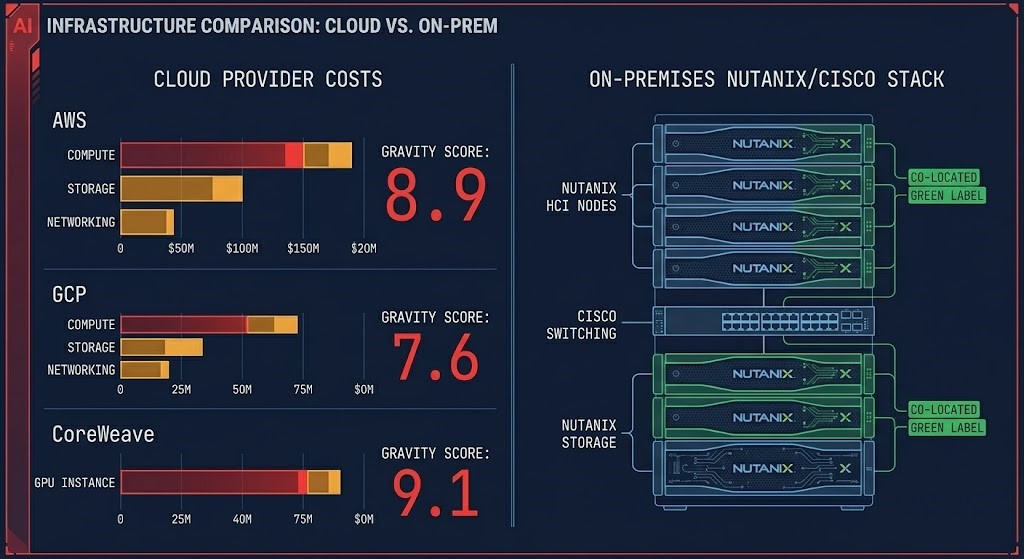
The AI Gravity & Placement Engine calculates the Token TCO for running Llama 3 70B at BF16 precision across six infrastructure tiers: AWS, GCP, CoreWeave, Lambda, Nutanix AHV, and Cisco UCS. It doesn’t stop at hourly GPU rates. It calculates the Data Gravity Score — the friction cost of moving your dataset to each provider — and uses that score to generate a placement verdict: Stay Put, Hybrid Burst, or Full Repatriation.
The benchmark is locked at Llama 3 70B in BF16 precision. BF16 requires approximately 145GB of VRAM just for model weights — which forces a multi-GPU configuration on every provider and reveals which platforms have the high-speed interconnects (InfiniBand or NVLink equivalent) needed to bridge those GPUs without introducing latency penalties. Those interconnect and memory locality constraints are what accelerated compute architecture defines before any placement decision is made — and what the AI Fabric Pressure Analyzer models at the cluster level, surfacing east-west pressure and oversubscription risk across the fabric topology before placement economics are committed. INT4 quantization fits on a single 48GB GPU. BF16 tells you what the architecture actually costs at production fidelity.
The Gravity Score is the differentiator. Most AI infrastructure calculators compare compute rates and stop there. The Gravity Score measures egress cost as a fraction of compute cost — when that ratio exceeds 0.5, the data is too heavy to move economically and the placement decision is already made. When it falls below 0.1, the data is weightless and the cheapest compute wins. Everything between those thresholds is the architectural decision space this engine is designed to map.
The output is not a table. It is a verdict — provider, strategy, reasoning, and an Architect Tip that surfaces the Day 2 operational consideration that the cost comparison alone doesn’t show.
AI Infrastructure Operational Stack
AI Gravity & Placement Engine: Key Features
Frequently Asked Questions
Q: What benchmark does the AI Gravity & Placement Engine use?
A: The engine uses Llama 3 70B at BF16 precision as the standard benchmark unit. BF16 requires approximately 145GB of VRAM for model weights alone, forcing a multi-GPU configuration on every provider. This precision level was chosen because it reflects production-fidelity inference requirements — INT4 quantization fits on a single GPU and masks the interconnect and fabric costs that matter at scale. All Token TCO outputs are expressed as cost-per-1M-tokens at this benchmark configuration.
Q: What is the Data Gravity Score and how is it calculated?
A: The Gravity Score (G) measures the friction cost of moving your dataset to a given provider as a fraction of your monthly compute cost: G = (Dataset Size in GB × Egress Rate) ÷ Monthly Compute Cost. A score above 0.5 means egress costs exceed half your compute spend — at that point, moving the data is economically irrational and the engine defaults to Stay Put or Full Repatriation. Below 0.1, the data is effectively weightless and the cheapest compute wins. The score between those thresholds is the architectural decision space.
Q: How are on-prem providers (Nutanix, Cisco) priced in the comparison?
A: On-prem providers use a 36-month CapEx amortization model divided by 730 hours/month, with a configurable OpEx Adder (default 20%) applied on top. The OpEx Adder covers power, cooling, rack space, and maintenance overhead — costs that cloud providers bake into their hourly margins. Adjusting the OpEx Adder to 25–35% models older Tier II facilities or environments with significant staff allocation. This normalization produces a fully-loaded GPU-hour rate that is directly comparable to cloud on-demand pricing.
Q: What does Sovereign Mode do?
A: When Sovereign / Regulated Mode is enabled, AWS, GCP, CoreWeave, and Lambda are excluded from the placement recommendation entirely — regardless of their cost position. Only Nutanix AHV and Cisco UCS are eligible for the verdict. This reflects environments where data sovereignty requirements, air-gap mandates, or regulatory frameworks make public cloud placement non-viable. The cost comparison table still displays all six providers for reference, but the Architect’s Verdict is constrained to private infrastructure.
Q: What is the OpEx Adder and should I change the default?
A: The OpEx Adder accounts for the ongoing operational costs of on-prem infrastructure that don’t appear in the CapEx amortization — power and cooling (typically 10–12% of hardware CapEx annually), rack space and cabling (2–3%), and maintenance contracts (8–10%). The default 20% is a conservative baseline appropriate for modern data centers with efficient cooling. Increase it to 25–30% for older Tier II facilities, or 30–35% if including staff allocation for a dedicated GPU cluster administrator. The adder directly impacts the Nutanix and Cisco monthly TCO and can shift the placement verdict at higher settings.
Q: Why is CoreWeave more expensive per GPU-hour than AWS in the comparison?
A: CoreWeave’s rate reflects bare-metal HGX configuration with dedicated InfiniBand fabric and no multi-tenant GPU contention. AWS p5.48xlarge pricing includes shared infrastructure overhead and managed service components. At the benchmark configuration (8x H100, BF16 precision), CoreWeave’s dedicated fabric eliminates the inter-GPU latency penalty that multi-tenant environments can introduce — the premium reflects that architectural guarantee, not raw hardware cost. For workloads where GPU contention is a performance risk, the CoreWeave rate is the more accurate model of actual inference cost.
Q: What is the Bring Your Own Rate (BYOR) feature and when should I use it?
A: BYOR allows you to manually input a custom GPU hourly rate and egress rate to evaluate providers not in the standard matrix — spot marketplace instances (Vast.ai, RunPod), heavily negotiated enterprise discount programs, or regional cloud providers with non-standard pricing. The engine treats your custom rate as a seventh provider and ranks it dynamically against the six vetted tiers using the same Gravity Score and Token TCO methodology. Use it when you have an actual quote or marketplace listing you want to validate against the market before committing.
Q: What does the Legacy Data Center toggle do and how does it affect the math?
A: The Legacy Data Center toggle is designed for pre-2018 facilities running at PUE 1.8–2.2 — significantly less efficient than modern hyperscaler data centers at PUE 1.1–1.2. When enabled, the toggle sets a 35% floor on the OpEx Adder for on-prem providers (Nutanix and Cisco). If your slider is below 35%, it snaps to 35% and the label updates to show “Legacy Floor Applied.” If you’ve manually set the slider above 35%, the toggle has no effect — your value wins. The effective OpEx percentage is always displayed in the slider readout so the math is never hidden. The toggle also activates enhanced Architect Tips: if Sovereign Mode is also on, the verdict flags facility efficiency as a bottleneck and recommends modern colocation before new CapEx.
Provider rates reflect April 2026 market observations. AWS and GCP on-demand pricing sourced from published regional rate cards (US-East-1 / us-central1). CoreWeave and Lambda rates reflect published reserved cluster pricing. Nutanix and Cisco rates use 36-month CapEx amortization plus 20% OpEx Adder baseline on reference H100 node configurations — Legacy Data Center toggle applies a 35% floor when enabled. Bring Your Own Rate inputs are user-supplied and not verified by Rack2Cloud. All rates are subject to change. Verify current pricing directly with each provider before making infrastructure commitments. Lambda egress reflects absence of published fee — bandwidth limits apply at production scale. Token TCO calculated against Llama 3 70B BF16 at 730 hours/month steady-state utilization unless Duty Cycle is adjusted.