

VMware Cloud Foundation vs. vSphere + NSX: A Deep Dive on Positioning for SEs
The VMware Cloud Foundation vs vSphere decision used to be straightforward. VCF was for large enterprises building a full software-defined data center. vSphere was for everyone else. The component model in between — vSphere plus individual add-ons as needed — gave architects the flexibility to match licensing to actual requirements.
Broadcom ended that model.
The acquisition did not just change VMware’s ownership structure. It eliminated perpetual licenses, collapsed the a-la-carte catalogue, and restructured the entire product line around two per-core subscription bundles: VMware Cloud Foundation and VMware vSphere Foundation. The architectural decision is now also a financial decision — and making it without understanding what each bundle actually includes, what the per-core minimums cost in practice, and where the gaps between the two bundles create real operational consequences is how organizations end up locked into the wrong stack for the next three years.
This post covers the VMware Cloud Foundation vs vSphere calculation from the architecture side — what each bundle delivers technically, where NSX changes the math, and when VCF is genuinely justified versus when it is overkill for the environment it’s running.
What Broadcom Actually Changed
Understanding the VMware Cloud Foundation vs vSphere decision requires understanding what changed at the licensing layer — because the technical differences between the two bundles only matter in the context of what Broadcom now forces you to pay for regardless of whether you use it.
Perpetual licenses are gone. Every VMware deployment going forward is a per-core annual subscription. For organizations that amortized perpetual license costs over five to seven year hardware cycles, this is a structural cost increase that doesn’t map to the old TCO model.
The component model is gone. The previous ability to buy vSphere Enterprise Plus, add NSX as needed, add vSAN as needed, add Aria Operations as needed — independently priced, independently licensed — no longer exists. The catalogue collapsed into two bundles. If a component you need is in the more expensive bundle, you are buying the more expensive bundle.
Per-core minimums apply. Broadcom enforces minimum core counts that apply regardless of actual physical core utilization. Small deployments — edge locations, branch offices, lab environments — are forced to pay for cores they are not using. The minimum applies per processor and scales with the hardware profile.
The VMware Core Calculator at Rack2Cloud models your specific hardware profile against Broadcom’s per-core minimums — including the VVF and VCF core requirements — so the cost delta between bundles is a real number before the renewal conversation, not an estimate after it.
Input your processor count and core profile. The calculator applies Broadcom’s per-core minimums against both VVF and VCF pricing to produce the actual cost delta for your environment — not a vendor estimate.
[+] Run the Core CalculatorVMware Cloud Foundation: What the Full Stack Actually Includes
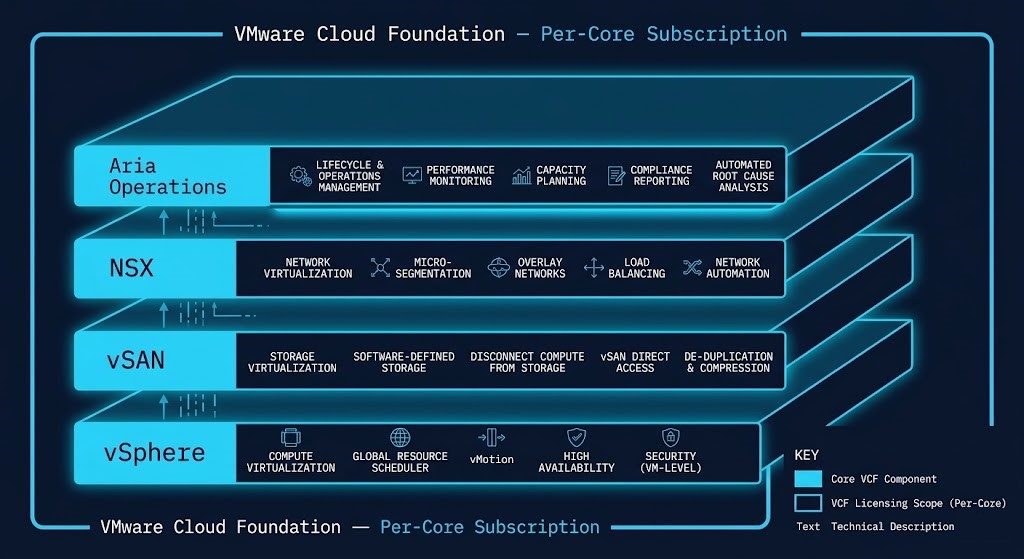
VCF bundles four product layers into a single per-core subscription:
vSphere — the hypervisor layer. Enterprise Plus tier, including DRS, vMotion, HA, and the full compute virtualization stack.
vSAN — the software-defined storage layer. Distributed across cluster nodes, eliminating the need for an external SAN for workloads running within the VCF environment. vSAN ESA (Express Storage Architecture) in current releases delivers improved performance and efficiency over the original vSAN OSA architecture.
NSX — the network virtualization and micro-segmentation layer. This is the component that most directly determines whether VCF or VVF is the correct choice. NSX provides software-defined networking, distributed firewall, micro-segmentation, and the policy model that replaces physical network perimeters with workload-identity-based controls.
Aria Operations — the lifecycle management and operational intelligence layer. SDDC Manager orchestrates automated patching, firmware updates, and cluster lifecycle operations across the VCF stack. Aria Ops provides capacity analytics, performance monitoring, and cost visibility.
When VCF Is Genuinely Justified
VCF makes architectural sense when the environment’s requirements actually use the full stack — not as a default choice, but as the correct one.
NSX is a hard requirement. If the environment requires network virtualization, micro-segmentation, or distributed firewall capabilities — for regulatory compliance, zero-trust segmentation, or multi-tenancy — NSX is not optional. Under Broadcom’s current model, NSX is only available in VCF. An environment that needs NSX is an environment that needs VCF.
Full-stack lifecycle automation is an operational requirement. Environments managing large cluster counts where manual patching and firmware updates create operational risk benefit from SDDC Manager’s automated lifecycle orchestration. For organizations where hypervisor maintenance windows are a recurring operational burden, the automation layer in VCF has genuine ROI.
Hybrid cloud extension is in scope. VMware Cloud on AWS (VMC on AWS) and Azure VMware Solution (AVS) both require VCF as the foundational licensing model. If the architecture extends to these managed VMware services, VCF is the mandatory starting point.
VMware vSphere Foundation: What the Stripped-Down Bundle Actually Delivers
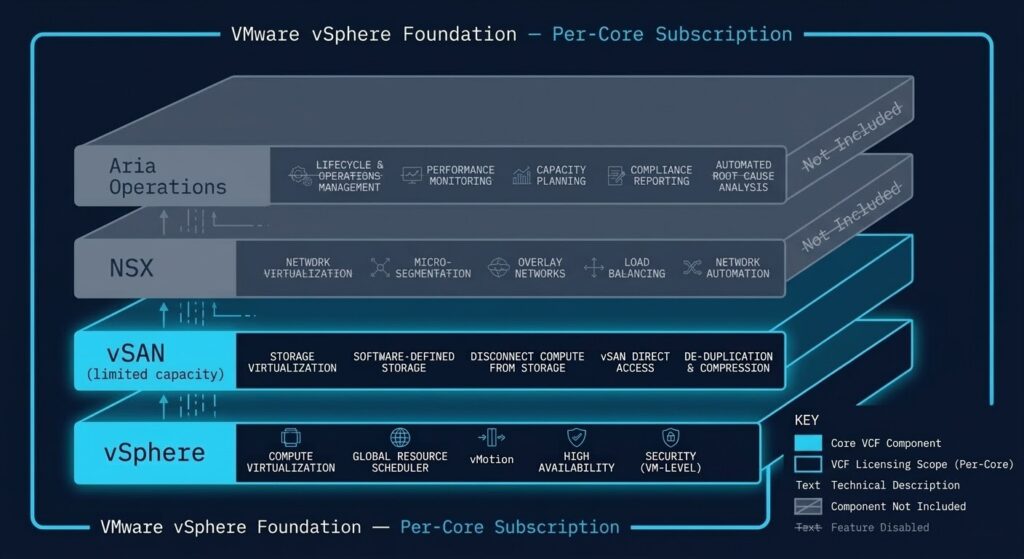
VVF includes:
vSphere Enterprise Plus — the full compute virtualization stack, identical to what ships in VCF.
vSAN Essentials — a limited vSAN allocation sufficient for basic workloads. Not the full vSAN Enterprise tier included in VCF — capacity and feature limitations apply.
What VVF does not include: NSX. Full Aria Operations suite. SDDC Manager automated lifecycle orchestration.
Where VVF Makes Sense — and Where It Doesn’t
VVF is the correct choice for environments where the missing components are genuinely absent from the requirements — not just currently unused.
External SAN environments with remaining lifecycle. If the environment runs on a dedicated SAN — Dell PowerStore, Pure FlashArray, NetApp — with years of remaining hardware lifecycle, paying for vSAN storage virtualization in VCF is paying for a capability that is redundant to existing infrastructure. VVF provides the hypervisor without the storage layer overhead.
No NSX requirement now or in the planning horizon. If the environment uses physical networking and has no near-term requirement for micro-segmentation, distributed firewall, or network virtualization, the NSX component of VCF has no ROI. VVF covers the workload without it.
Per-core cost pressure is the primary driver. For smaller environments where Broadcom’s per-core minimums produce a significant cost increase over the previous perpetual model, VVF’s lower per-core cost reduces the subscription shock. The delta between VVF and VCF per-core pricing directly affects the total cost at minimum core counts.
The Core Minimum Trap
Small and edge deployments face a specific VVF problem that deserves explicit attention. Broadcom’s per-core minimums apply regardless of physical core utilization. A two-node edge cluster running a modest workload pays for the minimum core count Broadcom requires — not the cores the workload actually needs.
For environments where the minimum core requirement significantly exceeds actual utilization, the per-core cost model produces a cost structure that is disconnected from the operational value delivered. This is the scenario where the VMware Core Calculator is most useful — the gap between minimum required cores and actual utilized cores is the hidden cost that most renewal conversations don’t surface until the invoice arrives.
The NSX Decision Point
The VMware Cloud Foundation vs vSphere decision is, in most environments, actually the NSX decision.
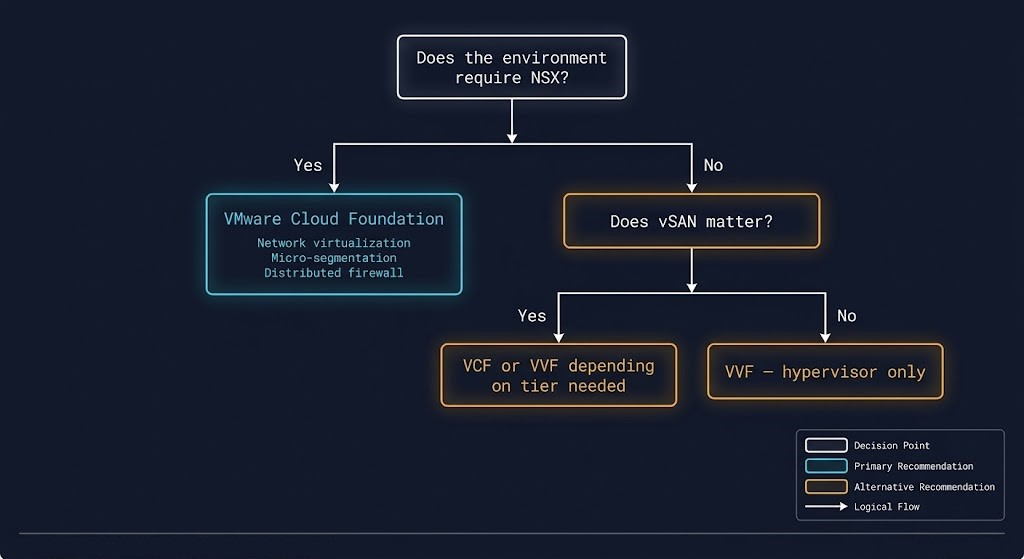
Under the previous component model, NSX was an add-on purchase. Architects could evaluate NSX independently, price it against requirements, and add it to a vSphere environment when the use case justified it. That optionality is gone.
NSX is now exclusively available in VCF. An environment that requires NSX capabilities — for any reason — must license VCF. The architectural implications:
Micro-segmentation requirements. Regulatory frameworks that mandate workload isolation at the network layer — PCI-DSS zone segmentation, HIPAA workload isolation, SOC 2 network controls — typically require the kind of granular east-west traffic control that NSX provides. If compliance requirements mandate micro-segmentation, VVF cannot satisfy them.
Multi-tenancy environments. Environments hosting workloads for multiple business units or customers with strict isolation requirements rely on NSX’s tenant network model. Physical VLAN-based isolation at the scale multi-tenancy requires is operationally unmanageable. NSX makes it programmable.
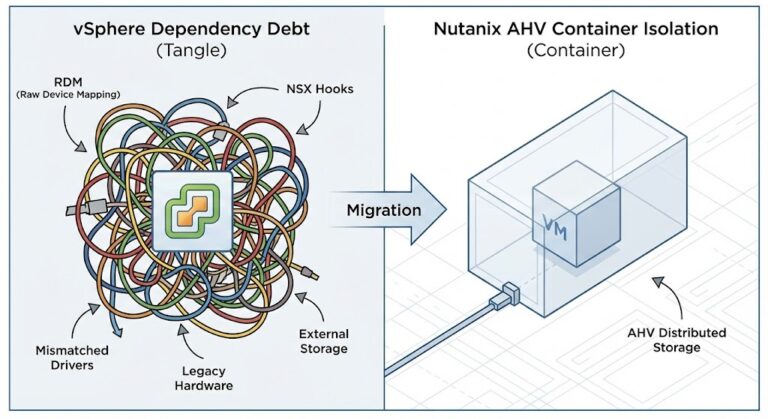
Migration from NSX environments. Organizations currently running NSX under the old licensing model face a specific renewal scenario: their existing NSX deployment requires VCF at renewal. There is no migration path from NSX to a VVF subscription without removing NSX from the environment — which means removing the network virtualization layer before finding a replacement.
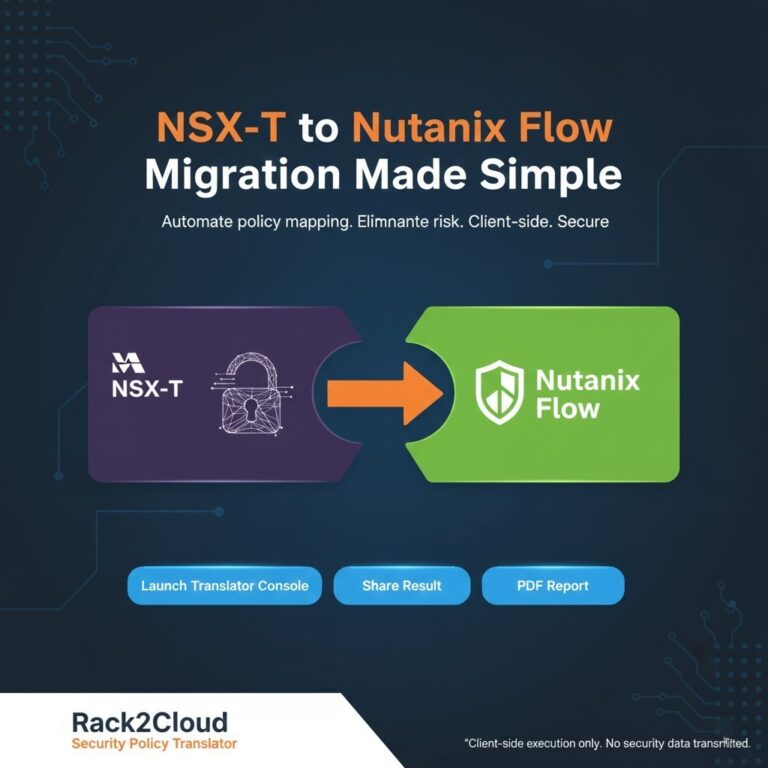
The NSX-T to Nutanix Flow migration path — documented in the Post-Broadcom series Part 4 — covers exactly this transition for environments where the VCF cost at renewal is the trigger for evaluating an exit from the VMware stack entirely.
VCF vs VVF Decision Framework
| Scenario | Verdict | Why |
|---|---|---|
| NSX currently deployed and required | VCF | NSX is only available in VCF. No alternative path within the VMware stack. |
| Micro-segmentation required by compliance | VCF | Regulatory isolation requirements at the workload level require NSX capabilities. |
| VMC on AWS or AVS in scope | VCF | Both managed VMware services require VCF as the foundational licensing model. |
| Full-stack automation, no manual patching | VCF | SDDC Manager lifecycle automation is VCF-exclusive. |
| External SAN, no vSAN required | VVF | Paying for vSAN in VCF is redundant to existing SAN infrastructure. |
| No NSX requirement now or in planning horizon | VVF | VVF covers hypervisor requirements without paying for unused network virtualization. |
| Per-core cost exceeds workload value | Evaluate Exit | When VVF per-core minimums still produce cost structure that doesn’t match operational value, the VMware exit path deserves evaluation. |
| NSX required but VCF cost is untenable | Evaluate Exit | Nutanix Flow provides micro-segmentation capabilities outside the VMware stack. Migration path documented in Post-Broadcom Part 4. |
Architect’s Verdict
The VMware Cloud Foundation vs vSphere decision is not a features comparison. It is a requirements audit against a forced bundling model.
VCF is the correct choice when the environment genuinely requires NSX, full lifecycle automation, or hybrid cloud extension to VMware-managed cloud services. In those scenarios, VCF delivers real architectural value and the per-core cost is justified by the operational requirements it meets.
VVF is the correct choice when the environment’s requirements stop at compute virtualization — no network virtualization, no full vSAN, no automated lifecycle orchestration. In those scenarios, VCF is a tax on capabilities the environment doesn’t use.
The third answer — neither — is increasingly relevant. For environments where Broadcom’s per-core minimums produce a subscription cost that exceeds the operational value of staying on the VMware stack, the exit path to Nutanix AHV, Proxmox, or Kubernetes deserves the same rigorous evaluation as the VCF vs VVF decision. The Broadcom Exit Strategy and the Post-Broadcom Migration Series cover that calculation in detail.
The VMware Core Calculator models the per-core cost for your specific hardware profile against both bundles — run it before the renewal conversation, not during it.
Additional Resources
Editorial Integrity & Security Protocol
This technical deep-dive adheres to the Rack2Cloud Deterministic Integrity Standard. All benchmarks and security audits are derived from zero-trust validation protocols within our isolated lab environments. No vendor influence.

R.M.
Senior Solutions Architect with 25+ years of experience in HCI, cloud strategy, and data resilience. As the lead behind Rack2Cloud, I focus on lab-verified guidance for complex enterprise transitions. View Credentials →
Get the Playbooks Vendors Won’t Publish
Field-tested blueprints for migration, HCI, sovereign infrastructure, and AI architecture. Real failure-mode analysis. No marketing filler. Delivered weekly.
Select your infrastructure paths. Receive field-tested blueprints direct to your inbox.
- > Virtualization & Migration Physics
- > Cloud Strategy & Egress Math
- > Data Protection & RTO Reality
- > AI Infrastructure & GPU Fabric
Zero spam. Includes The Dispatch weekly drop.
Need Architectural Guidance?
Unbiased infrastructure audit for your migration, cloud strategy, or HCI transition.
>_ Request Triage Session