VPA vs HPA: Why Most Teams Choose the Wrong Autoscaler
The VPA vs HPA decision is one of the most misunderstood choices in Kubernetes resource management. Most Kubernetes teams reach for HPA first. It’s visible, it’s familiar, and the CPU metric dashboard makes the decision feel obvious. When traffic spikes, pods scale out. When traffic drops, they scale back. The mental model is clean.
The problem isn’t that HPA is wrong. The problem is that HPA solves one specific failure mode — traffic-driven throughput degradation — and teams apply it to workloads where the actual failure mode is something else entirely. An under-resourced pod doesn’t need more replicas. It needs more CPU. More replicas of a starved pod just gives you more starved pods.
This post is the decision framework layer in the Rack2Cloud Kubernetes scaling series. If you’ve already read the mechanics of in-place pod resize in Kubernetes 1.35: In-Place Pod Resize — What Platform Teams Need to Know and the Day-2 production reality in Vertical Pod Autoscaler in Production: When In-Place Resize Still Breaks, this is where those pieces connect to the architectural decision that precedes both.
The question isn’t which autoscaler is better. It’s which failure mode you’re actually solving for — and whether your current setup is solving it or hiding it.
The Misconception Baked Into Most Kubernetes Setups
VPA vs HPA are not two ways to accomplish the same thing. Teams treat them that way because both live under the autoscaling umbrella and both react to resource signals. But they operate on completely different dimensions of the system, and conflating them produces architectures that fail in ways that are genuinely hard to diagnose.
HPA scales the number of running pod replicas. VPA scales the resource requests and limits assigned to individual pods. One affects how many instances of your workload are running. The other affects how much infrastructure each instance is allocated. These are orthogonal levers. Pulling the wrong one under load doesn’t just fail to fix the problem — it can make it worse.
What Each Autoscaler Actually Does
HPA watches a metric — CPU utilization, memory utilization, or a custom signal from an external source — and adjusts the number of pod replicas in a Deployment or StatefulSet to keep that metric within a defined target range. When load increases, HPA adds replicas to distribute it. When load decreases, HPA removes replicas to reclaim capacity.
The operational model is additive. More traffic means more pods. The existing pods don’t change. The workload is assumed to be stateless enough that adding identical copies increases throughput proportionally.
VPA — Vertical Pod Autoscaler
VPA watches actual resource consumption at the container level and adjusts the CPU and memory requests and limits defined in the pod spec. It doesn’t change how many pods are running. It changes how much of the node’s resources each pod is permitted to use.
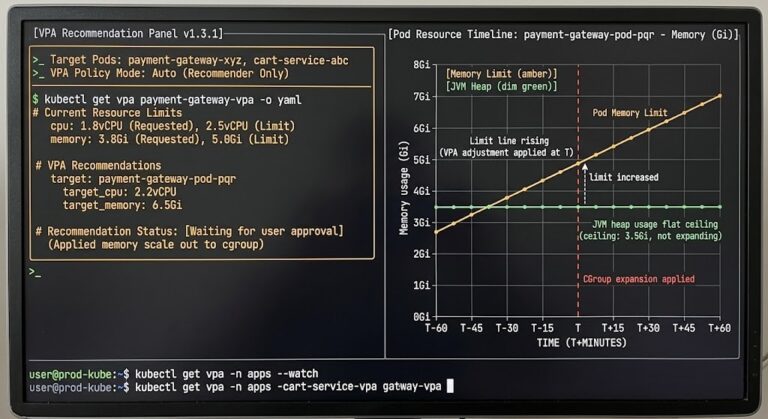
VPA operates in three modes: Off (recommendations only, no automated changes), Initial (applies recommendations only at pod creation), and Auto (applies recommendations live, with evict-and-recreate or in-place resize depending on Kubernetes version and configuration). The Kubernetes 1.35 in-place resize capability changed the operational risk profile of VPA’s Auto mode significantly — but as the production Day-2 analysis shows, it eliminated one failure mode, not all of them.
A brief note on scope: KEDA (Kubernetes Event-Driven Autoscaling) extends HPA’s trigger model to arbitrary event sources — queue depth, Kafka lag, custom webhooks. It’s the right answer for event-driven workloads where CPU and memory are weak proxies for actual load. It’s outside the scope of this post, but worth knowing it exists before you reach for custom metrics in HPA as a workaround.
The Real Difference Between VPA vs HPA: Dimensions, Not Dials
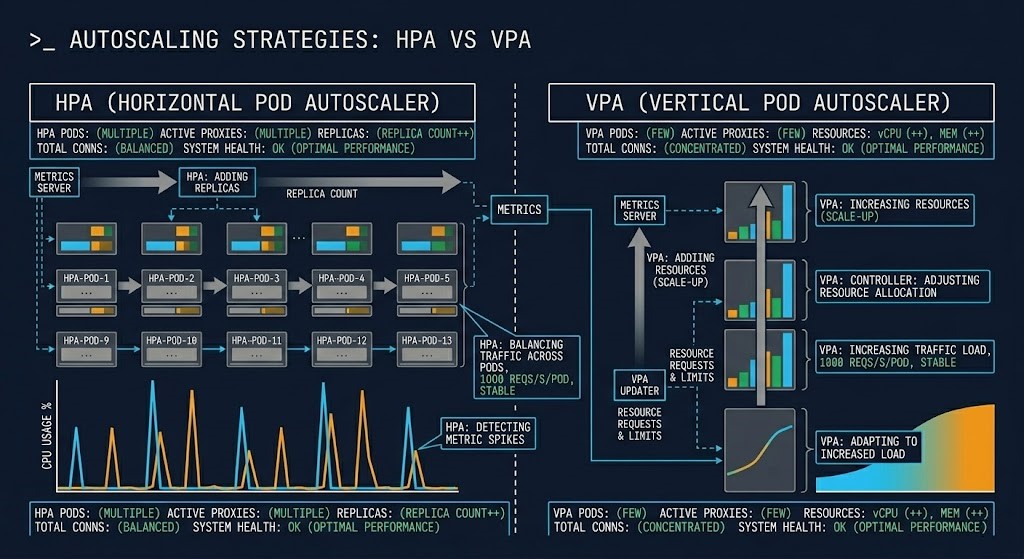
The surface-level summary — HPA scales out, VPA scales up — is accurate but incomplete. The more useful frame is what each autoscaler is actually responding to and what failure mode each one is designed to prevent.
| Dimension | HPA | VPA |
|---|---|---|
| What it scales | Replica count | Resource requests/limits |
| Trigger | Load (CPU, memory, custom metrics) | Resource efficiency gap |
| Primary impact | Throughput | Stability and right-sizing |
| Risk | Over-scaling, cold start amplification | Pod eviction, restart disruption |
| Failure mode it solves | Traffic-driven saturation | Resource mis-sizing, OOM, throttling |
| Failure mode it creates | Latency spikes during scale-out | Scheduling pressure, node fragmentation |
| Works best with | Stateless, burst-pattern workloads | Steady, stateful, right-sizing targets |
The failure mode column is the one worth reading twice. HPA doesn’t prevent OOM kills. VPA doesn’t absorb traffic bursts. Applying the wrong autoscaler to a workload means you’re solving for a failure that isn’t happening while leaving the actual failure mode unaddressed. The Kubernetes Day-2 Operations guide covers the broader diagnostic framework for identifying which resource failure loop you’re actually in before you reach for an autoscaling solution.
Where Each Autoscaler Breaks
CPU is a weak proxy for real load. HPA’s default trigger is CPU utilization. For many workloads, CPU utilization correlates poorly with actual user-facing demand. A service that’s latency-bound due to downstream I/O will show low CPU while requests queue. HPA sees a healthy CPU metric and doesn’t scale. Users see degraded response times.
Cold start amplification under burst patterns. When HPA scales out rapidly under sudden load, new pods require initialization time — container startup, dependency injection, JVM warm-up, connection pool establishment. During that window, the new pods are registered as available but not yet serving efficiently. Traffic routes to them anyway. The burst that triggered scale-out now has to absorb the latency penalty of cold pods at exactly the wrong moment.
Latency-sensitive workloads punish scale-out events. The brief period between scale-out trigger and pod readiness is a service disruption in disguise. For workloads where P99 latency matters more than throughput, HPA scale-out events are visible in the latency profile as spikes that don’t correspond to any external traffic change.
Where VPA breaks
Stateful workloads and restart disruption. In clusters running Kubernetes versions before 1.35, VPA’s Auto mode requires pod eviction to apply new resource settings. For stateful workloads — databases, Kafka brokers, services with warm JIT caches or active sessions — that eviction has a real operational cost. Kubernetes 1.35’s in-place resize path removes the restart requirement for CPU changes, but memory shrink still requires eviction in most configurations.
Rapid traffic changes outpace VPA’s observation window. VPA builds recommendations from a sliding historical window defaulting to 8 days. Workloads with sharp intraday load patterns — batch jobs, services with strong daily or weekly cycles — may receive recommendations calibrated to a low-load period. When high-load conditions return, VPA’s current recommendation is wrong. The VPA in production post covers this recommendation drift failure mode in detail.
In-place resize creates node fragmentation at scale. After VPA increases a pod’s resource allocation in-place, that pod occupies more of its node’s capacity without being rescheduled. Other pods that were previously schedulable on that node may no longer fit. At cluster scale, repeated in-place resizes fragment node capacity in ways that produce pending pods even when aggregate cluster CPU and memory are sufficient — the same fragmentation pattern documented in Kubernetes Scheduler Stuck: The Guide to Pending Pods.
The Decision Framework
The VPA vs HPA decision follows from the failure mode. Map your workload against these patterns before configuring anything.
- Workload is stateless — replicas are identical and interchangeable
- Load pattern is traffic-driven and burst-shaped
- CPU or custom metrics are a reliable proxy for demand
- Cold start latency is acceptable during scale-out events
- Individual pod resource sizing is already correct
- Workload has steady, predictable load patterns
- Pods are consistently OOM-killed or CPU-throttled
- Initial resource requests were set by guesswork
- Right-sizing over time matters more than burst absorption
- Running in Recommendation mode first to validate before enabling automation
- VPA in Recommendation or Initial mode only — not Auto
- Use VPA to establish correct baseline sizing
- Use HPA to handle burst scaling above that baseline
- Never enable VPA Auto mode on the same resource dimension HPA is watching
- Validate coordination behavior in non-production before enabling in cluster
The Trap: Running Both Without Coordination
This is the failure mode that doesn’t show up in the documentation examples. Both autoscalers are enabled. Both are watching CPU. VPA recommends a larger CPU request and evicts the pod to apply it. The eviction momentarily reduces the replica count visible to HPA. HPA interprets the metric signal as a scale-in condition and removes a replica. VPA recalculates on a smaller pod pool. The cycle repeats.
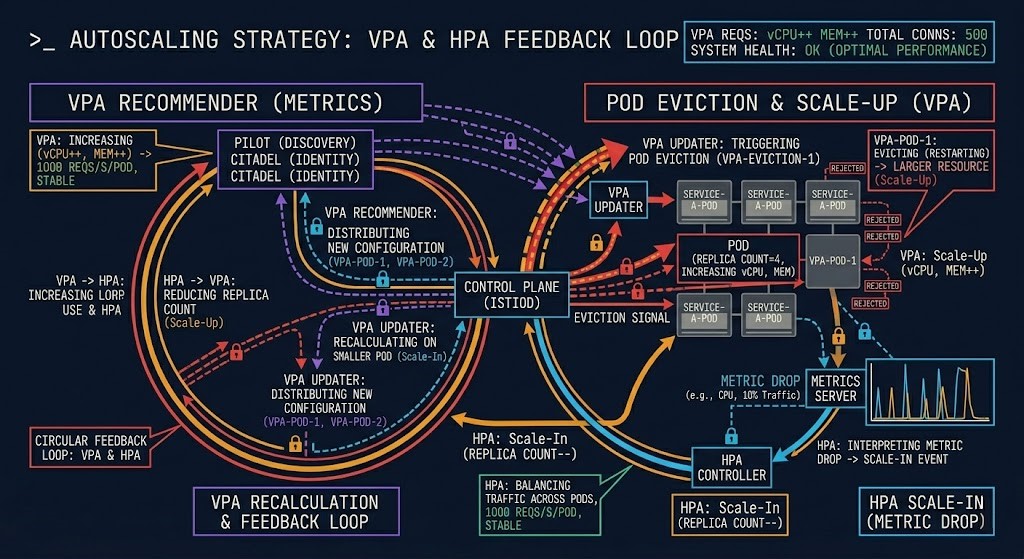
The result is oscillation — pods being evicted and rescheduled in a pattern that isn’t driven by actual workload behavior, resource pressure, or any real system condition. The scheduler sees the churn. Nodes fragment. The resource contention physics documented elsewhere in this series — CPU wait, scheduling pressure, run queue saturation — emerge not from load, but from the autoscalers fighting each other.
The coordination rule is simple: if you run both, VPA must not operate in Auto mode on any resource dimension that HPA is also watching. In practice, this means VPA handles memory right-sizing (where HPA rarely triggers directly) and HPA handles CPU-driven replica scaling. The two systems operate on different axes and don’t interact. The moment their trigger dimensions overlap, coordination breaks down.
Scaling Decisions Are Cost Decisions
Every autoscaling configuration is a cost architecture decision, not just an operational one. HPA scales by adding pods — each additional replica consumes node capacity, and at cloud scale that means additional compute spend. Aggressive HPA configurations with low scale-in thresholds result in replica counts that track traffic curves closely, which feels like efficiency but often means you’re paying for capacity that’s online and idle during the transition periods between scale-out and scale-in.
VPA’s cost case is different. Right-sized pods mean better bin-packing efficiency — more workloads fit on fewer nodes, which reduces the node count required to run the cluster at a given utilization target. But VPA misconfiguration in the other direction — oversized resource requests from a stale recommendation window — wastes capacity that could serve other workloads.
The FinOps Architecture post covers the broader framework for treating infrastructure cost as an architectural constraint rather than a billing report. Autoscaling configuration is where that principle has some of its most direct operational consequences.
Architect’s Verdict
VPA vs HPA are not alternatives. They solve different failure modes on different dimensions of the same system. The mistake isn’t choosing the wrong one — it’s treating them as interchangeable answers to the same question.
Map the failure mode first. If your pods are saturated by traffic and individual sizing is correct, HPA is the answer. If your pods are OOM-killed or CPU-throttled regardless of replica count, VPA is the answer. If both conditions are present, run them in coordination with explicit constraints on which dimensions each controls.
The teams that get this wrong don’t get it wrong because they don’t understand Kubernetes. They get it wrong because they reached for a tool before they diagnosed the failure. The autoscaler is the last decision, not the first one.
Continue the Architecture
Additional Resources
Editorial Integrity & Security Protocol
This technical deep-dive adheres to the Rack2Cloud Deterministic Integrity Standard. All benchmarks and security audits are derived from zero-trust validation protocols within our isolated lab environments. No vendor influence.

R.M.
Senior Solutions Architect with 25+ years of experience in HCI, cloud strategy, and data resilience. As the lead behind Rack2Cloud, I focus on lab-verified guidance for complex enterprise transitions. View Credentials →
Get the Playbooks Vendors Won’t Publish
Field-tested blueprints for migration, HCI, sovereign infrastructure, and AI architecture. Real failure-mode analysis. No marketing filler. Delivered weekly.
Select your infrastructure paths. Receive field-tested blueprints direct to your inbox.
- > Virtualization & Migration Physics
- > Cloud Strategy & Egress Math
- > Data Protection & RTO Reality
- > AI Infrastructure & GPU Fabric
Zero spam. Includes The Dispatch weekly drop.
Need Architectural Guidance?
Unbiased infrastructure audit for your migration, cloud strategy, or HCI transition.
>_ Request Triage Session