

From vSphere to Nutanix AHV: The Deterministic Migration Checklist to Avoid the 99% Hang
There is no worse feeling in a migration window than watching the cutover bar hit 99% and stop.
The tool says “Finalizing,” but the VM is actually dead.
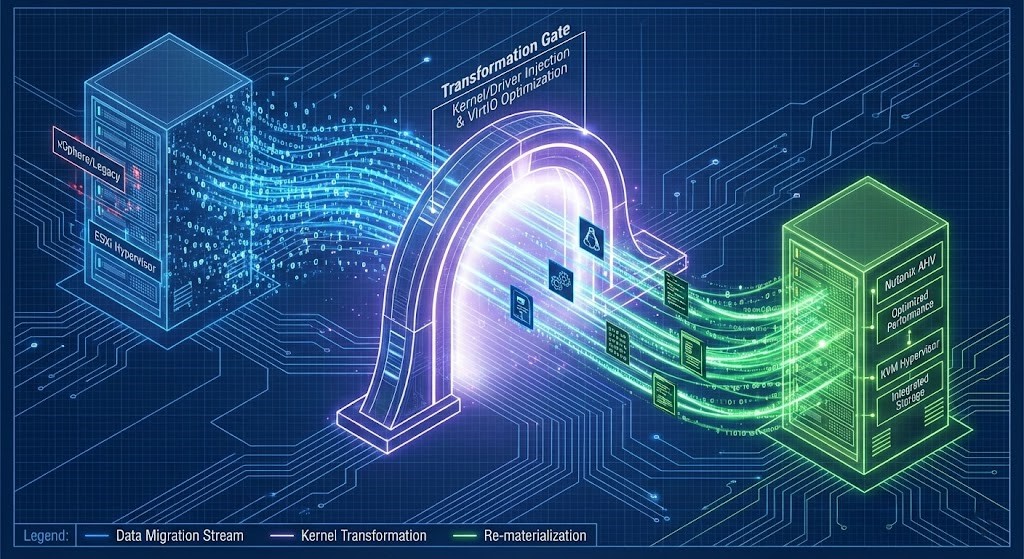
The “99% Hang” isn’t a random glitch. It is almost always a driver failure. You are forcing a Windows VM to boot on KVM (AHV) while its kernel is still hard-coded to look for a VMware Paravirtual SCSI controller. The migration software tries to inject the VirtIO drivers during the final delta sync, and if that injection fails, the VM boots into a blue screen or a black void.
We need to stop trusting the “Auto” settings in migration tools. Here is the manual checklist to ensure the kernel actually survives the platform swap.
The Physics of Migration: Why does the “99% Hang” happen?
Let’s strip away the marketing fluff. When you migrate a VM, you are essentially performing a transplant. You are ripping the brain (OS) out of one body (ESXi hardware abstraction layer) and shoving it into another (AHV/KVM).
To guarantee success, you must satisfy the Migration Physics Model:
- Device Continuity: The guest kernel must recognize its boot and network devices immediately post-cutover (VirtIO injection).
- Data Coherency: The final delta sync must reconcile snapshot chains without read amplification.
- Network Integrity: The replication stream must traverse the fabric without fragmentation or loss.
The “99% Hang” occurs when one of these physics constraints is violated during the Switchover Phase. The source VM shuts down, the final bits are sent, and the Target VM attempts to boot. If the OS kernel looks for an LSI Logic SAS controller (VMware standard) and finds a VirtIO SCSI controller (AHV standard), it panics. It doesn’t “hang”; it crashes instantly, but the orchestration tool interprets the lack of heartbeat as a “hang.”
Migration Failure Modes (Troubleshooting Matrix)
| Symptom | Root Cause | Detection Method | Deterministic Fix |
| Cutover stuck at 99% | Missing/Corrupt VirtIO drivers | Boot console / WinRE | Inject VirtIO + rebuild BCD |
| VM boots then BSODs | Storage controller mismatch (Stop code 0x7B) | BlueScreenView / Event Logs | Pre-install NGT or VirtIO ISO |
| Migration crawls then fails | MTU Mismatch (Fragmented packets) | iperf / packet capture | Normalize MTU end-to-end |
| Migration API times out | Snapshot chain depth > 2 | Snapshot tree inspection | Consolidate snapshots |
Pre-Flight: The Kernel & Driver Audit
If you skip this, you will fail. I don’t care what the UI says.
The VirtIO Imperative
VMware uses emulated hardware (Intel E1000 NICs, LSI Logic Storage). Nutanix AHV is KVM-based and uses paravirtualized drivers (VirtIO) to talk directly to the hypervisor for speed.
The War Story: I once watched a Junior Engineer force-migrate a SQL cluster without verifying the Nutanix Guest Tools (NGT) installation. The VMs migrated, booted, and then BSOD’d with INACCESSIBLE_BOOT_DEVICE. We spent 6 hours rebuilding the boot sectors.
Linux-Specific Failure Modes
While Windows fails loudly (BSOD), Linux fails silently.
- Initramfs Missing Modules: If your
initramfsimage doesn’t containvirtio_blkorvirtio_scsi, the kernel will panic at boot. - UUID Mismatches in fstab: If
/etc/fstabreferences disks by UUIDs that change during migration (rare, but possible with raw disk imports), the mount will fail. - Dracut/Grub: Ensure your bootloader config includes KVM modules.
- Secure Boot Caveat: If Secure Boot is enabled, unsigned VirtIO modules will fail to load — resulting in a silent boot failure.
Pro Tip: Use our HCI Migration Advisor to automate this. It scans your vCenter inventory specifically for “Ghost ISOs”, RDM disks, and driver inconsistencies that will break the Nutanix Move orchestration.
Network Physics: How do MTU mismatches kill migration?
This is where I see the most sophisticated architects get burned.
In vSphere environments, we often crank the vMotion and vSAN networks to MTU 9000 (Jumbo Frames) to maximize throughput. When you deploy Nutanix Move, it creates a small appliance that acts as the data pump.
The Failure Scenario:
If your vSphere host communicates via MTU 9000, but your Top-of-Rack switches or the destination AHV OVS (Open vSwitch) uplink is set to MTU 1500, the packets will fragment or drop.
- Symptom: The migration starts fast, then crawls to 2MB/s, then times out.
- Diagnosis: The large data payloads for the disk blocks are being dropped silently by the switch fabric.
The Fix:
Ensure end-to-end MTU consistency. I prefer setting the Nutanix Move appliance interface to MTU 1500 explicitly unless I have personally verified the switch config. Reliability > Speed.
Storage Physics: How do Snapshot Chains affect migration?
VMware snapshots are delta files. base-disk.vmdk -> 00001.vmdk -> 00002.vmdk.
When you ask a migration tool to read the disk, it has to traverse this chain to figure out what the “current” state of a block is.
- The Risk: If you have a VM with 3+ years of snapshots (I’ve seen it), the read latency skyrockets. The migration tool may time out waiting for the vSphere API to lock the file.
- The Requirement: Consolidate all snapshots before migration. Do not migrate a VM with an active backup snapshot or a “Testing” snapshot from 2021.
Deep Dive: For a deeper look at how hidden metadata destroys timelines (and budgets), read my full analysis on The Snapshot Tax: Why VMware Migrations Explode.
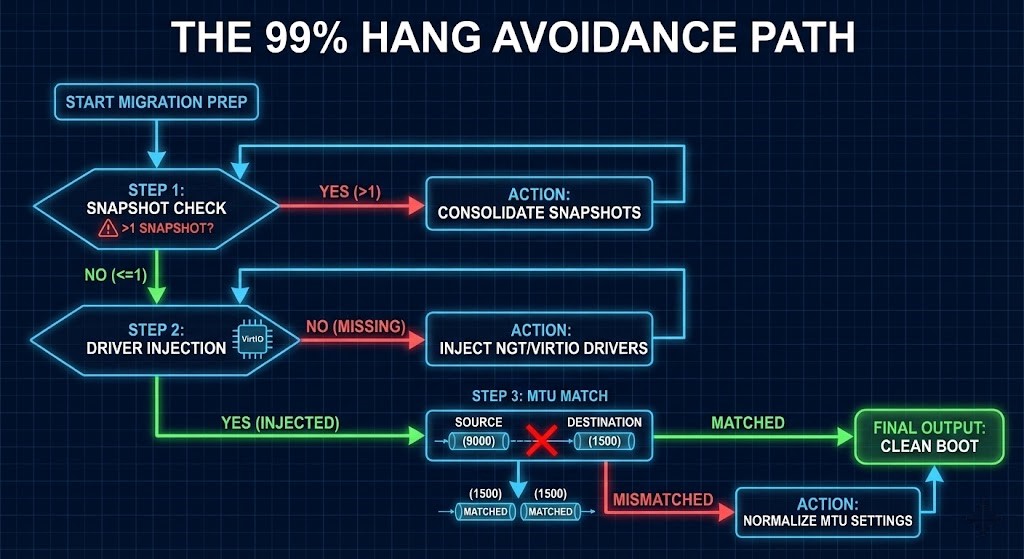
Day 2 Operations: The Post-Migration Reality
Congratulations, the VM is on AHV. You aren’t done.
Network Re-Mapping
vSphere uses Distributed Virtual Switches (DVS). AHV uses Flow Virtual Networking or standard VLAN-backed networks.
- The Disconnect: The VM will maintain its static IP, but the MAC address might change depending on your config. If you have MAC-based security filtering on your physical firewalls, your app will be dark.
- The Solution: Reference our NSX-T to Nutanix Flow Migration Guide to map your security groups before the cutover.
The Cleanup (Removing VMware Tools)
Don’t leave VMware Tools running on AHV. It wastes cycles polling for a hypervisor that isn’t there.
- Windows: Uninstall via Control Panel.
- Linux:
vmware-uninstall-tools.plusually does the trick, but check for orphanedvmtoolsdprocesses.
Financial Analysis: CapEx vs. OpEx
Why go through this pain? Because the “Broadcom Tax” is real.
When we model this for clients, the ROI isn’t in year 1 (due to migration labor costs). It’s in Year 3.
- vSphere: Recurring licensing costs have shifted to per-core subscriptions that punish high-density hosts.
- Nutanix AHV: The hypervisor is included in the AOS license. You are essentially removing a line item.
Check the VMware Renewal Estimator to calculate your specific renewal cliff and compare it against the migration effort.
Conclusion: Engineering Trust
A successful migration isn’t about the tools — it’s about architectural discipline. Tools execute. Architects predict. The “99% Hang” is strictly a failure of the architect to account for drivers, network fragmentation, or storage latency.
When you think like an architect, you respect the physics of the data. When you build like an engineer, you verify the MTU, inject the drivers, and consolidate the snapshots.
Next Step
Don’t guess at your inventory’s readiness. If you want, I can generate a deterministic pre-flight checklist for your top five business-critical VMs — kernel, network, storage, and security — so you can predict success before you touch Cutover.
Additional Resources:
- Nutanix Bible – Migration: https://www.nutanixbible.com (The definitive source on AHV architecture)
- Red Hat VirtIO Documentation: https://access.redhat.com/documentation/en-us (Deep dive on KVM/VirtIO drivers)
- VMware KB – Snapshot Best Practices: https://kb.vmware.com (Validating snapshot chain integrity)
Editorial Integrity & Security Protocol
This technical deep-dive adheres to the Rack2Cloud Deterministic Integrity Standard. All benchmarks and security audits are derived from zero-trust validation protocols within our isolated lab environments. No vendor influence.

R.M.
Senior Solutions Architect with 25+ years of experience in HCI, cloud strategy, and data resilience. As the lead behind Rack2Cloud, I focus on lab-verified guidance for complex enterprise transitions. View Credentials →
Get the Playbooks Vendors Won’t Publish
Field-tested blueprints for migration, HCI, sovereign infrastructure, and AI architecture. Real failure-mode analysis. No marketing filler. Delivered weekly.
Select your infrastructure paths. Receive field-tested blueprints direct to your inbox.
- > Virtualization & Migration Physics
- > Cloud Strategy & Egress Math
- > Data Protection & RTO Reality
- > AI Infrastructure & GPU Fabric
Zero spam. Includes The Dispatch weekly drop.
Need Architectural Guidance?
Unbiased infrastructure audit for your migration, cloud strategy, or HCI transition.
>_ Request Triage Session