

ZFS vs Ceph vs NVMe-oF: Choosing the Right Storage Backend for Modern Virtualization
I still have nightmares about a storage migration I ran back in 2014.
We were moving off a monolithic SAN and onto an early “software-defined” storage platform. The sales engineers promised infinite scalability and self-healing magic. Two weeks in, a top-of-rack switch flapped, the cluster split-brained, and the SDS platform completely lost the plot.
We spent 72 hours manually stitching iSCSI targets back together while the CIO hovered over my desk asking why our “infinite” storage was infinitely offline.
That experience taught me a hard truth: Storage abstraction is not a silver bullet.
Failure domains still exist. Physics still applies. And blast radius still matters.
Today, when I design virtualization backends—especially for teams executing a VMware to Proxmox migration—I don’t start with vendor IOPS charts. I start with:
- What happens when something breaks?
- How fast can we recover?
- How painful are Day 2 operations?
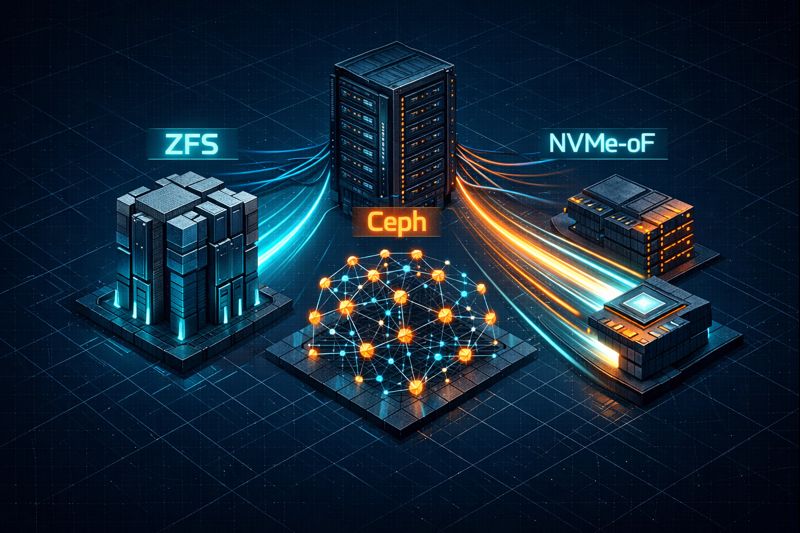
In modern virtualization, most backend decisions boil down to three fundamentally different philosophies: ZFS (the monolithic fortress), Ceph (the distributed hydra), and NVMe-oF (the disaggregated speed demon).
Here’s how to choose without destroying your weekend (or your on-call sanity).
The Architectural Trilemma
You aren’t just choosing a protocol. You’re choosing a failure domain.
Every storage backend is a tradeoff between Latency, Consistency, and Complexity.
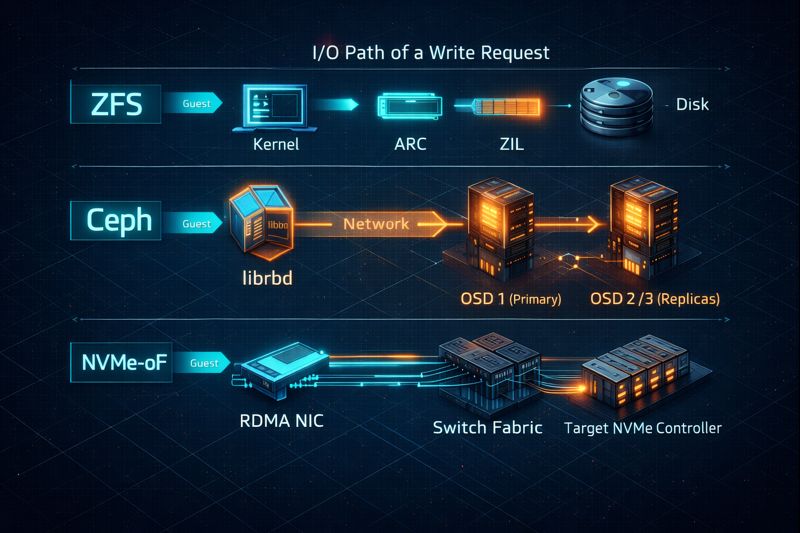
Here’s how each contender approaches that trade:
- ZFS embeds filesystem logic directly into the host. Storage and compute are tightly coupled.f
- Ceph distributes storage logic across the cluster using RADOS and CRUSH maps. Storage is decoupled from disk location—but at a computational cost.
- NVMe-oF removes SCSI entirely, pushing raw NVMe commands over Ethernet (RoCE v2 or TCP). It is a lightweight, low-latency protocol that delegates transport reliability entirely to the network fabric.
Different physics. Different failure modes. Different operational taxes.
ZFS: The Fortress of Solitude
I treat ZFS as the baseline for reliability. If your cluster is small (2–3 nodes), or you’re running hyper-converged and can’t afford to burn 30% of your RAM on storage overhead, ZFS is almost always the right answer.
The Architect’s View
ZFS shines because of ARC (Adaptive Replacement Cache). I’ve watched ZFS boxes serve 90%+ of reads straight from RAM, completely masking the slowness of spinning disks.
But ZFS is fundamentally local. To make it “shared” for virtualization (i.e., live migration), you usually have to layer replication on top—and replication introduces failure domains.
⚠️ The Split-Brain Trap (Especially in 2-Node Clusters)
This is where I see teams get burned.
They buy two beefy servers, slap ZFS replication between them, and think they’ve built “high availability.” They haven’t. Without a third vote, you’re building a split-brain machine.
If you’re running a 2-node Proxmox cluster on ZFS, you must implement an external quorum witness. We published the exact engineering fix here: Proxmox 2-Node Quorum HA Fix. Skipping this step isn’t a gamble—it’s a guarantee of downtime.
The “When to Choose” Decision Framework
- Choose ZFS if: You have <5 nodes, want maximum density per node, and care deeply about data integrity (checksums, COW, snapshots).
- Avoid ZFS if: You need active-active multi-writer storage, can’t tolerate downtime during vdev expansion, or need seamless horizontal scale.
Ceph: The Scalable Hydra
Ceph is seductive. It promises you can lose a disk, a node, or even a rack—and the cluster will heal itself. And honestly? That part is true. I’ve pulled drives out of live Ceph clusters just to prove it to junior engineers.
But that resilience comes with a price: latency, complexity, and operational overhead.
The Architect’s View
Ceph isn’t “just storage.” It’s a distributed system. Every write must be acknowledged by multiple OSDs across the network before it’s considered committed. That introduces a latency floor that no amount of SSDs can eliminate.
If you’re deciding between ZFS and Ceph specifically in a Proxmox environment, read this first: Proxmox ZFS vs Ceph Storage Guide. We benchmark the real-world behavior and installation nuances—no marketing fluff.
The “When to Choose” Decision Framework
- Choose Ceph if: You have >5 nodes, need no single point of failure (SPOF), and want to mix-and-match drive sizes or scale capacity without downtime.
- Avoid Ceph if: You only have 10GbE (bare minimum) and no path to 25GbE+, are CPU constrained, or don’t have staff for Day 2 operations (CRUSH, PGs, BlueStore tuning).
NVMe-oF: The Disaggregated Speed Demon
NVMe over Fabrics strips away the SCSI baggage that drags down iSCSI and Fibre Channel. It treats the network like a PCIe bus. This is storage for people who hate waiting.
The Architect’s View
I deploy NVMe-oF (NVMe/TCP for simplicity, RoCEv2 for absolute performance) when the workload is:
- High-frequency trading
- Massive AI/ML training
- Latency-sensitive OLTP databases
The goal here is disaggregation. I want compute nodes to be diskless pizza boxes. I want storage nodes to be dense flash arrays (JBOFs). And I want the fabric to do the heavy lifting. With RDMA, data movement is offloaded to the NIC. The CPU barely notices the I/O.
The “When to Choose” Decision Framework
- Choose NVMe-oF if: You need sub-100µs latency, want to scale compute and storage independently, and are building performance-first infrastructure.
- Avoid NVMe-oF if: Your network fabric can’t support lossless Ethernet (PFC/ECN for RoCE) or your budget doesn’t support all-flash arrays and RDMA NICs.
Visual Engineering: Feature Velocity Comparison
Here’s how these backends behave under real production pressure:
| Feature Domain | ZFS (Local/Replicated) | Ceph (RBD) | NVMe-oF (TCP/RoCE) |
| Write Latency | Low (RAM log / ZIL) | Higher (Network RTT + OSD ACKs) | Ultra-low (Near-local) |
| Scalability | Vertical (Add JBODs) | Horizontal (Add nodes) | Disaggregated (Independent scaling) |
| Consistency Model | Strong (COW + Checksums) | Strong (Paxos/CRUSH) | Fabric dependent |
| CPU Overhead | Medium (Compression/Dedup) | High (CRUSH, replication, recovery) | Low (NIC offload) |
| Network Reqs | N/A (Local) or 10GbE (Rep) | 25GbE+ recommended | 100GbE+ ideal |
| Recovery Time | Slow (Resilver limited by disk) | Fast (Parallel rebalance) | Backend-dependent (usually RAID) |
| Typical Use Case | DB servers, branch clusters | Private cloud, OpenStack, Large Proxmox | HPC, AI/ML, ultra-low-latency DBs |
Financial Reality: CapEx vs OpEx
Designing storage without modeling TCO is malpractice. Here’s where the hidden costs live:
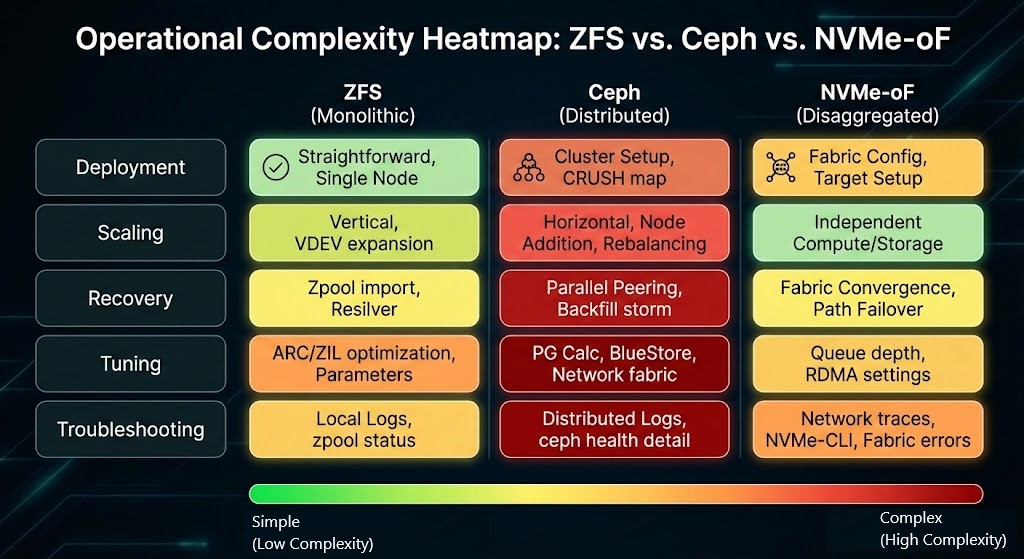
ZFS
- CapEx: Moderate. You pay for ECC RAM and enterprise SSDs (especially for SLOG/ZIL).
- OpEx: Low. Once tuned, ZFS is stable. The pain point is capacity expansion, which is rigid and sometimes disruptive.
Ceph
- CapEx: High. You’re not buying disks—you’re buying nodes. To perform well, you need NVMe OSDs, more CPU cores per node, and a serious switch fabric (leaf/spine).
- OpEx: Very high. Ceph is a Day 2 system. You need people who understand CRUSH maps, PG math, and BlueStore tuning. If you don’t have that in-house, you’ll be paying consultants.
- Check our Deterministic Tools portfolio for our Ceph calculator to model PG growth.
NVMe-oF
- CapEx: Premium. RDMA NICs, high-end switches, and all-flash arrays aren’t cheap.
- OpEx: Moderate. The protocol is simpler than Ceph. The complexity lives in the network fabric (DCB, PFC, ECN). Once the fabric is stable, the storage layer is refreshingly boring.
Conclusion: The Architect’s Verdict
There is no “best” backend. There is only the backend that fits your SLOs, your staff, and your failure tolerance.
- If I’m building a branch office or small hyper-converged cluster, I use ZFS (with a mandatory quorum fix). It’s boring, reliable, and operationally sane.
- If I’m building a large private cloud where I need to add capacity without downtime, I use Ceph. The operational tax is the price of scale.
- If I’m building a database cluster where latency directly impacts revenue, I use NVMe-oF. Physics beats everything.
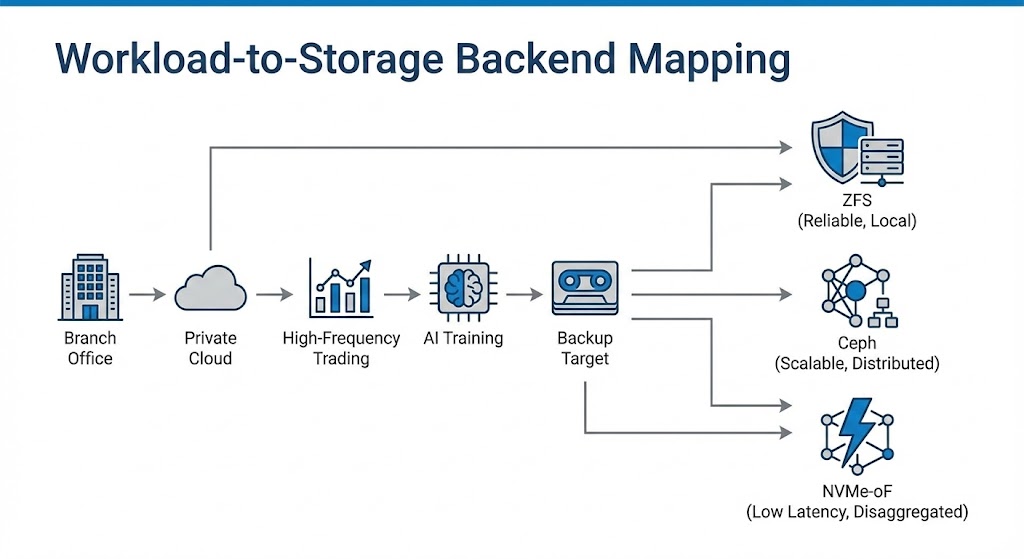
Don’t build a Ferrari (NVMe-oF) to haul groceries. Don’t try to cross the ocean in a tank (ZFS). Match the physics of the storage to the physics of the workload.
Next Step: If you’re unsure whether your network topology can handle Ceph or NVMe-oF—or whether your current design will survive a real failure—I’m happy to review your architecture and switching capacity requirements. Just ask.
Additional Resources
Editorial Integrity & Security Protocol
This technical deep-dive adheres to the Rack2Cloud Deterministic Integrity Standard. All benchmarks and security audits are derived from zero-trust validation protocols within our isolated lab environments. No vendor influence.

R.M.
Senior Solutions Architect with 25+ years of experience in HCI, cloud strategy, and data resilience. As the lead behind Rack2Cloud, I focus on lab-verified guidance for complex enterprise transitions. View Credentials →
Get the Playbooks Vendors Won’t Publish
Field-tested blueprints for migration, HCI, sovereign infrastructure, and AI architecture. Real failure-mode analysis. No marketing filler. Delivered weekly.
Select your infrastructure paths. Receive field-tested blueprints direct to your inbox.
- > Virtualization & Migration Physics
- > Cloud Strategy & Egress Math
- > Data Protection & RTO Reality
- > AI Infrastructure & GPU Fabric
Zero spam. Includes The Dispatch weekly drop.
Need Architectural Guidance?
Unbiased infrastructure audit for your migration, cloud strategy, or HCI transition.
>_ Request Triage Session