Database Backup Fidelity: Why Crash-Consistent Is Not a Database Backup
App-consistent database backup is the difference between a recoverable database and a recovery event that fails under pressure. Backup policies are designed by architects. They are discovered by engineers during recovery.
That gap — between what was configured and what actually works — is where database recovery failures live. Not in the backup tool. Not in the storage layer. In the assumption that because backups are running, the data is recoverable in a meaningful state.
Most enterprise environments have backup schedules configured, retention policies set, and monitoring dashboards showing green. What most environments have not validated is the consistency level those backups are actually capturing. That question rarely gets asked during architecture reviews. It gets answered — usually under pressure — when a DBA attempts to restore a production database and discovers that the backup they’re working from represents a storage snapshot taken mid-transaction.
The technical term for that scenario is crash-consistent. The operational term for it is a problem.
This post covers what crash-consistent and app-consistent actually mean at the database engine layer, why most enterprise environments default to crash-consistent without realizing it, and how to determine — before a recovery event — what level of fidelity your database backups actually have.
The Two Models
At the storage layer, every backup is a point-in-time copy. The difference between crash-consistent and app-consistent database backup is what state the database engine is in when that copy is taken.
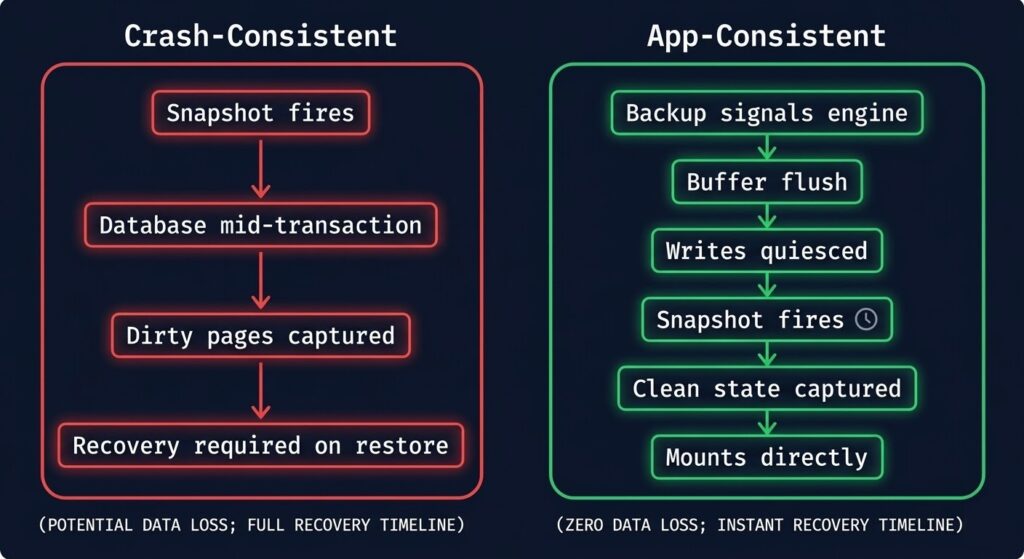
Crash-consistent means the backup captures whatever was on disk at the moment the snapshot fired — no coordination with the database engine, no warning, no quiesce. The storage state is consistent with itself, but the database state is not necessarily consistent. Open transactions are mid-flight. Write-ahead logs may not be flushed. Buffer pools may have data that hasn’t reached disk yet. The result is a backup that looks complete from a storage perspective and is incomplete from a database perspective.
The name comes from what it replicates: the state a database would be in if the server had crashed at that exact moment. If a server crashes, the database engine uses its recovery mechanisms — WAL replay, transaction log rollback, redo/undo operations — to bring itself to a consistent state on the next startup. A crash-consistent backup requires those same recovery mechanisms to work correctly on restore. If they do, the restore succeeds. If they don’t — corrupted log sequence, missing log files, engine version mismatch — the restore fails or produces a database in an indeterminate state.
App-consistent means the backup is coordinated with the database engine. Before the snapshot fires, the engine is signaled to flush its buffer pool to disk, complete or roll back in-flight transactions, and quiesce writes. The snapshot is taken against a database that is in a known-good state — the same state it would be in after a clean shutdown. No recovery mechanisms are required on restore. The database mounts cleanly.
The practical difference: crash-consistent shifts recovery risk from backup time to restore time. App-consistent resolves that risk at backup time. The data is captured correctly, or it isn’t captured at all.
Why Environments Default To Crash-Consistent
Most environments don’t choose crash-consistent backups. They inherit them — through tooling defaults, coverage priorities, and assumptions about database self-healing that are only partially correct.
VM snapshot tooling prioritizes speed. Hypervisor-level snapshots — whether vSphere, AHV, or Hyper-V — capture the entire VM at the storage layer. They are fast, they are storage-efficient, and they require no knowledge of what’s running inside the VM. For stateless workloads, this is the correct approach. For databases, it produces crash-consistent backups unless the hypervisor is explicitly configured to coordinate with VSS (Windows) or pre/post freeze scripts (Linux) — and most environments never configure this.
Backup vendors optimize for coverage. Enterprise backup platforms are sold on the number of workloads protected, the speed of backup windows, and the simplicity of policy configuration. A single policy that covers 500 VMs in a single pass is a compelling story. That same policy applied uniformly to database VMs and application VMs without differentiation produces crash-consistent backups for the databases — because application-aware backup requires per-workload agent installation, credential configuration, and validation that adds time and operational complexity.
App-consistent database backup requires integration work that crash-consistent does not. App-consistent database backup requires a backup agent installed inside the VM, credentials with sufficient database permissions to trigger quiescing, and validation that the quiesce-and-snapshot cycle completes successfully on every backup job. Each of these steps requires work. In environments where backup configuration was done under time pressure — a data centre migration, a hardware refresh, a new environment stood up to meet a deadline — the integration work gets deferred. The deferred work becomes the default.
Operators assume database logs will fix everything. Transaction logs are the database engine’s recovery mechanism — they exist precisely to bring a database back to a consistent state after an unclean shutdown. The assumption that a crash-consistent backup plus available transaction logs equals a recoverable database is not wrong in principle. It is wrong in practice when the log chain is broken, when log backups don’t cover the gap between the crash-consistent snapshot and the recovery point, or when the recovery environment has a different engine version than the source. The assumption transfers risk without eliminating it.
Thr Inherited Environment Problem
A new engineer joins an infrastructure team and reviews the backup environment. The picture looks solid:
- Backups running on schedule — nightly fulls, daily incrementals
- Retention configured — 30 days on-site, 90 days offsite
- Monitoring dashboard — all jobs green, no failures in 60 days
- Documentation — backup policy document dated 18 months ago
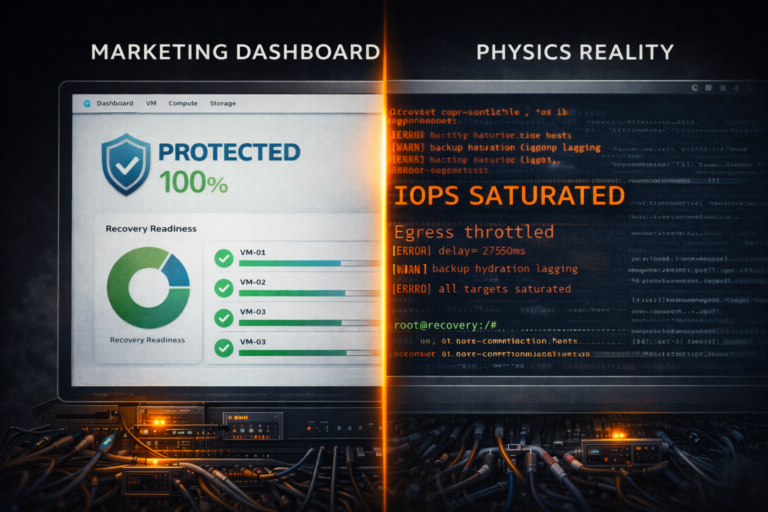
What the dashboard does not show is the consistency level being captured. The backup tool’s job is to report whether the backup job completed. It completed. The job ran, the snapshot was taken, the data was written to the backup target. Green.
What the dashboard cannot show is whether the PostgreSQL database running on VM-PROD-DB-04 was in a consistent state when that snapshot fired. Whether the SQL Server transaction logs are included in the backup or only the data files. Whether the Oracle RMAN configuration is actually being invoked or whether the backup tool is taking a VM-level snapshot that bypasses RMAN entirely.
These questions are not answered by backup job status. They are answered by reviewing backup configuration at the application layer — which requires knowing that the question exists in the first place.
Most inherited environments have never been tested at the database layer. Recovery testing, when it happens at all, typically involves restoring a VM and confirming it boots — not restoring a database and confirming it mounts cleanly, serves queries, and reflects a known-good transaction state.
The Illusion Break
- ✓ Backups: Running
- ✓ Schedule: Configured
- ✓ Retention: Set
- ✓ Last Job: Successful
- ✓ No Failures: 60 days
- ? Consistency Level: Unknown
- ? Database Quiesced: Unverified
- ? Transaction Logs: Included?
- ? Agent Installed: Confirmed?
- ? Restore Tested: Never
The dashboard measures job completion. It does not measure recoverability.
How To Validate Backup Fidelity
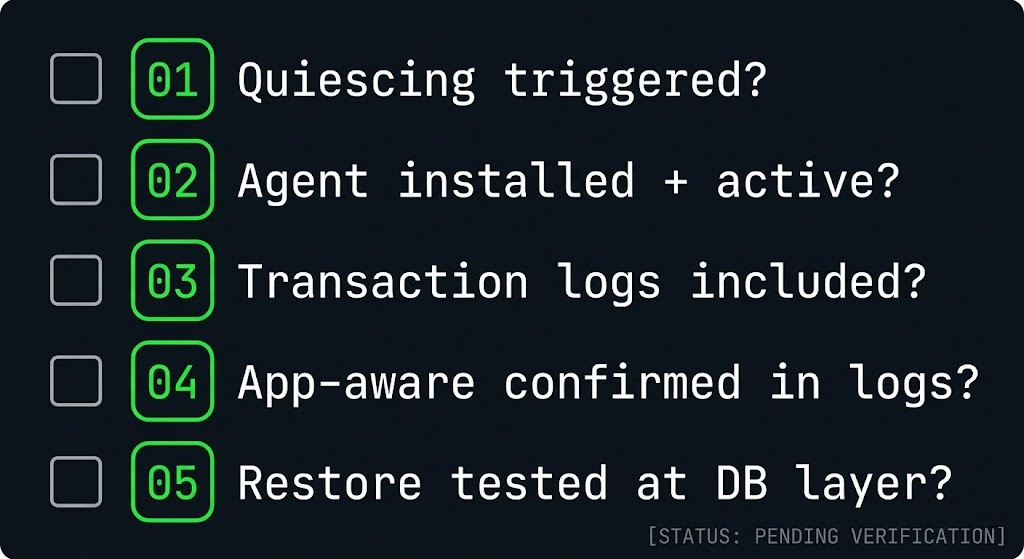
These five questions determine whether an app-consistent database backup is what your environment actually has — not just whether the backup job completed. Ask them for every database workload in the environment. The answers will be uncomfortable in some cases. That discomfort is the point.
Engine Behavior: What Crash-Consistent Means Per Database
The risk profile of a crash-consistent backup compared to an app-consistent database backup is not uniform across engines. Each engine has its own recovery model, and each recovery model has its own failure modes when presented with an inconsistent backup.
| Engine | Crash-Consistent Behavior | Recovery Dependency | Risk Level |
|---|---|---|---|
| SQL Server | Snapshot captures data files mid-transaction. SQL Server runs crash recovery on attach — rolls back uncommitted transactions, replays committed ones from log. | Transaction log must be intact and present. If log files are on a separate volume not included in snapshot, recovery fails. | Medium — recoverable if logs are included. High if logs are on separate volume. |
| PostgreSQL | Snapshot captures heap files and WAL in potentially inconsistent state. PostgreSQL runs WAL replay on startup to reach consistency. | WAL files must be intact and complete from the snapshot point. Missing or corrupt WAL segments produce unrecoverable state. | High — WAL completeness is critical and often not validated at backup time. |
| MySQL / MariaDB | InnoDB buffer pool not flushed. Snapshot captures dirty pages. InnoDB crash recovery runs on startup using redo log. | InnoDB redo log must be present and intact. MyISAM tables (if any) will be inconsistent and require manual repair. | Medium for InnoDB-only. High for mixed-engine environments with MyISAM tables. |
| Oracle | Datafiles captured without RMAN coordination. Oracle must perform instance recovery using redo logs on startup — rolls forward committed, rolls back uncommitted. | All redo log members must be present. Archive log gap between snapshot and recovery point must be bridged. RMAN not invoked means no catalog entry. | High — bypassing RMAN breaks the recovery catalog and archive log chain management. |
| MongoDB | WiredTiger journal not synced. Snapshot captures storage engine files mid-write. Journal replay runs on startup. | Journal files must be present and intact. Replica set members may require resync if journal replay fails, adding recovery time. | Medium — WiredTiger is generally resilient but replica resync adds unpredictable recovery time. |
The pattern across every engine is the same: crash-consistent backups are recoverable under ideal conditions — when every dependent file is present, intact, and complete. Real recovery scenarios are rarely ideal conditions.
The Recovery Risk Table
The engine behavior table covers what happens technically. This table covers what happens operationally — the actual scenarios that surface during a real recovery event.
| Scenario | Crash-Consistent Outcome | App-Consistent Outcome |
|---|---|---|
| Full VM restore, database attach | Crash recovery runs. May succeed. May fail if log files are missing or corrupt. Recovery time unpredictable. | Database mounts cleanly. No recovery required. Predictable restore time. |
| Point-in-time recovery required | Requires unbroken log chain from snapshot point to recovery target. Any gap in log backup chain makes point-in-time recovery impossible. | Clean base + log chain to recovery point. Predictable and reliable if log backups are configured correctly. |
| Log files on separate volume, volume not in snapshot | Recovery fails. Database unattachable without manual log reconstruction or engine-specific recovery procedures. | Not applicable — app-consistent backup includes all required files by design. |
| Ransomware recovery, restore to clean environment | Crash recovery may succeed but recovery state is uncertain. Integrity validation required before returning to production. Extends recovery window. | Known-good state. Integrity validation still recommended but recovery state is deterministic. |
| Application-aware processing silently failed at backup time | Operator discovers crash-consistent backup during recovery. Recovery may fail or produce partial data. No warning was issued at backup time. | Agent failure at backup time surfaces as a job warning or failure — consistency degradation is visible, not silent. |
| Recovery to different engine version | Crash recovery behavior varies between engine versions. Recovery that succeeds on the source version may fail on a different target version. | Clean database state reduces version sensitivity. Standard restore procedures apply. |
The red cells in that table represent recovery events that fail — not slowly or partially, but completely. They are also the scenarios most likely to occur under real incident conditions, where the pressure to recover quickly is highest and the time available for manual log reconstruction is lowest.
What App-Consistent Actually Requires
Application-aware backup is not a checkbox in a policy. It is an integration between the backup infrastructure and the database engine that requires installation, configuration, and validation.
On Windows — VSS (Volume Shadow Copy Service) VSS is the Windows mechanism for coordinating application-consistent snapshots. When a backup tool invokes VSS, it signals all registered VSS writers — including SQL Server’s VSS writer — to flush their buffers, complete in-flight transactions, and freeze writes before the snapshot fires. SQL Server’s VSS writer handles the quiesce automatically when properly registered and invoked. Verify the SQL Server VSS writer is registered and in a stable state: vssadmin list writers should show the SQL Server writer with state [1] Stable.
On Linux — Pre/Post Freeze Scripts Linux does not have a native equivalent to VSS. Application-consistent backups on Linux require pre-freeze scripts that signal the database engine to quiesce before the snapshot and post-thaw scripts that signal it to resume after. These scripts must be configured explicitly in the hypervisor tools (VMware Tools, Nutanix Guest Agent) or the backup agent. Without them, Linux VM snapshots are crash-consistent regardless of backup tool configuration.
Database Agents Most enterprise backup platforms — Veeam, Rubrik, Commvault — provide database-specific agents that handle quiescing natively. A Veeam Agent for Microsoft SQL Server invokes VSS and manages transaction log backup as part of the backup job. A Rubrik agent for Oracle coordinates with RMAN directly. These agents require installation inside the VM, credentials with sufficient database permissions (typically sysadmin for SQL Server, SYSDBA for Oracle), and periodic validation that they are connecting and functioning correctly.
Transaction Log Backup Configuration App-consistent full backups capture a clean database state at the backup window. Point-in-time recovery between backup windows requires transaction log backups running continuously between full backup jobs. Log backup frequency determines the maximum data loss in a recovery scenario — a 15-minute log backup interval means a maximum of 15 minutes of data loss, regardless of how frequently full backups run. Configure log backup frequency against the RPO requirement, not against the backup window schedule.
Restore Testing None of the above matters if restore testing has never confirmed that the backup actually produces a recoverable database. A restore test for a database workload means: restore the backup to an isolated environment, attach or mount the database, run integrity checks (DBCC CHECKDB for SQL Server, pg_dump verification for PostgreSQL), and confirm the database serves queries from a known transaction state. This test should run on a defined schedule — quarterly at minimum for production databases, monthly for mission-critical ones.
The RTO, RPO, and RTA post covers how recovery metric design should drive backup configuration decisions — including why the gap between designed RPO and actual recovery capability is one of the most common disconnects in enterprise data protection architecture.
Architect’s Verdict
Backup policies are designed by architects. They are discovered by engineers during recovery.
The gap between those two events is where database recovery failures live — not in the backup tool, not in the storage layer, but in the assumption that job completion equals recoverability.
Crash-consistent backups are not wrong. They are appropriate for stateless workloads, for environments where recovery time is flexible, and as a fallback when application-aware integration is not feasible. They are not appropriate as the default backup strategy for production databases where recovery time, recovery point, and data integrity are defined requirements.
The shift to app-consistent database backup is not a technology problem. Every enterprise backup platform supports it. It is an integration and validation problem — one that requires deliberate configuration, agent deployment, and restore testing to confirm that what the dashboard shows as protected is actually recoverable.
The five questions in the validation checklist above exist because the dashboard cannot answer them. Ask them before a recovery event, not during one.
For environments where backup architecture is part of a broader data protection and ransomware resilience strategy, the Immutable Backups deep-dive and the Rubrik vs Veeam Sovereign Backup analysis cover the platform-level decisions that sit above the consistency layer covered here.
Additional Resources
Editorial Integrity & Security Protocol
This technical deep-dive adheres to the Rack2Cloud Deterministic Integrity Standard. All benchmarks and security audits are derived from zero-trust validation protocols within our isolated lab environments. No vendor influence.

R.M.
Senior Solutions Architect with 25+ years of experience in HCI, cloud strategy, and data resilience. As the lead behind Rack2Cloud, I focus on lab-verified guidance for complex enterprise transitions. View Credentials →
Get the Playbooks Vendors Won’t Publish
Field-tested blueprints for migration, HCI, sovereign infrastructure, and AI architecture. Real failure-mode analysis. No marketing filler. Delivered weekly.
Select your infrastructure paths. Receive field-tested blueprints direct to your inbox.
- > Virtualization & Migration Physics
- > Cloud Strategy & Egress Math
- > Data Protection & RTO Reality
- > AI Infrastructure & GPU Fabric
Zero spam. Includes The Dispatch weekly drop.
Architecture Audit Services
Fixed-scope audits for Zero-Trust Azure, VMware migration readiness, and recovery posture — no discovery call required to start.
>_ View Audit Services>_Related Posts
Your Recovery Program Has a Recovery Evidence Boundary
Recovery evidence boundary is the point where a recovery program stops being an engineering question and starts being a governance one — and most organizations cross it without ever finding out, because everything on the way there still looks like success. The backups completed. The DR test passed. The tabletop went well. Somebody wrote a…
Your Recovery Architecture Has A Bus Factor Problem
Recovery bus factor is the gap between a recovery plan that has been tested, documented, and signed off — and a recovery plan that can actually be executed when the one or two people who know how to run it aren’t in the room. The recovery program had passed everything that mattered on paper: RTO…
Your Ransomware Recovery Plan Has a Recoverability Gap
The recoverability gap is the structural distance between what your recovery plan assumes and what your infrastructure can actually deliver under failure conditions. Most organizations don’t discover it during planning. They discover it on day three of an incident. >_ Architect’s Brief 60-second read before you commit to the full post · Full post: 12…
Your Ransomware Plan Is Fiction: 5 Recovery Metrics Nutanix, Cohesity, Rubrik & Pure Can’t Hide
Ransomware recovery metrics are the only thing standing between your recovery plan and a PowerPoint. Every vendor demo shows a single VM booting in 60 seconds. Every real ransomware recovery looks like this: the backups are intact, the ransomware is neutralized, the executives are on the bridge — and nothing is coming back online. >_…
Your Logs Are Not Evidence If The Infrastructure That Produces Them Can Rewrite The Record
The evidence layer is not a byproduct of your infrastructure — it is infrastructure, and on August 30, Sygnia documented what happens when the evidence layer is captured along with everything else. Fire Ant, a China-nexus threat actor Sygnia has tracked since 2025, spent this year moving past the VMware hypervisors it was previously known…
Your Identity System Is Your Biggest Single Point of Failure
Part 2 of the Rack2Cloud’s Cloud Fragility Series >_ Cloud Fragility Series 01 Multi-Cloud Cascading Failure Risks 02 Your Identity System Is Your Biggest Single Point of Failure [CURRENT] 03 Vendor Lock-In Happens Through Networking — Not APIs 04 Your Cloud Bill Quietly Increased in 2026 — Here’s Where the Money Is Actually Going >_…