Client’s GKE Cluster Ate Their Entire VPC: The Class E Rescue (Part 2)
In Part 1, we diagnosed the crime scene: a production GKE cluster flatlined because its /20 subnet (4,096 IPs) hit a hard ceiling at exactly 16 nodes.
The “official” consultant solution? Rebuild the VPC with a /16. The actual engineering solution? GKE Class E IP address space. If you are reading this, you likely don’t have the luxury of a maintenance window to tear down your entire networking stack. You need IPs, and you need them now. This is the field guide to the rescue operation.
The Math: Why Your Subnet Disappeared
Before we fix it, let’s explain exactly why a /20 vanishes so fast. It comes down to GKE’s default formula for VPC-native clusters, which prioritizes anti-fragmentation over efficiency.
(Max Pods per Node × 2) rounded up to the nearest subnet mask
By default, GKE assumes 110 pods per node. The math: 110 × 2 = 220 IPs. The nearest CIDR block to hold 220 IPs is a /24 (256 IPs). So the math for your /20 subnet becomes brutal:
- Total IPs: 4,096 (
/20) - Cost per node: 256 (
/24) - Result:
4096 / 256 = 16 nodes maximum
It doesn’t matter if you run 1 pod or 100 — that /24 slice is locked exclusively to that node the moment it boots. The full IP math breakdown and how to audit your cluster before hitting this ceiling is covered in GKE IP Exhaustion 2026: The /24 Trap & Autopilot’s Hidden Cost.
The GKE Class E IP Fix: Why Class E? (And Why Not CGNAT?)
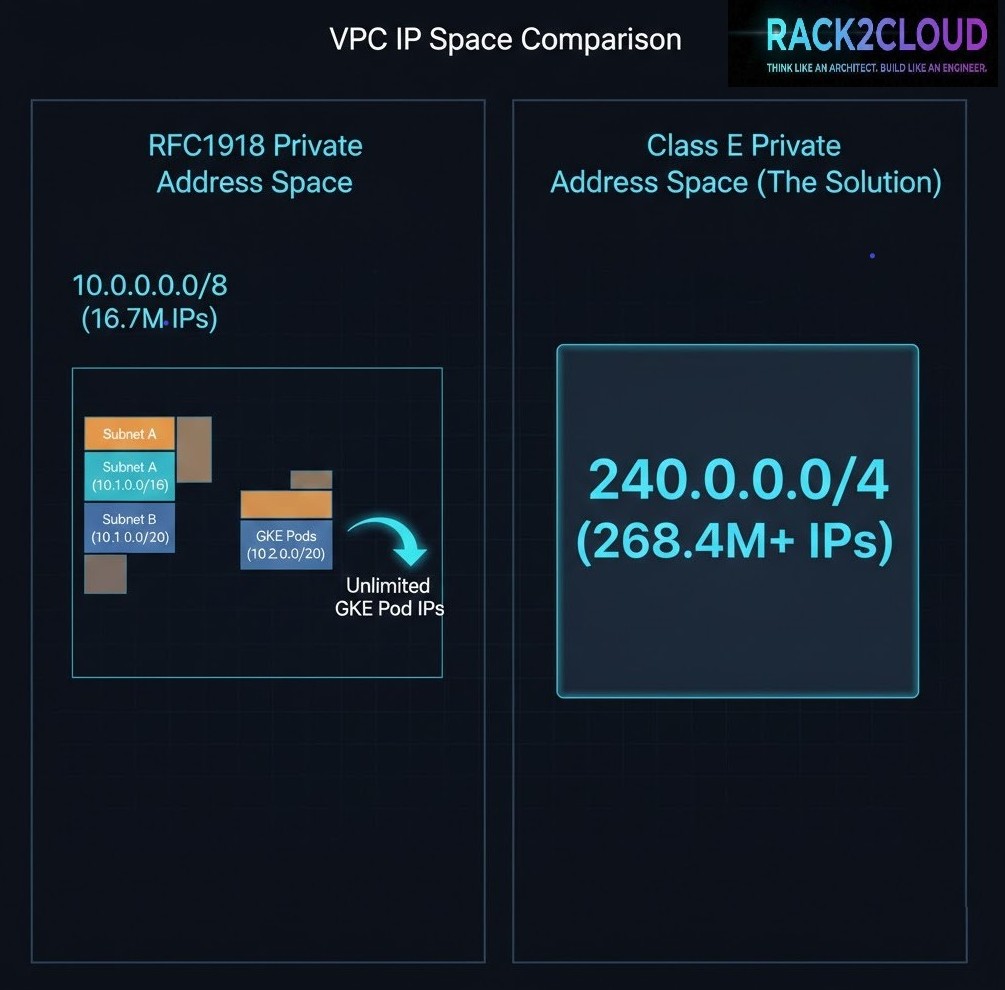
To rescue the cluster without a rebuild, we need to attach a massive amount of contiguous IP space to the existing subnet. We chose Class E (240.0.0.0/4).
- Why not CGNAT (100.64.0.0/10)? In complex enterprise environments, CGNAT ranges often conflict with carrier-grade peering or existing transit setups. We needed zero routing conflicts.
- Why not IPv6? IPv6 is the correct strategic answer. But flipping a legacy IPv4-only environment to dual-stack during an active outage is a high-risk gamble.
- The Class E advantage: It offers ~268 million IPs. Most modern operating systems (Linux kernels 3.x+) and GCP’s software-defined network handle it natively.
Note that this fix addresses Pod IP exhaustion only. If you have also exhausted your Service (ClusterIP) range, that is a different problem — Service CIDRs behave differently at the API layer. The GKE Service CIDR post covers exactly that edge case.
Step 1: Verify Prerequisites
Stop. This is a rescue operation, not a standard architecture. Verify these constraints before running any commands:
- GKE Standard only: GKE Autopilot manages this automatically. This guide is for Standard clusters.
- VPC-native: Your cluster must use Alias IPs.
- Hardware warning: While GCP’s SDN handles Class E perfectly, physical on-prem firewalls (Palo Alto, Cisco) often drop these packets. If your pods need to talk to on-prem databases via VPN or Interconnect, verify your hardware firewall rules first.
- Pod ranges only: This fix solves Pod IP exhaustion. If you have exhausted your Service (ClusterIP) range, this guide will not help — Service ranges are immutable at the gcloud layer.
Step 2: The Expansion (No Downtime)
Attach a secondary CIDR range to your existing subnet using a /20 from Class E to match the original scope without massive over-provisioning.
gcloud compute networks subnets update [SUBNET_NAME] \
    --region [REGION] \
    --add-secondary-ranges pods-rescue-range=240.0.0.0/20
Step 3: Create the Rescue Node Pool
Existing pools cannot dynamically change their Pod CIDR. A new pool must be created targeting the pods-rescue-range. You must use the COS_CONTAINERD image type — older Docker-based images or legacy OS versions may not handle Class E routing correctly.
gcloud container node-pools create rescue-pool-v1 \
    --cluster [CLUSTER_NAME] \
    --region [REGION] \
    --machine-type e2-standard-4 \
    --image-type=COS_CONTAINERD \
    --enable-autoscaling --min-nodes 2 --max-nodes 20 \
    --cluster-secondary-range-name pods-rescue-range \
    --node-locations [ZONE_A],[ZONE_B]
Step 4: The Migration (Cordon & Drain)
Once the rescue nodes are online and pulling 240.x.x.x IPs, shift workloads from the starved pool.
Cordon the old nodes:
kubectl get nodes -l cloud.google.com/gke-nodepool=default-pool -o name | xargs kubectl cordonDrain workloads safely:
kubectl drain [NODE_NAME] --ignore-daemonsets --delete-emptydir-data --timeout=10m0sStep 5: Validation
Confirm the control plane sees the new ranges:
gcloud container clusters describe [CLUSTER] --format="value(clusterIpv4Cidr,podIpv4Cidr)"Verify pods are pulling from the new block:
kubectl get pods --all-namespaces -o wide | grep 240.0.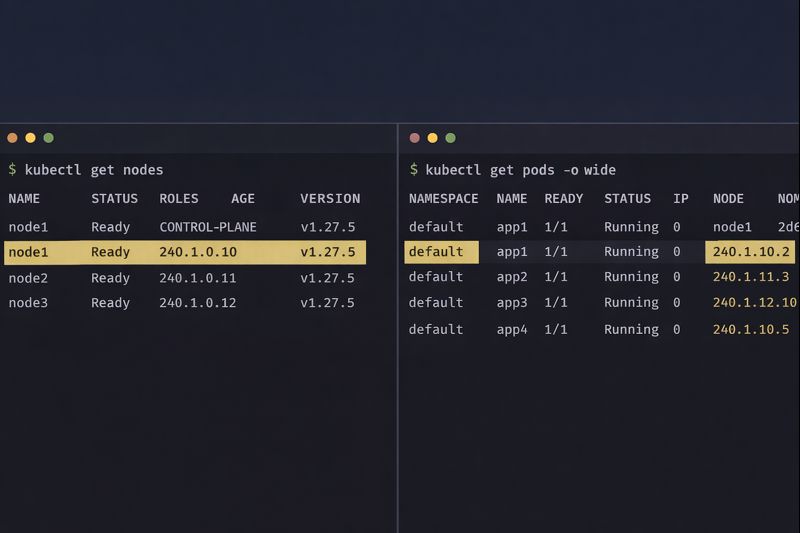
If you see 240.x.x.x addresses, you have successfully engineered your way out of a corner.
Architect’s Verdict
Using GKE Class E IP space is a valid, production-ready technique in 2026 — but it is technical debt. It breaks the mental model of RFC1918 private networking, and anyone who inherits this cluster without context will be confused by 240.x.x.x addresses.
If you just completed this rescue operation: Document it immediately. Create a cluster annotation, update your runbooks, and add a comment to your Terraform or IaC configuration explaining why Class E is in use. If a junior engineer sees 240.x.x.x IPs next year without context, they will assume the cluster is misconfigured or compromised.
If you’re planning ahead after reading this: Don’t size your pod CIDR for current node count — size it for 3× your projected peak. The /24-per-node consumption model is unforgiving, and expanding it after the fact is exactly the rescue operation described in this post. Design it correctly in Terraform from day one.
If you’re evaluating whether to rebuild the VPC instead: Class E buys you time, not a permanent fix. Use that time to plan proper VPC sizing or evaluate whether your workload actually requires the complexity of Kubernetes. The scheduler fragmentation and node pressure issues that accompany IP exhaustion are covered in Your Kubernetes Cluster Isn’t Out of CPU — The Scheduler Is Stuck — they often travel together.
The Kubernetes Cluster Orchestration pillar is the full reference for GKE architecture and Day 2 operations on rack2cloud.
Additional Resources
Editorial Integrity & Security Protocol
This technical deep-dive adheres to the Rack2Cloud Deterministic Integrity Standard. All benchmarks and security audits are derived from zero-trust validation protocols within our isolated lab environments. No vendor influence.

R.M.
Senior Solutions Architect with 25+ years of experience in HCI, cloud strategy, and data resilience. As the lead behind Rack2Cloud, I focus on lab-verified guidance for complex enterprise transitions. View Credentials →
Get the Playbooks Vendors Won’t Publish
Field-tested blueprints for migration, HCI, sovereign infrastructure, and AI architecture. Real failure-mode analysis. No marketing filler. Delivered weekly.
Select your infrastructure paths. Receive field-tested blueprints direct to your inbox.
- > Virtualization & Migration Physics
- > Cloud Strategy & Egress Math
- > Data Protection & RTO Reality
- > AI Infrastructure & GPU Fabric
Zero spam. Includes The Dispatch weekly drop.
Architecture Audit Services
Fixed-scope audits for Zero-Trust Azure, VMware migration readiness, and recovery posture — no discovery call required to start.
>_ View Audit Services>_Related Posts
Your Kubernetes Cluster Isn’t Out of CPU — The Scheduler Is Stuck
Compute Tier 1 Authority Cascades to ➔ >_ Architect’s Brief 60-second read before you commit to the full post · Full post: 9 min Generating brief… [Storage] [Network] 🚨 Failure Signature Detected Grafana shows cluster CPU utilization is under 50%, but pods are stuck in Pending. Events show: 0/10 nodes are available: 10 Insufficient cpu….
Your Identity System Is Your Biggest Single Point of Failure
Part 2 of the Rack2Cloud’s Cloud Fragility Series >_ Cloud Fragility Series 01 Multi-Cloud Cascading Failure Risks 02 Your Identity System Is Your Biggest Single Point of Failure [CURRENT] 03 Vendor Lock-In Happens Through Networking — Not APIs 04 Your Cloud Bill Quietly Increased in 2026 — Here’s Where the Money Is Actually Going >_…
Your Identity Provider Was Never Your Spend Boundary
Every enterprise cloud governance program assumes a spend boundary sits somewhere between identity and money — a checkpoint that catches compromised access before it becomes compromised spend. It doesn’t exist. Not as a distinct control. Not as a separate policy layer. Not anywhere in the architecture most organizations have actually built. >_ Architect’s Brief 60-second…
Your Identity Controls Passed. Your Authorization Chain Failed.
A credential chain functioned exactly as it was designed to. No firewall failed. No exploit executed. No malware bypassed a control. A red team walked past physical and social barriers using nothing more exotic than a plausible pretext, and came out the other side holding network admin credentials — issued correctly, authorized correctly, working exactly…
Your DR Test Passed. The Assumptions Didn’t.
DR plan failure rarely happens where you tested. It happens at the assumptions the exercise never reached — the dependencies that weren’t in scope, the runbook written for last year’s architecture, the authority chain nobody tested at 2am.
Your Cloud Provider Is Not Your HA Strategy
A Tactical Playbook for Architecting, Testing, and Automating Real Multi-Cloud & Multi-Region Resilience We’ve previously explored why cloud SLAs fail as guarantees in our deep dive, Cloud SLA Failure & Resilience Strategy. This article focuses on how to survive those failures in practice — architecturally, operationally, and financially. >_ Architect’s Brief 60-second read before you…