The 2-Node Trap: Why Your Proxmox “HA” Will Fail When You Need It Most (and How to Fix It)
The proxmox 2 node quorum fix is a 15-minute deployment that most engineers skip until Saturday morning teaches them why it matters. Two beefy nodes. Shared storage. HA enabled. I shut the laptop feeling smug — I had just replaced a six-figure VMware stack with two commodity servers and some Linux magic.
Saturday morning, a power blip hit the rack. Both nodes came back online. No VMs came back.
Three hours later, after console spelunking, log archaeology, and a crash course in Corosync internals, I learned the most expensive free lesson of my career: Two nodes ≠ High Availability. They equal a mathematically guaranteed outage when one fails.
This isn’t just a homelab problem. I’ve seen this exact failure pattern in 2-node retail edge clusters, “temporary” production clusters that became permanent, and even 6-node enterprise clusters deployed in isolated pairs. For a broader comparison of how Proxmox stacks up against VMware and other alternative hypervisors at the architecture level, see the Alternative Hypervisors: Proxmox, KVM & Beyond guide.
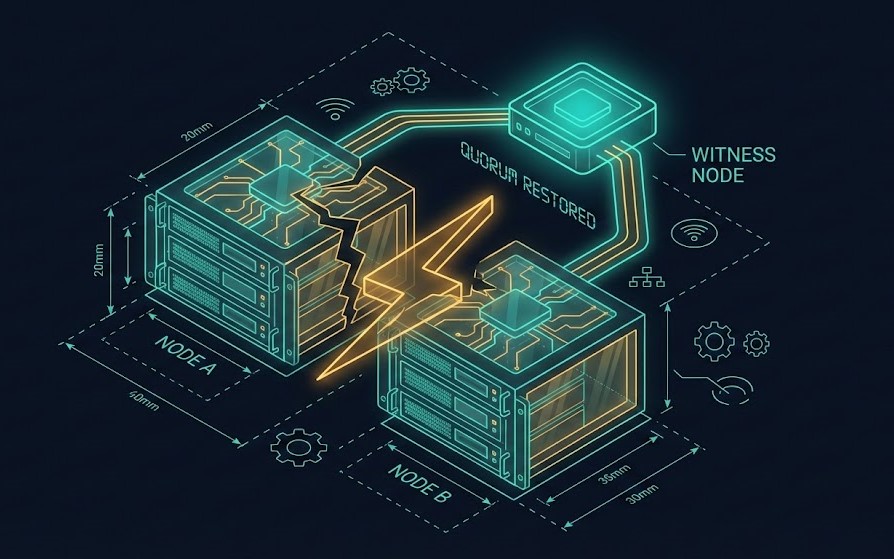
The Lie: Two Proxmox Nodes = vSphere HA
I hear this constantly from clients migrating off Broadcom: “We only need two servers. VMware let us do it, so Proxmox should too.”
Here is the cold reality: VMware didn’t eliminate quorum physics — it just hid them behind expensive proprietary locking, vCenter arbitration, and license-enforced constraints. Proxmox doesn’t hide physics. It respects them.
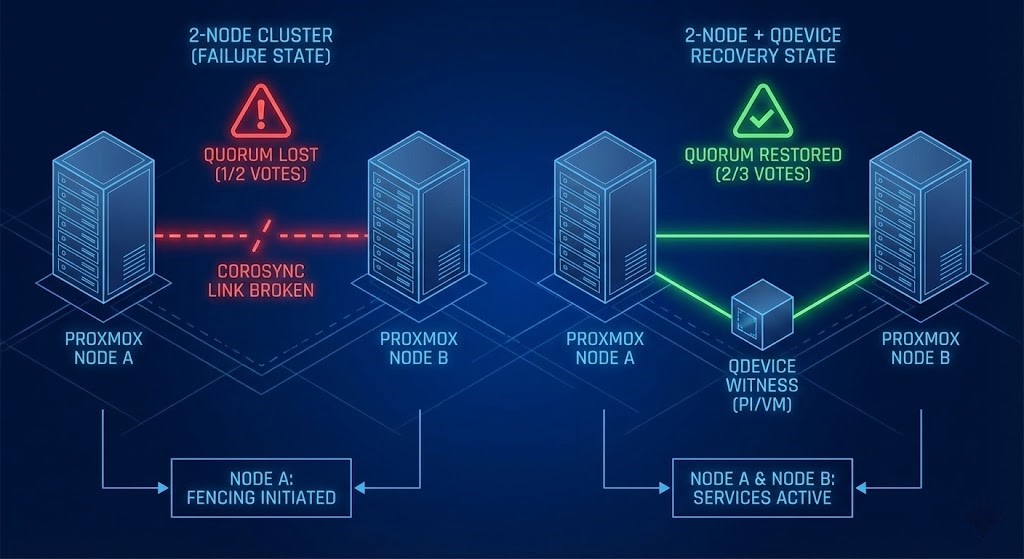
Corosync — the engine driving Proxmox HA — requires a strict majority of votes to run workloads safely. With two nodes, you have 2 votes. If one fails, you have 1 vote.
1 vote is not >50%. There is no tie-breaker. So the system does the only safe thing: it fences everything to prevent Split-Brain. That’s not a bug. That’s integrity.
This is the same failure domain problem that governs Metro cluster arbitration in enterprise HCI environments — where a witness node is mandatory for the same mathematical reason. If you’re evaluating Proxmox as part of a broader Broadcom exit strategy, see the Proxmox vs VMware Migration Playbook for the full architectural comparison.
The Quorum Physics Trap (Math That Bites)
Here is the exact math that kills your cluster on a Saturday morning:
| Scenario | Node A | Node B | Total Votes | Required for Quorum (>50%) | Result |
| Healthy | 1 | 1 | 2 | 2 | ✅ Running |
| Node B Dies | 1 | 0 | 1 | 2 | ❌ FENCE ALL |
What You Actually See
When this happens, your logs will tell the story clearly:
Bash
pvecm status
# Quorum information: 1/2
# Status: Activity Blocked
Symptoms:
- All VMs stuck in
fencedorstopped. - The surviving node is healthy, accessible via SSH, but refuses to start workloads.
- Your “HA cluster” is now mathematically forbidden from working.
The 2-Node Death Spiral (Step-by-Step)
I once watched payroll batch processing halt at 2:00 AM because a single PSU died in a 2-node cluster.
- State: Both nodes healthy — 2/2 votes
- Event: Node B power supply fails, heartbeat lost
- Reaction: Node A asks — “Did Node B crash, or did the network partition?”
- Calculation: Node A checks votes. It has 1. It needs 2.
- Decision: “No majority. I cannot guarantee I am the only writer. To save the filesystem, I must stop.”
- Outcome: Node A fences itself. The entire environment is dark.
The CIO’s takeaway from that night: “Our HA failed when we needed it most.” That sentence should terrify you — because it means the failure wasn’t hardware. It was architecture.
The Physics Fix: Add a QDevice (Witness Vote)
The proxmox 2 node quorum fix isn’t complicated. It’s mathematical. You need an External Witness — a third vote that lives outside the blast radius of your two nodes.
The correct math:
2 Nodes (1 vote each) + 1 QDevice (1 vote) = 3 Total Votes
If Node B dies: Node A + QDevice = 2 Votes
2 Votes ≥ 2 (Majority) → Quorum achieved → VMs auto-start on Node A
Hardware Options
| Option | CapEx Cost | Reliability | Use Case |
| Raspberry Pi 4 | ~$35 | High | The Homelab King. Ethernet connected, low power. |
| AWS t3.nano | ~$5/mo | Very High | Excellent for remote/edge clusters. |
| Spare Linux VM | $0 | Medium | Good if it lives on a separate hypervisor. |
| Cluster Node | N/A | ❌ FAIL | Never put the witness on the cluster itself. |
For a cloud-hosted witness node, a DigitalOcean Droplet is an excellent choice — low cost, reliable uptime, and completely outside your local blast radius. A Basic Droplet at $6/month provides the same mathematical fix as a Raspberry Pi without the physical hardware dependency.
Deploying a QDevice (Lab-Validated)
Pre-requisite: Ensure you have SSH access to both Proxmox nodes and your target QDevice (Debian/Ubuntu).
1. On the QDevice Host (Pi/VM):
Bash
# Install the external voter daemon
apt update && apt install corosync-qnetd corosync-qdevice -y
2. On the Main Proxmox Cluster (Node 1):
Bash
# Install the QDevice plugin
apt install corosync-qdevice -y

# Setup the QDevice (IP of your Pi/VM)
pvecm qdevice setup 192.168.1.100
3. Verify The Math:
Bash
pvecm status
# Look for:
# Quorum information: 2/3   <-- SUCCESS
# Votequorum information:
# Expected votes: 3
Time: 15 minutes. Cost: <$50. Outcome: Your cluster stops triggering self-fencing during minor failures.
Deploying a QDevice (Lab-Validated)
Pre-requisite: SSH access to both Proxmox nodes and your target QDevice host (Debian/Ubuntu).[KEEP EXISTING QDEVICE DEPLOYMENT CODE BLOCKS — all 3 steps]
Time: 15 minutes. Cost: under $50. Outcome: your cluster stops triggering self-fencing during minor failures.
When 2+1 Still Fails: Production Reality Check
If you are running a homelab or small SMB stack, the QDevice fix is sufficient. But if you are an enterprise architect, there are additional constraints that a QDevice alone does not solve.
A QDevice fixes quorum physics — it does not fix capacity or storage physics. A single surviving node that cannot handle the RAM and CPU pressure of 200 restarting VMs will still fail, just for a different reason.
Enterprise constraints to validate before relying on 2+1:
- Ceph Storage: Ceph needs its own quorum. A 2-node Proxmox + QDevice setup cannot run Ceph safely. You need 3 full nodes minimum for Ceph monitors
- Rack Awareness: If you have 5 nodes but 3 are in Rack A and 2 in Rack B, losing Rack A kills your quorum at 2/5
- Hardware Fencing (Stonith): In high-stakes environments, software quorum isn’t enough. You need IPMI or PDU-level fencing to physically cut power to a rogue node before recovering workloads
The resource sizing problem — whether your surviving node can absorb the full workload under failure — is exactly what the HCI Architecture Learning Path covers for production cluster design. For a full breakdown of where Proxmox’s capability constraint becomes a disqualifying factor versus Nutanix and VMware, see The Post-Broadcom Platform Decision: Proxmox vs Nutanix vs VMware.
Architecture Archetypes
Archetype A: The “Homelab Escape Hatch”
Structure: 2 beefy nodes + Raspberry Pi or DigitalOcean QDevice
Pros: Under $100 HA fix, survives single node failure
Cons: No live migration without shared storage, not payroll-safe
Verdict: Perfect for learning or non-critical edge deployments
Archetype B: SMB Production Ready
Structure: 3 identical nodes (e.g., 16c/128GB each)
Pros: Live migration, no QDevice dependency, true N+1 redundancy
Verdict: Minimum viable product for business-critical workloads
Archetype C: Enterprise Standard
Structure: 5+ nodes + Ceph + redundant Corosync links
Pros: Survives drive failures, node failures, and rack failures when architected correctly
Verdict: Required for 100+ VMs or mission-critical SLAs
For teams evaluating whether Proxmox at Archetype B or C can replace a VMware environment, see the Modern Virtualization Learning Path — which covers hypervisor selection criteria, migration physics, and operational model differences as a structured progression.
Validation Tests: Prove Your HA Works
If you haven’t tested failure, you don’t have HA—you have hope. And hope is not a clustering strategy. Nor is blind optimism.
- The Pull-the-Plug Test: Physically yank the power from Node 2. Does Node 1 take over?
- Without QDevice: NO, cluster fences.
- With QDevice: YES, Node 1 takes over.
- The Network Slice: Unplug the LAN cables from Node 2.
pvecm statuson Node 1 should show2/3.
- The QDevice Death: Stop the
corosync-qnetdservice on your Pi.- Cluster should remain Green (2/3 votes active).
Run all three tests before declaring your cluster production-ready. If any fail, fix before deploying workloads.
Architect’s Verdict: Fix It Before Disaster Teaches You
The proxmox 2 node quorum fix exists because the 2-node trap kills more clusters than hardware failure ever will.
- ❌
pvecm status = 1/2→ You are in the trap. - ✅
pvecm status = 2/3→ Escape hatch deployed. - ✅
3+ Nodes→ Production reality.
Your Weekend Project:
- Run
pvecm statusright now and confirm your quorum state - If you see 1/2, spin up a DigitalOcean Droplet or order a Raspberry Pi as your witness node
- Run the three validation tests above — prove the physics work before you need them to
Before you scale further, audit your cluster health, zombie snapshots, and hardware compatibility using the HCI Migration Advisor — it surfaces the gaps that manual audits miss.
Two servers ≠ HA. Two servers + QDevice = survival. Three servers = reality.
I wish someone had told me this in Week 1. Now you know.
Additional Resources
For deeper technical context on Proxmox HA, Corosync internals, and cluster architecture:
Editorial Integrity & Security Protocol
This technical deep-dive adheres to the Rack2Cloud Deterministic Integrity Standard. All benchmarks and security audits are derived from zero-trust validation protocols within our isolated lab environments. No vendor influence.

R.M.
Senior Solutions Architect with 25+ years of experience in HCI, cloud strategy, and data resilience. As the lead behind Rack2Cloud, I focus on lab-verified guidance for complex enterprise transitions. View Credentials →
Get the Playbooks Vendors Won’t Publish
Field-tested blueprints for migration, HCI, sovereign infrastructure, and AI architecture. Real failure-mode analysis. No marketing filler. Delivered weekly.
Select your infrastructure paths. Receive field-tested blueprints direct to your inbox.
- > Virtualization & Migration Physics
- > Cloud Strategy & Egress Math
- > Data Protection & RTO Reality
- > AI Infrastructure & GPU Fabric
Zero spam. Includes The Dispatch weekly drop.
Architecture Audit Services
Fixed-scope audits for Zero-Trust Azure, VMware migration readiness, and recovery posture — no discovery call required to start.
>_ View Audit Services>_Related Posts
ZFS vs Ceph vs NVMe-oF: Choosing the Right Storage Backend for Modern Virtualization
I still have nightmares about a storage migration I ran back in 2014. >_ Architect’s Brief 60-second read before you commit to the full post · Full post: 7 min Generating brief… We were moving off a monolithic SAN and onto an early “software-defined” storage platform. The sales engineers promised infinite scalability and self-healing magic….
Your VMware Exit Was Successful. The First Incident Will Tell You If That’s True.
VMware exit survivability is the question your migration project never formally scheduled — and the first production incident on the new platform will answer it whether you are ready or not. The cutover completed. The workloads are running. The project closed green. None of that tells you whether the operating model, runbooks, authority structures, and…
Your VMware Exit Plan Assumed a Tool You Didn’t Control
A VMware exit plan usually treats the migration tooling as a given — something you download, install, and use, not something you have to keep asking permission for. In late August, the public self-service path to the Virtual Disk Development Kit (VDDK) stopped working. No deprecation notice. No public transition announcement. A download path that…
Your Recovery Program Has a Recovery Evidence Boundary
Recovery evidence boundary is the point where a recovery program stops being an engineering question and starts being a governance one — and most organizations cross it without ever finding out, because everything on the way there still looks like success. The backups completed. The DR test passed. The tabletop went well. Somebody wrote a…
Your Recovery Architecture Has A Bus Factor Problem
Recovery bus factor is the gap between a recovery plan that has been tested, documented, and signed off — and a recovery plan that can actually be executed when the one or two people who know how to run it aren’t in the room. The recovery program had passed everything that mattered on paper: RTO…
Your Ransomware Recovery Plan Has a Recoverability Gap
The recoverability gap is the structural distance between what your recovery plan assumes and what your infrastructure can actually deliver under failure conditions. Most organizations don’t discover it during planning. They discover it on day three of an incident. >_ Architect’s Brief 60-second read before you commit to the full post · Full post: 12…