The 72-Hour Restore: Why “Instant Recovery” Failed in Production
The IT Director slid the report across the conference table with a confident smirk.
“We’re good,” he said. “We just refreshed the entire backup stack. Immutable storage, air-gapped copies, and the vendor guarantees ‘Instant VM Recovery’ for up to 500 workloads. RTO is under 15 minutes.”
I looked at the datasheet. It was impressive. It promised the world. Then I looked at the architecture diagram.
- Capacity: 1.2 PB of source data.
- Deduplication Ratio: 9:1 (aggressive).
- Target Storage: Spinning disk (7.2k RPM NL-SAS).
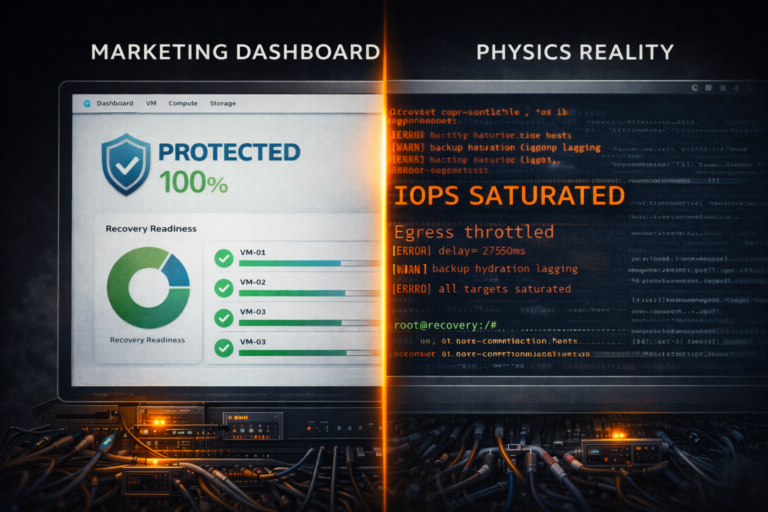
I pushed the report back. “Your datasheet says 15 minutes. Physics says you’re going to be down for three days.”
He laughed. He thought I was being dramatic.
So we ran the drill. Not a single-file restore. A Smoking Hole Scenario — the entire cluster is encrypted, and we need to bring the business back online from the backup appliance now.
- Hour 1: 15 VMs restored.
- Hour 24: 60% capacity, SQL crawling.
- Hour 72: Business limping at 20% IOPS. Still rehydrating.
Here is the anatomy of a failed recovery — and why instant VM recovery marketing is dangerous when it meets the laws of physics.
The Physics Trap: The Rehydration Tax
ThThe failure wasn’t software. It was basic storage physics.
The marketing team sold the client on “9:1 Deduplication.”
- Translation: We take 10TB of data, chop it into tiny unique blocks, and store only 1TB on the disk.
- The Benefit: You save a fortune on hard drives.
- The Trap: Your data is now fragmented across millions of non-contiguous sectors.
The “Straw” Analogy — Imagine your data is a smoothie.
- Sequential Read (Backup): Pouring the smoothie into a cup. Fast. Easy.
- Random Read (Restore): Trying to suck the smoothie back out through 500 tiny coffee stirrers simultaneously.
When you hit “Restore” on 500 VMs, the backup appliance has to find every single unique block, re-assemble (“rehydrate”) the file, and serve it to the hypervisor. Because the underlying storage was Spinning Disk (NL-SAS), the drive heads were thrashing physically back and forth to find the scattered blocks. This is the rehydration bottleneck explored in detail in The Backup Rehydration Bottleneck: Why Your Deduplication Engine Is Killing Your RTO.
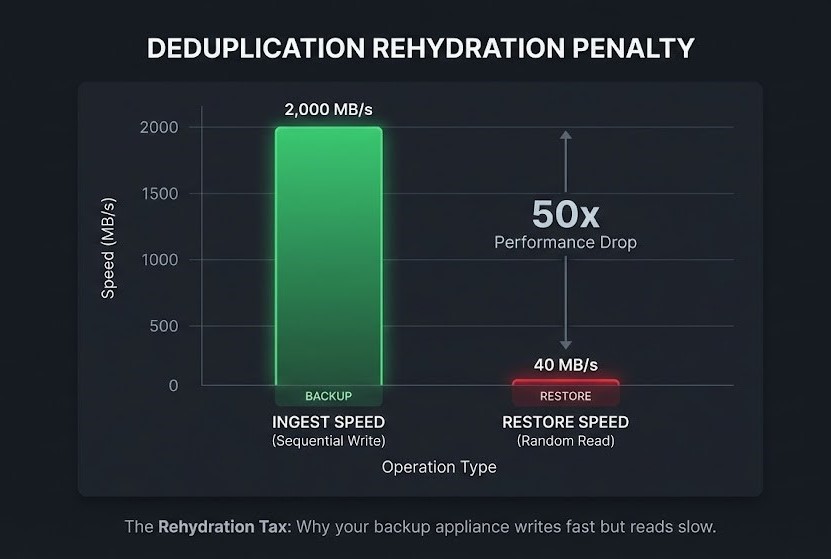
The Math of the Crash:
- Ingest Speed (Write): 2 GB/s (Sequential).
- Restore Speed (Random Read): 40 MB/s per stream.
The appliance hit 100% Disk Latency within 10 minutes. The VMs booted, but they were unusable. Logging into Windows took 15 minutes. Opening SQL Management Studio took an hour.
The “Instant Restore” feature worked perfectly—the VMs were on. But the business was effectively off.
The Forensic Drag: The “Permission” Trap
By Hour 30, the storage array had finally caught up. We had enough IOPS to bring the critical systems online.
I turned to the CIO. “We are ready to restore the ERP.” He shook his head. “Legal said no.”
This is the Forensic Drag. In a ransomware event, your production environment is no longer a data center. It is a Crime Scene.
Cyber Insurance providers and Forensic Incident Response (FIR) teams have strict rules: Do not touch the evidence. If you restore over the encrypted machines before the forensics team has captured memory dumps and logs, you might void your coverage.
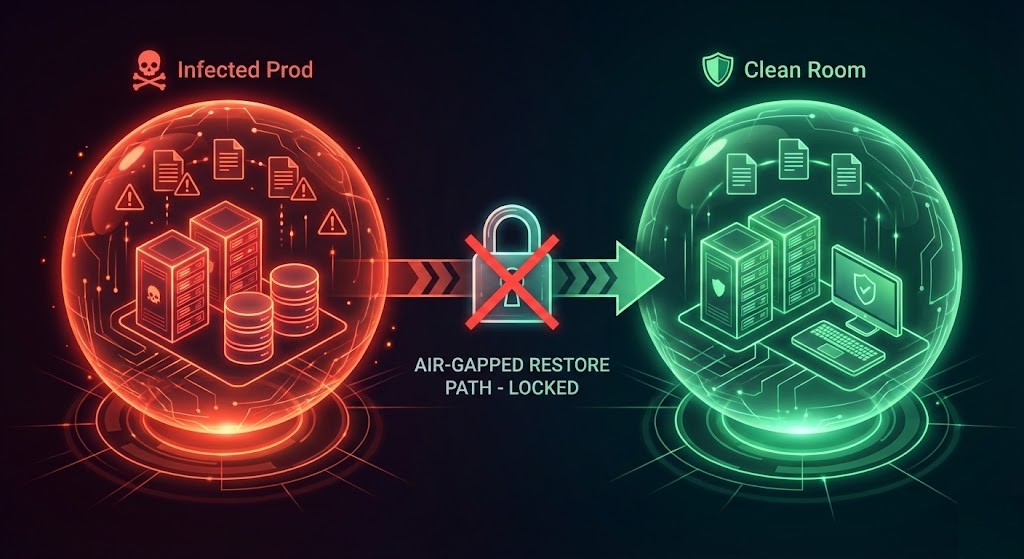
The “Clean Room” Gap — The only way to bypass this deadlock is a Clean Room — an isolated environment (compute + network) completely air-gapped from the infected production network.
- The Plan: Restore to the Clean Room → Scan/Sanitize → Patch → Promote to Prod.
- The Reality: The client didn’t have a Clean Room. They only had Production.
So, we waited. For 48 hours, the IT team sat on their hands while lawyers and forensic analysts argued over chain-of-custody. The backup appliance was ready, but the business was paralyzed by process. This is exactly the clean room architecture covered in Immutability Is Not a Strategy: Engineering Recovery Silos for Ransomware Survival.
The Identity Kill Shot: The “Immutable” Lie
The final nail in the coffin came during the post-mortem audit of the backup server itself.
The vendor had sold them “Immutable Backups.” The software was configured correctly — the backup files were locked (WORM) and couldn’t be deleted by ransomware.
But here was the catch:
- The Backup Server’s operating system was joined to the domain.
- The IPMI (Out-of-Band Management) card was on the main management VLAN.
- The RAID Controller management utility was accessible via the OS.
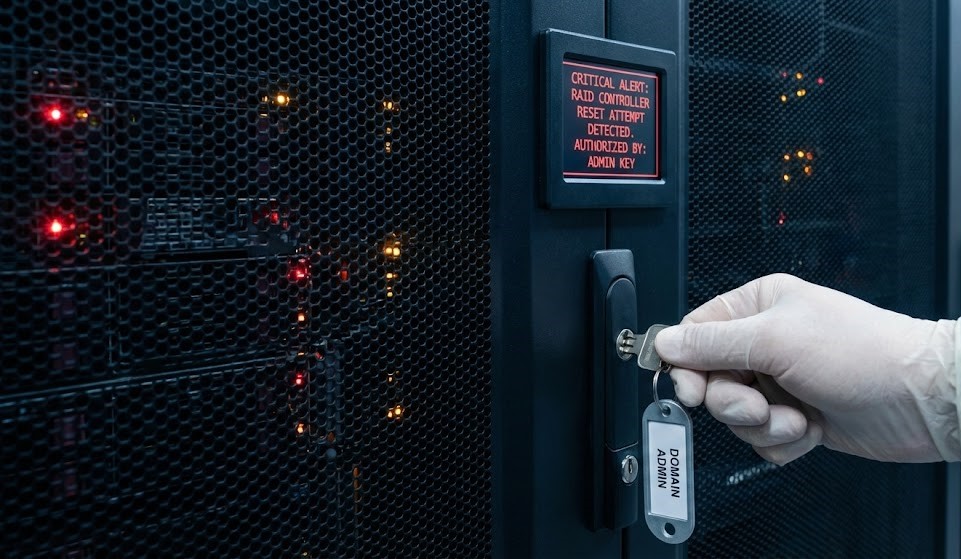
If the attackers had compromised a Domain Admin account (which they usually do), they wouldn’t waste time trying to delete the files inside the immutable software.
They would have just logged into the server’s iDRAC/IPMI and initialized the RAID controller. “Immutable” software cannot stop a hardware-level disk format.
The client didn’t have an “Immutable Backup.” They had a really expensive, fragile doorstop. For how to build identity isolation that actually holds, see Your Identity System Is Your Biggest Single Point of Failure.
Instant VM Recovery: The Lesson — Physics > Marketing
Instant VM recovery is a fantastic feature for a single corrupted file or a failed SQL update. It is not a Disaster Recovery strategy.
If you are relying on a backup appliance to save you from a smoking hole scenario, check the math:
- Test the Physics: Can your storage handle the Random IOPS of 500 booting VMs? (Likely not).
- Build the Clean Room: If you don’t have a fenced environment ready today, you will be waiting on lawyers tomorrow.
- Isolate the Identity: If your Backup Admin logs in with
corp\admin, your backups are not immutable.
Don’t wait for the ransom note to find out how long 72 hours actually feels — and don’t mistake a vendor datasheet for restore evidence you’ve actually produced yourself. The full RTO modeling framework is in RTO, RPO, and RTA: Why Recovery Metrics Should Design Your Infrastructure.
Architect’s Verdict
Instant VM recovery is a real capability — but it’s scoped to low-volume, low-latency restores. When you have 500 VMs, aggressive deduplication, spinning disk, no clean room, and a domain-joined backup server, that 15-minute promise becomes a 72-hour disaster.
The three failure modes in this case study — rehydration physics, forensic drag, and identity kill shot — are not edge cases. They are the default outcome when marketing collateral replaces architecture review. Test the drill. Build the clean room. Isolate the identity. Do it before the ransom note arrives. All three failure modes here — rehydration physics, forensic drag, identity kill shot — are instances of the same architectural question: Data Protection — Maturity Stage 4 — Ransomware Survival Architecture evaluates whether recovery survives adversarial conditions, not whether a vendor datasheet’s RTO number is technically achievable in isolation.
Additional Resources
Editorial Integrity & Security Protocol
This technical deep-dive adheres to the Rack2Cloud Deterministic Integrity Standard. All benchmarks and security audits are derived from zero-trust validation protocols within our isolated lab environments. No vendor influence.

R.M.
Senior Solutions Architect with 25+ years of experience in HCI, cloud strategy, and data resilience. As the lead behind Rack2Cloud, I focus on lab-verified guidance for complex enterprise transitions. View Credentials →
Get the Playbooks Vendors Won’t Publish
Field-tested blueprints for migration, HCI, sovereign infrastructure, and AI architecture. Real failure-mode analysis. No marketing filler. Delivered weekly.
Select your infrastructure paths. Receive field-tested blueprints direct to your inbox.
- > Virtualization & Migration Physics
- > Cloud Strategy & Egress Math
- > Data Protection & RTO Reality
- > AI Infrastructure & GPU Fabric
Zero spam. Includes The Dispatch weekly drop.
Architecture Audit Services
Fixed-scope audits for Zero-Trust Azure, VMware migration readiness, and recovery posture — no discovery call required to start.
>_ View Audit Services>_Related Posts
Your Recovery Program Has a Recovery Evidence Boundary
Recovery evidence boundary is the point where a recovery program stops being an engineering question and starts being a governance one — and most organizations cross it without ever finding out, because everything on the way there still looks like success. The backups completed. The DR test passed. The tabletop went well. Somebody wrote a…
Your Recovery Architecture Has A Bus Factor Problem
Recovery bus factor is the gap between a recovery plan that has been tested, documented, and signed off — and a recovery plan that can actually be executed when the one or two people who know how to run it aren’t in the room. The recovery program had passed everything that mattered on paper: RTO…
Your Ransomware Recovery Plan Has a Recoverability Gap
The recoverability gap is the structural distance between what your recovery plan assumes and what your infrastructure can actually deliver under failure conditions. Most organizations don’t discover it during planning. They discover it on day three of an incident. >_ Architect’s Brief 60-second read before you commit to the full post · Full post: 12…
Your Ransomware Plan Is Fiction: 5 Recovery Metrics Nutanix, Cohesity, Rubrik & Pure Can’t Hide
Ransomware recovery metrics are the only thing standing between your recovery plan and a PowerPoint. Every vendor demo shows a single VM booting in 60 seconds. Every real ransomware recovery looks like this: the backups are intact, the ransomware is neutralized, the executives are on the bridge — and nothing is coming back online. >_…
Your Logs Are Not Evidence If The Infrastructure That Produces Them Can Rewrite The Record
The evidence layer is not a byproduct of your infrastructure — it is infrastructure, and on August 30, Sygnia documented what happens when the evidence layer is captured along with everything else. Fire Ant, a China-nexus threat actor Sygnia has tracked since 2025, spent this year moving past the VMware hypervisors it was previously known…
Your Identity System Is Your Biggest Single Point of Failure
Part 2 of the Rack2Cloud’s Cloud Fragility Series >_ Cloud Fragility Series 01 Multi-Cloud Cascading Failure Risks 02 Your Identity System Is Your Biggest Single Point of Failure [CURRENT] 03 Vendor Lock-In Happens Through Networking — Not APIs 04 Your Cloud Bill Quietly Increased in 2026 — Here’s Where the Money Is Actually Going >_…