Vertical Pod Autoscaler in Production: In-Place Resize Works — Until It Doesn’t
Kubernetes 1.35 made in-place pod resize stable. Most of the coverage stopped there.
The narrative wrote itself: Vertical Pod Autoscaler finally works for stateful workloads. No more restarts. Enable InPlaceOrRecreate and let the autoscaler do its job. The restart tax is gone.
That framing is accurate about one thing and misleading about everything else.
In-place resize eliminates restart disruption. It does not eliminate the other reasons VPA automation fails in production. Those failure modes are quieter, harder to debug, and more likely to surface after you’ve enabled automation and moved on.
This post is the companion to Kubernetes 1.35: In-Place Pod Resize — What Platform Teams Need to Know. That post covers the mechanism. This one covers the Day-2 reality of running VPA in production — specifically, where it still breaks.
What In-Place Resize Actually Fixes
Before getting into the failure modes, the reframe matters.
In-place pod resize solves one problem: a container needed different resources, and applying that change required a restart. For stateful workloads — databases with WAL backlogs, JVM services with warm JIT caches, Kafka brokers mid-rebalance — that restart had a real operational cost. Teams either absorbed the disruption during maintenance windows or disabled VPA automation entirely and ran it in recommendation-only mode.
Kubernetes 1.35 removes the restart from the resize path. The kubelet patches the cgroup directly. The container keeps running. For that specific problem — restart disruption on resource changes — in-place resize is the fix.
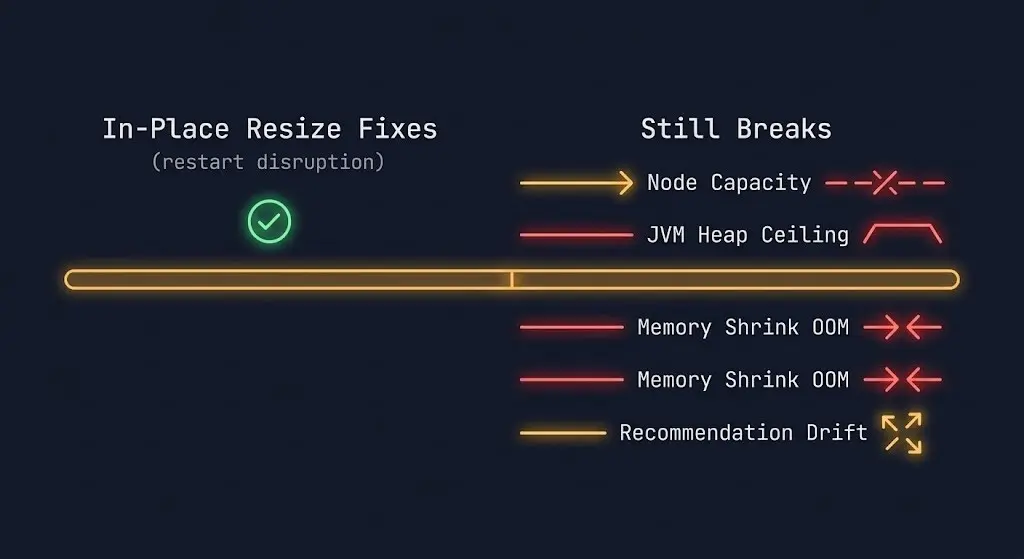
What it does not fix:
- Node capacity constraints
- NUMA and memory topology binding
- Scheduler fragmentation after resize
- JVM heap configuration at startup
- VPA recommendation drift under variable load
Each of these can fail silently after you enable InPlaceOrRecreate. They are the subject of the rest of this post.
Failure Mode 1: Node Capacity Constraints
InPlaceOrRecreate has a fallback path that the feature name obscures: if the node cannot satisfy the resize in-place, VPA falls back to evict-and-recreate. The in-place attempt fails silently and the pod gets evicted anyway.
This matters because node capacity is not a static condition. A node may have headroom when VPA generates a recommendation and be fully committed by the time the resize is attempted. CPU overcommit ratios, memory pressure from other pods, and DaemonSet overhead all shift available capacity dynamically.
The failure signature is a pod that VPA is repeatedly trying to resize but which keeps getting evicted — not because the resize failed at the cgroup layer, but because the node was full when the attempt was made. The resize never happened. The eviction looks like a normal rescheduling event.
The diagnostic signal is in VPA’s event log and pod status, not in cgroup metrics:
bash
kubectl describe vpa <vpa-name> -n <namespace>
kubectl get events --field-selector involvedObject.name=<pod-name> -n <namespace>
Look for EvictedByVPA events followed by scheduling delays. If the pod is landing on a new node each time rather than staying where it was, the in-place attempt failed and the fallback fired.
The fix is not VPA configuration — it is node headroom management. Clusters running at 80%+ utilization will trigger the fallback path regularly. If your bin-packing strategy assumes tight utilization, VPA’s in-place path will underdeliver. The scheduler behavior under these conditions — including CPU fragmentation patterns that keep pods pending — is documented in Kubernetes Scheduler Stuck: The Guide to Pending Pods.
Failure Mode 2: The JVM Heap Ceiling
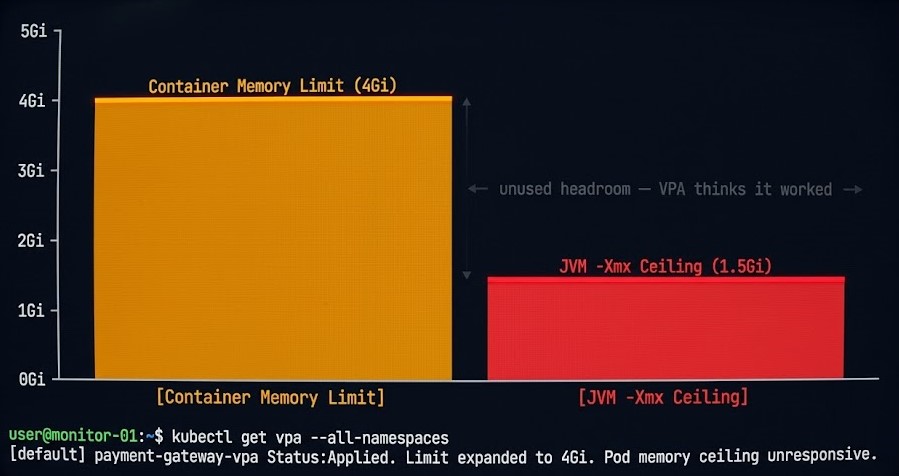
This is the most common post-upgrade surprise for teams running JVM workloads.
In-place resize increases the container’s memory limit at the cgroup layer. The container now has more memory available. The JVM does not use it.
-Xmx is a startup parameter. The JVM reads it once at initialization and sets the maximum heap ceiling for the lifetime of the process. Raising the container memory limit after startup does not raise the heap. The JVM continues operating against the original -Xmx value, and the additional memory sits unused.
The failure is invisible from a resource metrics perspective. Container memory usage stays flat. VPA may interpret flat memory consumption as evidence that its recommendation was correct. The heap ceiling that was causing GC pressure, OOM kills, or performance degradation remains exactly where it was.
yaml
# This is the trap
containers:
- name: app
  resources:
    limits:
      memory: "4Gi"   # VPA raised this from 2Gi
  env:
  - name: JAVA_OPTS
    value: "-Xmx1536m"   # Still set to the original value
The container has 4Gi available. The JVM will never use more than 1.5Gi of heap regardless.
For JVM workloads, in-place memory resize requires a coordinated change: cgroup limit adjustment plus JVM heap reconfiguration. In most cases that means a restart is still required to change heap behavior — which means resizePolicy: RestartContainer for memory is the correct setting for JVM services, not NotRequired.
The resizePolicy field exists precisely for this reason. Use it explicitly. The default NotRequired behavior is correct for CPU and for memory on non-JVM workloads. For JVM services, silent memory expansion without heap reconfiguration is worse than no resize at all — VPA thinks it fixed the problem, and the problem persists.
Failure Mode 3: Memory Shrink Is Dangerous
Memory increases are relatively safe under in-place resize. Memory decreases are not.
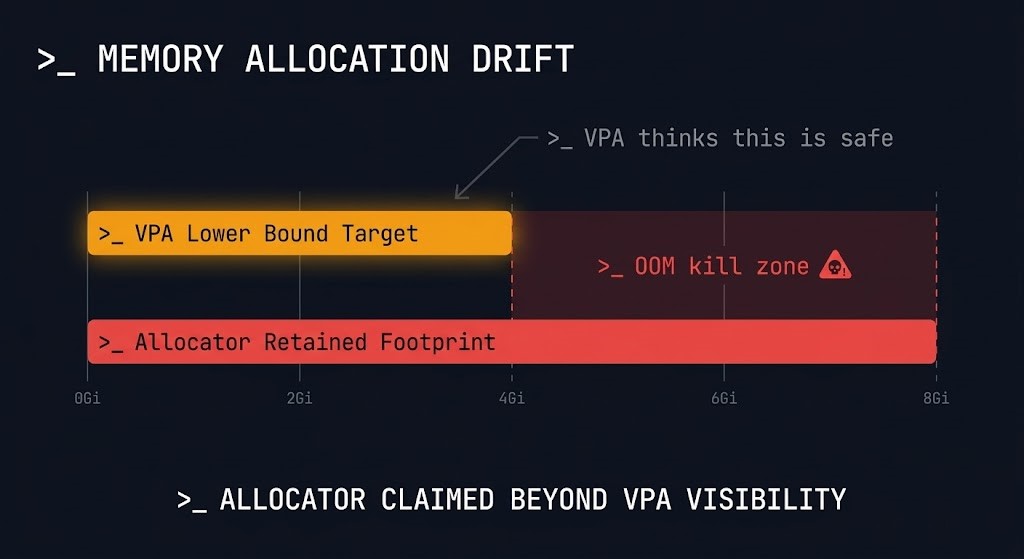
When VPA recommends reducing a container’s memory limit, the kubelet attempts to lower the cgroup limit. If the container’s current memory consumption is already near the new limit, the process gets OOM-killed. The kubelet provides no hard guarantee against this — it makes a best-effort attempt to prevent OOM kills during memory limit reductions, but the protection is not absolute.
The risk is compounded by how memory allocators work. Many allocators — including the glibc allocator used by most Linux processes and the JVM’s garbage collector — do not release memory back to the OS proactively. A process that consumed 3Gi of memory at peak may still be holding 2.8Gi of allocated pages even if it currently needs only 1.5Gi. VPA’s recommendation is based on observed consumption. The allocator’s retained footprint is higher.
bash
# Check actual memory consumption vs VPA recommendation
kubectl top pod <pod-name> -n <namespace>
kubectl describe vpa <vpa-name> -n <namespace> | grep -A 5 "Lower Bound\|Target\|Upper Bound"
Compare VPA’s target recommendation against kubectl top output. If the gap between current consumption and VPA’s lower bound is small, memory shrink automation is operating close to the OOM boundary.
The operational rule: treat memory shrink automation as higher-risk than memory growth automation. For memory-sensitive workloads — databases, caches, anything with a large retained allocator footprint — set updatePolicy.minAllowed conservatively and consider disabling downward memory automation entirely. The savings from right-sizing memory down are rarely worth the risk of a production OOM kill.
Failure Mode 4: Scheduler Fragmentation After Resize
In-place resize keeps the pod on its current node. That is the point. But it has a secondary effect on cluster scheduling topology that most teams don’t account for.
After a successful in-place resize, the pod is consuming more resources on its original node. Other pods that were schedulable on that node based on its available capacity before the resize may no longer fit. The scheduler’s view of available node resources shifts — without any pod being created, evicted, or moved.
At small scale this is noise. At scale — clusters with hundreds of services and tight bin-packing — repeated in-place resizes can fragment node capacity in ways that produce scheduling pressure and pending pods even when aggregate cluster capacity is sufficient. The fragmentation pattern looks identical to the CPU fragmentation failure documented in Kubernetes Scheduler Stuck: The Guide to Pending Pods: pods pending, nodes not full in aggregate, scheduler unable to place.
The diagnostic is the same:
bash
kubectl get pods --all-namespaces --field-selector=status.phase=Pending
kubectl describe node <node-name> | grep -A 10 "Allocated resources"
If you see pending pods alongside nodes with fragmented remaining capacity — enough total CPU and memory across nodes, but no single node with enough headroom to fit the pending pod — in-place resize fragmentation may be contributing.
The mitigation is cluster-autoscaler coordination and deliberate headroom management. VPA and cluster autoscaler interact through the VPA + CA mode. If you are running both, verify that cluster autoscaler headroom settings account for in-place resize growth — not just new pod scheduling demand.
Failure Mode 5: VPA Recommendation Drift
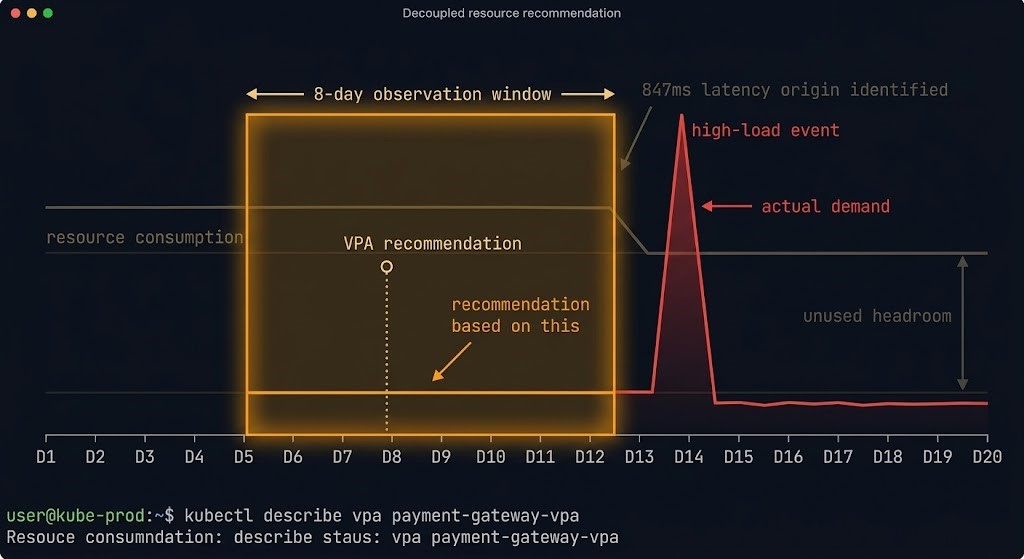
VPA builds recommendations from historical resource consumption data over a sliding observation window. The default window is 8 days. For workloads with variable load patterns — batch jobs, services with strong weekly or monthly traffic cycles, anything with irregular usage — the recommendation window may not capture the full load profile.
The practical failure: VPA recommends resource settings based on a low-load period, automation applies them, and the workload gets OOM-killed or CPU-throttled when high-load conditions return.
bash
# Check the observation window and recommendation history
kubectl describe vpa <vpa-name> -n <namespace>
The Status.Recommendation block shows current targets. Cross-reference against actual resource consumption patterns from your observability stack before trusting VPA automation for workloads with irregular load.
Relevant configuration to bound VPA’s recommendation range:
yaml
apiVersion: autoscaling.k8s.io/v1
kind: VerticalPodAutoscaler
metadata:
  name: app-vpa
spec:
  targetRef:
    apiVersion: apps/v1
    kind: Deployment
    name: app
  updatePolicy:
    updateMode: "InPlaceOrRecreate"
  resourcePolicy:
    containerPolicies:
    - containerName: app
      minAllowed:
        cpu: 100m
        memory: 512Mi
      maxAllowed:
        cpu: 4
        memory: 8Gi
      controlledResources: ["cpu", "memory"]
minAllowed and maxAllowed bound VPA’s recommendation range. For workloads with known load spikes, set minAllowed conservatively — it acts as a floor that prevents VPA from right-sizing down below the minimum safe operating point.
NUMA and Memory Topology
NUMA (Non-Uniform Memory Access) topology binding is a separate concern from cgroup resource limits. For latency-sensitive workloads — ML inference, high-frequency data processing, anything with tight memory bandwidth requirements — NUMA node alignment matters. A pod may have sufficient memory limits but still suffer from cross-NUMA memory access if the kubelet’s topology manager placed it without alignment or if node conditions changed after initial placement.
In-place resize does not re-evaluate NUMA placement. The pod stays on its node. The topology binding — good or bad — is fixed at scheduling time and does not change when resources are adjusted. For workloads where NUMA alignment is a first-class operational concern, in-place resize is not a substitute for correct initial placement and topology-aware scheduling configuration.
Before You Enable Vertical Pod Autoscaler Automation
resizePolicy: RestartContainer for memory on JVM workloads — silent heap ceiling will not be fixed by cgroup expansionOff mode first — observe recommendations for 2+ weeks before enabling automationArchitect’s Verdict
Kubernetes 1.35 solved the restart problem. That was the right problem to solve, and in-place resize is a genuine operational improvement for stateful workloads that previously had no safe automated scaling path.
The mistake is treating restart elimination as the whole problem. VPA automation in production has five failure modes. The restart was one of them. The other four — node capacity constraints, JVM heap ceilings, memory shrink risk, and recommendation drift — are still live. Scheduler fragmentation from in-place resize is a new one to add to the list.
Enable InPlaceOrRecreate with the same discipline you’d apply to any production automation change: start in observation mode, validate per workload class, bound recommendations with minAllowed and maxAllowed, and treat memory shrink automation as higher risk than memory growth. The teams that will get the most out of this feature are the ones who understood why VPA automation was disabled in the first place — and address those reasons deliberately rather than assuming the feature upgrade fixed them.
The full Kubernetes Day-2 diagnostic framework — including compute, network, identity, and storage failure loops — is at Kubernetes Day 2 Failures: 5 Incidents & the Metrics That Predict Them.
Additional Resources
View 2 more resources
Editorial Integrity & Security Protocol
This technical deep-dive adheres to the Rack2Cloud Deterministic Integrity Standard. All benchmarks and security audits are derived from zero-trust validation protocols within our isolated lab environments. No vendor influence.

R.M.
Senior Solutions Architect with 25+ years of experience in HCI, cloud strategy, and data resilience. As the lead behind Rack2Cloud, I focus on lab-verified guidance for complex enterprise transitions. View Credentials →
Get the Playbooks Vendors Won’t Publish
Field-tested blueprints for migration, HCI, sovereign infrastructure, and AI architecture. Real failure-mode analysis. No marketing filler. Delivered weekly.
Select your infrastructure paths. Receive field-tested blueprints direct to your inbox.
- > Virtualization & Migration Physics
- > Cloud Strategy & Egress Math
- > Data Protection & RTO Reality
- > AI Infrastructure & GPU Fabric
Zero spam. Includes The Dispatch weekly drop.
Architecture Audit Services
Fixed-scope audits for Zero-Trust Azure, VMware migration readiness, and recovery posture — no discovery call required to start.
>_ View Audit Services>_Related Posts
ZFS vs Ceph vs NVMe-oF: Choosing the Right Storage Backend for Modern Virtualization
I still have nightmares about a storage migration I ran back in 2014. >_ Architect’s Brief 60-second read before you commit to the full post · Full post: 7 min Generating brief… We were moving off a monolithic SAN and onto an early “software-defined” storage platform. The sales engineers promised infinite scalability and self-healing magic….
Your Monitoring Didn’t Miss the Incident. It Was Never Designed to See It.
I’ve watched observability vs monitoring play out as a live incident more times than I can count. >_ Architect’s Brief 60-second read before you commit to the full post · Full post: 10 min Generating brief… The dashboard was green. The on-call engineer was not paged. The monitoring system did exactly what it was designed…
Your Kubernetes Cluster Isn’t Out of CPU — The Scheduler Is Stuck
Compute Tier 1 Authority Cascades to ➔ >_ Architect’s Brief 60-second read before you commit to the full post · Full post: 9 min Generating brief… [Storage] [Network] 🚨 Failure Signature Detected Grafana shows cluster CPU utilization is under 50%, but pods are stuck in Pending. Events show: 0/10 nodes are available: 10 Insufficient cpu….
Your Cloud Provider Is Not Your HA Strategy
A Tactical Playbook for Architecting, Testing, and Automating Real Multi-Cloud & Multi-Region Resilience We’ve previously explored why cloud SLAs fail as guarantees in our deep dive, Cloud SLA Failure & Resilience Strategy. This article focuses on how to survive those failures in practice — architecturally, operationally, and financially. >_ Architect’s Brief 60-second read before you…
Your CI-CD Pipeline Is Your Real Infrastructure Control Plane
Terraform defines desired state. Kubernetes reconciles workload state. Cloud consoles expose state. None of those systems decides whether infrastructure state is allowed to change. The ci-cd control plane does — or more precisely, the CI-CD pipeline is the only system in most environments that can hold that authority. That distinction — between storing state and…
Why Infrastructure Survivability Fails After The Design Review
Infrastructure survivability is not something an architecture has. It’s something an organization keeps proving, on a schedule nobody wrote down, long after the design review that approved it has been forgotten. >_ Architect’s Brief 60-second read before you commit to the full post · Full post: 8 min Generating brief… That review happened. Redundancy was…