

The VM That Survived the Migration But Lost Its Identity
The most expensive vmware migration issues don’t happen at cutover. They happen three days later, when something that passed every checklist starts failing in ways nobody can trace back to the migration.
The migration ran clean. The VM came up on AHV within the expected window. Storage latency was nominal. The health check returned green. The team marked it complete, moved to the next workload, and closed the cutover ticket.
Seventy-two hours later, a service desk ticket arrived. Intermittent authentication failures on that VM. Not consistent — sometimes fine, sometimes not. The on-call engineer checked the obvious things: network connectivity, DNS resolution, service status. All healthy. The VM was healthy. The monitoring said healthy.
The failure didn’t surface fully until a scheduled GPO refresh ran four days post-cutover and Kerberos authentication broke hard.
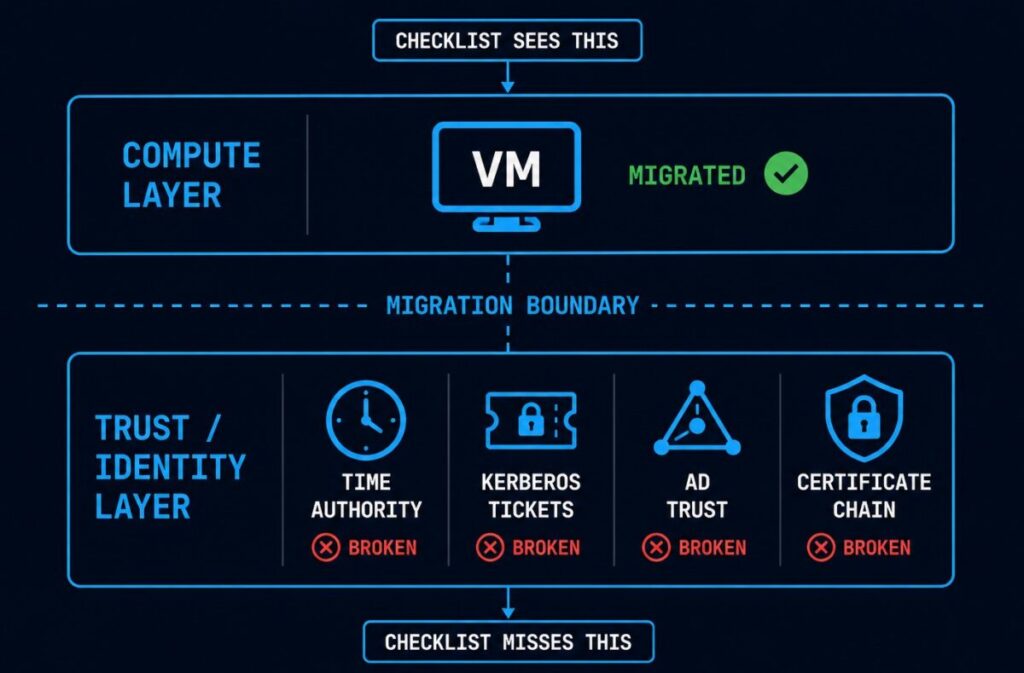
Post-incident analysis identified the root cause as time drift introduced during the VMware Tools replacement. Nobody had put time synchronization verification on the migration checklist — because time sync had always been a VMware Tools responsibility, and VMware Tools had been replaced as part of the migration procedure. The checklist showed “VMware Tools replaced ✅.” The checklist passed. The implicit dependency on VMware Tools for time authority wasn’t on the checklist at all.
This is the vmware migration issues pattern most cutover playbooks don’t cover — not compute portability, but identity continuity.
The Failure Chain
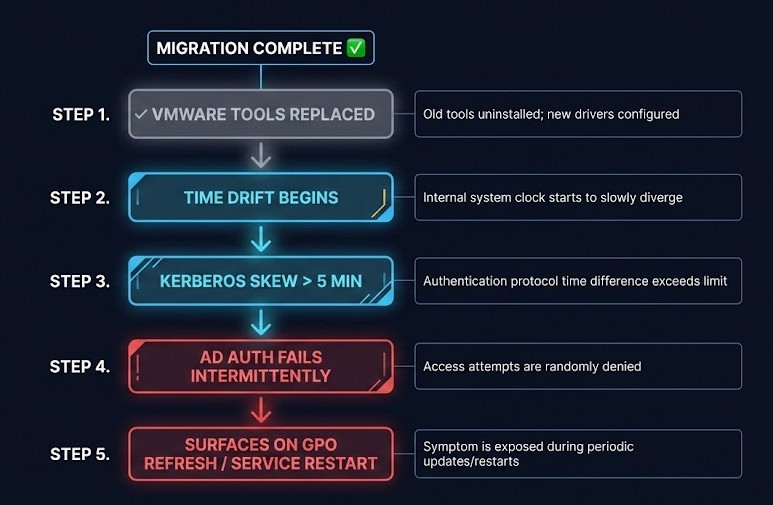
The sequence is specific enough to be worth walking through precisely, because each step looks like a different problem until you see them in order.
01 — VM MIGRATES SUCCESSFULLY
Compute layer: complete. Storage: attached. Network: connected. The migration tooling reports success. This is accurate.
02 — VMWARE TOOLS REPLACED ✓
Correct procedure, checklist item passes. What isn’t documented: VMware Tools was managing time synchronization between the guest and the ESXi host. The replacement agent has different time sync behavior — and on many AHV and KVM deployments, the guest’s NTP configuration was inheriting from VMware Tools rather than maintaining an independent NTP source.
03 — TIME DRIFT APPEARS AFTER REBOOT
Not immediately visible. The guest clock drifts gradually — often only a few minutes in the first hour. Monitoring shows the VM as healthy because it checks process health and network reachability, not clock skew against domain time.
04 — KERBEROS SKEW EXCEEDS 5-MINUTE TOLERANCE
Kerberos has a hardcoded default clock skew tolerance of 5 minutes. When the guest clock crosses that threshold, Kerberos begins rejecting authentication tickets. Failures are intermittent because drift is gradual and the skew crosses the threshold inconsistently depending on when tickets are being issued and validated.
05 — AD AUTHENTICATION FAILS INTERMITTENTLY
Not constantly — which makes diagnosis significantly harder. Constant failures point to a configuration error. Intermittent failures look like a network problem or a transient event. The VM is healthy. The domain controller is healthy. The clock is broken.
06 — CERTIFICATE RENEWAL BEGINS FAILING
Certificates tied to the hostname or SPN that require Kerberos-authenticated connections to the CA start failing silently. Existing certificates are still valid — the failure appears at renewal, which may be weeks after the migration.
07 — MONITORING STILL SHOWS HEALTHY
Compute metrics normal. Process health normal. Network reachability normal. Nothing in the standard monitoring stack is measuring Kerberos ticket validity or certificate renewal success rates. The VM is broken in ways that don’t register as broken.
08 — FAILURE SURFACES ON GPO REFRESH OR SERVICE RESTART
GPO application requires authenticated domain communication. Scheduled tasks under domain service accounts require valid Kerberos tickets. Service restarts trigger re-authentication. Any of these makes the intermittent failure consistent and visible.
09 — POST-INCIDENT ANALYSIS MISSES THE MIGRATION
The cutover was days ago. The VM has been running. The standard analysis starts with what changed recently — and “the migration ran clean” is the answer everyone gives, because the migration checklist passed.
What the Migration Checklist Missed
The checklist wasn’t wrong. “VMware Tools replaced ✅” is correct procedure. The problem isn’t that the checklist item failed — it’s that the checklist didn’t capture what VMware Tools was implicitly responsible for beyond its documented feature set.
Time synchronization is the most common implicit dependency, but it’s not the only one. VMware Tools mediates a set of guest-hypervisor interactions that most migration checklists treat as a binary: installed or not installed. The replacement is documented as “install target hypervisor guest agent.” The functional dependencies that VMware Tools was maintaining — time authority, some certificate operations, guest identity signals to the control plane — aren’t listed as VMware Tools dependencies in most runbooks because they were never explicitly configured. They were defaults that worked because VMware Tools was present.
The Identity Continuity Gap is one instance of a broader migration success-signal failure. The Dashboard Said the Migration Succeeded generalizes the pattern: every layer of a migrated estate has a version of “the tool reports green against a stack the tool no longer fully understands,” and the identity layer is one of the layers most likely to drift without alerting because the standard monitoring stack isn’t measuring Kerberos ticket validity or certificate renewal success in the first place.
This is the architectural distinction that makes vmware migration issues like this one genuinely difficult to catch in preflight: the dependency is invisible until it’s broken. You can’t audit a dependency that isn’t documented. The migration checklist verifies what was intentionally configured. It cannot verify what was never written down.
The control plane dependency drift problem is structurally identical — implicit dependencies on the VMware control plane that don’t surface until the control plane is gone. Identity continuity is the same failure at the guest layer rather than the infrastructure layer. The pattern compounds during the coexistence period covered in The VMware Exit Has Entered the Coexistence Era — split control plane authority between two platforms creates precisely the verification gaps where identity drift accumulates undetected.
The Identity Continuity Gap
This failure pattern has a name: the Identity Continuity Gap — the operational gap between workload portability and trust portability during virtualization migrations.
Workload portability is what migration tooling measures: the VM can boot, run, and serve traffic on the new hypervisor. Trust portability is what migration tooling doesn’t measure: the VM’s identity relationships — its standing with the domain controller, its certificate chain validity, its time authority, its SPN registrations — are intact and functional on the new hypervisor.
A migration can achieve complete workload portability and zero trust portability simultaneously. The VM boots. The checklist passes. The identity layer is broken in ways that only surface under specific operational conditions.
What breaks after you leave VMware covers the broader failure taxonomy for post-cutover operational issues. The Identity Continuity Gap is the specific sub-pattern where the failure is in the trust layer rather than the compute or storage layer — and it’s the pattern most likely to be misdiagnosed as a network or service problem because the compute layer is genuinely healthy.
The VMware Migration Strategy Track maps this failure domain explicitly in its Cluster 02 sequence — the identity gap is one of several failure domains that appear clean on
cutover day and surface on a deferred schedule when operational assumptions about the source platform stop being true.
The lift-and-shift fallacy post makes the argument that migration complexity isn’t in the move — it’s in what the move reveals about implicit architectural dependencies. Identity continuity is one of the clearest examples: the dependency was invisible in the VMware environment because it was handled automatically. The migration makes it visible by removing the handler.
What Trust Portability Actually Requires
Five verification steps that belong on every migration checklist and aren’t on most of them.
Time synchronization verification before cutover confirmation. Not “NTP service is running” — verify that the guest clock is synchronized to domain time within Kerberos tolerance after the guest agent replacement and before marking the migration complete. This is a 30-second check that prevents the entire failure chain.
Kerberos skew tolerance testing post-reboot. Run an explicit Kerberos authentication test after the first reboot on the new hypervisor. A successful kinit or equivalent against the domain controller with a clock skew measurement confirms that time authority is intact. This should be a checklist item with a pass/fail gate, not a background assumption.
SPN audit independent of VMware Tools. Service Principal Names registered for the migrated VM should be verified post-cutover. SPN registration issues are rare but they do occur during migrations that involve hostname changes, IP changes, or guest agent replacements that affect the machine’s domain identity surface.
Certificate chain validation independent of the old hypervisor. Any certificates tied to the VM’s domain identity — machine certificates, service account certificates, certificates issued against the hostname or FQDN — should be validated for renewal path integrity after migration. The test isn’t whether the certificate is currently valid, but whether the renewal process can complete successfully against the CA from the new hypervisor.
Identity reconciliation checkpoint as a migration gate, not a boot confirmation. The standard migration gate is “VM is running and responding to health checks.” The trust portability gate should be separate: “VM has successfully completed a Kerberos-authenticated domain operation after migration.” That single check catches the majority of identity continuity failures before they surface operationally.
The VMware skills gap post makes the point that the most expensive VMware exit failures are the ones that require AD and identity expertise the migration team doesn’t have in the room. Trust portability verification is precisely the category of check that falls outside the typical migration engineer’s toolbox — it requires someone who understands Kerberos, certificate chains, and domain identity mechanics, not just hypervisor operations.
Architect’s Verdict
The migration succeeded at the compute layer and failed at the trust layer because the architecture treated identity as attached to the VM rather than attached to the operational control plane.
That framing is the useful one for post-mortems: this wasn’t a migration failure, it was an identity architecture assumption that the migration exposed. The VM had always depended on VMware Tools to maintain its time authority and by extension its domain trust relationships. That dependency was invisible because VMware Tools was always present. The migration removed it — and the identity layer failed on a deferred schedule, in ways that looked like network problems, service problems, and transient events until the pattern became clear.
The checklist item was correct. The checklist was incomplete. The gap between those two statements is where most vmware migration issues at the identity layer live — not in what was verified, but in what was never written down as a dependency in the first place. The gap between those two statements is the governance portability problem at the identity layer. The Sovereign Virtualization Architecture stage maps the full failure taxonomy — trust portability, policy inheritance, and what actually transfers when the platform changes.
Additional Resources
View 2 more resources
Editorial Integrity & Security Protocol
This technical deep-dive adheres to the Rack2Cloud Deterministic Integrity Standard. All benchmarks and security audits are derived from zero-trust validation protocols within our isolated lab environments. No vendor influence.

R.M.
Senior Solutions Architect with 25+ years of experience in HCI, cloud strategy, and data resilience. As the lead behind Rack2Cloud, I focus on lab-verified guidance for complex enterprise transitions. View Credentials →
Get the Playbooks Vendors Won’t Publish
Choose the architecture problems you care about. Get field-tested playbooks and frameworks delivered to your inbox.
- > AI Infrastructure & Inference Economics
- > Cloud Strategy & Hidden Cost Models
- > Virtualization & Deterministic Migration
- > Kubernetes, IaC & Modern Infrastructure
- > Data Protection & Recovery Engineering
Zero spam. Includes The Dispatch weekly drop.
Need Architectural Guidance?
Independent review before major infrastructure decisions.
- > Validate assumptions
- > Identify hidden dependencies
- > Quantify migration risk
- > Challenge vendor narratives
Triage · Advisory · Fractional · Direct Hire