

Resource Pooling Part 2: The Physics of Memory Overcommit (Ballooning, Compression, and Swap Failure)
When Overcommit Works vs. Explodes
Memory overcommit isn’t some clever trick to magically create free RAM. It’s more like taking out a high-interest loan from your hypervisor—you’ll pay for it sooner or later.
Picture a typical enterprise setup: 26 hosts split into two clusters, mostly Dell R740s. With a 17:1 VM-to-host ratio, CPU scheduling usually isn’t the thing that keeps you up at night. But if a lot of those VMs are running heavy databases and grabbing big memory reservations, you end up with your physical RAM locked in tight.
Now, let’s say usage suddenly spikes across the cluster and you run out of physical memory. The hypervisor has to find a way to claw back some RAM to keep things going. How it does that will decide if your applications just hiccup—or go down hard.
First, let’s be clear on what the hypervisor is actually taking:
The Working Set Law
First, let’s be clear on what the hypervisor is actually taking. (Note: If you are fuzzy on how hypervisor scheduling works at a systemic level, you should bookmark the Modern Virtualization Learning Path and review our core Virtualization Architecture Pillar before reading further). >_
Every workload on your cluster deals with memory in three ways:
- Allocated memory: What you gave the VM, like 32GB.
- Working set: The memory the VM is actually using right now—reading, writing, doing real work (maybe 12GB out of that 32).
- Idle memory: The leftover, just sitting there, maybe caching something, maybe doing absolutely nothing.
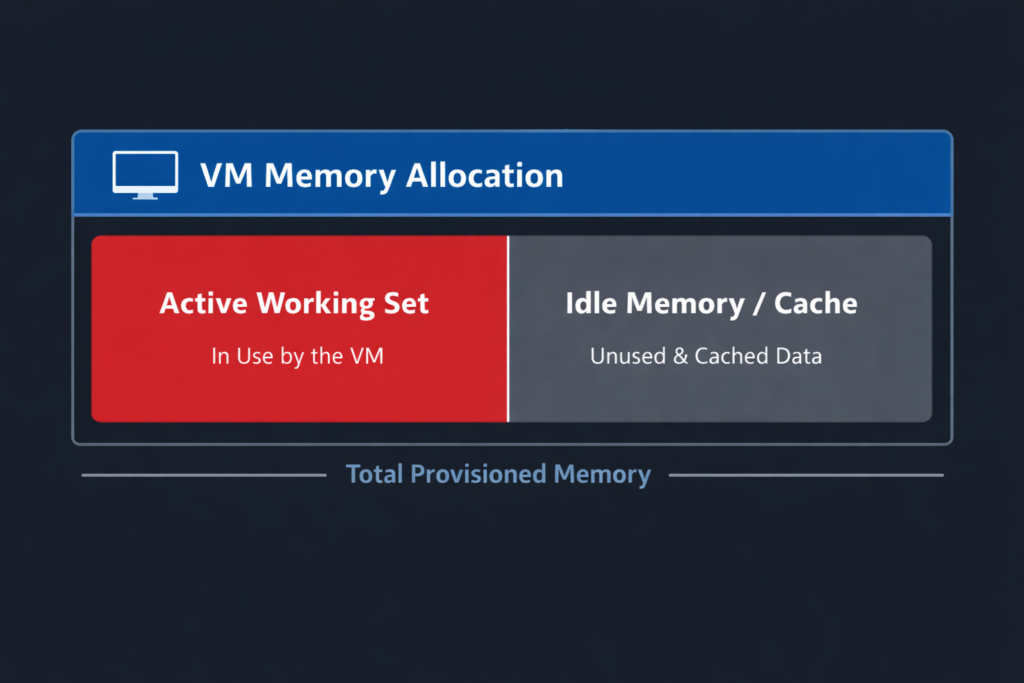
Overcommitting works fine as long as VMs aren’t all using their full allocations at the same time. You’re safe if their working sets are small and their peaks don’t overlap much.
But when working sets creep up close to what you allocated, and a bunch of VMs hit their peak at once, you’re in trouble. Databases are a special case—they love to hog memory for buffer pools and usually have almost no idle RAM. So when the hypervisor comes looking, there’s nothing safe to give up.
The Memory Reclamation Sequence
When a hypervisor like VMware ESXi or Nutanix AHV runs out of physical memory, it follows a pretty strict set of steps to survive:
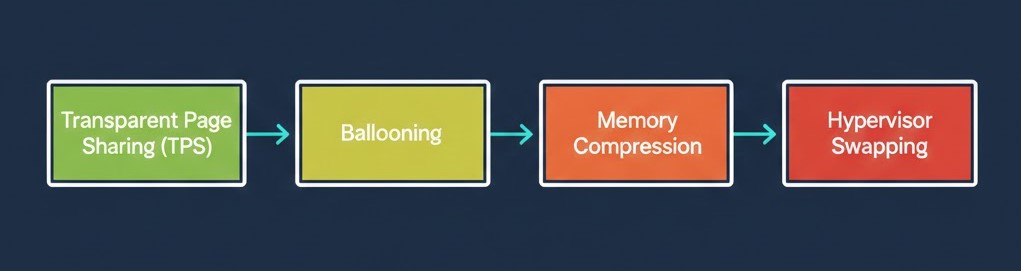
0. Transparent Page Sharing (TPS)
First, the hypervisor tries to deduplicate RAM. It looks for identical memory pages across VMs and maps them to the same physical page. This trick works great for things like identical VDI boot storms, but it’s useless for encrypted data, random workloads, or database buffers. (And VMware mostly turned it off between VMs for security reasons, but you still need to know about it).
1. Ballooning (The Cooperative Loan)
When the host gets desperate for memory, it can’t just reach into a guest OS and yank it back. Instead, it uses a driver (like vmmemctl from VMware Tools or VirtIO) to ask nicely.
- How it works: The hypervisor tells the driver to “inflate” and request memory from the guest OS.
- The Reality: The guest OS actually thinks it’s running out of RAM. It responds by dumping its idle file cache or paging out its least-used memory to its own internal swap file. The hypervisor then scoops up those freed physical pages. It’s usually a mild hit because the guest OS gets to choose what to sacrifice.
2. Memory Compression (The Warning Track)
If ballooning isn’t freeing up RAM fast enough, the hypervisor starts squeezing.
- How it works: The hypervisor looks for memory pages it can shrink down significantly (usually to 2KB or less) and shoves them into a per-VM compression cache.
- The Reality: You are trading CPU cycles to save memory space. Unzipping a page takes microseconds, which is still lightyears faster than reading it off a physical disk.
3. Hypervisor Swapping (The Explosion)
If the host is still starving, it hits the big red button: host-level swapping (.vswp in VMware).
- How it works: The hypervisor completely bypasses the guest OS and blindly dumps virtual machine memory pages straight to the host’s local storage.
- The Cascade Failure: The hypervisor has no clue what it’s swapping out. It could be a useless text file, or it could be your SQL server’s active buffer cache. When the VM needs that memory back, it stalls. The vCPU waits. The scheduler cycles pile up, and suddenly CPU Ready time spikes. This is exactly why we covered Part 1: CPU Ready vs CPU Wait—high CPU Ready is often just a symptom of your cluster silently starving for memory.
The Brutal Physics of Swapping (Or Why NVMe Won’t Save You)
I hear this all the time from architects looking at modern HCI clusters: “We’re on all-flash NVMe. Swapping to disk won’t hurt us.”
That’s just bad math. You’re trading nanosecond RAM access for microsecond or millisecond disk access. That’s a 10,000x to 100,000x penalty.
| Medium | Approx. Latency |
| RAM | ~100 nanoseconds |
| NVMe | ~100 microseconds |
| SSD | ~500 microseconds – 1 ms |
| Spinning Disk | 5–10 ms |
Databases do millions of memory lookups a second. Multiply that by a 1,000x latency hit, and the whole thing cascades. Connections drop. Apps lock up. The system crashes. When it comes to a fight between the hypervisor and disk I/O, the disk always wins.
🛑 The Failover Multiplier Trap
Even if your cluster runs completely fine at 85–90% memory utilization on a normal Tuesday, think about what happens if a host dies. In an N+1 design, that single failure instantly dumps those VMs onto the surviving hosts, overlapping everyone’s working sets. You’ll go from compression to a swap storm in seconds. You have to model overcommit for your post-failure state, not your steady state.
Warning Metrics Before the Crash
Don’t wait for the helpdesk phones to light up. You need to watch the physics of your cluster.
In VMware vCenter Server, watch for:
- Ballooned Memory: Any sustained value > 0 means the host is actively clawing memory back.
- Memory Compression: A steady rise means ballooning is failing.
- Swap In Rate: Any value > 0 is a red alert. The explosion has started.
- Guest-level Swap Usage: Monitor this inside the VM OS.
In Nutanix Prism, watch for:
- Memory Pressure %: Sustained high percentages mean you need to rebalance workloads immediately.
- Swap usage per CVM/VM: Indicates the hypervisor is burying active pages in storage.
- High Sustained Host Memory Utilization: Anything sitting over 90% leaves you zero buffer for a failover event.
The Boundary: When Overcommit Fails
Overcommit relies on workloads being predictable.
| Workload | Working Set Variability | Reservations Required | Safe Overcommit | Failure Mode |
| VDI | High variability | No | 1.3–1.5x | Minor latency |
| Web Tier | Moderate | Rare | 1.2x | Slow responses |
| App Tier | Moderate | Sometimes | 1.1–1.2x | CPU + memory contention |
| Enterprise DB | Low variability | Yes | 1:1 | Immediate swap storm |
The Architectural Law of Memory Overcommit
You simply cannot have all four of these at the same time:
- High VM density
- Strict memory reservations
- Database-heavy workloads
- Zero risk of swapping
Pick three.
If the CFO’s financial model demands high density, but your application team demands strict reservations, the hypervisor is going to eventually settle the argument using disk I/O.
And like we said, disk I/O always wins.
Return to the Master Guide: To see how memory swapping interacts with CPU run queues and NUMA boundaries, head back to the main hub: The Resource Pooling Physics.
Additional Resources
Editorial Integrity & Security Protocol
This technical deep-dive adheres to the Rack2Cloud Deterministic Integrity Standard. All benchmarks and security audits are derived from zero-trust validation protocols within our isolated lab environments. No vendor influence.

R.M.
Senior Solutions Architect with 25+ years of experience in HCI, cloud strategy, and data resilience. As the lead behind Rack2Cloud, I focus on lab-verified guidance for complex enterprise transitions. View Credentials →
Get the Playbooks Vendors Won’t Publish
Choose the architecture problems you care about. Get field-tested playbooks and frameworks delivered to your inbox.
- > AI Infrastructure & Inference Economics
- > Cloud Strategy & Hidden Cost Models
- > Virtualization & Deterministic Migration
- > Kubernetes, IaC & Modern Infrastructure
- > Data Protection & Recovery Engineering
Zero spam. Includes The Dispatch weekly drop.
Need Architectural Guidance?
Independent review before major infrastructure decisions.
- > Validate assumptions
- > Identify hidden dependencies
- > Quantify migration risk
- > Challenge vendor narratives
Triage · Advisory · Fractional · Direct Hire