

Proxmox isn’t “Free” vSphere: The Hidden Physics of ZFS and Ceph
Proxmox ZFS vs Ceph storage is the decision that determines whether your VMware exit succeeds or quietly destroys your IOPS. Broadcom’s acquisition of VMware forced thousands of teams to ask a dangerous question: “Why not just move everything to Proxmox? It’s free.”
On paper, Proxmox VE is the perfect escape hatch. It is open-source, capable, and battle-tested. Management hears “free hypervisor” and assumes the migration is a simple file transfer. A VM is a VM, right?
That assumption is how storage outages happen.
vSphere spent 15+ years shielding admins from storage physics. VMFS hid the ugly details — locking, block alignment, multipathing, and write amplification — behind a single abstraction. Proxmox does not coddle you. It hands you the raw tools — ZFS, Ceph, or NFS — and expects you to understand the tradeoffs.
If you treat ZFS like VMFS, your databases will crawl. If you run Ceph on 1GbE, your cluster will freeze during a rebuild. If you ignore block alignment, your IOPS will silently drop by 50%.
VMware trained you to think in datastores. Proxmox forces you to think in I/O paths, latency domains, and failure behavior. For the migration execution framework — VirtIO injection, network segmentation, and the 4-week production timeline — see the Proxmox vs VMware 2026: The Engineer’s Migration Playbook. This post covers the Proxmox ZFS vs Ceph storage physics you need to understand before you move a single VM.
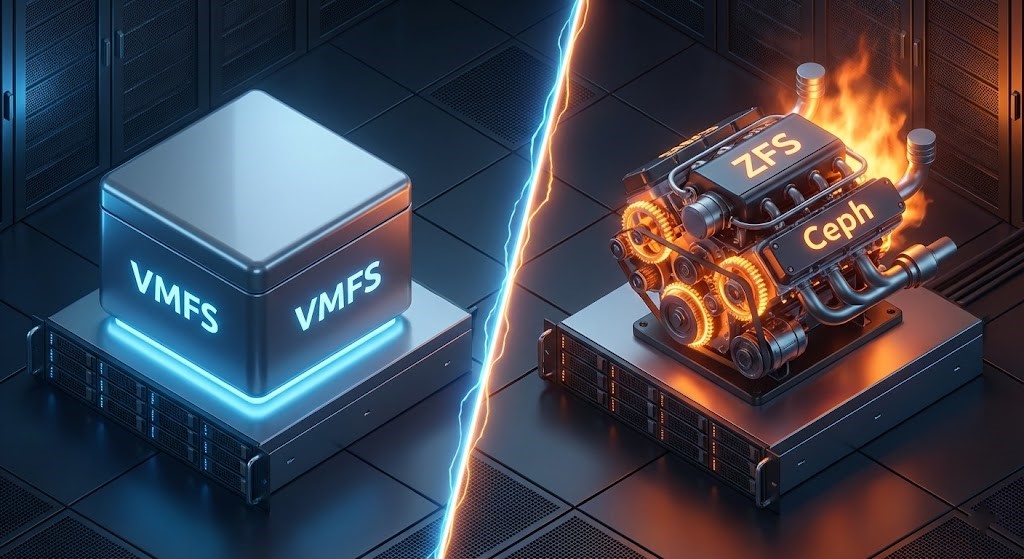
The “VMFS Hangover”
In the vSphere era, storage was conceptually simple: carve a LUN, format it VMFS, and all hosts saw it. vMotion and HA just worked. The SAN controller handled the heavy lifting of RAID, caching, and tiering.
Proxmox does not ship with a VMFS-style clustered filesystem that magically abstracts locks, metadata, and shared access. The Proxmox ZFS vs Ceph storage decision forces you to choose a side:
| Option | What You Get | What You Lose |
|---|---|---|
| Local ZFS | Exceptional performance, data integrity, simplicity. | No shared storage (no live migration without replication). |
| Ceph (RBD) | True HCI, Shared Storage, HA, Live Migration. | Requires operational maturity and a dedicated high-speed network. |
| NFS / iSCSI | Familiar “Legacy” SAN model. | Loses the HCI value proposition entirely. |
There is no default safe path. Each option encodes a new set of risks. The decision framework below maps which architecture fits which workload — but first, understand the failure modes that make each option dangerous when misapplied.
Proxmox ZFS vs Ceph Storage: The ZFS Trap — The RAM Eater
ZFS is a Copy-on-Write filesystem. It offers data integrity that VMFS can only dream of — end-to-end checksumming, atomic writes, native snapshots — but it pays for that with RAM.
The ARC: The Cache That Will Eat Your Host
By default, ZFS aggressively consumes RAM for its Adaptive Replacement Cache. On a typical Linux system, ZFS will happily take 50% of available memory to speed up reads. It does this silently, without warnings, and without asking permission.
War Story: We recently audited a failed migration where a team moved a 64GB SQL VM onto a host with 128GB of RAM. They assumed they had plenty of headroom. The VM started swapping and eventually crashed. ZFS had silently consumed ~64GB for ARC. The hypervisor and the database were fighting for the same memory pool. No errors. No alerts. Just a slow death.
The same run queue and memory contention physics that cause ballooning in VMware apply here — the failure mode just wears a different mask. See Resource Pooling Physics: CPU Wait & Memory Ballooning for the diagnostic framework that applies equally to KVM on Proxmox.
The Fix: Do not let ZFS guess. Explicitly cap the ARC size:
# Cap ZFS ARC to 16GB (adjust to ~25-30% of host RAM)
# Add to /etc/modprobe.d/zfs.conf

echo "options zfs zfs_arc_max=17179869184" >> /etc/modprobe.d/zfs.conf
update-initramfs -u

# Verify after reboot:
cat /proc/spl/kstat/zfs/arcstats | grep c_max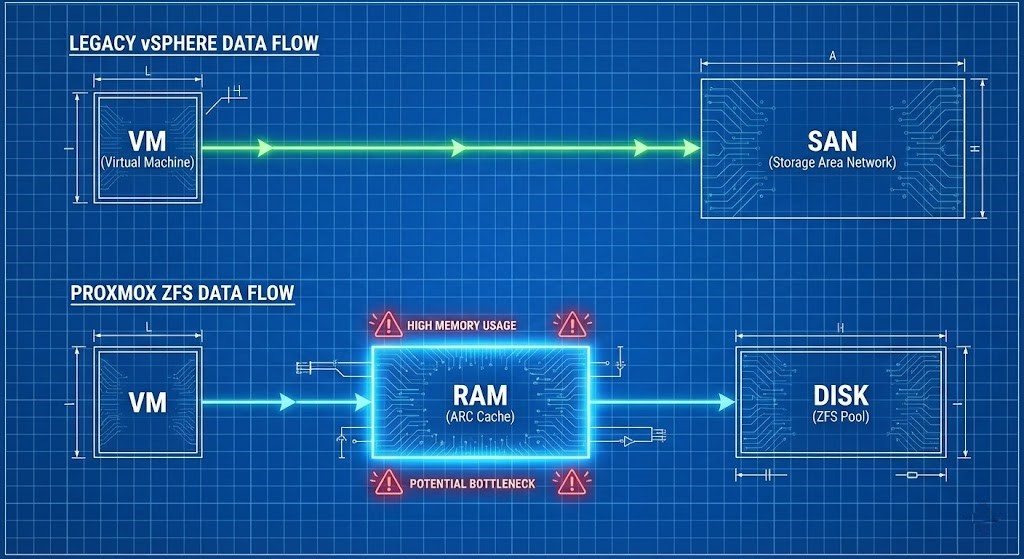
Cap ARC to roughly 25–30% of host RAM on mixed workloads, then tune based on real hit ratios. A ZFS ARC hit ratio above 90% means the cache is earning its RAM allocation. Below 70%, you are paying the RAM tax for diminishing returns.
The Write Cliff
Because ZFS is CoW, every overwrite becomes a new block allocation and metadata update — write amplification. If you run ZFS on consumer-grade SSDs (QLC) without a proper ZIL (ZFS Intent Log), you will burn through the drive’s endurance in months and hit a Write Cliff where latency spikes from 1ms to 200ms instantly. The ZIL should be on a dedicated, low-latency NVMe device — not shared with your data pool.
The Ceph Trap: The Network Killer
Ceph is distributed object storage — but it is fundamentally constrained by the speed of light. Every write involves network replication, placement calculation, and quorum consensus. In the Proxmox ZFS vs Ceph storage decision, Ceph does not care how fast your CPUs are if your network is slow.
The 10GbE Lie
Can you run Ceph on 1GbE? Technically yes. Operationally no. When a drive fails, Ceph initiates a rebalance — moving terabytes of data across the network to restore redundancy. On a 1GbE link, this saturation blocks client I/O. Your VMs freeze. The cluster feels down even though it is technically up.
Treat 10GbE dedicated to Ceph as the absolute floor. 25GbE is the new normal if you plan to survive rebuilds without user-visible pain. The same network saturation physics that cause Ceph rebalance freezes apply to any distributed storage rebalance event — the network is always the bottleneck, never the CPUs.
The 2-Node Fantasy
This pattern appears constantly: “I’ll just buy two beefy servers and run Ceph.” Ceph requires quorum. A 2-node cluster is not High Availability — it is a split-brain generator. Even with a Witness or Tie-Breaker vote, performance during a failure state is abysmal because you lose data locality. Three nodes is the minimum for operational safety. Five or more is the realistic production floor.
The Migration Trap: Block Alignment
This is where most migrations silently fail. The standard tool — qemu-img convert — moves your .vmdk files to Proxmox’s .qcow2 or .raw format. Clean, simple, and potentially catastrophic if you skip the alignment audit.
If you don’t align blocks properly during conversion — especially when moving from 512b legacy sectors to 4K sectors — you get sector misalignment. Every single logical write operation becomes two physical write operations (Read-Modify-Write). Your IOPS are cut in half. You see no errors. You just think Proxmox is slow.
The Pre-Migration Audit: Before converting any VM, check for snapshot chains. Moving a VM with a 2-year-old snapshot chain onto a CoW filesystem like ZFS is a performance death sentence — the chain and the CoW overhead compound each other. The HCI Migration Advisor surfaces snapshot chains, dirty delta disks, and block alignment risks before VMDK conversion.
Align the Disk: Use virt-v2v or explicit qemu-img flags to ensure 4K alignment during conversion.
Validate the Result: Run the same fio test on a freshly created Proxmox-native disk and on a migrated disk:
Align the Disk: Use virt-v2v or explicit qemu-img flags to ensure 4K alignment during conversion.
Validate the Result: Run the same fio test on a freshly created Proxmox-native disk and on a migrated disk:
# Run on both native and migrated disk — compare latency
# If migrated disk shows 2x latency: alignment or stack problem

fio --name=alignment-test \
    --ioengine=libaio \
    --rw=randwrite \
    --bs=4k \
    --numjobs=4 \
    --iodepth=32 \
    --runtime=60 \
    --time_based \
    --filename=/dev/sdX \
    --direct=1 \
    --output-format=normal
If latency doubles on the migrated disk with the same test pattern, you have an alignment or stack problem — not a “Proxmox is slow” problem. Fix the source, not the symptom.
For the IaC governance framework that prevents configuration drift from silently re-introducing ZFS ARC cap settings being overwritten during OS updates, see Configuration Drift: Enforcing Infrastructure Immutability.
Architecture Archetypes: Which One Are You?
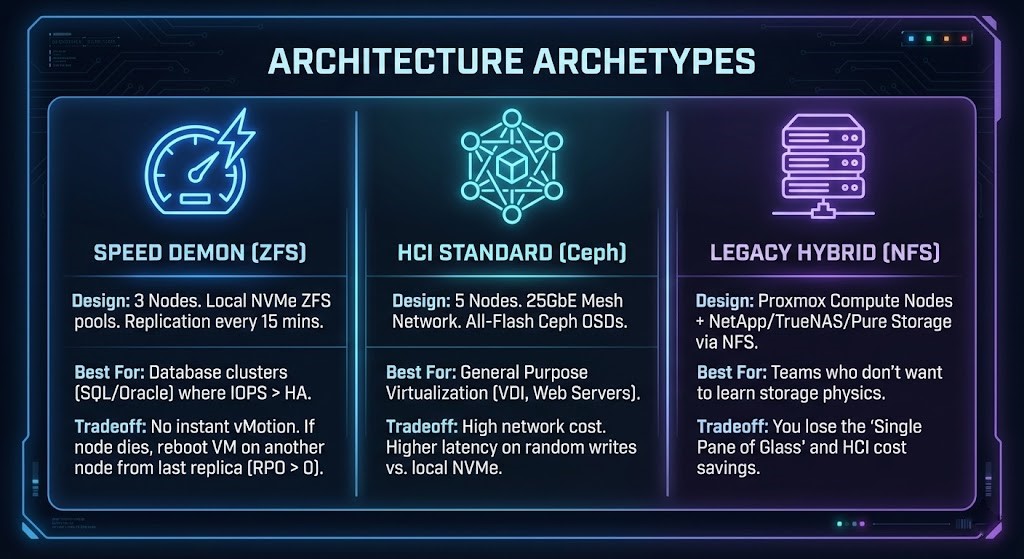
To survive the Proxmox ZFS vs Ceph storage decision, pick one of these validated patterns. Do not invent your own.
Archetype A: The Speed Demon (Local ZFS)
Design: 3 nodes. Local NVMe ZFS pools. Replication every 15 minutes. Best For: Database clusters (SQL/Oracle) where IOPS matter more than instant HA. Tradeoff: No instant vMotion. If a node dies, you reboot the VM on another node from the last replica (RPO > 0).
Archetype B: The HCI Standard (Ceph)
Design: 5 nodes. 25GbE mesh network. All-flash Ceph OSDs. Best For: General purpose virtualization — VDI, web servers, mixed workloads. Tradeoff: High network cost. Higher latency on random writes compared to local NVMe.
Archetype C: The Legacy Hybrid (External NFS)
Design: Proxmox compute nodes + NetApp/TrueNAS/Pure Storage via NFS. Best For: Teams that want Proxmox at the hypervisor layer but are not ready to operate distributed storage. Tradeoff: Loses the single-pane-of-glass and HCI cost savings. Reintroduces external storage dependency.
Architect’s Verdict
Proxmox is enterprise-ready when you respect the physics. It is not a black box like vSphere — and that is both its strength and its danger.
The Proxmox ZFS vs Ceph storage decision is not a feature comparison — it is a commitment to a different operational model. If you want set-and-forget, buy a SAN. If you want performance, tune ZFS and buy RAM. If you want HCI, build a 25GbE network and commit to Ceph.
Before you migrate a single VM, profile your current IOPS, audit your snapshot chains, and model your storage architecture against one of the three archetypes above. The failure modes described in this post are not edge cases — they are the standard outcome of treating Proxmox like vSphere with a different logo.
The storage physics are only half the problem. Teams migrating from VMware also carry operating model assumptions — about cache behavior, snapshot semantics, and storage policy inheritance — that survive the ZFS/Ceph decision and surface post-cutover. The Proxmox Migration Assumptions That Break at Cutover maps the specific assumption failures that sit above the storage layer.
Once you have validated your storage architecture and are ready to execute the cutover, the Proxmox vs VMware 2026: The Engineer’s Migration Playbook covers the 4-week production timeline, network schematics, VirtIO injection for Windows VMs, and the Clonezilla vs native import decision for large SQL servers.
Additional Resources
Editorial Integrity & Security Protocol
This technical deep-dive adheres to the Rack2Cloud Deterministic Integrity Standard. All benchmarks and security audits are derived from zero-trust validation protocols within our isolated lab environments. No vendor influence.

R.M.
Senior Solutions Architect with 25+ years of experience in HCI, cloud strategy, and data resilience. As the lead behind Rack2Cloud, I focus on lab-verified guidance for complex enterprise transitions. View Credentials →
Get the Playbooks Vendors Won’t Publish
Choose the architecture problems you care about. Get field-tested playbooks and frameworks delivered to your inbox.
- > AI Infrastructure & Inference Economics
- > Cloud Strategy & Hidden Cost Models
- > Virtualization & Deterministic Migration
- > Kubernetes, IaC & Modern Infrastructure
- > Data Protection & Recovery Engineering
Zero spam. Includes The Dispatch weekly drop.
Need Architectural Guidance?
Independent review before major infrastructure decisions.
- > Validate assumptions
- > Identify hidden dependencies
- > Quantify migration risk
- > Challenge vendor narratives
Triage · Advisory · Fractional · Direct Hire