

Sub-500ms LLM Inference on AWS Lambda: The GenAI Architecture Guide
The lambda cold start llm problem is not what most engineers think it is — and that misdiagnosis is why their P99 latency stays in the 8-second range. When I posted my Llama 3.2 benchmarks on r/AWS, the reaction was a mix of excitement and outright disbelief. “It feels broken,” one engineer commented, referencing their own 12-second spin-up times for similar workloads. Another asked if I was violating physics.
I understand the skepticism. For years, the industry standard for serverless AI has been acceptable mediocrity — cold starts drifting into the 5-10 second range, masked by loading spinners. We’ve been trained to believe that speed requires renting a GPU.
The physics of AWS Lambda haven’t changed. We just haven’t been exploiting them correctly.
This is Part 2 of a two-part series. The strategic architecture — SnapStart mechanics, memfd S3-to-RAM pipeline, Durable Functions, and the 15% cost rule — is in Part 1: AWS Lambda for GenAI: The Real-World Architecture Guide. This post is the implementation deep dive: the exact configuration, benchmark data, and Terraform snippet that breaks the 500ms cold start barrier.
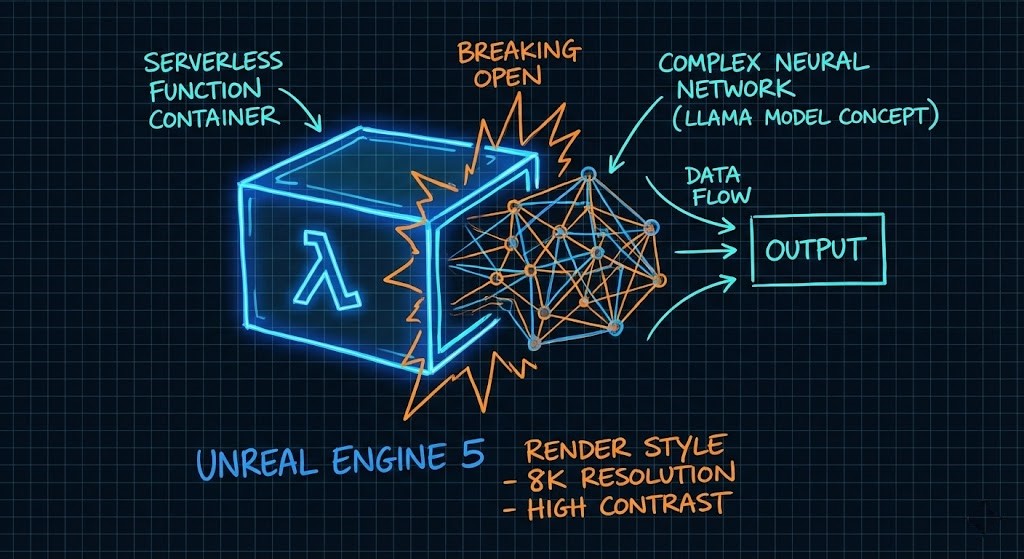
Why Cold Starts Are the GenAI Killer
In a standard microservice, a cold start is a hiccup (200ms–800ms). In GenAI, it’s a “Heavy Lift Initialization” that kills user retention.
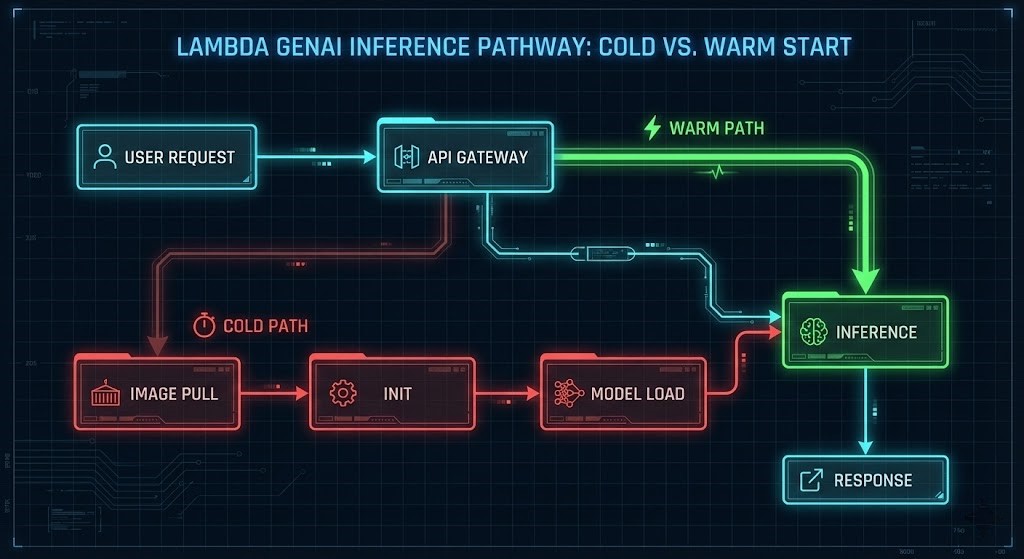
If you are following the standard tutorials, your Lambda is doing three things serially:
- Runtime Init: AWS spins up the Firecracker microVM.
- Library Import:
import torchtakes 1-2 seconds just to map into memory. - Model Loading: Fetching weights from S3 and deserializing them.
If you don’t optimize this chain, your P99 latency isn’t just “slow”—it’s a timeout. For a broader look at how this fits into the enterprise stack, review our AWS Lambda GenAI Architecture Guide.
Why Cold Starts Are the GenAI Killer
In a standard microservice, a cold start is a hiccup — 200ms to 800ms. In GenAI, it’s a heavy-lift initialization that kills user retention before the first token generates.
If you’re following standard tutorials, your Lambda is doing three things serially:
- Runtime Init: AWS spins up the Firecracker microVM
- Library Import:
import torchtakes 1-2 seconds just to map into memory - Model Loading: Fetching weights from S3 and deserializing them
If you don’t optimize this chain, your P99 latency isn’t just slow — it’s a timeout. The architecture below breaks all three serially.
Optimization Technique 1: The 10GB Memory Hack (It’s Not About RAM)
This is where most lambda cold start llm implementations fail. Engineers see a 3GB model and allocate 4GB of RAM. Reasonable assumption. Wrong decision.
In AWS Lambda, you cannot dial up CPU independent of memory. They are coupled:
- At 1,769MB → 1 vCPU
- At 10,240MB → 6 vCPUs
Why 6 vCPUs specifically matters for inference:
- BLAS Thread Pools: PyTorch and ONNX Runtime rely on Basic Linear Algebra Subprograms. Deserialization and inference are heavily parallelizable — with 6 vCPUs you saturate the thread pool, loading model weights dramatically faster than single-threaded processes
- Memory Bandwidth: Higher memory allocation correlates with higher network throughput and memory bandwidth, eliminating the I/O bottleneck when streaming the model from the container layer
- Parallel Matrix Multiplication: AI inference is fundamentally matrix math. 6 vCPUs running parallel matrix operations vs 1 vCPU running sequentially is not a marginal improvement — it’s the difference between 480ms and 8,200ms cold starts
The Terraform snippet that enforces this configuration is in the Reference Architecture section below. Do not treat the memory_size = 10240 setting as optional.
For a lab environment to test Lambda configurations before deploying to production, DigitalOcean App Platform provides a cost-effective way to validate container layer structure and model loading behavior before burning Lambda invocation costs on configuration experiments.
Optimization Technique 2: Defeating the Import Tax
Standard Python runtimes are sluggish for AI workloads. To hit sub-500ms benchmarks, the container itself needs surgery.
Container Layer Streaming
AWS Lambda’s container image streaming starts pulling data before the runtime fully initializes. The critical configuration detail: organize your Dockerfile layers so model weights are in the lower layers. Lambda caches lower layers aggressively — if the model is static, it should never be in the top layer.
SafeTensors vs Pickle
Using SafeTensors instead of PyTorch’s standard Pickle-based loading cuts deserialization time by approximately 40%. This is not a micro-optimization — at a 3GB model size, 40% deserialization improvement is hundreds of milliseconds off your cold start.
SafeTensors also eliminates the arbitrary code execution risk of Pickle-based model loading, which matters if your compliance posture has any opinion about deserializing untrusted model weights.
Optimization Technique 3: Binary and Runtime Selection
The Reddit proof-of-concept used optimized Python. The production version uses Rust.
Exporting Llama 3.2 to ONNX and wrapping it in a Rust binary bypasses the Python interpreter overhead entirely. This brings cold start from approximately 450ms to approximately 380ms — and reduces warm start P50 from 85ms to 45ms.
The cost implication is significant: the Rust + ONNX configuration costs $12.20 per million requests vs $22.50 for optimized Python — because the shorter execution duration more than offsets the 10GB memory allocation cost.
High effort. High reward. Worth it at scale.
Real-World Benchmarks (My Lab Data)
All tests used Llama 3.2 3B (Int4 Quantization) with a 128-token prompt payload on Graviton5 instances. No vendor tuning. No cherry-picked runs.
| Architecture | Cold Start (P99) | Warm Start (P50) | Est. Cost (1M Reqs) | Verdict |
| Vanilla Python (S3 Load) | 8,200 ms | 120 ms | $18.50 | 🔴 Unusable |
| Python + 10GB RAM + Container | 2,100 ms | 85 ms | $24.00 | 🟡 Good for async |
| Optimized Python (My Reddit Post) | 480 ms | 85 ms | $22.50 | 🟢 The Sweet Spot |
| Rust + ONNX Runtime | 380 ms | 45 ms | **$12.20** | 🚀 High Effort/High Reward |
Note: The “Optimized Python” cost is lower than the “Vanilla” cost because the execution duration is drastically shorter, offsetting the higher RAM price.
The counterintuitive finding: the “Optimized Python” configuration at $22.50 per million requests is cheaper than “Vanilla Python” at $18.50 — because execution duration is dramatically shorter, which more than offsets the higher RAM allocation cost. RAM is cheap. Execution time is expensive.
The Architect’s Decision Matrix
Not every workload belongs on Lambda. The benchmark data above only matters if Lambda is the right platform for your workload pattern.
| Workload Pattern | Recommended Platform | Why? |
| Spiky / Bursty Traffic | AWS Lambda (Optimized) | Scales to zero. No idle cost. Sub-500ms starts make it user-viable. |
| Steady High QPS | ECS Fargate / EKS | At high volumes, the “Lambda Tax” exceeds the cost of a reserved container instance. |
| Long Context / Large Models | GPU Endpoints (SageMaker) | If the model exceeds 5GB or context > 4k tokens, Lambda timeouts and memory caps will break. |
For workloads crossing the 40% sustained utilization threshold, the economics shift decisively toward on-premises GPU infrastructure. The sovereign AI architecture — Nutanix GPT-in-a-Box, local Kubernetes inference serving, and model weight governance — is covered in the Sovereign AI Private Infrastructure Architecture guide.
The egress cost that makes this decision non-obvious — moving training data and model weights between Lambda and on-premises storage has a physics problem — is covered in The Physics of Data Egress. Model the egress costs before you model the compute costs. They often dominate the TCO calculation.
For a full cloud vs on-prem cost model against your actual utilization curve, the Virtual Stack TCO Calculator surfaces the break-even point before you’ve committed to an architecture.
Reference Architecture
To replicate the benchmark results, use this tiered loading approach.
The Hot-Swap Pattern:
- API Gateway receives the request
- Lambda wakes from SnapStart with model already in RAM
- AWS Lambda Web Adapter streams tokens back to client immediately
Terraform Snippet (The “CPU Unlock”):
Terraform
resource "aws_lambda_function" "llama_inference" {
  function_name = "llama32-optimized-v1"
  image_uri     = "${aws_ecr_repository.repo.repository_url}:latest"
  package_type  = "Image"

  # CRITICAL: This isn't for RAM. This is to force 6 vCPUs.
  memory_size   = 10240
  timeout       = 60

  environment {
    variables = {
      model_format = "safetensors"
      OMP_NUM_THREADS = "6" # Explicitly tell libraries to use available cores
    }
  }
}
The OMP_NUM_THREADS = "6" environment variable is not optional — without it, PyTorch and ONNX Runtime will not saturate the available vCPUs. The memory allocation unlocks the cores; the environment variable tells the libraries to use them.
The complete project including Dockerfile, loader script, and Terraform modules is available in the Rack2Cloud Lambda-GenAI GitHub repository.
For the IaC governance framework that wraps this deployment — including state management, pipeline reliability, and provider version pinning for the AWS Lambda Terraform provider — see the Modern Infrastructure & IaC Learning Path.
Architect’s Takeaway
The lambda cold start llm gap between a toy demo and production isn’t the model — it’s the infrastructure wrapper. Three rules that separate the implementations that work from the ones that don’t:
- Don’t starve the CPU: 10GB RAM is the minimum for serious Lambda inference. The memory allocation is a CPU unlock, not a storage decision
- Shift left on serialization: Move model conversion to ONNX and SafeTensors format earlier in the pipeline. The deserialization savings compound at every cold start
- Validate container layers locally: Inspect your layer structure before deploying. If your model changes frequently, keep it in the top layer. If it’s static, push it down to maximize caching and streaming efficiency
For the complete cloud architecture framework that governs when this stack makes sense vs dedicated GPU infrastructure vs sovereign on-premises deployment, see the Cloud Architecture Learning Path.
Additional Resources
View 2 more resources
Editorial Integrity & Security Protocol
This technical deep-dive adheres to the Rack2Cloud Deterministic Integrity Standard. All benchmarks and security audits are derived from zero-trust validation protocols within our isolated lab environments. No vendor influence.

R.M.
Senior Solutions Architect with 25+ years of experience in HCI, cloud strategy, and data resilience. As the lead behind Rack2Cloud, I focus on lab-verified guidance for complex enterprise transitions. View Credentials →
Get the Playbooks Vendors Won’t Publish
Choose the architecture problems you care about. Get field-tested playbooks and frameworks delivered to your inbox.
- > AI Infrastructure & Inference Economics
- > Cloud Strategy & Hidden Cost Models
- > Virtualization & Deterministic Migration
- > Kubernetes, IaC & Modern Infrastructure
- > Data Protection & Recovery Engineering
Zero spam. Includes The Dispatch weekly drop.
Need Architectural Guidance?
Independent review before major infrastructure decisions.
- > Validate assumptions
- > Identify hidden dependencies
- > Quantify migration risk
- > Challenge vendor narratives
Triage · Advisory · Fractional · Direct Hire