

The Endpoint Mapper Limit Changed Under Windows Server. Four October Update Notes Don’t List It.

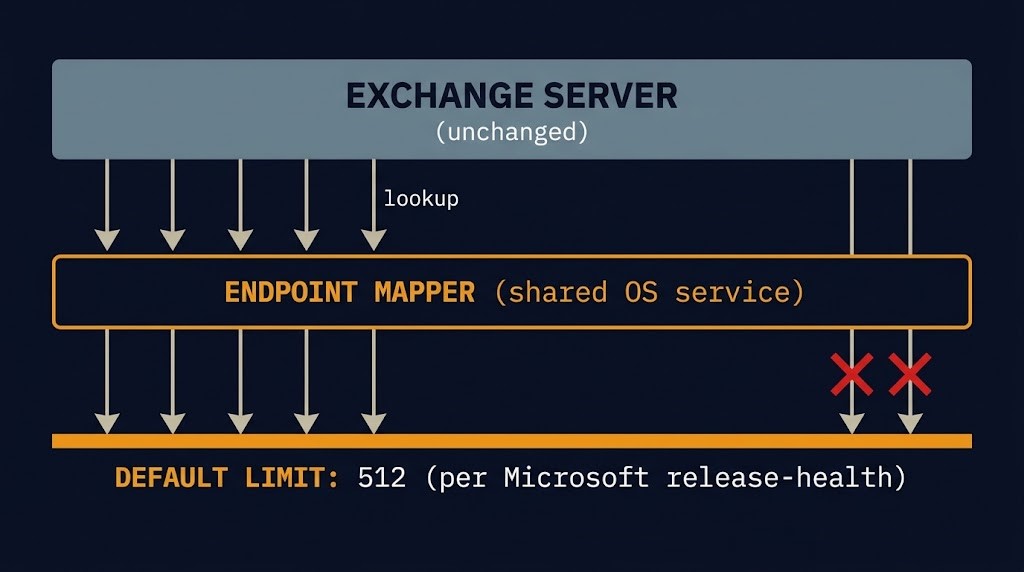
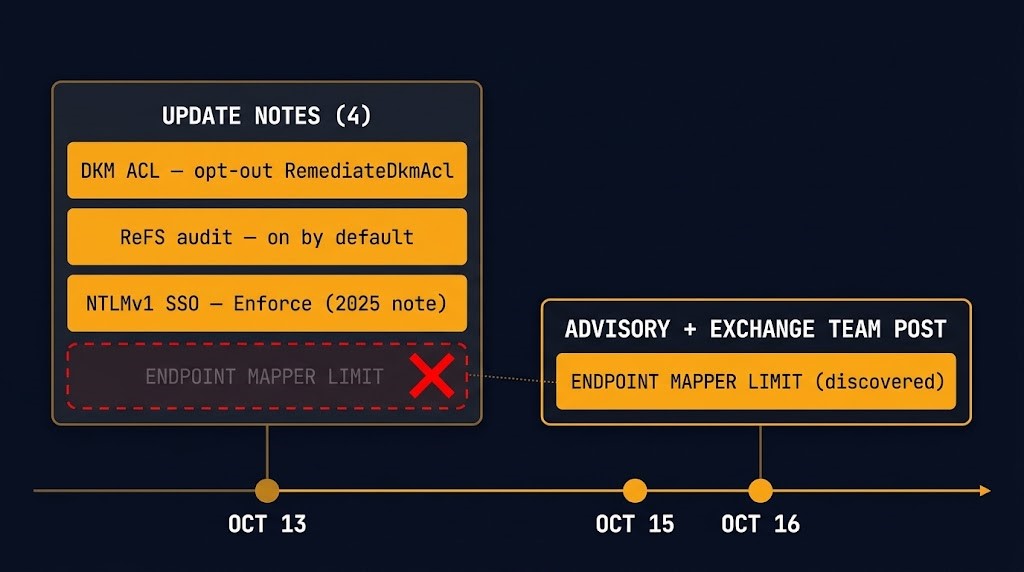
The Endpoint Mapper limit that Microsoft’s October 2026 Windows Server updates introduced is described in two Microsoft pages, and neither is the update notes that shipped with it. The October 13 cumulative updates for Windows Server 2025, 2022, 2019 and 2016 are documented in four notes. I read the improvement and summary sections of all four on October 19. None of them mentions it.
Other default changes in the same notes are listed by name, with an opt-out. This one surfaced three days after release, in a release-health entry and an Exchange Team post, because Exchange servers started failing. What follows is what Microsoft has documented, what it has not, and what an estate can track so a default like this is found before load finds it.
What Microsoft Documented About the Endpoint Mapper Limit
Two Microsoft pages carry the substance. The Windows release-health entry, “Users might be unable to sign in to OWA or send emails on Exchange Server,” opened October 16 at 16:19 PT and was last updated October 16 at 21:48 PT. The Exchange Team’s post, “Exchange servers may become unstable after installation of October 2026 Windows updates,” is dated October 16. This table keeps what they state apart from what they leave open.
| Item | Microsoft states | Not established in the pages read |
|---|---|---|
| The change | “The October 2026 update introduced a default limit on the amount of memory used by Endpoint Mapper when handling Endpoint Lookup calls” (release-health entry) | Which setting or component the update notes would have carried this under; why it was introduced |
| The figure | For workloads such as Exchange Server, “the default limit of 512 simultaneous Endpoint Lookup calls might not be sufficient under heavy load” (release-health entry) | That 512 applies to every version and configuration; what happens to a call over the limit |
| Platforms | Windows Server 2025 (KB5126646), 2022 (KB5126655), 2019 (KB5126651), 2016 (KB5126868); client: none | Any workload other than Exchange |
| Symptoms | OWA MapiExceptionMdbOffline with event 1006, growing mail queues, DAG members unable to reach quorum; a reboot resolves it temporarily (Exchange Team) | A delay figure. The Exchange Team says only “after certain time” |
| Scope | Not tied to the October Exchange security updates; “any version of Exchange that runs on impacted versions of Windows could be impacted” (Exchange Team) | Why some servers are never affected beyond “severity and speed … varies based on Exchange server load” |
| Mitigation | Set EpmapSavedContextCap to 65536, reboot, raise the limit if it recurs; “shown to solve the problem based on customer reported cases we have assisted”; an additional mitigation is available through Microsoft Support | A root cause; a correct value for any given estate |
| Status | Labeled Mitigated, last updated October 16 at 21:48 PT, and the same entry says Microsoft is investigating. Read together: a workaround is published and a permanent fix is not established. The pages I read do not define the label | A permanent fix or a date for one |
The Mechanism: A Capacity Default Changed, the Workload Did Not
Read plainly, Microsoft’s account of the Endpoint Mapper limit is that a shared operating-system service gained a default ceiling and a workload that makes many lookups through it can reach the ceiling. Exchange did not change. The Exchange Team says the October Exchange security updates are not required for the failure and that it is not a known issue of those updates.
Microsoft also says the impact depends on load, and that some servers might never see it. Taken together, that is the useful part. A server that was validated after patching, at ordinary load, could show nothing, and so could a fleet in which only a few busy servers sit near the ceiling. This is my analysis, not Microsoft’s: patch-day checks are built to find things that break at install, and a ceiling that bites only at peak concurrency is outside what they test.
Why Release-Note Review Missed the Endpoint Mapper Limit
The same four notes disclose other default changes. The DKM ACL change is listed in all four: AD FS remediation now runs by default, with RemediateDkmAcl set to 0 as the opt-out, a change covered in DKM ACL hardening. ReFS auditing on externally attached storage is on by default in all four. The Server 2025 note also states that NTLMv1 SSO now defaults to Enforce when BlockNtlmv1SSO is not set. Each of those carries a registry value or a policy an administrator can find in the note and act on.
The Endpoint Mapper limit is not in that list. The bounded claim is this: it does not appear in the improvement or summary sections of KB5126646, KB5126655, KB5126651 or KB5126868 as read on October 19, 2026. The notes now list the Exchange issue under known issues in this update. The release-health entry that listing points to opened October 16, so the listing postdates release, and it reports the problem without describing the change. Microsoft describes the limit only in the release-health entry and the Exchange Team post, both from October 16, and the Exchange security-update announcement’s change log records a warning banner added October 15.
What this does not establish matters as much. I did not check the Security Update Guide entries for October, the Microsoft 365 Message Center, or the mitigation Microsoft Support supplies, so the limit may be documented somewhere I did not look. And an absence from release notes says nothing about intent. It says only that an administrator reading the notes before deploying would not have found it.
What an Estate Can Track Before Load Finds It
This section is my analysis, not Microsoft guidance. It rests on one incident, and Microsoft has not published a delay figure, a metric for Endpoint Lookup concurrency, or a root cause that would justify a universal procedure. The governance problem it points at belongs to modern infrastructure architecture: state a vendor can change underneath you has to be tracked by someone, and the governance and drift stage of the learning path covers where that question sits.
Three things follow, and none of them needs the Endpoint Mapper limit to be understood first.
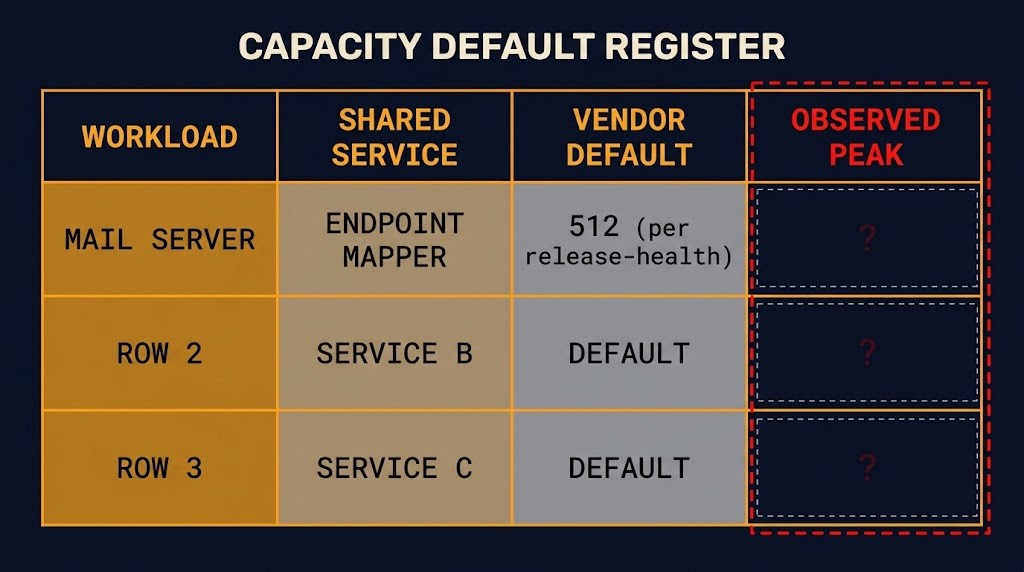
- A register of capacity-relevant platform defaults. For each high-concurrency workload, record the shared OS services it depends on, the default ceiling each service enforces, and the peak the workload actually reaches. If the peak column is empty, that is the finding. Who owns the register is the question configuration drift ownership addresses in general.
- A baseline before the change. Observed peak concurrency on the busiest servers, captured before patching, is the number to compare a vendor’s stated default against. The Microsoft pages I read do not name a metric for Endpoint Lookup concurrency, so what an estate can measure here needs to be confirmed before it is relied on.
- A soak window chosen from your own evidence. Patch a canary that carries representative peak load and hold it long enough to span your own busiest cycle. Microsoft gave no delay figure, so no number from this incident belongs in a standard. Whatever window you choose, write down why.
The mitigation is also a decision. Microsoft’s example sets the value to 65536 and says to raise it if the failure recurs, and the setting raises the memory the service may use. Whether that value suits an estate is not something the pages establish.
What This Note Does Not Argue
It does not argue about rollback. Microsoft’s Exchange Team says not to uninstall the October updates, and that is context for the mitigation, nothing more. Who may reverse a remediation, on what evidence and for how long is the subject of Patch Rollback Risk.
It does not claim every server reaches the 512-call figure, that Exchange Online is affected, that the Exchange security updates are at fault, or that Microsoft has identified a root cause. It gives no fix timing, because the entry gives none. Before relying on any of it, read the release-health entry again: its status and last-updated stamp are what Microsoft says today.
Architect’s Verdict
A platform vendor can change a capacity-relevant default beneath a workload that has not changed. The October Windows Server updates did, with the Endpoint Mapper limit, according to Microsoft’s own release-health entry, and the four update notes read here do not list it.
The real problem is not that one note was incomplete. An estate with no record of the capacity ceilings under its busiest workloads has no baseline against which to judge a changed default, and that is a governance risk the estate owns. Release-note review catches the defaults a vendor announces. It cannot catch the ones it does not.
A patch validated at ordinary load has been validated against ordinary load. Know the ceilings under your peak.
Additional Resources
Editorial Integrity & Security Protocol
This technical deep-dive adheres to the Rack2Cloud Deterministic Integrity Standard. All benchmarks and security audits are derived from zero-trust validation protocols within our isolated lab environments. No vendor influence.

R.M.
Senior Solutions Architect with 25+ years of experience in HCI, cloud strategy, and data resilience. As the lead behind Rack2Cloud, I focus on lab-verified guidance for complex enterprise transitions. View Credentials →
Get the Playbooks Vendors Won’t Publish
Choose the architecture problems you care about. Get field-tested playbooks and frameworks delivered to your inbox.
- > AI Infrastructure & Inference Economics
- > Cloud Strategy & Hidden Cost Models
- > Virtualization & Deterministic Migration
- > Kubernetes, IaC & Modern Infrastructure
- > Data Protection & Recovery Engineering
Zero spam. Includes The Dispatch weekly drop.
Need Architectural Guidance?
Independent review before major infrastructure decisions.
- > Validate assumptions
- > Identify hidden dependencies
- > Quantify migration risk
- > Challenge vendor narratives
Triage · Advisory · Fractional · Direct Hire