

Universal Cloud Restore Calculator Cloud Restore Feasibility Engine
RTO Feasibility · Retrieval Latency · Usable Throughput · Recovery-Path Bottleneck · Required Capacity
A recovery test that passes validates restart speed. It does not validate whether recovery architecture can meet the RTO under real-world constraints.
The backup might be pristine, but if the recovery path is bottlenecked by WAN bandwidth, restrictive link efficiencies, or fixed archive retrieval latencies, the recovery objective can fail before data transmission even peaks.
The recoverability gap is the distance between an assumed restore rate and the modeled constraints imposed by retrieval latency, usable throughput, circuit capacity, recovery scope, and cloud transfer costs. The Universal Cloud Restore Calculator models these dependencies directly in your browser and evaluates the recovery path against an explicit target RTO.
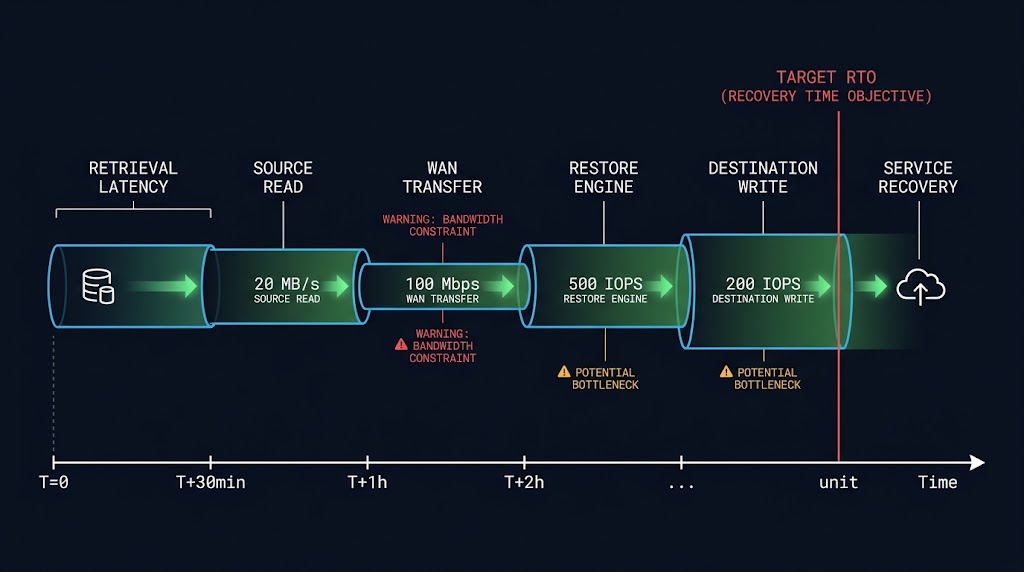
What the Universal Cloud Restore Engine Surfaces
01 — Retrieval Latency vs. Bulk Transfer
Separates rehydration delays from active network transmission time, ensuring retrieval delays are explicitly included in the total recovery timeline rather than treated as transfer time.
02 — Recovery-Path Bottlenecks
Identifies the limiting constraint in the recovery path: WAN bandwidth, source-read capacity, restore-engine throughput, or destination-write capacity.
03 — Critical Recovery Set Modeling
Calculates the modeled time required to restore the critical recovery subset needed for primary service restart, rather than assuming the entire dataset must be recovered before service can resume.
04 — Inverse Bandwidth & Headroom Analysis
Computes the required circuit bandwidth to meet your target RTO, including a throughput headroom ratio that measures how much safety margin the current recovery path provides.
05 — Financial Cost Exposure (Secondary)
Quantifies retrieval and cloud transfer costs associated with the modeled recovery scope across AWS, Azure, and GCP, allowing architects to evaluate the financial impact of the recovery path alongside its RTO feasibility.
Why Cloud Restore Architectures Fail RTO
Thaw Window Blindness
Treating archive storage like active disk. When a recovery tier requires a 12-hour or 15-hour rehydration delay, a tight 24-hour RTO leaves almost no margin for unexpected network queuing or throttling.
Protocol & TCP Overhead
Assuming a 10 Gbps circuit delivers 10 Gbps of restore throughput. Link efficiency, transport behavior, API constraints, and other recovery-path overhead can reduce usable throughput well below line rate.
Undeclared Hardware Ceilings
Focusing exclusively on WAN capacity while ignoring downstream limits like target storage write performance, media server CPU constraints, or source read limits.
Cloud Restore Feasibility Engine: Key Features
- RTO Feasibility Analysis: Evaluates modeled retrieval and transfer time against the target RTO and identifies whether the recovery path can satisfy the objective, including cases where retrieval latency alone consumes the available recovery window.
- Multi-Cloud Pricing Models: Versioned JSON pricing schemas for AWS, Azure, and GCP storage tiers, ensuring accurate egress and retrieval cost modeling where applicable.
- Deterministic Math Engine: Pure TypeScript calculation pipeline evaluating dataset size, recovery scope, retrieval latency, usable throughput, and recovery-path constraints without external calculation services.
- Architectural Findings Engine: Automated analysis flagging severe RTO gaps, cost risks, and throughput bottlenecks with actionable remediation advice.
- Client-Side Privacy: Calculations run locally in your browser session without transmitting or storing scenario data on an external calculation server.
THE CALCULATOR REVEALS THE BOTTLENECKS.
A REVIEW CLOSES THEM.
The calculator identifies where the recovery path cannot meet the RTO. Closing the gaps requires independent multi-cloud transit optimization, storage tier tuning, and verifiable recovery engineering.
Recovery Readiness Assessment
A structured review against your restore findings — resolving WAN bandwidth ceilings, optimizing multi-cloud data transit, and hardening recovery pipelines against strict RTO objectives.
- > RTO feasibility & recovery sequencing
- > Multi-cloud transit & bandwidth optimization
- > Storage tier selection & thaw strategy
- > Hardware ceiling & bottleneck remediation
- > Egress cost modeling & budget alignment
Architecture Playbooks. Field-Tested Blueprints.
Weekly breakdowns of disaster recovery architecture, cloud storage economics, and performance decisions.
- > Cloud restore throughput patterns
- > Archive tier rehydration strategies
- > Multi-cloud data egress cost control
Zero spam. Unsubscribe anytime.
Frequently Asked Questions
Q: What does the Universal Cloud Restore Calculator measure?
A: It models whether your recovery architecture can successfully meet an explicit target RTO. Rather than guessing restore speeds based on raw storage sizes, it factors in cloud retrieval thaw latencies, usable WAN throughput, hardware bottlenecks, link efficiencies, and dataset scope percentages to provide a deterministic RTO feasibility verdict based on the supplied recovery assumptions.
Q: How are cloud egress and retrieval costs calculated?
A: Costs are dynamically computed using versioned pricing tables built into the application for AWS, Azure, and GCP. The engine multiplies your recovered dataset size (adjusted by recovery scope) against the specific tier’s per-GB egress rate and the chosen retrieval mode’s request/data fees where applicable.
Q: Can I share or export my recovery configurations?
A: Yes. You can click ‘Share URL’ to encode your exact scenario parameters into a shareable link, save configurations to your browser’s local storage for later comparison, or use ‘Export PDF’ to generate a clean, print-ready architectural report complete with your branding and findings.
Q: Is any data sent to a server or stored?
A: Calculations run locally in your browser, and the calculator does not send scenario inputs to a calculation server or store them in a server-side database. If you use Share URL, the scenario parameters are encoded into the URL so they can be restored when the link is opened.
🔒 Privacy Architecture: Calculations run locally in your browser. No scenario data is submitted to a calculation server or stored in a server-side database.
Share URLs contain the scenario parameters needed to reconstruct the calculation.