

Rubrik Virtual Stack TCO Calculator
Platform licensing and Rubrik protection cost on one annualized line
The Rubrik virtual stack TCO calculator puts the platform licensing under your virtualization stack and the Rubrik protection quoted for it on one annualized line, using only rates you enter. It models VMware, Nutanix and Hyper-V licensing and Rubrik FETB or BETB capacity as two separate calculations, then adds them. No rate is prefilled from a price list, and a missing value is never counted as zero.
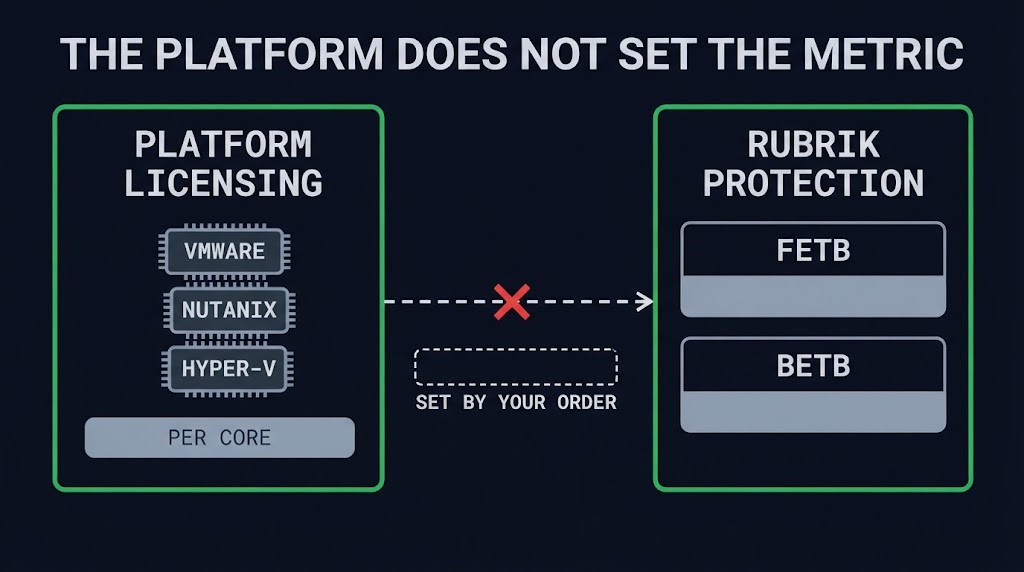
A single capacity-times-rate figure hides the question that moves a Rubrik quote: which metric the order is billed on. The Rubrik Licensing Guide (v10152026, effective October 15, 2026) sets a default of BETB for on-premises Rubrik Scale workloads, with FETB on-premises by approval and FETB for cloud workloads, and the platform underneath does not decide it. The calculator therefore asks for the metric your order states, treats the capacity as a modeled quantity until you confirm it, and treats the back-end reduction ratio as an assumption, not a contract term.
What the Rubrik Virtual Stack TCO Calculator Surfaces
01 — Platform Licensing
VMware VVF or VCF per core with the 16-core-per-CPU minimum applied and stated. Nutanix NCI Pro or Ultimate per physical core, with no floor modeled. Hyper-V Windows Server Datacenter with the 8-core-per-processor and 16-core-per-server minimums in 2-core steps, the 16-core pack price amortized over the years you choose. Order minimums can also apply, so the tool says so beside the count.
02 — Rubrik Protection
You choose FETB or BETB and confirm it against your order. FETB quantity is the protected front-end capacity. BETB quantity is front-end capacity divided by a modeled reduction ratio. Quoted rates can be per TB per year or per TB per month and are annualized.
03 — Metric Bridge
A bar view shows where the modeled quantity sits on the FETB and BETB scales and which one your rate is applied to. It is labeled modeled, not billed.
04 — A Status on Every Figure
Each line is labeled Entered by you, Illustrative, Required or Needs confirmation, so a reader of the result can tell a quoted rate from a sample value or a missing input.
05 — What the Estimate Excludes
A list of items outside the number travels with the result: hardware, support bundles, add-on products, capacity growth, Scale Review and Capacity Burst events, Utility on-demand charges, edition entitlements, discounts and taxes.
How to Read a Result: Four Status Labels
| Label | Meaning | What to do |
|---|---|---|
| Entered by you | You typed the value. | Treat it as your assumption; the tool does not check it against a quote. |
| Illustrative | A round sample value from the example loader. | Replace it. It is not a price point. |
| Required | An input is missing, so no figure is shown. | Enter it. The line stays blank until then. |
| Needs confirmation | The Rubrik metric is not confirmed in your order. | Confirm FETB or BETB against the order before relying on the quantity. |
Each label has a text name, an icon and its own border style, so meaning never depends on colour alone. Copy the result as text, or print it and save a PDF.
What Is Not in the Number
The Rubrik virtual stack TCO total is platform licensing plus Rubrik protection at the rates you enter, and nothing else. Hardware, support bundles, add-on products, discounts and taxes sit outside it. Growth over a contract term, Scale Review and Capacity Burst triggers, and Utility reserve-versus-on-demand billing are not calculated in this version. A contract-exposure analysis covering them is planned, and this page does not provide it yet.
The VMware figure applies a 16-core-per-CPU minimum carried over from the earlier version of the calculator; your order may carry others. For core counting in depth, the VMware Core Licensing Auditor applies the 16-core floor and surfaces ghost-core exposure. The Hyper-V rules follow Microsoft’s core-based licensing model: a minimum of 8 core licenses per processor, 16 per server, sold in 2-packs. This is a calculation from the rates you enter, not a quote, and it is not affiliated with Rubrik, VMware, Nutanix or Microsoft.
Rubrik Virtual Stack TCO Calculator: Key Features
- Deterministic Annualization: Identical inputs return identical output. No AI generates a figure, and no rate is prefilled from a price list.
- Separate Platform and Rubrik Models: The platform choice never sets the Rubrik metric. VMware, Nutanix and Hyper-V licensing are calculated on their own rules, and Rubrik capacity is calculated on the metric your order states.
- Metric Bridge: FETB and BETB scales with the modeled quantity highlighted, and the back-end reduction ratio shown as an assumption, not a contract term.
- Status on Every Figure: Entered by you, Illustrative, Required or Needs confirmation on each line, with a missing value never counted as zero.
- Client-Side Only: No data leaves the browser. No telemetry, no server-side logging, no account required.
THE CALCULATOR ANNUALIZES THE STACK YOU DESCRIBE.
A REVIEW TESTS IT AGAINST THE QUOTE YOU HOLD.
The calculation uses your rates and stated assumptions. A review checks the licensing metric, the counting rules and the contract terms behind them.
|
>_ Architectural Guidance
Infrastructure Architecture ReviewYour quote, protected workloads and platform plan reviewed against this estimate.
|
>_ The Dispatch
Architecture Playbooks. Field-Tested Blueprints.Failure-mode playbooks for backup, immutability and recovery design.
Zero spam. Unsubscribe anytime. |
Frequently Asked Questions
What does the Rubrik virtual stack TCO calculator actually measure?
It annualizes two separate costs from rates you enter: platform licensing for VMware, Nutanix or Hyper-V, and Rubrik protection on the FETB or BETB metric your order states. It adds them into one annualized figure and labels every line as entered by you, illustrative, required or needing confirmation.
How is this different from multiplying capacity by a rate?
A spreadsheet or reseller estimate usually applies one rate to one capacity figure. The Rubrik virtual stack TCO calculator keeps the platform and Rubrik models separate, requires a stated metric, treats the back-end reduction ratio as an assumption and not a contract term, and shows a status on each figure so a missing input is never read as zero.
Which Rubrik licensing metric should I select?
The one your order or quote states. The Rubrik Licensing Guide (v10152026) sets a default of BETB for on-premises Rubrik Scale workloads, FETB on-premises by approval, and FETB for cloud workloads, but the platform underneath does not decide it. The calculator does not infer the metric, and it flags the quantity as needing confirmation until you confirm it.
Which platforms and scenarios does the calculator cover?
VMware VVF and VCF, Nutanix NCI Pro and Ultimate, and Hyper-V on Windows Server Datacenter, each with its own counting rules, alongside Rubrik FETB or BETB capacity. It does not model capacity growth over a term, Scale Review or Capacity Burst triggers, Utility reserve-versus-on-demand billing, edition entitlements or workload classes.
Does the calculator contain Rubrik or VMware pricing?
No. Every rate is one you enter. The example loader fills round sample values and labels them illustrative. The result is a calculation from your assumptions, not a quote and not vendor pricing.
Is any data sent to a server or stored?
No. The calculation runs in your browser. Inputs are never transmitted, and the page sets no cookies and uses no analytics or web storage.
Additional Resources
🔒 Privacy Architecture: No cookies. No tracking pixels. No server-side database.
This logic runs entirely in your local browser session.