

The Alpine sshd Bypass Is Not a Version Check. It Is Four Conditions and a Restart.
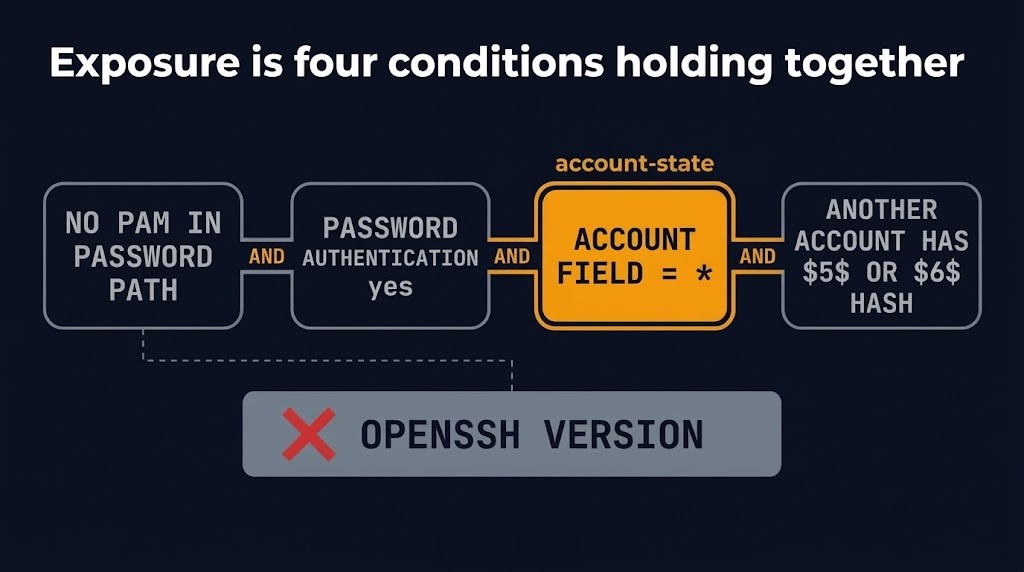
The Alpine sshd bypass is not a version problem. On November 5, Alpine Linux published an advisory for a password authentication bypass in its openssh-server package, and the OpenSSH project shipped 10.6p2 the same day with what its release notes call a “critical security workaround” for Linux systems that use musl libc with PAM disabled. Whether a given Alpine host is exposed depends on four conditions holding at once, and one of them is the state of the accounts on the machine, not a setting anyone chose. The fix has the same shape. A package on disk, a daemon in memory and an image in a registry are different states, and the advisory’s first instruction is to restart sshd after upgrading.
This post is scoped to what Alpine’s advisory, the OpenSSH 10.6p2 release notes and the CVE record establish for Alpine hosts. The flaw is tracked as CVE-2026-123158, and CISA added it to its Known Exploited Vulnerabilities catalog on November 9. It does not claim that the Alpine sshd bypass reaches OpenSSH on other distributions, and it does not assess whether any particular host has been accessed.
The Alpine sshd bypass needs four conditions at once
Operating Linux hosts and the images they come from is day-2 work in modern infrastructure and IaC architecture, and this advisory is a clean example of why: the exposure lives in running state, which no template declares. Alpine lists four conditions. All four must be true on the same machine.
| # | Condition | Where it comes from | What removes it |
|---|---|---|---|
| 1 | PAM is not in the password path | The openssh-server package is built without PAM. openssh-server-pam with UsePAM no is the same state. | openssh-server-pam with UsePAM yes |
| 2 | Password authentication is on | PasswordAuthentication yes, the OpenSSH default unless changed | PasswordAuthentication no. Cloud-init images write it for you, per Alpine. |
| 3 | An account’s password field is exactly * | root, which has shipped as root:* in the base image since about 3.16. Any key-only user made without a password. Users from a directory service through musl-nscd (nslcd, winbind, sssd), which have no shadow entry. The alpine user in the official tiny-cloud images. | No such account, or accounts locked with !, which Alpine says are not affected |
| 4 | At least one local account has a $5$ or $6$ hash | Any account that has a real password | No account on the machine with a hash |
Two clarifications keep the table honest. Root is protected by OpenSSH’s default PermitRootLogin prohibit-password, so root is reachable only if that was changed to yes. That protection does not help when another account that can log in is able to become root, which Alpine’s advisory illustrates with doas. And Docker or other container users who do not run sshd in the container are outside the exposure entirely. Alpine reports that every release it checked contains the affected code path: 3.21 through 3.24 and edge, plus the older 3.16 to 3.20 releases that no longer receive regular updates. That describes the packages, not every installation. The four conditions above must also hold on a given host.
Read as a checklist, the table describes a host most operators would call disciplined. Condition 3 is the key-only account, which is good practice. Condition 4 is a console password an administrator set once, or a user added through user-data. Neither is a mistake. The exposure appears when the second one is added to the first, and it can appear on a host whose configuration has not changed. A version number cannot tell you which side of that line a machine is on, which is why the Alpine sshd bypass is hard to find by inventory.
A read-only screen for the Alpine sshd bypass conditions 2 to 4 takes three commands. The first two are this post’s method, not Alpine’s instruction; the third is from the advisory:
awk -F: '$2=="*" {print $1}' /etc/shadow
awk -F: '$2 ~ /^\$(5|6)\$/ {print $1}' /etc/shadow
sshd -T | grep -i passwordauthentication
These are screening commands, not an exposure determination. They are proposed methods that have been run only against a mock shadow file, not validated on an Alpine host. The first lists local accounts with * in /etc/shadow. It cannot see accounts supplied by a directory service through musl-nscd, which have no shadow entry, so an empty result does not establish that condition 3 is false. The second lists local accounts with a $5$ or $6$ hash. Condition 4 is about local accounts, so an empty result there does mean condition 4 does not hold on that host. The third shows the effective global setting. It does not evaluate Match blocks, which can set password authentication per connection (Alpine’s own commands account for them), and it reports the configuration as sshd would load it now, not what a running daemon loaded. Condition 1 comes from which package is installed and, for openssh-server-pam, the UsePAM setting. A clean result from these commands narrows the question for that machine at that moment. It does not close it.
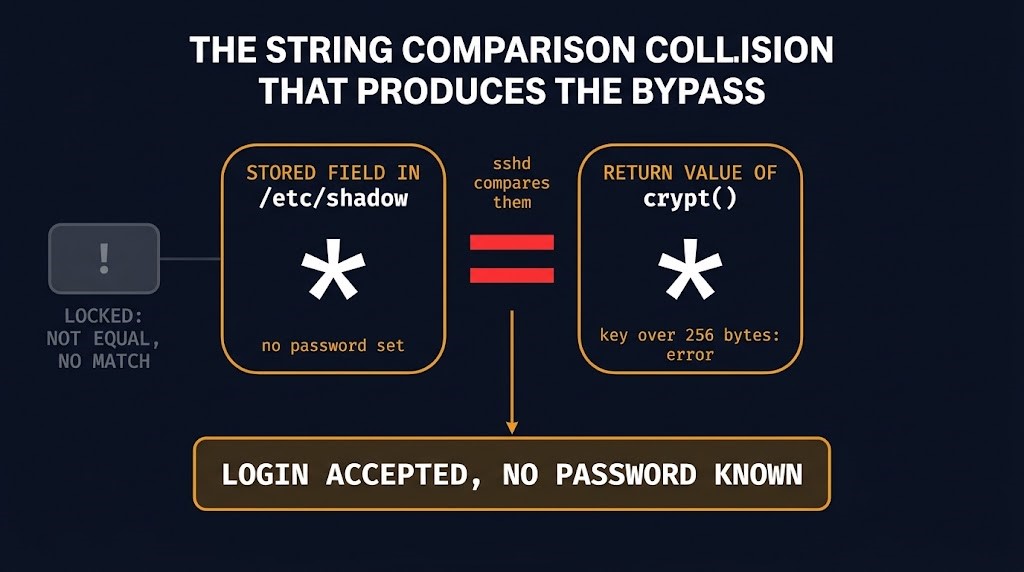
How an account with no password becomes a login
Alpine explains the mechanism, and it is worth following because it shows why condition 3 is the dangerous one. When sshd is built without PAM, it checks a password by hashing the attempt with the C library’s crypt() and comparing the result with the stored password field. For an account whose stored field is too short to contain a salt, sshd borrows the salt of another account. That borrowing is why condition 4 exists: Alpine lists systems with no $-style hash on any account as unaffected. musl’s crypt() returns the string * as an error indicator when the key is longer than 256 bytes. The string * is also exactly what the stored field holds for every account with no password. The comparison sees two equal strings and the login succeeds.
Two unrelated meanings of * collide in that sequence: “no password is set” in the shadow file, and “this call failed” in a return value. The attacker needs the name of an account whose field is *. One account with a real password is enough, in Alpine’s words, to make every account without one reachable. The same description explains the one carve-out in the advisory. A field of ! is not equal to the error marker, so the comparison fails; this is a reading of the mechanism as Alpine describes it, and Alpine states the unaffected result directly.
That collision is the whole mechanism of the Alpine sshd bypass. Who should have prevented it is a separate question, taken up below, and it changes nothing about how an operator tests exposure or applies the fix.
For a key-only account, the consequence of the Alpine sshd bypass is a login as that account without a key. Where the account can reach root through doas, as the alpine user in the tiny-cloud images can, the login is a root shell. Alpine offers a second route for hosts that cannot update yet: set PasswordAuthentication no in the effective configuration and restart sshd. Alpine says either route closes the exposure, and both end with a restart. As sshd reads its configuration at start, an edit without a restart leaves the running daemon unchanged, and a restart without the edit leaves the exposure in place.
Package, daemon and image are not one fix
The fix for the Alpine sshd bypass has two halves, and the second one is where hosts stay exposed. The first half is apk upgrade -U -a. The second is a restart (rc-service sshd restart), because upgrading the package does not replace the running daemon. A host that took the update and never restarted sshd is running the old code with the new package sitting on disk.
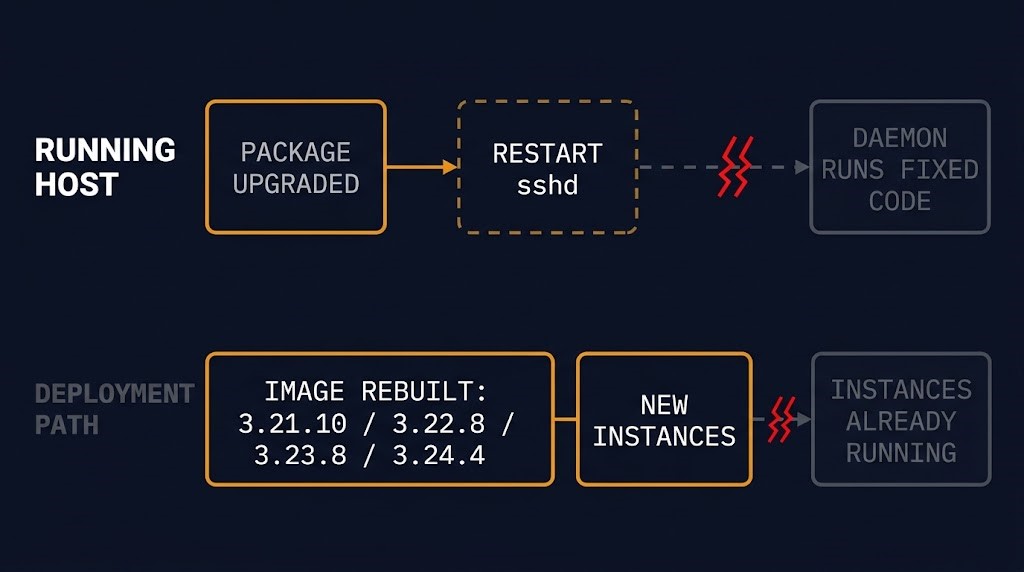
The fix has two parallel paths, and finishing one says nothing about the other:
| Path | What closes the exposure | What does not | How you know |
|---|---|---|---|
| Running host | Fixed package installed and sshd restarted | The package upgrade alone | The listener started after the package was upgraded (this post’s method, below) |
| Running host, interim | PasswordAuthentication no on every such line, Match blocks included, and sshd restarted, after confirming key login works | Editing the file without a restart | Alpine ends its steps with sshd -T, run after the restart |
| Deployment path | Images rebuilt from the 3.21.10, 3.22.8, 3.23.8 and 3.24.4 point releases or later, which include the fixed package | A rebuilt image tells you nothing about instances already running | Check each running instance |
On the host, the evidence that matters is whether the running listener is newer than the package. As a method for your own estate, compare the sshd process start time with the time the package was upgraded; the listener has to be the younger of the two. sshd -T is useful, but it reports the configuration as sshd would load it now. It is evidence about the file, not about what an already running daemon loaded, and the restart is what connects the two.
On the deployment path, the rebuild is a separate state and Alpine says so plainly. Images from earlier point releases do not include the fixed package, and for every running instance the answer is to update openssh or disable password authentication. Alpine has published fixed packages for every release back to 3.16, including 3.21, which reached the end of its support period on November 1. Alpine’s stable branches carry the fix as patches to their existing OpenSSH package versions, so the fixed package version on a stable branch differs from upstream 10.6p2: edge ships 10.6_p2-r0 and 3.24 ships 10.3_p1-r2, per the Alpine advisory’s fixed-version table. Check a host against its own branch’s fixed package version, not against the upstream number. An estate on an unsupported release still has a fix to apply.
The interim route deserves its own care. Alpine gives exact commands, including a drop-in file that its default sshd configuration reads from 3.19 onward and an edit of the main configuration for releases that ignore the drop-in directory. Use the published commands as written rather than a paraphrase, confirm key login works before starting, and keep the current session open until a new login has been tested.
The distinction between what exists and what is running is also a governance question. Managed Compute Patching Is Not Managed Remediation examines the same separation where the final action belongs to a provider lifecycle setting. Here the final action is a command on a host you operate, and the package manager does not schedule it. The broader governance problem, which the Governance & Drift stage of the modern infrastructure path takes up, begins when nobody owns verifying that the running state continues to match the intended state.
Tiny-cloud images are safe at first boot and exposed after the first password
The official tiny-cloud images (the qcow2, VHD and AMI artifacts) from 3.18.11 through 3.24.3 ship an alpine user with a * password field and passwordless doas. Alpine describes them as safe on first boot. They become exploitable once a $6$ hash exists on the machine, for example when an administrator sets a console password or user-data adds a user with hashed_passwd, provided the other conditions hold: sshd without PAM and password authentication on. An attacker then gets a shell as alpine and can use doas to become root.
State this one only with all of its conditions. The image is not vulnerable as shipped, and the state change that makes it vulnerable is an ordinary provisioning action. That is why the deployment path and the running-host path of the Alpine sshd bypass cannot be collapsed. Fixed images come from 3.21.10, 3.22.8, 3.23.8 and 3.24.4 onward. An instance launched from an earlier image keeps its sshd until someone updates it or turns password authentication off.
When a login cannot be ruled out, the verdict stops at exposure
Alpine’s guidance on whether a host was attacked is specific. Look in /var/log/messages for sshd lines reading Accepted password for an account that has no password (alpine, root or any key-only user). Review doas use and recently created users, files and authorized keys on exposed machines. If you cannot rule out a login, Alpine says to treat the machine as compromised.
This post stops at the exposure verdict, which has three outcomes: not exposed because a condition fails, exposed and fixed because both fix states are verified, or exposed with a login history you can or cannot read. Establishing what a login did is incident response, and the architectural question the advisory leaves is narrower: does the evidence to rule a login out still exist? A rotated or unshipped log cannot show an absence. When the records that would settle it were never kept, the decision narrows to what you can rebuild and attest, which When You Cannot Prove Integrity, Rebuilding Becomes the Recovery Decision works through on a different Alpine matter, the Alpine project’s own GitLab server and an unrelated flaw. A shell as a key-only account with doas also leaves things behind, new users and authorized keys among them, and The Server Was Fixed. Persistent Access Wasn’t. covers why rebuilding a host does not remove access that was written somewhere the rebuild never reached.
What the sources leave open
Who owns the root cause is disputed. The OpenSSH release notes say the root cause of the bug is outside sshd, while describing the change as one that avoids it in sshd. Rich Felker, writing to the musl mailing list on November 5, states his position that it is not a bug in musl but erroneous use by the caller, and says the mechanism is likely to change in the upcoming release cycle. Those are statements from the two projects, and Alpine’s own description names the collision without assigning it. The CVE record lists OpenSSH as the affected product, which names where the fix shipped and does not settle that dispute. This post takes no side. For an operator the exposure test and the fix paths above are identical either way.
Scope beyond Alpine is not assessed here. The release notes scope the workaround to Linux systems using musl without PAM and do not describe a problem with OpenSSH in general. Felker’s post describes OpenSSH prior to 10.6p2 on musl with UsePAM=no and PasswordAuthentication=yes. How that maps onto other musl-based distributions or devices is outside what this post establishes.
An upstream affected-version lower bound is not established. Alpine reports the releases it checked. Neither the release notes nor the CVE record, which says only “before 10.6p2”, state where the exposure begins.
Exploitation is reported, not described. CISA lists this vulnerability in its catalog, which it populates on evidence of active exploitation. The listing does not say which hosts were affected, how many, or how the attacks were carried out, and this post makes no claim about whether any particular host has been accessed.
Alpine’s advisory reflects the position on November 5, and both projects’ pages on the Alpine sshd bypass may have changed since. Treat the dates and package versions above as correct for the sources as read, and re-read the advisory before acting on a specific version.
Architect’s Verdict
The Alpine sshd bypass is a state, not a version. Four conditions have to hold together, and the one that does the work is an account with no password, which is exactly what key-only hygiene produces. Alpine says accounts locked with ! are not affected, but a locked account cannot log in by key either, which is my analysis, not Alpine’s. The fix is a state as well: a package on disk, a restarted daemon and a rebuilt image are three facts, and closing one does not close the others.
The real problem is what estates track. Version numbers, upgrade logs and image tags are signals that fire when an action ran. Exposure to the Alpine sshd bypass lives in two places those signals do not reach: the accounts that exist on a machine today, and the process that is listening today. An administrator who sets one console password can move a host across the line with no change to its configuration and no change to its version.
The operational answer to the Alpine sshd bypass is to ask the running host. Does a password-less account exist, does a hashed account exist, is password authentication on, and is the listener younger than the package. Where the answer comes from the host, the fix is verified. Where it comes from the upgrade log or the image pipeline, it is a record that something ran.
A package manager reports what was installed. Only the running host can say what is listening.
Additional Resources
View 2 more resources
Editorial Integrity & Security Protocol
This technical deep-dive adheres to the Rack2Cloud Deterministic Integrity Standard. All benchmarks and security audits are derived from zero-trust validation protocols within our isolated lab environments. No vendor influence.

R.M.
Senior Solutions Architect with 25+ years of experience in HCI, cloud strategy, and data resilience. As the lead behind Rack2Cloud, I focus on lab-verified guidance for complex enterprise transitions. View Credentials →
Get the Playbooks Vendors Won’t Publish
Choose the architecture problems you care about. Get field-tested playbooks and frameworks delivered to your inbox.
- > AI Infrastructure & Inference Economics
- > Cloud Strategy & Hidden Cost Models
- > Virtualization & Deterministic Migration
- > Kubernetes, IaC & Modern Infrastructure
- > Data Protection & Recovery Engineering
Zero spam. Includes The Dispatch weekly drop.
Need Architectural Guidance?
Independent review before major infrastructure decisions.
- > Validate assumptions
- > Identify hidden dependencies
- > Quantify migration risk
- > Challenge vendor narratives
Triage · Advisory · Fractional · Direct Hire