

Hardened Server Core Changes the Configuration Ownership Question
Hardened Server Core makes Windows Server Core install with its security configuration already decided. Microsoft announced it on November 17, 2026: starting with Windows Server Insider Preview build 29706, Server Core installs hardened, and the announcement covers Server Core only.
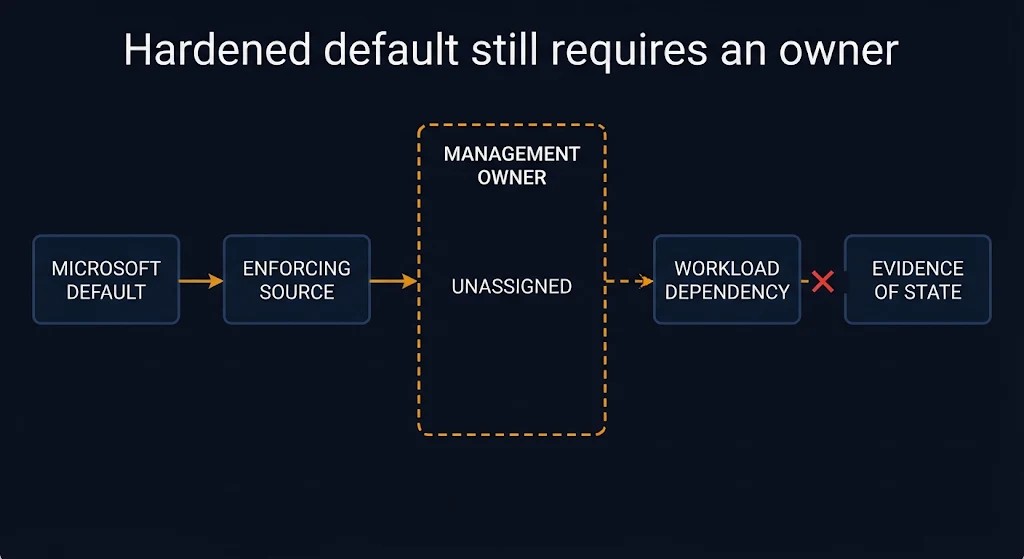
The security content is easy to find. The architectural change is quieter. A server now arrives with what Microsoft calls “hundreds of security settings” already chosen, and each of them raises the same question: who owns that value once a management tool touches it? Microsoft answers part of it. It says whichever tool sets a value owns it. It does not say how your estate records that, which workload depends on which setting, or what proves the state afterward.
This is a source-verified post, not an independently captured one. I read Microsoft’s pages and did not install or test the preview. Everything below is Microsoft’s documented behavior, or it is labeled as untested or as Rack2Cloud analysis.
What Hardened Server Core Starts Hardened
Scope first, because the page is narrow. This is a preview feature in Windows Server Insider builds from 29706 onward, and it applies to Server Core. Microsoft’s page does not state how Desktop Experience behaves, and it does not state what an upgrade does to an existing installation. This post claims neither.
Microsoft groups the hardening into six layers: identity and authentication, network exposure, cryptography, privilege and admin access, platform and code integrity, and remote access and observability. It describes the settings as aligned with CIS and DISA STIG guidance. The page makes no certification claim, so neither does this post.
The reason this belongs in an architecture review and not only a security one is who writes the first version of the server’s state. In most Windows estates the operator wrote it, through images, GPOs and scripts. Here the vendor ships a first version and the operator inherits it. That is a configuration-governance question, and it sits where modern infrastructure and IaC architecture keeps its ownership decisions.
How the Defaults Hold
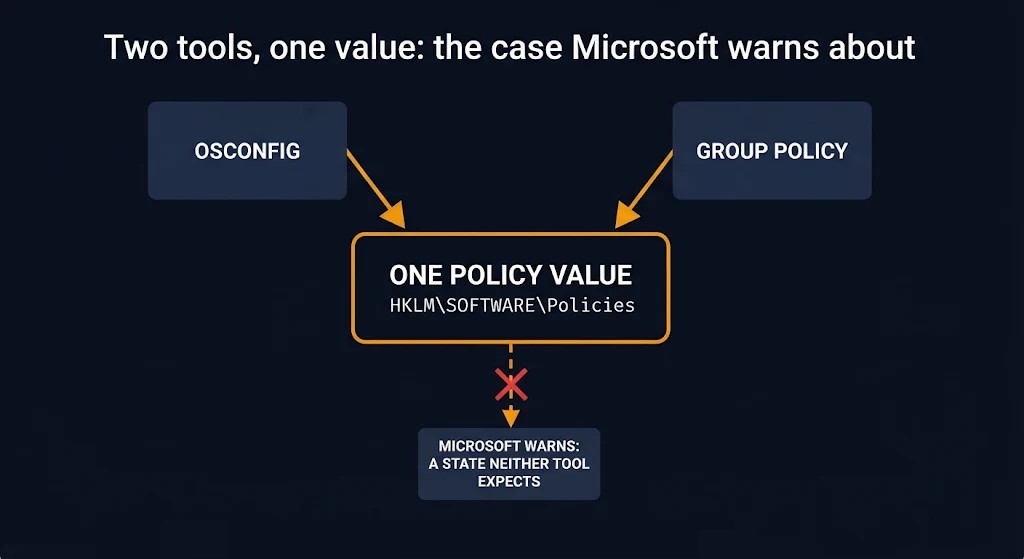
Microsoft’s page describes the mechanics of Hardened Server Core in four statements. Policy is delivered through the policy hive, HKLM\SOFTWARE\Policies, where a setting supports it, and policy takes precedence over local configuration. The defaults are built into the image. The firewall stays locally manageable. And whichever tool sets a value owns it, whether that tool is OSConfig, Group Policy or another management path.
One consequence follows from Microsoft’s documentation, not from testing. gpresult and RSOP report these settings as Not Configured. The values are in force, and the tool most Windows teams use to ask what applies on a server does not list them. That is Rack2Cloud’s reading, and it matters in the register below: on this platform gpresult is not evidence of state.
Microsoft’s Rule, and What It Leaves Open
Microsoft states the ownership rule for Hardened Server Core more directly than most vendor pages do. On a server that something already manages, use the in-box tooling for scoring only. Applying or restoring policy with it can put the two tools in conflict and leave a state neither expects. The restore command, Restore-MSHardenedPolicy, returns standard behavior. It does not return a snapshot of the server’s earlier configuration, and it should not be read as restoring the pre-hardening state. Microsoft frames applying and restoring for a server that nothing manages yet.
The page does not settle three questions, and I did not test them. The table keeps the documented behavior apart from the untested.
| Item | Microsoft states | Not established (not tested) |
|---|---|---|
| Managed servers | Use the in-box tooling for scoring only; applying or restoring can leave a state neither tool expects | How a conflict between the two tools resolves, in detail |
| Restore | Returns standard behavior, not a snapshot | Whether a restored state persists across a reboot |
| Scoring after a restore | Not stated | How the score behaves after a restore |
Assessing State Without gpresult
Microsoft’s documented way to assess Hardened Server Core state is its scoring tooling: Get-MSHardenedPolicyScore for the score and Get-MSHardenedPolicyCategories for the breakdown, with MSHardenedPolicyEval.exe as the executable form, which first appeared in the build 29683 announcement. Microsoft’s example output lists categories such as AuditPolicy, CredentialAndLSAProtection, CryptographyAndTLS, RemoteDesktop, RemoteManagement, SMBAndFileSharing and WindowsFirewall, with an overall score of 191 of 237, or 80.59. That is Microsoft’s example, not output I captured. Retrieve your own categories and scores on your own build.
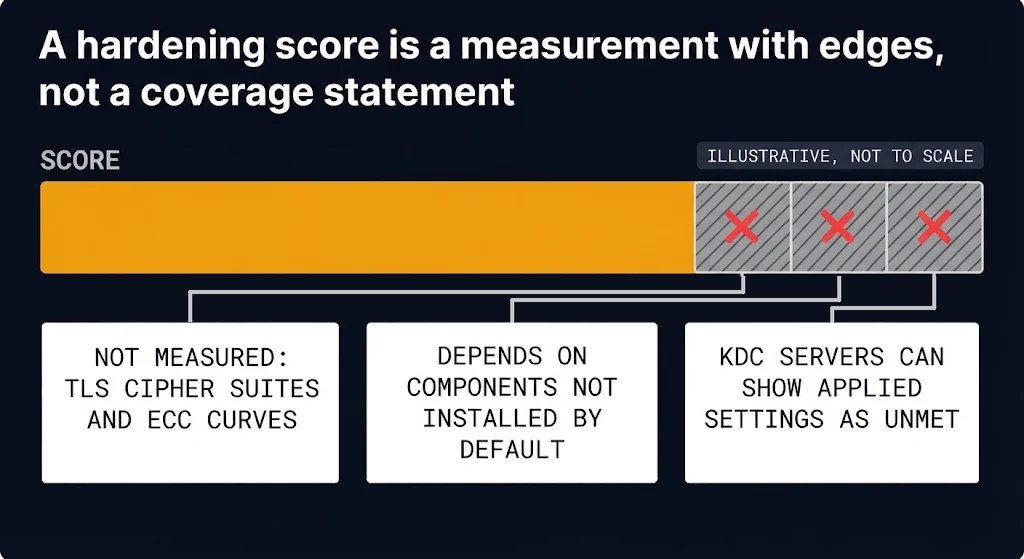
Microsoft lists the limits of the score. TLS cipher suites and ECC curves are not measured. Some scores depend on components that are not installed by default. KDC servers can show applied settings as unmet. The cmdlet and tool names are described as temporary. A score below 100 percent is a list of unmet items to investigate, not a coverage statement in either direction. This post keeps Microsoft’s six layers and its scoring categories as two separate lists and does not map one onto the other.
OSConfig is the other reporting path. The announcement says OSConfig reports compliance for a security baseline, meaning the settings in an applied baseline. Microsoft’s OSConfig documentation states that OSConfig does not support Windows Server versions earlier than Windows Server 2025. An estate planning OSConfig as the owner of these values has a version prerequisite before it has an ownership decision.
The Ownership and Exception Register
The register is the part of this post worth keeping. The first two columns come from Microsoft’s documentation. The rest are yours to fill in before the first server reaches production, because each one is a decision Hardened Server Core leaves with you. The enforcing source column asks which mechanism holds the value: the image, OSConfig, Group Policy, another management tool, or a workload-specific configuration. That is separate from the evidence column, which records how you verified it.
| Layer | Microsoft-documented items | Enforcing source | Management owner | Workload dependency | Evidence of state | Exception |
|---|---|---|---|---|---|---|
| Identity and authentication | Kerberos over NTLM, LSASS protection, strong passwords and lockout, no consumer accounts | Identify and verify | You define | Legacy authentication | Scoring tool; KDC servers can show applied settings as unmet | You define |
| Network exposure | SMB signing and encryption, firewall on in every profile, legacy name resolution and unauthenticated RPC off | Identify and verify | You define | Legacy protocols, RPC | Scoring tool | You define |
| Cryptography | Modern TLS cipher suites, hybrid ML-KEM key exchange, strong stored-key protection | Identify and verify | You define | TLS interoperability | Scoring tool; cipher suites and ECC curves are not measured | You define |
| Privilege and admin access | Admin approval for elevation, powerful rights stay with Administrators, no Guest sign-in, installers cannot self-elevate | Identify and verify | You define | Installer and admin workflows | Scoring tool | You define |
| Platform and code integrity | Microsoft-signed sign-in code, stricter signature validation, encrypted paging file | Identify and verify | You define | Drivers, code compatibility | Scoring tool | You define |
| Remote access and observability | RDP with NLA and TLS, WinRM without Basic, Digest or unencrypted traffic, advanced audit with command lines, script block logging, larger event logs | Identify and verify | You define | Remote admin, automation, monitoring | Scoring tool | You define |
Three notes on the table. The Microsoft-documented items are Microsoft’s list for each layer, abbreviated, not a full inventory. The workload dependency column is a Rack2Cloud prompt about where hardened defaults tend to meet real workloads, not a Microsoft claim. And the evidence column carries the same warning in every row: gpresult and RSOP show Not Configured, so they prove nothing here, and the scoring tool is the documented check, with the limits above.
Each column answers a different failure. Detection does not assign ownership, the argument the configuration drift ownership post makes for declared state in code. Here the declared state is vendor-shipped, and the owner column is where that gap shows. A shipped default is not evidence of state either. DKM ACL hardening makes that argument about one AD object, where the closure signal is an update and the state is something else. The workload column is where the Endpoint Mapper limit failure mode lives: a default changes under a workload that did not. The split between a standard, its enforcement and its evidence is the one documentation debt draws, and the register applies it to a vendor default.
Exceptions need more than a ticket. Record the setting, the owner, the workload requirement that justifies relaxing it, the evidence of the resulting state, and a reassessment date. An exception with no reassessment date outlives its reason, and the Governance & Drift stage of the learning path treats that as exceptions that quietly become permanent architecture nobody owns fixing.
Two Compatibility Streams, Kept Separate
Two different Microsoft statements bear on compatibility, and they should not be merged.
The first concerns the hardened defaults themselves. Microsoft warns that older protocols, legacy authentication and some management tools and scripts may fail on a hardened server. That is the reason the workload column exists.
The second is a known issue from an earlier build. Microsoft’s Windows Server Insider Preview build 29683 release notes documented a TLS hybrid key-exchange race condition that could crash LSASS when a TLS server negotiated certain hybrid groups. The documented groups included X25519_MLKEM768, SecP256r1_MLKEM768 and SecP384r1_MLKEM1024. This was documented for build 29683. Rack2Cloud has not verified whether it remains present in build 29706, and this post does not attribute the crash to Hardened Server Core.
What Microsoft Says Is Not Hardened Yet
Microsoft’s own list of what the preview does not harden yet includes NTLM blocking, Secure Boot and DMA protection requirements, kernel shadow stacks, print and RPC hardening including Windows Protected Print, and further settings such as the logon banner. For the register, that means some rows are less complete than they look. A team that reads “hardened” as “finished” will miss the items Microsoft lists as still open.
Decision Framework
For a team deciding what to do with Hardened Server Core now, the framework below separates what Microsoft documents from what Rack2Cloud recommends.
| Situation | Recommendation | Source |
|---|---|---|
| New Server Core preview install | Evaluate the hardened starting state | Rack2Cloud |
| Test before deployment | Validate applications and operational tooling first | Microsoft |
| Server Core already under OSConfig or GPO | Use the in-box tooling for scoring only; the management tool owns the settings | Microsoft |
| A setting conflicts with a workload | Identify the enforcing and owning mechanism before any exception | Rack2Cloud |
| Score below 100 percent | Investigate the unmet items; do not read the score as complete coverage | Microsoft (limits), Rack2Cloud (reading) |
| Exception needed | Record setting, owner, workload requirement, evidence and reassessment date | Rack2Cloud |
Architect’s Verdict
Hardened Server Core reduces the initial security configuration work. It does not remove the ownership decisions that configuration used to force, and in one respect they hide them: the settings are in force while the usual reporting tool lists them as Not Configured.
The real problem is not whether Microsoft chose good defaults. It is that a default nobody owns behaves like any other unowned configuration: it holds until a workload needs an exception, and then the exception is made by whoever is closest and recorded nowhere. Microsoft states the rule that the tool setting a value owns it. The estate still has to write down which tool that is.
Before relaxing a hardened setting, identify what enforces it, who owns it, which workload requires the exception, and what evidence shows the resulting state. If none of those four can be answered, the setting was never governed. It was only shipped.
A hardened default is a decision Microsoft made. Who owns it afterward is still yours.
Additional Resources
View 1 more resource
Editorial Integrity & Security Protocol
This technical deep-dive adheres to the Rack2Cloud Deterministic Integrity Standard. All benchmarks and security audits are derived from zero-trust validation protocols within our isolated lab environments. No vendor influence.

R.M.
Senior Solutions Architect with 25+ years of experience in HCI, cloud strategy, and data resilience. As the lead behind Rack2Cloud, I focus on lab-verified guidance for complex enterprise transitions. View Credentials →
Get the Playbooks Vendors Won’t Publish
Choose the architecture problems you care about. Get field-tested playbooks and frameworks delivered to your inbox.
- > AI Infrastructure & Inference Economics
- > Cloud Strategy & Hidden Cost Models
- > Virtualization & Deterministic Migration
- > Kubernetes, IaC & Modern Infrastructure
- > Data Protection & Recovery Engineering
Zero spam. Includes The Dispatch weekly drop.
Need Architectural Guidance?
Independent review before major infrastructure decisions.
- > Validate assumptions
- > Identify hidden dependencies
- > Quantify migration risk
- > Challenge vendor narratives
Triage · Advisory · Fractional · Direct Hire