

The Vendor Retention Window Wasn’t a Recovery Control

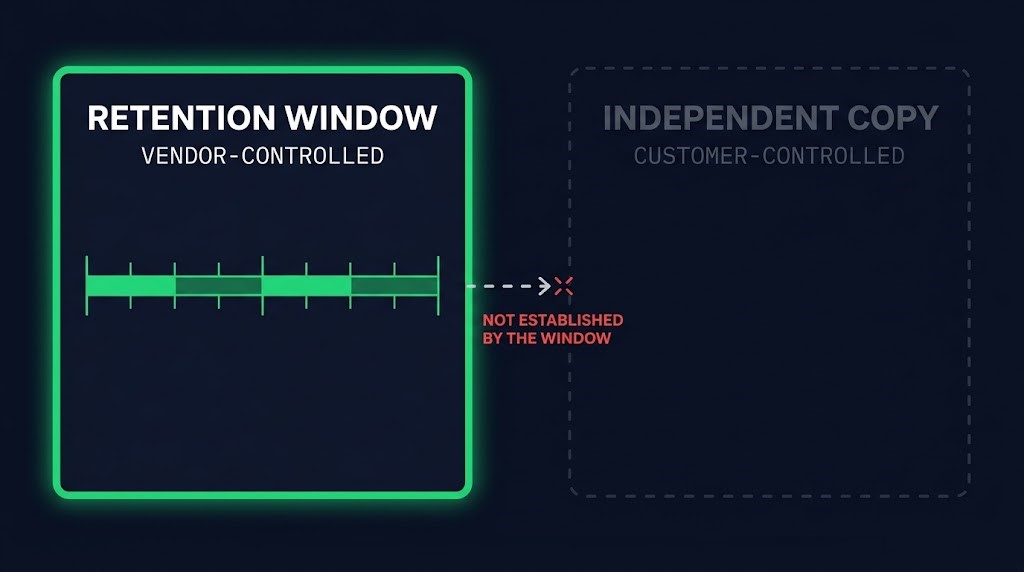
A vendor retention window is a lifecycle schedule, not a recovery control, and the Microsoft 365 deletion reported on September 28 is a clean example of the distance between the two. If the only copy of a tenant’s data sits inside the engine that enforces the schedule, a failure in that engine can become a failure of the recovery plan.
What Microsoft has confirmed is narrow. A spokesperson told The Register that an error resulted in remaining data, if any, being deleted before the retention period ended. The affected content was tied to expired Microsoft 365 Business Premium subscriptions held by nonprofit customers. Microsoft emailed one customer that it had investigated recovery options and that the data cannot be recovered. That is the confirmed record, and this post stays inside it.
What Microsoft Has and Hasn’t Said
The table separates Microsoft’s attributed statements from what the public record leaves open. Nothing in the right column is a claim about Microsoft. It is the list of things a reader cannot currently know.
| Stated by Microsoft (via The Register, 2026-09-28) | Not disclosed in the reporting |
|---|---|
| An error resulted in remaining data, if any, being deleted before the retention period ended | The cause of the error |
| The affected content was tied to expired Microsoft 365 Business Premium subscriptions | The number of affected organizations |
| Recovery options were investigated and the data cannot be recovered (email to one customer) | The deletion date, or how early the deletion ran |
| Microsoft is unable to list what was deleted, or whether any data was deleted | The retention period that applied to the affected tenants |
| The offer to customers is a free session to set up a new environment | The reason recovery is not possible |
Counts circulating in secondary coverage rest on a single unconfirmed support-staff account and are not used here.
One row deserves more weight than its length suggests. The party that deleted the data is also the only party that could say what it held, and it says it cannot. For a customer without an independent copy, the vendor’s inventory was the only inventory.
The unknowns matter because they decide what a customer can reconstruct. Without a deletion date, a scope or an inventory from the vendor, an affected team cannot size its own loss from the vendor side. The burden of knowing what existed shifts to whatever records the customer kept independently, and a team that kept none is left asking the custodian a question the custodian has said it cannot answer.
A Vendor Retention Window Is a Schedule, Not a Control
Microsoft’s published lifecycle for Microsoft 365 business subscriptions describes three stages: Expired, Disabled, Deleted. In the standard case, the headline durations are 30 days and 90 days for the first two, with different timings for enterprise and volume agreements, and CSP subscriptions follow a separate Partner Center reference. That is general product guidance. It is not evidence of the contractual or operational window that applied to the affected tenants, and nothing here assigns it to them.
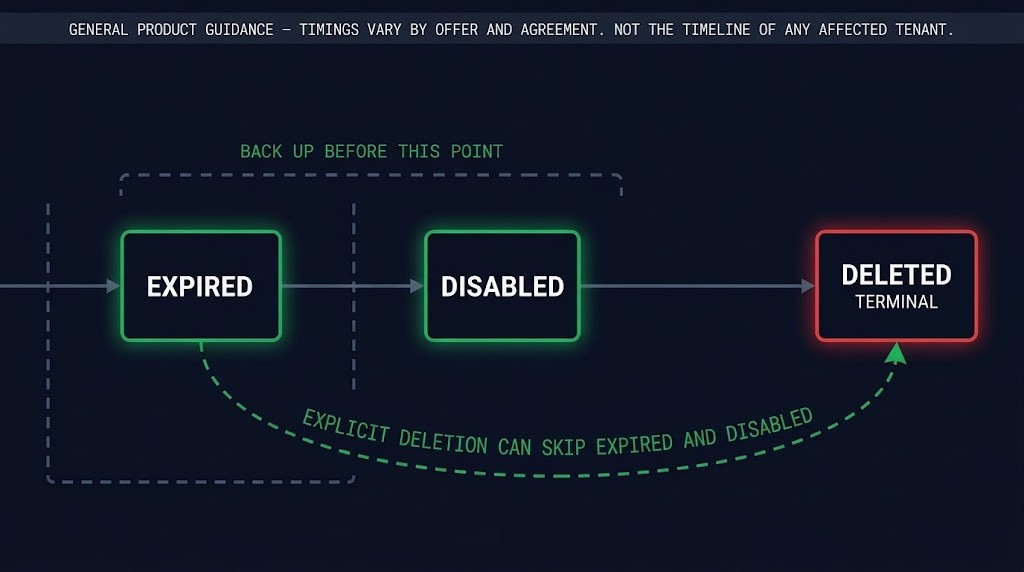
The schedule is legitimate, documented product behavior, and nothing in the record says it routinely fails. It is also a statement about what the vendor’s engine will do. It says nothing about what a customer can do if the engine does something else. The same documentation recommends backing up before deletion, and states that a deleted subscription cannot be reactivated and that buying a new subscription does not restore the data. Microsoft’s own lifecycle documentation treats the lifecycle as the thing you back up around, not as the backup.
A vendor retention window answers one question: how long does the custodian intend to hold the data. An independent copy answers a different one: if the custodian’s hold fails for any reason, is there a copy it cannot touch. The first is a property of the vendor’s lifecycle engine. The second is a property of your data protection architecture.
Microsoft’s documentation also distinguishes expiration from explicit deletion. An explicit deletion can bypass the Expired and Disabled stages, with SharePoint Online and OneDrive data deleted immediately. That is a different lifecycle path, not an explanation of the nonprofit incident. The architectural point is narrower: documented lifecycle stages describe expected vendor behavior, and they do not provide an independent recovery copy. A vendor retention window describes the vendor’s process, and your recovery requirement has to be met by something you control.
Whether the affected customers held an independent copy is not in the public record, and the argument does not depend on it. A hold enforced by the same engine that can delete is one failure domain, not two.
What This Is Not
This is not an argument that SaaS vendors delete data when relationships end, and it is not a claim about how Microsoft’s lifecycle normally behaves. Two neighboring problems are different decisions.
The Data Still Exists. You Just Can’t Reach It. covers data you still hold that the identity, network and tooling around it make unreachable. Here the question is earlier: whether a copy exists at all outside the custodian’s deletion boundary. The Retention Conflict Backup Architecture Wasn’t Built to Arbitrate covers two legitimate obligations competing over one record. Nothing competes in this incident. One schedule is reported to have run before its own window closed.
The Check
Applied to any consequential SaaS tenant, the test for whether a vendor retention window is doing any recovery work has three parts. A yes on the first does not carry the other two.
DIAGNOSTIC QUESTION
“Independence: does a copy exist outside the SaaS vendor’s lifecycle and deletion boundary?”
“Custody: who controls that copy, its credentials, and its retention policy?”
“Recovery evidence: when was a representative restore last completed and verified?”
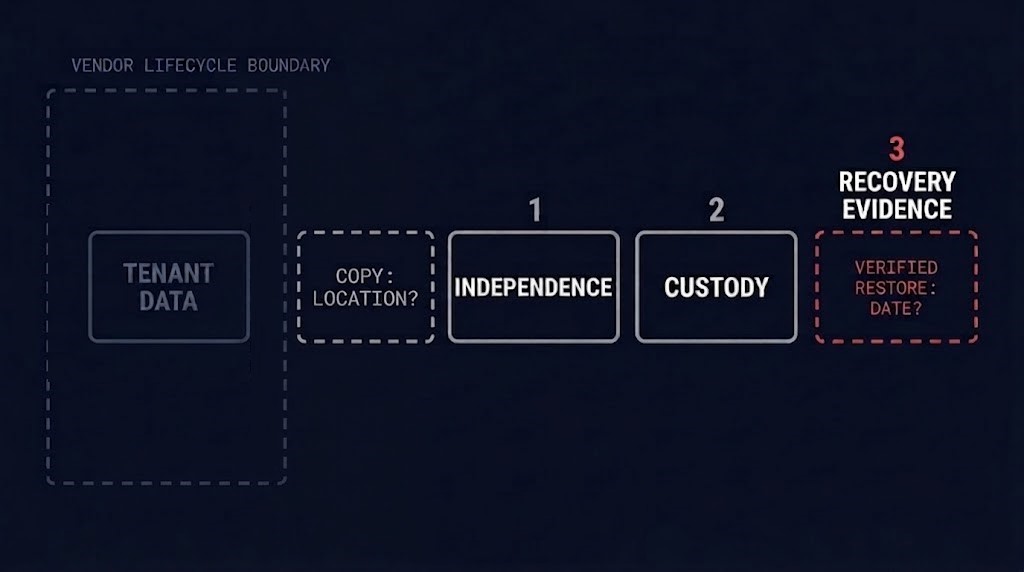
Independence. A second tenant at the same vendor under the same admin plane is not outside the boundary. Neither is an export folder inside the tenant it protects. The copy has to survive the vendor deleting, expiring or disabling the original, and the test is whether you can name where it lives, whatever the vendor retention window says.
Custody. Who holds the credentials, and who sets the retention? If access to the copy depends on the identity provider or admin account of the tenant it protects, the two share a fate. If the copy’s retention is governed by another vendor default that you cannot independently verify or control, you may have recreated the same dependency at another layer. Establish who controls retention, what deletion events can affect the copy, and what evidence demonstrates that the copy survives them.
Recovery evidence. A copy outside the engine establishes a separate preservation boundary. It does not establish that the copy is complete, usable or restorable. The only evidence is a representative restore, with a date, a scope and a record of what failed. The Governance & Recovery Assurance stage covers how that evidence is kept honest.
A representative restore means more than opening one file. Sample each workload type the tenant holds, such as mailboxes, document libraries and the permissions that govern them. Restore into a clean location the original tenant does not control, verify contents against a known reference, and time it. If the restore needed the original tenant to be healthy, the copy was never independent.
Run the check before the next lifecycle event, not after it. A subscription lapse, a license reassignment, a program change or an offboarding is the event that starts the vendor’s clock.
Architect’s Verdict
A vendor retention window is a statement about the vendor’s intent and the vendor’s engine. It is not a recovery control, and the Microsoft 365 report does not change that so much as make it visible.
The underlying problem is a single failure domain. When the custodian, the deletion schedule and the only copy sit inside the same failure domain, the customer has no independent copy to fall back on if the lifecycle process fails. In this case, Microsoft also said it could not identify what may have been deleted. The three-part check is the answer: a copy outside the boundary, controlled by you, with a restore you have completed and verified.
The window is the vendor’s schedule. The restore is yours.
Additional Resources
Editorial Integrity & Security Protocol
This technical deep-dive adheres to the Rack2Cloud Deterministic Integrity Standard. All benchmarks and security audits are derived from zero-trust validation protocols within our isolated lab environments. No vendor influence.

R.M.
Senior Solutions Architect with 25+ years of experience in HCI, cloud strategy, and data resilience. As the lead behind Rack2Cloud, I focus on lab-verified guidance for complex enterprise transitions. View Credentials →
Get the Playbooks Vendors Won’t Publish
Choose the architecture problems you care about. Get field-tested playbooks and frameworks delivered to your inbox.
- > AI Infrastructure & Inference Economics
- > Cloud Strategy & Hidden Cost Models
- > Virtualization & Deterministic Migration
- > Kubernetes, IaC & Modern Infrastructure
- > Data Protection & Recovery Engineering
Zero spam. Includes The Dispatch weekly drop.
Need Architectural Guidance?
Independent review before major infrastructure decisions.
- > Validate assumptions
- > Identify hidden dependencies
- > Quantify migration risk
- > Challenge vendor narratives
Triage · Advisory · Fractional · Direct Hire