

Secure Boot Trust: Who Owns the Virtual Firmware State
Secure Boot trust is not solely a property of the hypervisor. It is enforced through virtual-firmware state, and the parties that initialize, inherit and update that state are not necessarily the parties that rely on it. A hypervisor can offer Secure Boot, an image can carry a bootloader that assumes it, and a guest operating system can ship an update that depends on it, while the value the firmware actually enforces was set at a different moment by a different actor.
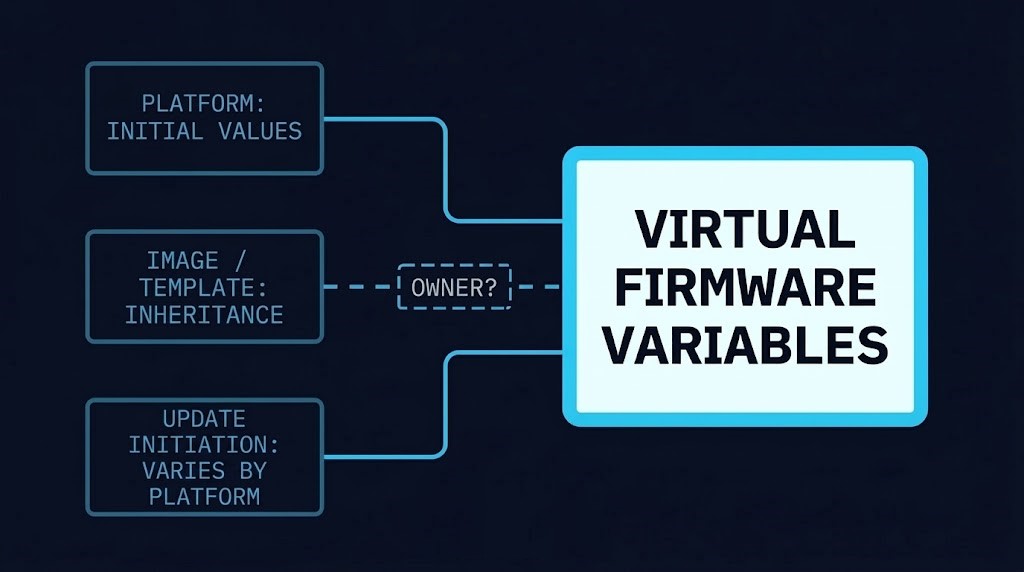
Where Secure Boot trust lives in virtualization architecture
This is a post about one narrow thing in virtualization architecture: where the Secure Boot trust anchors sit for a virtual machine, and who is able to change them.
The thesis is this. Secure Boot trust anchors are enforced as virtual-firmware state, but their initial values, inheritance and updates can be controlled by different actors. The architectural decision is who owns that state, how updates are sequenced, and how the resulting state is verified.
The three platforms examined here document that state in three different places. Broadcom describes the certificates on vSphere as set by the host at first power-on and held in each VM’s NVRAM, remaining static for the life of the VM unless updated. The Proxmox VE administration guide places the certificates on the VM’s EFI disk. Microsoft describes the Azure Trusted Launch and Confidential VM certificates as stored in virtual firmware and platform-managed. These are the documented examples. This post does not compare hypervisors comprehensively, and it makes no claim about any platform whose documentation was not reviewed.
Why the question is surfacing now
The move from the 2011 to the 2023 Secure Boot certificates is why vendors published these procedures this year. It is context, not the subject. What a system continues to do once a vendor boundary passes is a different question, treated in lifecycle support boundary. This post stays with the earlier question: who holds the value that has to change.
Initial values: who sets the first state
On all three platforms the documentation describes the initial state as seeded through the platform’s creation path. Who owns later updates is a separate question, taken up below.
On vSphere, the host sets the certificates at the first power-on of the VM. The values live in that VM’s NVRAM.
On Proxmox VE, a new EFI disk created with pve-edk2-firmware version 4.2025.05-1 or later includes both the 2011 and 2023 certificates, and the guide identifies this state with an ms-cert=2023k marker. EFI disks created earlier do not automatically receive the 2023 certificates and require the documented enrollment procedure.
On Azure, Microsoft states that VMs created after March 2024 typically already include the 2023 certificates in virtual firmware.
The consequence is architectural rather than operational. The value a given VM enforces today depends on its creation event and on what the creating platform seeded at that point. A fleet built over several years can therefore hold several initial states.
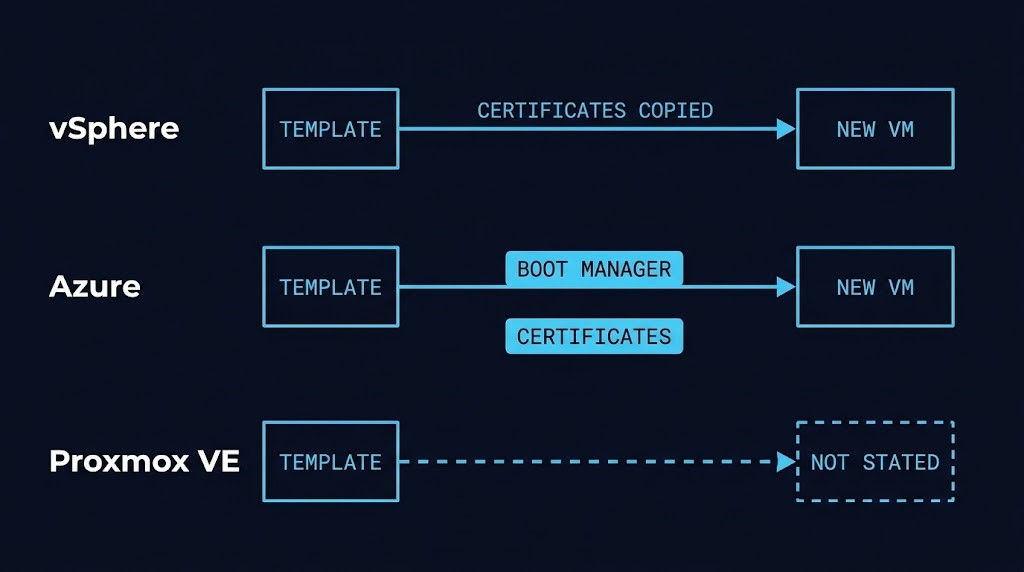
Inheritance: what a template or image carries
Inheritance of Secure Boot trust is where the three platforms diverge most, and where the documentation is most uneven.
Broadcom states that template VMs inherit the exact same Secure Boot certificates as the source template. On vSphere, then, a clone provisioned today from an older template starts with the older state.
Azure documents the opposite boundary. Microsoft states that an image captures the Windows Boot Manager but not the firmware variables, that the certificates are not captured during image generalization, and that updating the Boot Manager in an image does not persist Secure Boot certificates to virtual machines provisioned from that image. The Boot Manager is guest-OS-managed. The certificates are platform-managed. An image therefore carries one half of the pair and not the other.
For Proxmox VE, the administration guide does not state how a template or clone treats the EFI disk certificate state. Its template and clone text is generic and does not address it. This post does not infer Proxmox behavior from the vSphere or Azure behavior.
The same word, template or image, therefore means three different things for Secure Boot trust. On one platform it carries the state. On another it carries part of it. On the third the documentation is silent.
Updates: who initiates and who executes
The table below records only what the cited documentation states. A cell reading “Not stated” means the sources reviewed for this post do not say. It does not mean the behavior is absent.
| Question | vSphere (ESX 8.x / 9.x) | Proxmox VE | Azure Trusted Launch / CVM |
|---|---|---|---|
| Where the state is held | Per-VM NVRAM | Per-VM EFI disk | Virtual firmware, platform-managed |
| Initial values | Set by the host at first power-on | New EFI disks with pve-edk2-firmware 4.2025.05-1 or later include 2011 and 2023 certificates | VMs created after March 2024 typically already include the 2023 certificates |
| Template or image inheritance | Templates pass on the exact certificates of the source | Not stated | Images capture the Boot Manager, not firmware variables |
| Platform Key (PK) | Customer executes the PK update per Broadcom guidance (vUEFI, VMX, SilentPK, Capsule PK). Automated delivery: silent PK update from ESX 8.0 U3j for vTPM-disabled VMs; Capsule PK for vTPM-enabled Windows VMs from ESX 9.1.1.0, and for 8.x in a future patch. No automated path for Linux | Not stated separately | Not stated |
| KEK and DB | Updated from the guest using OS vendor tools | Administrator enrolls updated certificates (UI, API or qm enroll-efi-keys) | Initiated from the guest through Windows servicing; platform applies the authenticated update |
| Boot manager / bootloader | Not stated in the sources reviewed | Not stated | Guest-OS-managed; Linux shim and bootloader managed by the distro vendor |
| Documented per-VM verification | PK: mokutil --pk (Linux), Get-SecureBootUEFI -Name PK (Windows). DB: Get-SecureBootUEFI db, mokutil --db. vCenter alarm for an out-of-date PK (vCenter and ESX both on 9.1.1.0). KEK-specific command: Not stated | ms-cert=2023k marker in the VM configuration; 2023 or 2023w may indicate partial enrollment | Linux: mokutil or efi-readvar checks for the 2023 DB and KEK certificates. Windows page: Not stated |
| Documented sequencing | PK first if the Windows OEM Devices PK certificate is missing from the VM’s UEFI | Run the documented manage-bde -protectors -disable <drive> command for each BitLocker drive before enrollment; otherwise the recovery key is prompted on next boot. Enrollment takes effect on next start; the CLI requires the VM shut down | Apply certificates in the guest before redeploying an updated image to older VMs; Linux (Microsoft’s Linux-on-Azure guidance): firmware variables before shim or bootloader |
| Documented limits | All PK methods require VM hardware version 14 or newer; Capsule PK requires the VM running on ESX 9.1.1.0 or later, VMware Tools 13.1.5 and the July 2026 Windows cumulative update, installed before Tools 13.1.5 except on Windows Server 2025 and Windows 11 24H2/25H2; vSphere 7 has no automated tools | Not stated | Secure Boot must be enabled; standard security type and Generation 1 not supported; March 2026 Windows update or later required; Linux CVMs with old certificates must be recreated (Microsoft’s Linux-on-Azure guidance) |
| Backup, snapshot or restore | Restore from backup: Not stated | Not stated | Backups and snapshots of VMs created before the page’s 2024 cutoff: boot, apply updates, recapture. Restore behavior: Not stated |
The pattern across the row labeled KEK and DB is the one that matters. The platform seeds the state, an administrator or the platform applies the change, and the guest operating system often supplies the thing being applied. On vSphere, Broadcom splits the work: the customer executes the PK update from the hypervisor side, and KEK and DB are updated natively from within the guest following the OS vendor’s guidance. On Azure, Microsoft describes the guest as initiating an update the platform then applies to virtual firmware. On Proxmox VE the administrator enrolls the certificates, and the change applies at the VM’s next start.
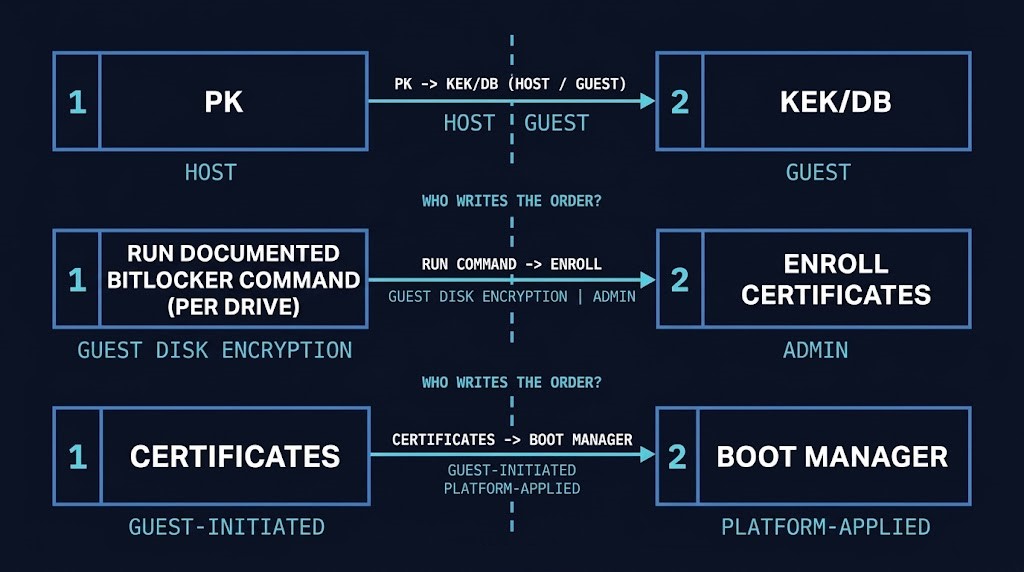
Sequencing Secure Boot trust updates: the order is part of the control
Each platform documents an order. None of the orders are interchangeable.
On vSphere, Broadcom states that authorizing a KEK update from the guest requires the Windows OEM Devices PK certificate to be present in the VM’s UEFI, and that the PK must be updated first when it is missing. All of the PK methods require VM hardware version 14 or newer, and the Capsule PK method additionally requires the VM to be running on ESX 9.1.1.0 or later after a power-on on that host, VMware Tools 13.1.5 and the July 2026 Windows cumulative update. Broadcom documents an install order for the last two: the cumulative update must be installed before installing or upgrading VMware Tools to 13.1.5, and that strict sequence does not apply when the guest is Windows Server 2025 or Windows 11 24H2/25H2. Broadcom’s Capsule PK procedure carries further steps that this post does not reproduce. Broadcom also states that updating these from outside the guest OS carries the risk of breaking applications, such as triggering BitLocker recovery.
On Proxmox VE, the guide instructs running manage-bde -protectors -disable <drive> in PowerShell for each BitLocker drive before enrollment, and states that otherwise the BitLocker recovery key is prompted for on the next boot. Enrollment through the UI or API takes effect when the VM next starts; the CLI command requires the VM to be shut down. The guide also warns about partial enrollment markers (ms-cert=2023 and 2023w).
On Azure, Microsoft states that certificates should be applied in the guest first when an updated golden image is redeployed to older VMs, because the updated Boot Manager might otherwise be applied to VMs whose firmware does not yet trust the 2023 certificates. For Linux on Azure, Microsoft’s Linux-on-Azure guidance states the firmware variables should be updated before the shim or bootloader, with a restart to confirm the firmware state first. BitLocker handling for Azure is not stated in the pages reviewed.
Read across, each documented sequencing constraint couples two things owned by different parties. In the vSphere case that is the hypervisor-side PK and the guest-side KEK and DB. In the Azure image case that is the platform-managed certificates and the guest-managed Boot Manager. In the Proxmox case that is the administrator’s enrollment and the guest’s disk encryption. A sequencing plan that is written by only one of those parties is incomplete.
Verifying Secure Boot trust: reading the resulting state
The last question is how Secure Boot trust is checked after a change, and the three sets of documentation answer it differently.
Broadcom documents per-VM checks for vSphere: mokutil --pk on Linux, Get-SecureBootUEFI -Name PK on Windows, and DB checks from inside the guest, plus a vCenter alarm, available once vCenter and ESX are both on 9.1.1.0, that flags a VM whose UEFI Secure Boot Platform Key is out of date. The page gives no specific command for KEK contents. Proxmox VE exposes a marker in the VM configuration: ms-cert=2023k indicates the new certificates are enrolled, while 2023 or 2023w may indicate partial enrollment. For Linux guests on Azure, Microsoft’s Linux-on-Azure guidance documents mokutil and efi-readvar checks for the 2023 DB and KEK certificates. The Azure Trusted Launch page for Windows guests does not state a verification method in the sections reviewed, and requires a restart for the Boot Manager update to apply.
Those are three different read paths with three different scopes: a guest command, a host-side configuration marker, and a vCenter alarm that covers one certificate. The procedures reviewed do not document a fleet-level way to inspect certificate generation beyond the vSphere PK alarm. That is a statement about the documents reviewed, not about what the platforms or third-party tooling can do. Within one estate, the question of who reads which signal, and who is accountable when the signals disagree or are absent, is an ownership question.
What the owner has to decide
The decisions are small and specific. Each has to be assigned.
Who sets the initial Secure Boot trust for a new VM, and does anyone check what a template will hand it? Who initiates the update on an existing VM, and who completes it? What is the written order of operations when the update and a guest feature such as disk encryption interact? How is the resulting state read back, and by whom? And where a platform documentation set is silent, as Proxmox VE is on template behavior and all three are on restore from backup, who is responsible for establishing the answer in the environment before any procedure is trusted?
Asking those questions for one platform is a runbook. Asking them across vSphere, Proxmox VE and Azure in the same estate is an ownership model.
Architect’s Verdict
Secure Boot trust is enforced as virtual-firmware state, and it is easy to treat it as a property of the platform. It is a value. Someone set it, something may have copied it, and something will have to change it.
The documented platforms agree on that and on very little else. Initial values come from the host at power-on, from the firmware package version at disk creation, or from the platform at provisioning. Inheritance passes through templates on one platform, is split between Boot Manager and certificates on another, and is not stated on the third. Updates are triggered from the guest, executed by the administrator, or applied by the platform, and each has its own order.
The real problem is not that any one of those paths is hard. It is that the three parties involved, the platform team, the image owner and the guest operating system owner, each hold one piece of the sequence and none holds the whole of it.
Name the owner of the state before scheduling the update. The change window will arrive regardless; the state will only be right if someone was responsible for it.
Additional Resources
Editorial Integrity & Security Protocol
This technical deep-dive adheres to the Rack2Cloud Deterministic Integrity Standard. All benchmarks and security audits are derived from zero-trust validation protocols within our isolated lab environments. No vendor influence.

R.M.
Senior Solutions Architect with 25+ years of experience in HCI, cloud strategy, and data resilience. As the lead behind Rack2Cloud, I focus on lab-verified guidance for complex enterprise transitions. View Credentials →
Get the Playbooks Vendors Won’t Publish
Choose the architecture problems you care about. Get field-tested playbooks and frameworks delivered to your inbox.
- > AI Infrastructure & Inference Economics
- > Cloud Strategy & Hidden Cost Models
- > Virtualization & Deterministic Migration
- > Kubernetes, IaC & Modern Infrastructure
- > Data Protection & Recovery Engineering
Zero spam. Includes The Dispatch weekly drop.
Need Architectural Guidance?
Independent review before major infrastructure decisions.
- > Validate assumptions
- > Identify hidden dependencies
- > Quantify migration risk
- > Challenge vendor narratives
Triage · Advisory · Fractional · Direct Hire