

An RMM Extension Carries Its Own Authority. Version Governance for the Platform Doesn’t Cover It.
RMM extension authority is the access and execution authority assigned to an extension inside a remote management platform: who approved its admission, what credential authenticates its API, what it can execute, and which customers’ endpoints it can reach. ConnectWise’s November 2026 ScreenConnect investigation puts all four on the table at once. Every ConnectWise fact below is frozen as of its advisory update of Monday, November 16, 2026 at 20:00 UTC, in which ConnectWise declared its investigation complete. Huntress facts are as of its November 13 update, and Microsoft facts are as read on November 14. The claim is narrow. ConnectWise has not established how attackers first gained access, and in its November 12 update it said it had found no evidence that initial access involved a ScreenConnect vulnerability. The component at issue is a family of independently developed third-party extensions called RMM+, not the ScreenConnect server or client.
The argument is about governance, not the incident. The platform and what is installed inside it are governed in different registers, and an extension that holds its own credential and its own execution rights sits in the gap between them.
What the Sources Establish, and What They Do Not
This post rests on four sources. Factual claims are attributed to their source; architectural conclusions are identified as this post’s analysis. The sources are ConnectWise’s Trust Center advisory, ConnectWise’s GitHub advisory for CVE-2026-127063, Huntress’s analysis of the SCKit toolkit, and Microsoft’s November 13 analysis of the same toolkit. The table keeps them apart because they do not say the same thing. What they document together is a governance question that none of them names: RMM extension authority.
| Source | What it establishes | What remains unestablished |
|---|---|---|
| ConnectWise Trust Center advisory (updates through Nov 16, 20:00 UTC) | About 400 partner environments (Nov 12 update) had at least one extension from the RMM+ family installed. The extension API can execute remote commands and is protected by a passphrase the partner sets. ConnectWise disabled the extensions in cloud environments and tells on-premises partners to disable them. Client version 26.6.5 or later blocks the toolkit’s attempted endpoint-to-technician spread technique. ConnectWise has no visibility into partner environments after initial access. | How attackers first gained access; the Nov 16 update, which declares the investigation complete, publishes no conclusion. The full scope of compromise. Whether individual environments are unaffected; ConnectWise says completion does not establish that. Whether Huntress’s blank-key finding is correct; ConnectWise said in its Nov 12 update it was assessing it, and the Nov 16 update does not resolve it. Whether an installed extension means compromise; ConnectWise says it does not. |
| Huntress SCKit analysis (updated Nov 13) | Run Command activity on cloud-hosted panels installed rogue ScreenConnect clients on at least 288 hosts across 48 organizations on Nov 11, and on another 205 hosts across 41 organizations on Nov 13. The activity “seems to be related” to RMM+. In versions 1.0.31 and 1.0.32 the access key defaulted to blank and an empty value passed the check. Commands arrived with no corresponding login activity. | That RMM+ is the initial access vector; Huntress’s wording is hedged. Whether the two waves overlap. Whether the toolkit’s technician-spread technique works; Huntress has not seen it succeed. |
| ConnectWise GitHub advisory, CVE-2026-127063 (Nov 12) | The third-party RMM+ extension ships with a default API secret. CVSS 4.0 score 9.3, CWE-1392 (default credentials). The ScreenConnect server and client are not affected. No fixed RMM+ version is announced; disabling is the mitigation. | The affected-version range; the advisory names the DataComm RMM+ extension without versions. NVD had no record of the CVE when checked on Nov 14. |
| Microsoft Security Research (Nov 13) | Microsoft’s analysis of the SCKit toolkit describes two distinct attack surfaces: a server-side extension API, where the RMM+ family exposes remote-command APIs protected by a separately configured passphrase, and RelayTrap, which targets a technician workstation through a connection from an affected endpoint. It attributes the RMM+ authentication flaw to ConnectWise’s advisory. | The confirmed initial access method; Microsoft calls the RMM+ route reported. Whether the technician-targeting path has succeeded anywhere; Microsoft describes it as propagation design, not a confirmed sequence of infections. |
⚠ INITIAL ACCESS UNCONFIRMED
RMM+ is the leading reported path, not the confirmed one. Huntress ties the activity to RMM+ in hedged terms, and ConnectWise’s November 16 update declares its investigation complete without publishing an initial-access conclusion or resolving Huntress’s blank-key finding. Treat the extension as a documented exposure, not as an established cause.
The sources also describe the extension’s default credential in three different ways, and this post keeps all three attributed. ConnectWise’s GitHub advisory says the extension uses “a static API secret by default.” ConnectWise’s investigation update describes an API protected by a passphrase the partner configures during setup. Huntress reports that in versions 1.0.31 and 1.0.32 the access key defaulted to blank and the authentication check accepted an empty value. None of the three sources says how the descriptions relate, and this post does not reconcile them.
Two numbers need their limits stated up front. ConnectWise’s count of about 400 partner environments is environments with at least one RMM+ family extension installed, which it says is exposure and not confirmed compromise. Huntress’s counts are hosts it observed among organizations that use Huntress.
RMM Extension Authority: Four Control Questions in One Component
Extension update authority, the subject of an earlier post, covers who controls when an extension’s code changes on an endpoint. A management platform adds a question that post did not ask: once an extension is installed, what authority does it hold of its own? That is modern infrastructure architecture before it is incident response, because the platform is the control plane for every endpoint it manages, and an extension inside it can be handed a share of that reach. RMM extension authority is the governance of that share.
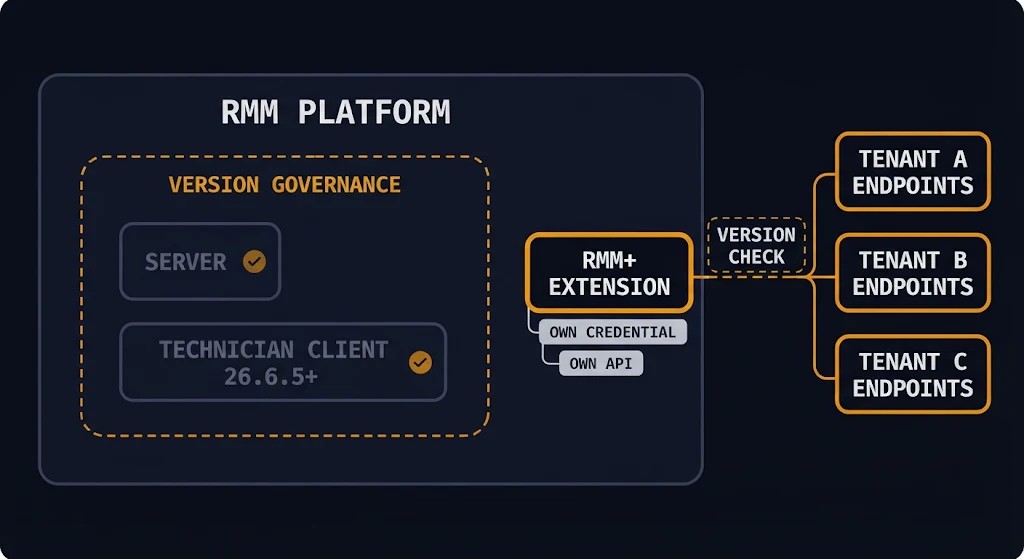
Per Huntress, RMM+ lets another tool manage ScreenConnect sessions without a technician working through the console. It bypasses the platform’s user accounts, roles and MFA and authenticates requests with a shared access key stored in the extension’s settings. ConnectWise describes the family as providing an API capable of executing remote commands. Huntress found that most RMM+ installations it encountered were legitimate, usually added for a project and left in place. Four distinct control questions converge on that one component, and RMM extension authority is the governance of those boundaries.
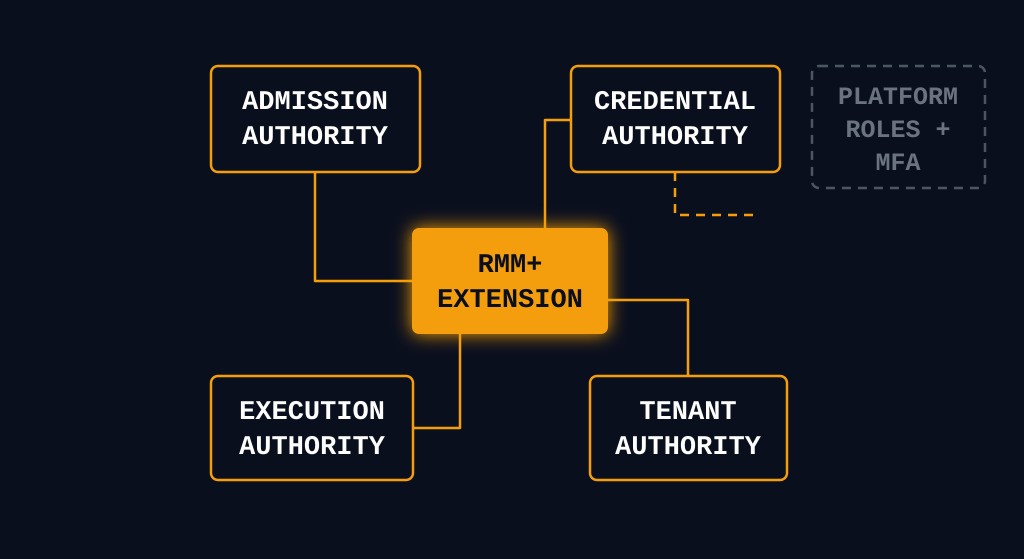
01 — ADMISSION AUTHORITY
Who permitted this extension into the environment, and who owns it now? Huntress found installations added for a project and left in place. Neither source says who owned those installations afterward, which is the point: the vendor can count installs, and only the partner can say who is accountable for each.
02 — CREDENTIAL AUTHORITY
What authenticates the extension’s API, and what scope does that identity receive? In the sources, a shared key in the extension’s settings stands in for the user accounts, roles and MFA the platform applies to people.
03 — EXECUTION AUTHORITY
What can it run, and as whom? ConnectWise describes an API capable of executing remote commands. Huntress observed an operator using the panel’s Run Command feature to push commands to groups of managed endpoints, running as SYSTEM, and links the commands in the logs it reviewed to RMM+.
04 — TENANT AUTHORITY
Which customers’ endpoints can it reach? A multi-tenant panel manages many customers from one console. That is an architectural point, not a source finding: the sources do not describe how tenant scope is assigned to an extension, so what an extension that can send commands to managed agents can reach is a question the owner has to answer for each panel.
These control questions are separate even though they converge on one extension, and answering one does not answer the others. A vetted installation can still ship with a default credential. A strong credential does not, by itself, narrow the API permissions or tenant reach assigned to the extension. A narrow execution scope still has no owner if the person who installed it has left.
The Platform’s Version Is Not the Extension’s Version
ConnectWise’s November 13 update asks partners to do two things and says they “address separate risks.” First, verify that every technician client runs ScreenConnect 26.6.5 or later, the September 8 release that fixed CVE-2026-84869, a flaw in the client. Second, disable the identified third-party extensions. ConnectWise adds that updating a server or cloud console does not confirm that technician clients are updated, and that updating clients does not replace disabling the extensions.
The client fix addresses a separate path. ConnectWise says clients on 26.6.5 or later block the toolkit’s attempted endpoint-to-technician spread technique, and Huntress reports it has not seen that technique succeed. ConnectWise also says the fix does not establish how attackers first accessed partner environments. Microsoft’s November 13 analysis draws the same line between platform controls and RMM extension authority: it treats the server-side extension APIs and the technician client as two distinct attack surfaces, and advises addressing them separately because securing one does not remove the other or an existing endpoint installation.
CVE-2026-127063 is a separate record. ConnectWise’s GitHub advisory, dated November 12, assigns it to the third-party RMM+ extension, scores it 9.3 under CVSS 4.0, classifies it as use of default credentials (CWE-1392), and states that the ScreenConnect server and client are not affected. It announces no fixed RMM+ version; disabling the extension is the stated mitigation. The client update therefore does not establish remediation of the extension vulnerability, and ConnectWise’s own guidance treats the two as separate. NVD had no record of the CVE when checked on November 14.
Huntress says the most current ScreenConnect versions, 26.6.6.9747 and 26.7.6.9783, are affected by this activity. Read with ConnectWise’s November 12 statement that it found no evidence of a ScreenConnect vulnerability in initial access, the sources describe a platform whose current versions Huntress reports as affected while the reported path runs through an extension inside it. ConnectWise’s November 16 update, however, describes continued on-premises activity where the extensions remain enabled and ScreenConnect has not been updated, and the sources do not reconcile the two. The governance point that follows is this post’s inference, not either vendor’s conclusion.
The architectural inference is this. A governance process that verifies server and client versions answers a question about those two components. RMM extension authority sits with a third: an extension has its own version line (Huntress names 1.0.31 and 1.0.32), its own default configuration and its own API. If the register of governed components lists the platform and its clients, an extension can be installed and unreviewed while every platform version check passes. This is analysis, not a ConnectWise statement or a product finding, and it does not claim that any scanner or tool misses extensions. It claims only that a process scoped to server and client versions has no reason to look.
Downstream Reach Is Not a CVSS Number
The vector ConnectWise published for CVE-2026-127063 lists impact to subsequent systems as none. Whatever the scoring convention behind that entry, a base score cannot record how many tenants sit behind the panel that hosts the extension, and tenant reach is the fourth control question of RMM extension authority, not a footnote to the first three.
Huntress’s figures describe what it observed, not what exists. On November 11 it saw Run Command activity on cloud-hosted panels install rogue clients on at least 288 hosts across 48 organizations that use Huntress, with all of them appearing over roughly 90 minutes and about a third in the first 10. On November 13 at 16:12 UTC it saw another spike affecting 205 hosts across 41 organizations, which it describes as additional. The reports do not say whether the two waves share organizations, so this post does not add them.
One more figure needs a boundary. Installer URLs in the campaign carry a parameter of the form c=Exploited followed by a number that Huntress says keeps rising, which it takes to suggest a running tally across the campaign. It reports seeing Exploited529, tied to eight connected clients through the victim’s ScreenConnect server. Huntress interprets the Exploited809 marker as 190 downstream clients compromised through a single ScreenConnect panel. That is Huntress’s reported assessment, not an independently established campaign-wide compromise count. The marker is a value in the attackers’ installer URL that Huntress reads as a counter, and ConnectWise says it cannot independently determine what happened inside partner and customer environments.
An MSP panel is a concentrated case of what third-party cloud access describes: authority held outside the customer’s security boundary and exercised inside it. Here RMM extension authority is exercised by a partner on behalf of customers who never see it. The end customer behind the panel may never have chosen the extension and may not know it exists. ConnectWise says it has no visibility or telemetry into activity inside partner environments after initial access, which is why its own count of about 400 environments is a count of exposure.
Disabling Is Not Removing
ConnectWise disabled the identified extensions in cloud environments as a precaution and cannot do it for on-premises partners. Its guidance is explicit about what that does and does not do. In its November 12 update it said disabling extensions and resetting credentials alone may not remove unauthorized software, persistence mechanisms or access already established on endpoints. Its November 13 update says disabling extensions and updating clients do not remove access already established. It also says the presence of an identified extension does not by itself establish compromise. Those are ConnectWise statements, and this post does not extend them to any particular environment.
Huntress’s cleanup guidance shows why the distinction matters. It reports a second, attacker-controlled ScreenConnect client, a scheduled task running as SYSTEM, a directory under ProgramData and a registry Run value, and it says isolation alone does not remove the persistence: affected systems were observed reinfecting shortly after isolation was lifted. None of those artifacts lives in the extension. Disabling the extension closes one route in. It does not reach what the route already installed, and revoking RMM extension authority is a different job from removing its consequences.
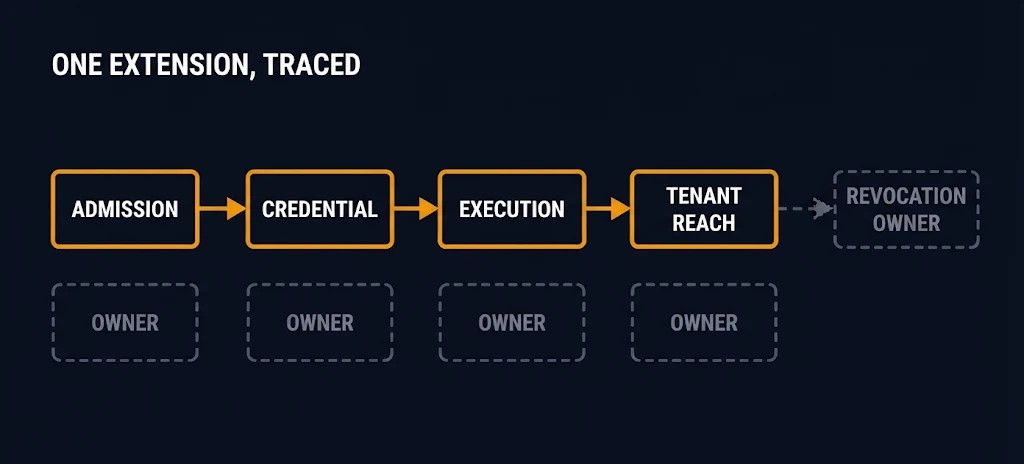
This is the pattern persistent access survives the fix describes: remediation that succeeds on the layers it was scoped to and never reaches the layer where access lives. ConnectWise’s instruction to revoke sessions as well as reset credentials is the revocation unit question in practice. It says password resets alone do not invalidate all existing sessions, so a reset closes one unit and leaves another open.
Both ConnectWise and Huntress also say not to investigate affected endpoints through ScreenConnect itself. The recovery path therefore has to exist outside the platform under suspicion, and it has to exist before the incident.
The Extension Register
The extension register is a proposed governance method. It is not a ConnectWise feature, and it is not an established industry standard. It turns the four control questions, plus ownership and revocation, into one row per installed extension, and it is how RMM extension authority becomes an assigned responsibility instead of a default.
| Register field | Governance question | What to record |
|---|---|---|
| Extension owner | Who is accountable for this extension today, not at install time? | A named owner and the reason it was installed |
| Admission approval | Who authorized installation, and when? | Approval record, installed version, install date |
| Identity and credential | What authenticates the extension’s API, and who holds the secret? | Where the credential lives, whether a default was ever changed, last rotation |
| API permissions | What can a caller of that API access? | Functions exposed, and whether they bypass platform roles and MFA |
| Execution capability | What can it run, and under which account? | Command execution scope and execution context |
| Tenant reach | Which customers’ endpoints can it reach? | Panels, groups and tenants in scope |
| Revocation owner | Who disables the extension, removes it, and revokes its credential, sessions, and any access it enabled? | Disable path for cloud and on-premises, session and credential revocation steps, proof it stays disabled |
DIAGNOSTIC QUESTION
“If a caller who never signed in sent this extension a command, which tenants could it reach, and who would find out?”
The inventory has to be by extension class, not by one advisory’s list. As of its November 13 update, ConnectWise also disabled ITBoost Integration, RepairShopr Integration and Guest Session Starter in cloud environments and its marketplace as a precaution, and encouraged all partners to do the same until further notice. Its November 12 updates listed five extensions; the November 13 update added these three. The November 16 update lists only the original five as extensions that must remain disabled and does not mention the three; this post does not infer that they were lifted or re-enabled. The advisory does not say the three share the RMM+ flaw, and this post does not claim they do. It shows only that the vendor’s own list of extensions to disable changed in a day, which is the case for knowing what is installed before the list changes.
The register also writes down where the platform’s authority stops and the extension’s begins, which is the part of RMM extension authority that is usually implicit. That boundary is a control plane boundaries question, and the register is where it is answered per extension. ConnectWise asks partners to verify the extensions remain disabled on every instance and not to reinstall them pending further guidance. The revocation owner is the person who can prove that.
Architect’s Verdict
RMM extension authority is the access and execution authority assigned to an extension inside the platform that manages everything else. Its admission, its credential, its execution rights and its tenant reach are each assigned by someone, and the platform’s version number assigns none of them.
ConnectWise’s own advisory asks for two separate actions because they address separate risks: update the clients and disable the extensions. The governance gap appears when an organization versions the platform and its clients but does not independently inventory and govern the third-party extensions installed inside it. Huntress found installations added for a project and left in place, and that is what unowned authority looks like.
ConnectWise has not established how access began, and this post does not either. The question of RMM extension authority does not wait for the answer. Whatever path the attackers took, the extension held a credential, could send commands to managed agents, and sat inside a panel whose reach it did not choose.
Name an owner for every installed extension before the next advisory, one extension at a time. An extension nobody owns is a credential nobody rotates.
Additional Resources
View 2 more resources
Editorial Integrity & Security Protocol
This technical deep-dive adheres to the Rack2Cloud Deterministic Integrity Standard. All benchmarks and security audits are derived from zero-trust validation protocols within our isolated lab environments. No vendor influence.

R.M.
Senior Solutions Architect with 25+ years of experience in HCI, cloud strategy, and data resilience. As the lead behind Rack2Cloud, I focus on lab-verified guidance for complex enterprise transitions. View Credentials →
Get the Playbooks Vendors Won’t Publish
Choose the architecture problems you care about. Get field-tested playbooks and frameworks delivered to your inbox.
- > AI Infrastructure & Inference Economics
- > Cloud Strategy & Hidden Cost Models
- > Virtualization & Deterministic Migration
- > Kubernetes, IaC & Modern Infrastructure
- > Data Protection & Recovery Engineering
Zero spam. Includes The Dispatch weekly drop.
Need Architectural Guidance?
Independent review before major infrastructure decisions.
- > Validate assumptions
- > Identify hidden dependencies
- > Quantify migration risk
- > Challenge vendor narratives
Triage · Advisory · Fractional · Direct Hire