

The SRM Entitlement Key Expires May 2. The Migration Path Is Documented Across Separate Broadcom KBs.
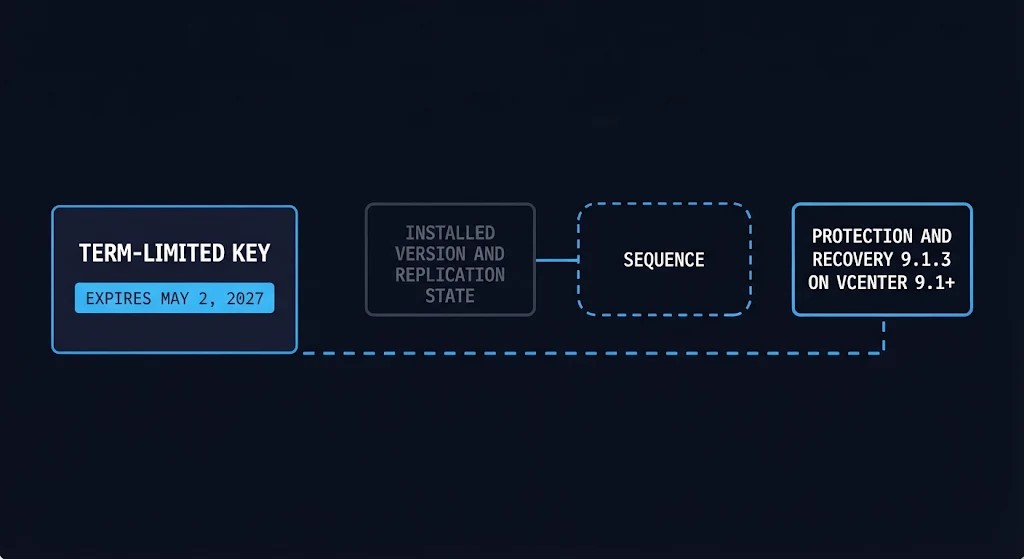
SRM entitlement under VCF and VVF now carries a May 2, 2027 deadline for existing subscribers using the term-limited key, while reaching the required Protection and Recovery 9.1.3 and vCenter 9.1+ state depends on a migration path documented across separate Broadcom articles. Whether that is one deadline or two is the operator’s call.
This post reads six Broadcom knowledge base articles: KB 461219, KB 438925, KB 312725, KB 444864, KB 460443 and KB 447296. They were read on November 13, 2026 and checked again on November 14 against each article’s Updated On date. On November 18, all six were re-read. KB 461219’s Updated On date had moved to 11-16-2026, and its current text was checked against this post. The other five Updated On dates were unchanged. The post separates what Broadcom documents from analysis and from what the operator must verify per deployment. Three sources the articles point to were not read: the convergence article linked from KB 444864, the Broadcom Product Interoperability Matrix, and the article Upgrading to VMware Cloud Foundation 9.1.x, which the KB 461219 FAQ points to. The proposed operator record later identifies all three as unresolved validation inputs.
What Broadcom Documents About SRM Entitlement
KB 461219 is the SRM entitlement article. It sits inside the larger virtualization architecture question of which stack to stay on, but its scope is narrow: one capability, two access paths and one expiry date. Table 1 restates its terms without extending them.
Table 1: SRM entitlement terms in KB 461219 (Updated On 11-16-2026)
| Item | What the article states |
|---|---|
| Packaging | As of November 2, 2026, SRM, formerly VMware Live Site Recovery (VLSR), is not sold standalone and is included in VCF and VVF |
| Who is entitled | Existing active VCF and VVF subscription customers: those who do not have SRM and want it, those renewing SRM or VLSR, and those expanding SRM or VLSR capacity |
| Not entitled | Customers with perpetual VCF licenses, with or without active Support and Subscription |
| Option 1 | Wait for VCF/VVF 9.1.3, stated as available between February 2027 and April 2027. The release adds SRM entitlement to existing subscriptions automatically, and using SRM then requires a Protection and Recovery appliance at 9.1.3 and vCenter at 9.1 or later |
| Option 2 | Obtain a term-limited key from the Support Portal (My Downloads, not the Licensing Portal). It covers up to 10,000 protected VMs, expires May 2, 2027, cannot be split, combined, upgraded or downgraded, and replaces existing keys |
| Condition tied to expiry | The appliance must reach 9.1.3 and vCenter 9.1 or later before the key expires. The FAQ says the expiry date factors in the time to get there, to avoid “disaster recovery functionalities ceasing to function” |
| Newer subscriptions | New, renewed or expanded subscriptions on or after November 2, 2026 include SRM and can disregard both options |
| Existing SRM or VLSR entitlements | The FAQ says customers can continue to use existing entitlements for the remainder of the contract term and keep current benefits, including support for older vCenter and Protection and Recovery appliance versions where applicable. Swapping licenses to the options above is the alternative for customers who want to protect more VMs, and the version requirements of the chosen option then apply |
The article also describes the Support Portal key as version 8.1, working on all supported SRM versions. It defers the minimum supported vCenter and appliance versions to the Interoperability Compatibility Matrix and to a KB article on invalid license key errors, which matches the title of KB 438925 and is covered below. For upgrades beyond vCenter 9.1+ and the Protection and Recovery appliance at 9.1.3, its FAQ points to the article Upgrading to VMware Cloud Foundation 9.1.x and to the Interoperability Compatibility Matrix. Neither was read for this post, and nothing here describes their contents.
Subscriptions renewed or expanded on or after November 2 carry SRM with them, and the renewal position behind them belongs to the VMware renewal decision. This post starts after that decision.
Decision One: Entitlement Continuity Before May 2, 2027
The first decision is which path keeps SRM entitlement in force. The articles describe two paths and state their conditions. They do not recommend one, and neither does this post.
What the Two Options Commit You To
Option 1 commits the operator to waiting for 9.1.3. When it ships, KB 461219 states that SRM entitlement arrives with the release, and that using it requires the Protection and Recovery appliance at 9.1.3 and vCenter at 9.1 or later. Option 2 commits the operator to replacing the existing SRM keys with the term-limited key in vCenter, since it cannot be split or combined. The same article ties that key to the same endpoint: the appliance and vCenter must reach 9.1.3 and 9.1+ before May 2, 2027.
Both options end at the same endpoint. The article presents Option 2 for customers who need SRM capabilities before 9.1.3 ships.
The Window Between 9.1.3 and Key Expiry
Analysis: KB 461219 gives two dates. It states that 9.1.3 is available between February 2027 and April 2027, and that the key expires May 2, 2027. The margin between them depends on where in that window the release lands. A release on February 1 leaves 90 days before May 2. A release on April 30 leaves two. The article does not state that the availability window is a commitment, or what happens to the expiry date if the release slips. These are theoretical calendar margins, not usable maintenance windows: they exclude preparation, validation, replication testing and recovery exercises. This is arithmetic from two documented dates, not a judgment that any margin is adequate.
What the Article Does Not State
Each item below was checked against the article text; none is filled in.
- Behavior at or before expiry. The FAQ names the outcome to avoid. It does not state which operations stop, whether there is a grace period, or whether the operator is notified before the key expires. KB 312725 documents a “not enough licenses” error that SRM shows on operations such as protecting VMs, failover and reprotect, and it lists an expired key among the conditions. Its environment list does not include Protection and Recovery 9.1.x, and it does not mention the term-limited key. Whether the same behavior applies is NOT STATED.
- Option 1 until 9.1.3. For customers with existing SRM or VLSR entitlements, the article states that those entitlements continue for the remainder of the contract term. It does not state how an environment with no existing SRM entitlement that waits for 9.1.3 is licensed before the release is installed.
- The key and KB 438925. KB 438925 describes a validation defect for keys generated on or after April 20, 2026, affecting VLSR (sold through the VLR SKU), VCDA (VLR or ACC SKU) and standalone SRM (SRM SKU). Its environment list includes Protection and Recovery 9.1.0.0, and it lists fixed builds: 9.0.2.4 and later, 9.0.5.1 and later, Protection and Recovery 9.1.0.0100 and later, and vCDA 4.7.5 and later. KB 461219 points to an article with its title for minimum versions. Neither article names the other’s key or SKU, and the generation date and SKU of the key are not stated in KB 461219. The articles do not establish whether the term-limited key needs the same validation remediation, so the installed build and the key’s behavior are verified with Broadcom. This post does not reconcile them.
- Split and merge. KB 438925 says to perform a split and merge in the Broadcom Support Portal to refresh license metadata if the validation error persists after the required upgrade. KB 461219 states that the term-limited key cannot be split or combined. The articles do not state whether the refresh applies to that key, so confirm with Broadcom before any license operation involving it.
Decision Two: Migration and Recovery Configuration Before 9.1.3
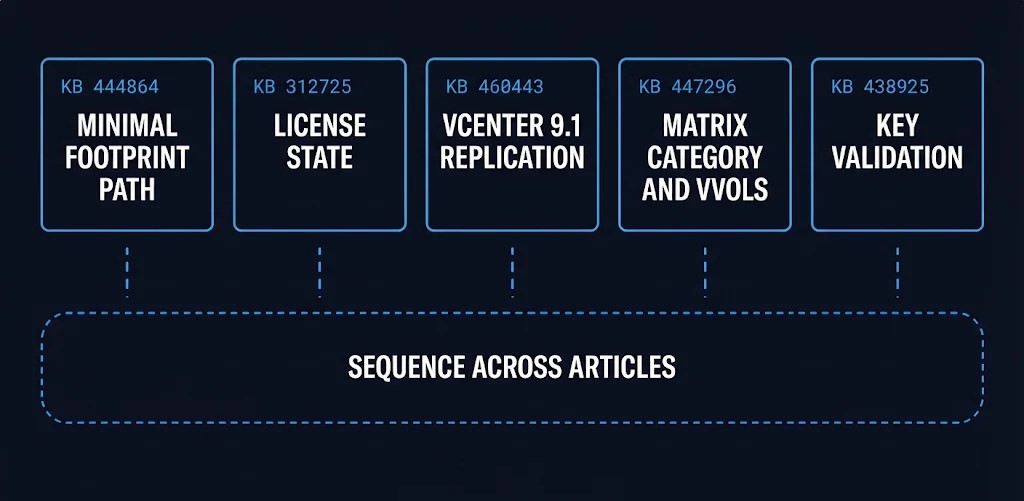
The second decision is how the installed appliance, vCenter and replication state reach the endpoint both SRM entitlement options share. The vCenter half of that endpoint is a version upgrade in its own right, and vSphere lifecycle management covers the compatibility envelope it has to stay inside. The articles that bear on the rest are separate.
Table 2: What each Broadcom article covers
| KB (Updated On) | Condition it addresses | What it states | Scope limit |
|---|---|---|---|
| 444864 (06-18-2026) | Moving from standalone SRM and vSphere Replication 9.0.2 to Protection and Recovery 9.1 | Standalone appliances are deprecated in 9.1, with no in-place ISO upgrade. A fresh-deployment procedure is given. Standalone 9.0.2 to 9.1 typically needs a convergence migration via 9.0.4 | Minimal footprint only: single-VM replication, no Protection Groups or Recovery Plans. The example is vCenter 8.0 U3 to 9.1 |
| 312725 (11-04-2026) | License errors on SRM operations when licenses are insufficient | The license is preserved only on an upgrade within the same version. A cross-version upgrade reverts to evaluation and the key must be reassigned | Lists SRM 8.x, VLSR 9.0 through 9.0.2.4 and VLR 9.0.4 through 9.0.5.1. Protection and Recovery 9.1.x is not listed |
| 460443 (10-25-2026) | Replication configuration fails with vCenter 9.1 | VLR 9.0.2 is not compatible with vCenter 9.1. The fix is to deploy VLR 9.1.0, re-pair the sites and re-run replication configuration | Environment lists VLR 9.0.2, vCenter 9.1 and VCF 9.1 |
| 447296 (09-20-2026) | Where SRM and VLSR compatibility entries live | SRM and VLSR are consolidated under Protection and Recovery in the Interoperability Matrix. Converged appliance model since VLSR 9.0.3. vVols are deprecated in VCF 9.0, and vVols replications move to array-based replication before Protection and Recovery 9.1 | Environment lists the VLR 9.0.5 appliance. The Matrix itself was not read |
| 438925 (11-10-2026) | “Invalid license key” on keys generated on or after April 20, 2026 | A validation defect affecting VLSR, VCDA and standalone SRM keys. Fixes are listed per build: 9.0.2.4+, 9.0.5.1+, Protection and Recovery 9.1.0.0100+ and vCDA 4.7.5+. If the error persists after the required upgrade, it says to perform a Support Portal split and merge | Environment list includes Protection and Recovery 9.1.0.0. Does not name the term-limited key |
The Minimal-Footprint Limit
KB 444864 gives a seven-step clean transition: delete active replications; access the legacy SRM and vSphere Replication appliances through VAMI and unregister them from vCenter; power down and delete those appliances; upgrade vCenter to 9.1; deploy the unified appliance; establish site pairing; and reconfigure VM replication. The article scopes it to minimal-footprint environments, meaning single-VM replication and no Protection Groups or Recovery Plans. For a standalone 9.0.2 environment beyond that, it points to a convergence migration via 9.0.4 and links a separate article. That article was not read here and is not summarized.
Licenses, Compatibility and Replication Do Not Share a Page
A license assignment, a version-compatibility fact and a replication reconfiguration each sit in a different article. KB 312725 covers the license, KB 460443 a replication failure that follows from putting vCenter 9.1 beside VLR 9.0.2, and KB 447296 where compatibility is recorded and the vVols deprecation. Broadcom’s naming also shifts across them: SRM, VLSR, VLR and Protection and Recovery. KB 460443 says to deploy VLR 9.1.0, while KB 461219 and KB 444864 call the 9.1 appliance Protection and Recovery. This post states each as written and does not reconcile them.
⚠ SCOPE LIMIT
Each article is scoped to its own environment list. Nothing in the six says every environment needs the convergence path, a site re-pair or a vVols migration, and this post does not say it either.
Two Planning Concerns, Not One Documented Requirement
Analysis: In the six articles read, SRM entitlement and the migration path are related, and Broadcom documents the relationship at the endpoint. KB 461219 states that the appliance must be at 9.1.3 and vCenter at 9.1+ before the key expires. What the six articles reviewed do not provide is one consolidated migration procedure covering the different installed states, licensing conditions and replication configurations that may exist across an estate. Individual procedures and compatibility requirements are documented, but their sequencing must be established against the actual deployment. KB 461219 also points to Upgrading to VMware Cloud Foundation 9.1.x, which was not read for this post. Nothing here describes its contents or assumes it closes that gap.
Read together, the articles imply an order. KB 460443 documents what fails when vCenter 9.1 meets VLR 9.0.2. KB 444864’s clean transition upgrades vCenter only after the legacy replications and appliances are removed. KB 312725 documents that a cross-version upgrade drops a license to evaluation. None of them sequences those facts for an environment that has all three conditions at once. That is a planning concern the operator owns per deployment, not a requirement Broadcom has written as one.
What to Validate Before Committing a Path
Table 3 is a proposed operator method. It is not Broadcom guidance and not a Broadcom checklist. It turns the open SRM entitlement items above into a record the operator completes per deployment, and it names the sources this post did not read.
Table 3: Proposed operator record, to be completed per deployment
| Item to verify | Why it is open | Where to verify |
|---|---|---|
| Installed SRM, VLSR, VLR or Protection and Recovery version, per site | Every article read is scoped by version, and none states a path for a version outside its list | Appliance management interface at each site, against each article’s environment list |
| vCenter version, per site | 9.1+ is the stated endpoint, and KB 460443 documents a failure with VLR 9.0.2 | vSphere Client, then the Protection and Recovery entry in the Interoperability Matrix (not read here) |
| Count of Protection Groups and Recovery Plans | KB 444864’s clean transition is scoped to environments that have none | Site Recovery interface |
| vVols-backed replications | KB 447296 says to move them to array-based replication before Protection and Recovery 9.1 | Replication inventory |
| License assignment state | KB 312725 documents reversion to evaluation on a cross-version upgrade | vSphere Client, Licensing, Assets, Solutions |
| Which key each site will hold | The term-limited key replaces existing keys and cannot be split or combined | Support Portal My Downloads, per KB 461219 |
| The convergence article linked from KB 444864 | It is the stated route for larger environments and was not read here | The link in KB 444864’s Additional Resources |
| The upgrade article pointed to by KB 461219 (Upgrading to VMware Cloud Foundation 9.1.x) | KB 461219’s FAQ points to it for upgrades beyond vCenter 9.1+ and the appliance at 9.1.3, and it was not read here | The link in KB 461219’s FAQ |
| The KB 438925 build list against the key path chosen, and whether its split and merge applies to the term-limited key | KB 461219 points to it by title, KB 438925 does not name the term-limited key, and KB 461219 says the key cannot be split or combined | KB 438925, and a Broadcom ticket under VMware vCenter Server, Protection and Recovery, the route KB 461219 gives |
| The 9.1.3 availability date against May 2, 2027 | Slip behavior is not stated | Broadcom release communications when published |
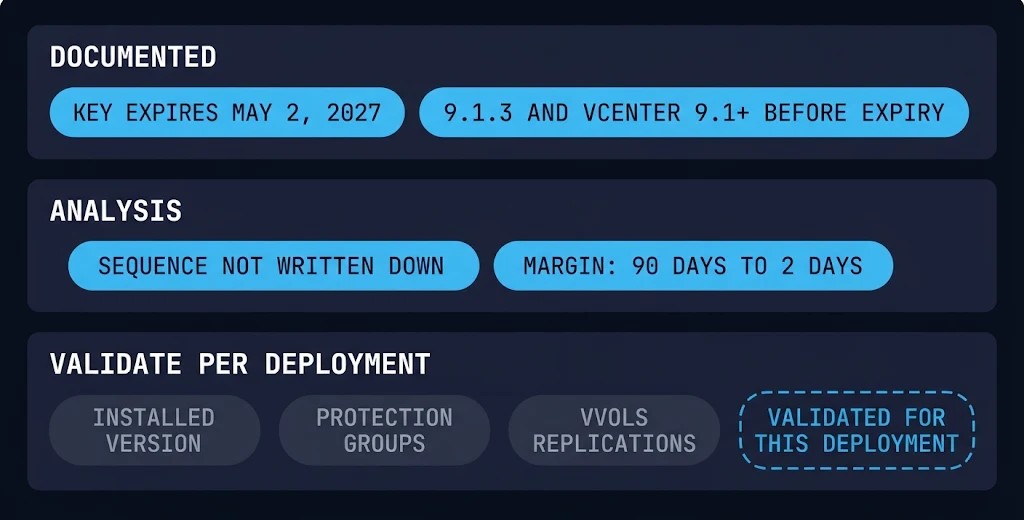
The version path is a lifecycle item before it is an upgrade ticket. The virtualization deterministic operations stage covers lifecycle and drift governance, which is where a record like Table 3 belongs once it exists. A blank row is an unestablished fact.
Architect’s Verdict
SRM entitlement now has a date, May 2, 2027, and a destination, Protection and Recovery 9.1.3 on vCenter 9.1 or later. Broadcom documents both and ties them together at the endpoint.
What the six articles read document only conditionally is the route between an installed estate and that destination. The license behavior, the compatibility facts, the replication fixes and the migration procedure each live in a separate article with its own environment list, and none sequences them for an estate that has several of those conditions at once. For that estate, the key’s expiry and the version path are two planning concerns joined at a single date.
The real problem is assembly. The operator has to build the sequence and own every row of it, including the rows where the source does not say. The SRM entitlement decision is the simpler half. The route is the work.
Broadcom documented the date and the destination. The route is yours to write down.
Additional Resources
View 2 more resources
Editorial Integrity & Security Protocol
This technical deep-dive adheres to the Rack2Cloud Deterministic Integrity Standard. All benchmarks and security audits are derived from zero-trust validation protocols within our isolated lab environments. No vendor influence.

R.M.
Senior Solutions Architect with 25+ years of experience in HCI, cloud strategy, and data resilience. As the lead behind Rack2Cloud, I focus on lab-verified guidance for complex enterprise transitions. View Credentials →
Get the Playbooks Vendors Won’t Publish
Choose the architecture problems you care about. Get field-tested playbooks and frameworks delivered to your inbox.
- > AI Infrastructure & Inference Economics
- > Cloud Strategy & Hidden Cost Models
- > Virtualization & Deterministic Migration
- > Kubernetes, IaC & Modern Infrastructure
- > Data Protection & Recovery Engineering
Zero spam. Includes The Dispatch weekly drop.
Need Architectural Guidance?
Independent review before major infrastructure decisions.
- > Validate assumptions
- > Identify hidden dependencies
- > Quantify migration risk
- > Challenge vendor narratives
Triage · Advisory · Fractional · Direct Hire