

The Backup Application Identity Was the Attack Path. The Vendor’s Containment Suspended the Backup.
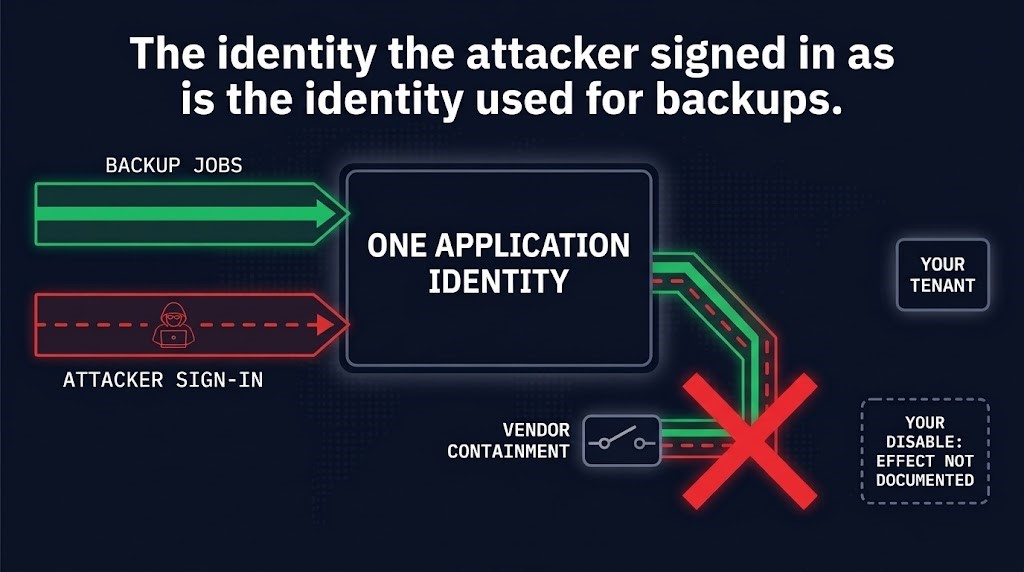
A backup application identity owned by the vendor puts two jobs under one identity: running your backups and, once its credential is exposed, signing an attacker into your Microsoft 365 tenant. ConnectWise Cloud Backup shows what that costs when the vendor contains the identity: the service was suspended with it. Every fact below is frozen as of the ConnectWise advisory update of Friday, October 23, 2026 at 01:00 UTC, and that advisory now updates daily.
The claim is narrow. ConnectWise has not published the permissions Cloud Backup holds, says the original credential-exposure mechanism is under investigation, and has not established whether a product vulnerability contributed. The argument depends on none of that. It depends on two documented facts and one inference. The facts: the attacker authenticated through application identities associated with Cloud Backup, and ConnectWise’s own containment suspended the service. The inference, which no source documents for any individual customer: a customer who contains the backup application identity in its own tenant meets the same dependency.
What Is Stated, and What Is Not
This is a data protection architecture question before it is an incident-response one. The sources agree on a few dated facts and stay silent or disagree on others, and this post uses only the first group.
| Claim | Source and date | Status |
|---|---|---|
| Unauthorized access to application identities associated with Cloud Backup; discovered October 14 | ConnectWise advisory, first published October 16, 17:47 UTC | Stated by the vendor |
| Seven application identities disabled October 17; Cloud Backup suspended by revoking certificates used for the affected connections | ConnectWise advisory, October 17 and 18 updates | Vendor-side actions, stated by the vendor |
| Storm-0940 assessed responsible for the compromise of a multi-tenant application | Microsoft Security Blog, October 21 | Microsoft’s assessment; ConnectWise cites Microsoft threat intelligence in its October 21, 22:00 UTC update |
| Attempted sign-ins to more than 2,250 tenants | Microsoft, October 21 | Attempts, not compromises |
| 162 tenants with confirmed unauthorized sign-ins | Huntress, as of 19:00 UTC October 16 | One vendor’s count, dated; not added to Microsoft’s |
| Whether a product vulnerability contributed; how the credentials were exposed | ConnectWise advisory FAQ, unchanged October 23 | Not established; under investigation |
| The permissions Cloud Backup holds | None of the sources read | Not published |
| What a customer disabling the enterprise application does to that customer’s backups | None of the sources read | Not documented |
Counts are source-specific and are not added together. Microsoft’s figure counts attempts. Huntress’s counts confirmed unauthorized sign-ins in tenants it could see. A separate ConnectWise Cloud Management application also appears in Microsoft’s detections; it is not part of this argument, and a successful sign-in does not by itself show data was accessed.
One Backup Application Identity, Two Jobs
In a customer’s Entra tenant, a multitenant vendor application appears as an enterprise application: a service principal holding whatever grants an administrator consented to. It authenticates as itself, so there is no interactive user step for MFA to apply to. Microsoft describes the actor authenticating through applications already granted access, without an interactive user sign-in. The backup service uses the identity to read what it protects. An attacker holding the credential uses it the same way.
That is why the sign-in log shows one name for both. ConnectWise’s guide tells administrators to filter service principal sign-ins on the Application ID, and notes that normal backup reads may make attribution difficult. This post does not claim the attacker used every permission the backup holds, or read the same data. The claim is only that, at the identity level, the log has one name for both jobs.
Who Owns the Unit
The backup application identity involves three controls, and they belong to different parties. The vendor disabled its seven application identities and revoked the certificates behind the connections. A tenant administrator can set the enterprise application’s “Enabled for users to sign-in?” to No, the guide’s tenant-side step, and review grants, owners and credentials. The customer does not own the registration or the credential, and vendor registrations may not appear in its app registrations. ConnectWise states the difference itself: “A vendor action and a customer-tenant setting are different controls.” The guide’s table of disabled identities does not document a separate change in each customer tenant.
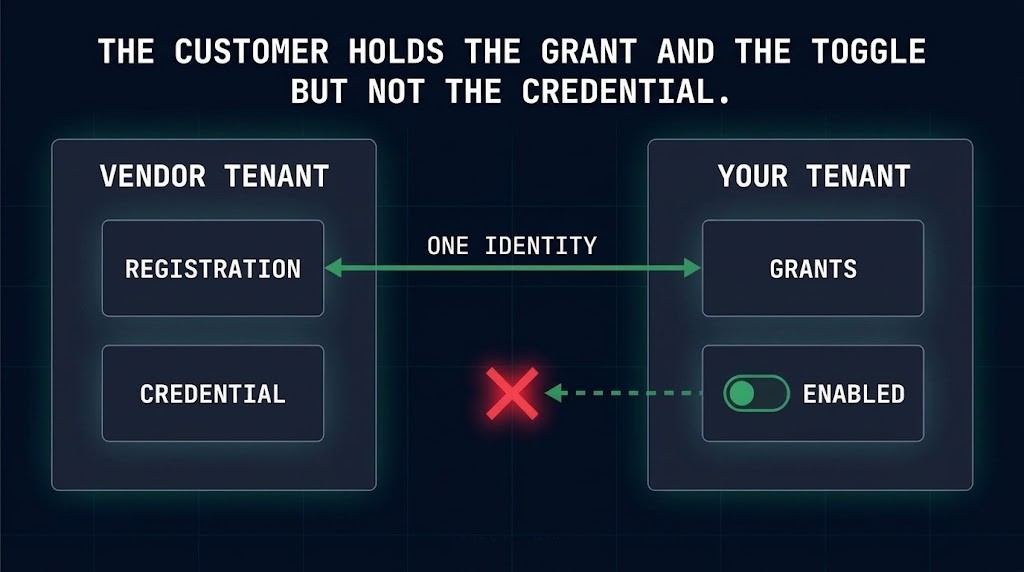
The guide also limits one policy-layer option. It says Conditional Access for workload identities covers supported single-tenant service principals registered in the tenant, not third-party SaaS or multitenant applications, and is not a substitute for disabling the affected connections. That is ConnectWise’s guidance for this application, not a general finding about Conditional Access, and it leaves the tenant no policy-layer alternative to disabling here. Microsoft recommends least privilege on multitenant application permissions and consent grants, which narrows reach, but a grant the backup function needs cannot be removed without affecting the function. Whether Cloud Backup’s grants exceeded what its function needs is not established.
The revocation unit is what one revoke action removes; Rotating Credentials Is Not Revoking Them. The Revocation Unit Decides Whether You Can. covers reach, atomicity and closure. Here someone else chose the unit, and it encloses legitimate function. It is also the inverse of authority that keeps working after a vendor is compromised: here the vendor withdrew the authority within three days of discovery, and the service was suspended with it.
What Containment Cost, Dated
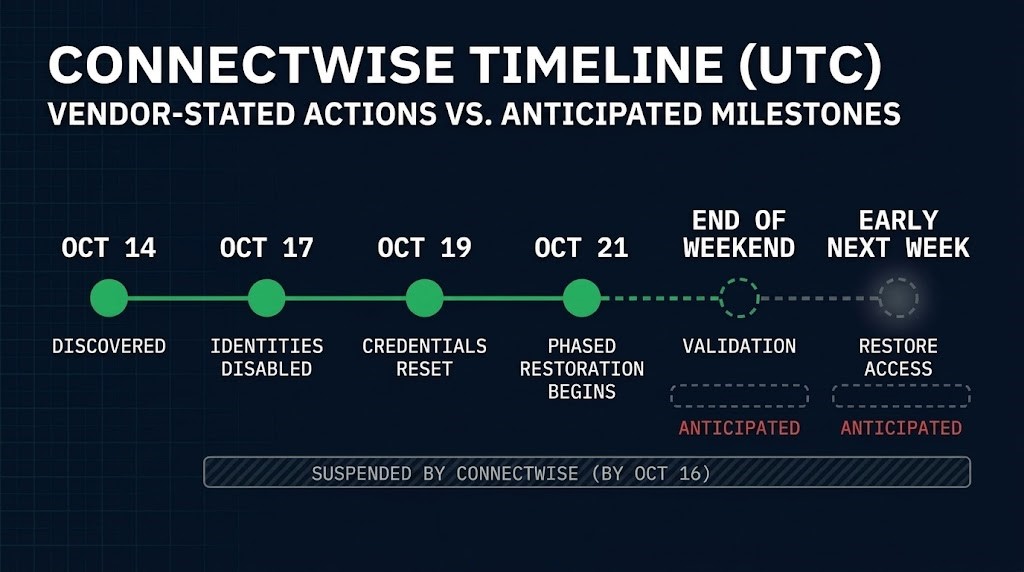
The dates are ConnectWise’s, in UTC. It discovered the unauthorized access on October 14, and its first advisory, October 16 at 17:47, already described Cloud Backup as suspended. On October 17 it disabled seven application identities, and the advisory says it suspended Cloud Backup by revoking the certificates used for the affected connections. Those are vendor-side actions, and they are what the advisory ties the outage to: backup and restore are unavailable while Cloud Backup remains suspended. On October 19 it completed a full reset of all accounts and credentials in the affected Cloud Backup environment.
A customer disabling the enterprise application is a different action, and the advisory does not describe what it did to any customer’s backups. While the service is suspended, ConnectWise tells customers to keep the affected connections disabled until it issues instructions, so the two controls point the same way. The dependency matters on the day the vendor is running and the customer must decide whether to contain. That is a decision to give up whatever depends on the identity, and the sources do not say what that is for any given customer.
RESTORATION, BY STATUS · AS OF THE OCT 23, 01:00 UTC UPDATE
- Began. On October 21 ConnectWise said it had begun restoring services in controlled phases, after an October 20 plan that put core infrastructure first. It warned that the start does not mean all capabilities are available.
- Not reported as available on October 23. The last explicit list of unavailable capabilities, October 20 at 19:00, names scheduled backups, archive access and restores. The October 23 01:00 update describes restore access, then re-enrollment, as still to come.
- Anticipated only. Validation of the restored environment by the end of the weekend, restore access early next week, and phased re-enrollment after that. These are the vendor’s anticipations, not confirmed dates.
Two limits on the cost. ConnectWise suspended SaaS Security and Cloud Management as a precaution because they are integrated with Cloud Backup, so not all of the lost function belongs to the identity coupling. And it reports the existing archives as encrypted, isolated and preserved, with no indication of compromise, which does not say whether a customer could restore from them this week. The guide tells partners to check the last successful recovery point and assess the protection gap.
The Containment-Cost Check
Before the next incident, record one row for each vendor application identity in your tenant that performs backup or restore.
| Vendor application identity | Who can disable it | What stops when it is disabled | Restore path while it is disabled |
|---|---|---|---|
| Name and Application ID of the enterprise application (ConnectWise Cloud Backup: 506e08f9-6e9a-4da4-942b-a099a03644ae) | Your tenant administrators can disable the enterprise application in your tenant; only the vendor controls the registration and the credential | What you establish depends on it (ConnectWise’s October 20 list of unavailable capabilities covers its suspension, not a customer’s disable) | Record one: documented; tested while the identity is disabled; or still dependent on the vendor or its service being available. ConnectWise, October 23: the advisory describes a vendor-provided restore process, anticipated early next week, so the path the sources describe depends on the vendor |
Three decisions follow from the table, one for each backup application identity you record.
First, decide in advance who may disable each backup application identity and what recovery gap you accept while it is disabled. ConnectWise’s guidance tells customers to keep the affected connections disabled until formal instructions arrive, so the disabled state is not brief by default.
Second, be exact about the last column. A documented restore path has been written down. A tested one has been run while the identity is disabled. One that still depends on the vendor or its service has not escaped the dependency and is recorded as one. Whether a path independent of the vendor identity exists for a given product is a question these sources do not answer. The isolation of recovery dependencies belongs to Your Backup System Is Part of the Blast Radius, and the platform-level stage is Recovery Platform Architecture.
Third, treat the disable decision as a recovery event. Record the last good recovery point when you disable, because that is where the protection gap starts. No configuration is claimed to remove the trade-off: stopping the identity can stop the function that depends on it.
Architect’s Verdict
When a vendor owns a backup application identity, containment and service can become the same decision. ConnectWise Cloud Backup is not evidence that anyone chose wrongly. It is a dated case in which the vendor’s containment of the backup application identity suspended the backup service, and in which the restore depends on the vendor’s service coming back.
The problem is not that the customer lacks controls. It has several, and each is real. The problem is that the control a customer holds over a vendor-owned backup application identity, disabling it in the tenant, acts on an identity the backup function depends on, and almost no architecture records what that costs before it is needed. This incident does not show what a customer’s own disable did to a backup, because the vendor had already suspended the service. It shows the dependency that decision would meet.
So the design question can be answered in advance: which vendor application identities perform backup or restore, who can disable each, what stops, and how restore proceeds while it is stopped. The identity you may need to contain can be the identity that delivers your backups, and the time to decide which matters more is before anyone asks.
Additional Resources
Editorial Integrity & Security Protocol
This technical deep-dive adheres to the Rack2Cloud Deterministic Integrity Standard. All benchmarks and security audits are derived from zero-trust validation protocols within our isolated lab environments. No vendor influence.

R.M.
Senior Solutions Architect with 25+ years of experience in HCI, cloud strategy, and data resilience. As the lead behind Rack2Cloud, I focus on lab-verified guidance for complex enterprise transitions. View Credentials →
Get the Playbooks Vendors Won’t Publish
Choose the architecture problems you care about. Get field-tested playbooks and frameworks delivered to your inbox.
- > AI Infrastructure & Inference Economics
- > Cloud Strategy & Hidden Cost Models
- > Virtualization & Deterministic Migration
- > Kubernetes, IaC & Modern Infrastructure
- > Data Protection & Recovery Engineering
Zero spam. Includes The Dispatch weekly drop.
Need Architectural Guidance?
Independent review before major infrastructure decisions.
- > Validate assumptions
- > Identify hidden dependencies
- > Quantify migration risk
- > Challenge vendor narratives
Triage · Advisory · Fractional · Direct Hire